Best Apple Pencil Alternatives of 2026

A stylus is one of those purchases people put off for years, because the name-brand option costs as much as a decent pair of headphones and you're not sure you'll use it. Then you borrow one for a single meeting, mark up a PDF, and your finger suddenly feels like a blunt instrument. Over the past four months, my team and I have written, sketched, and annotated our way through 16 iPad styluses, and the gap between good and frustrating rarely comes down to price.

What separates them is quieter stuff: how fast they charge and how long a charge really lasts, whether palm rejection holds when your hand rests on the glass, whether tilt shading feels natural instead of stepped, and whether the barrel still feels balanced after an hour of writing. Compatibility is the first trap, since these pencils span iPads from 2018 through 2026 but each one supports a slightly different slice of that range.

These are the ones we kept reaching for after the novelty wore off.

The Best Apple Pencil Alternatives

1

HATOKU Stylus Pen for iPad Best Overall
95 /100
TKZ Score Outstanding

Key details

Weight
0.49 oz
Charge Time
15 minutes
Battery Life
10 hours
Magnetic Attachment
Yes
View on Amazon

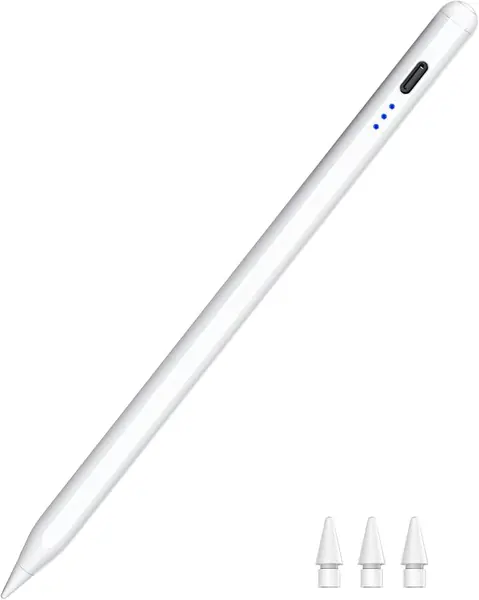
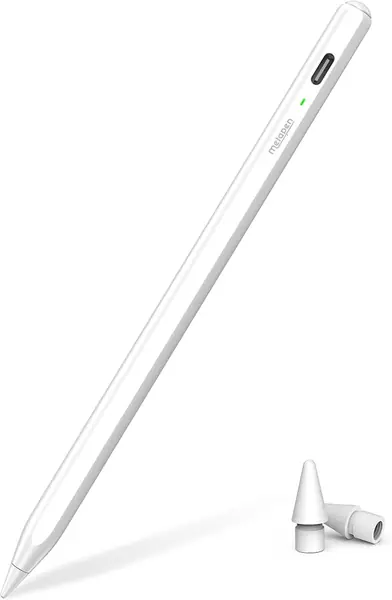
Fifteen minutes on USB-C is the figure that makes the HATOKU pen our default. That is enough for a full charge, and the pen then runs for about 10 hours, so a forgotten cable does not automatically mean a dead stylus in the middle of a lecture.

In hand, the 13.88 g body feels balanced rather than toy-light. The magnet holds it to the side of an iPad, and the tip tracks smoothly for notes and quick sketches. Palm rejection does what it should: we could rest a hand on the screen without the page jumping. Tilt response is useful for shading, though this is not a pressure-sensitive drawing tool.

Compatibility is the strong suit. The stated coverage runs from iPad 6th through 11th generation, plus Air, Pro, and mini models from 2018 forward, which makes it an easy recommendation for a household with more than one iPad. We still check the exact model before ordering, because the compatibility lines on these pens are not always written the same way.

The tip is the part we watch. Under heavy pressure it can wear faster than the barrel suggests, and a spare tip is worth keeping in the case. That is a small ownership cost, not a reason to skip the pen. For most note-taking, PDF markup, and casual sketching, the HATOKU gets the balance of charge, hold, and feel right.

Pros

  • Full charge in 15 minutes
  • Magnetic hold and palm rejection
  • Comfortable 13.88 g balance

Cons

  • Tip can wear under heavy pressure
Our verdict

For most iPad owners, the HATOKU is the easy all-around choice: quick charge, secure magnetic storage, and dependable palm rejection.
Check Latest Price
2

DIGIROOT iPad Pencil Best Budget

94 /100
TKZ Score Outstanding

Key details

Weight
0.56 oz
Charge Time
13 minutes
Battery Life
9 hours
Magnetic Attachment
Yes
View on Amazon

DIGIROOT sits at the budget end, and the first surprise is how little it feels like a compromise. The aluminum barrel has a solid, slim feel, and the pen charges fully in 13 minutes for up to 9 hours of use. For a student who grabs a pen between classes, that quick top-up matters more than a huge battery.

The 16 g body is heavier than the ultralight picks, but that weight gives it a steadier feel on the screen. The magnet holds it to the side of the iPad, and the three LED lights give a rough battery read without sending you into a menu. Palm rejection and tilt are both here, so notes and simple sketches behave the way you expect.

The trade-off is endurance. Nine hours is enough for a day of classes, not a weekend away from a cable, and the LED indicators are less precise than a percentage display. We still reach for it when we want a capable iPad pencil without paying for extras. It is the value pick for note-taking, not the pen for a serious illustrator.

Pros

  • 13-minute full charge
  • Aluminum body with magnetic hold
  • Solid budget value for notes

Cons

  • Battery life trails longer-running picks
  • LED dots are less precise than a percentage
Our verdict

DIGIROOT is the budget pick we recommend first: a metal body, fast charge, and magnetic hold without the usual corner-cutting.

Check Latest Price
3

Metapen Pencil Air8 Best Ultralight

93 /100
TKZ Score Outstanding

Key details

Weight
0.35 oz
Charge Time
45 minutes
Battery Life
20 hours
Magnetic Attachment
No
View on Amazon

The Air8 is the pen we forget we are holding. At 10 grams, it is half the weight of many styluses here, and that changes the end of a long note-taking session more than any spec sheet number suggests.

The plastic barrel is plain, but the lightness keeps your hand relaxed. Battery life is the other strong point: the pen is rated for up to 20 hours, and it sips power between uses. A 45-minute charge means we top it up overnight rather than expecting a quick rescue.

We treat it as a desk pen, and it lives in a case slot when it travels. That is the trade-off for the weight and battery, and it is easy to plan around. We found it best for people who write for long stretches and do not need Find My or shortcut buttons.

Compatibility is broad for 2018-and-later iPads, and the simple top button means no Bluetooth pairing for basic writing. If you want the lightest pen in the group, this is it; if you want the pen to live on the iPad, choose one with a magnet. The button is easy to find by feel, which matters when you are switching it on in a meeting.

Pros

  • Feather-light 10 g body
  • Up to 20 hours of battery
  • Simple one-button operation

Cons

  • No magnetic attachment
  • 45-minute charge is slower than most
Our verdict

The Air8 is the ultralight pick for long writing sessions, as long as you have a case slot for it.

Check Latest Price
4

ESR Geo Digital iPad Pencil Best with Find My

92 /100
TKZ Score Outstanding

Key details

Weight
0.46 oz
Charge Time
20 minutes
Find My Support
Yes
Wireless Charging
No
View on Amazon

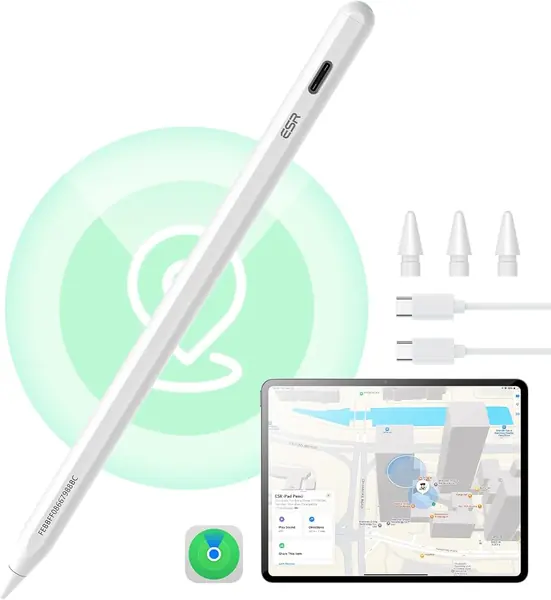
The ESR Geo is the pen we stop worrying about losing. Find My support is the reason to pay more: if the pen slips out of a bag, the iPad can point you back to it, and the same Bluetooth link adds shortcut taps and a battery readout.

The rest of the package is solid. The 13 g body is easy to hold, the magnet holds firmly to the side of an iPad, and the tip writes smoothly with tilt response for shading. A 20-minute USB-C charge gets it back to full, which is quick enough for a lunch break. The shortcut taps are genuinely useful once they become habit: one tap returns to the home screen, two open the task manager.

That tracking is the feature you are paying for, and it is the one that changes how you carry the pen. If you have ever torn a room apart looking for a stylus, this is the one that earns its place; otherwise a simpler pen does the same writing for less.

Pros

  • Find My tracking built in
  • Useful home and task-manager shortcuts
  • Strong magnetic hold

Cons

  • No wireless charging
Our verdict

The ESR Geo is the premium pick for anyone who misplaces pens, with Find My tracking and useful shortcut taps.

Check Latest Price
5

Metapen Pencil Air8 Pro X Best for Quiet Writing

91 /100
TKZ Score Outstanding

Key details

Weight
0.35 oz
Charge Time
45 minutes
Battery Life
26 hours
Tip
Air-Flex soft tip
View on Amazon

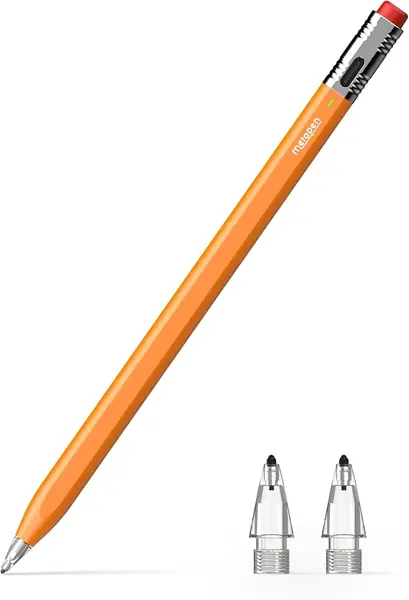
The Air8 Pro X is built around a soft, quiet tip. On glass it makes a muffled tap instead of the sharp click of a hard nib, which is the difference between taking notes in a meeting and feeling like you are drumming on the table.

The classic pencil shape is charming, and the body is light enough to forget. Battery life is the headline: up to 26 hours, with a 45-minute charge. That is the longest runtime here, and it changes travel packing more than a few extra grams would.

The soft tip has a paper-like resistance that we liked for handwriting. It is not the fastest tip for quick flicks, but it is the one that makes late-night notes easier on the ears. The three-color LED is simple but readable, and the top button is easy to find without looking.

We think this is the pen for a library, a shared office, or a late-night desk where clicky tips are annoying. It is also the one to choose if battery anxiety is your main problem. The quiet tip is the feature that stays with you after the novelty of the pencil shape wears off.

Pros

  • Quiet, paper-like soft tip
  • Up to 26 hours of battery
  • Light classic-pencil body

Cons

  • Soft tip wears with heavy use
  • 45-minute charge is slower than most
Our verdict

The Air8 Pro X is the quiet-writing pick for libraries and shared desks, with a soft tip and the longest battery here.

Check Latest Price
6

KEEPRO Stylus Pen for iPad Best Shortcut Controls

90 /100
TKZ Score Outstanding

Key details

Weight
1.23 oz
Charge Time
30 minutes
Battery Life
10 hours
Undo Shortcut
Yes
View on Amazon

The KEEPRO's one-click undo button is the feature we did not know we wanted. In a notes app, a single tap reverses the last stroke without a trip to the toolbar, and the Bluetooth link also puts battery percentage in the iPad's status bar. For anyone who edits as they write, that is a real workflow change.

The pen charges fully in about 30 minutes and runs for up to 10 hours, so it fits a workday without drama. The magnet holds it securely, and the tip is precise enough for small handwriting. The aluminum and PC barrel feels sturdy, and the pen has a deliberate feel rather than a nimble one.

We found the mass most noticeable in long sessions, where a lighter pen disappears and this one keeps reminding you it is there. The shortcut still earns its place for short bursts of editing, and the battery display is more useful than a row of dots. It is a specialized pen, not the default for everyone.

If you spend your day marking up documents or fixing notes, the undo button and percentage readout justify the extra heft. If you mostly write for an hour at a time, a lighter pen will be kinder to your hand. The button becomes muscle memory faster than the weight becomes a problem.

Pros

  • One-click undo and battery percentage
  • 30-minute charge and 10-hour use
  • Secure magnetic hold

Cons

  • Shortcuts require a Bluetooth connection
Our verdict

The KEEPRO is for heavy note editors who want one-click undo and a battery readout, and who can live with the weight.

Check Latest Price
7

JAMJAKE Stylus Pen for iPad Best for 2018-2022 iPads

89 /100
TKZ Score Excellent

Key details

Weight
0.49 oz
Charge Time
15 minutes
Compatibility
2018-2022 iPads
Standby Time
15 hours
View on Amazon

The JAMJAKE is the pen to consider only after you have checked your iPad's generation. Its stated compatibility covers 2018-2022 models, and it explicitly leaves out earlier iPads. If you own a newer M4 or A16 iPad, do not assume the wider date range in the title applies; this is an older-iPad pen first.

Inside that window, it is a simple, familiar stylus. A 15-minute USB-C charge gives a long standby, and the touch-cap button turns it on without an app. Tilt and palm rejection are both part of the package, so notes and annotations feel natural.

The plastic barrel is light at 14 g, and the lack of setup is the appeal. You turn it on and write; there is no app to install and no pairing step. For a family iPad that stays on the kitchen counter, that simplicity is a feature.

We think this is a sensible spare for an older iPad, not a pen for a household upgrading to new hardware. The compatibility limit is the whole decision. If your model is inside the window, it does the job; if it is outside, look at the HATOKU or another 2018-2026 pen.

Pros

  • Fast 15-minute charge
  • Tilt and palm rejection
  • Simple touch controls

Cons

  • Compatibility stops at 2022 iPads
Our verdict

The JAMJAKE is a simple spare for an older iPad, but only if your model falls inside its 2018-2022 compatibility window.

Check Latest Price
8

MoKo Stylus Pen for iPad Battery Visibility

88 /100
TKZ Score Excellent

Key details

Weight
0.6 oz
Magnetic Attachment
Yes
Included Tips
4 replacement tips
Battery Display
LED percentage
View on Amazon

The MoKo's LED readout shows an actual battery percentage, not a trio of vague dots. That sounds minor until you are packing for a flight and want to know whether the pen will last through a layover. We found it the most reassuring battery display in this group.

The rest of the pen is sensibly built. The aluminum barrel has a little more heft than the ultralight picks at 17.01 g, and the magnet holds it to the side of an iPad. Tilt and palm rejection work for notes and sketches, and the tip is responsive at a low angle.

Four replacement tips come in the box, which matters because tips are the part that wears. The USB-C port is easy to reach, and there is no Bluetooth pairing for basic writing. This is a pen you can hand to a kid or leave in a shared desk drawer without a setup lecture.

The pen lives in a case slot when we travel; that is an easy habit and keeps the battery display within reach. We treat it as a desk or bag pen rather than something that hangs off the iPad all day. That is a small caveat next to the battery display, which is the feature we kept using.

For a budget pen, the MoKo gets the practical details right: a readable battery gauge, spare tips, and a comfortable weight. We recommend it to anyone who wants to see the battery number before it matters. The spare tips mean you are not hunting for a replacement the week the first one flattens.

Pros

  • LED battery percentage
  • Four replacement tips included
  • Tilt and palm rejection

Cons

  • Magnet can let the pen slide in a bag
Our verdict

The MoKo is the budget pen for people who want a real battery percentage and spare tips in the box.

Check Latest Price
9

Hastraith Stylus Pen for iPad Starter Kit

87 /100
TKZ Score Excellent

Key details

Charge Time
13 minutes
Included Tips
3 replacement nibs
Compatibility
2018-2026 iPads
Battery Indicators
3 lights
View on Amazon

The Hastraith arrives with the sort of bundle that makes a first stylus less annoying: three replacement nibs, a silicone protective cover, a dust plug, and a USB-C cable. For a first-time buyer, the extras are not clutter; they are the difference between a pen that survives a school year and one that gets retired when the tip flattens.

The pen itself charges in 13 minutes and uses three battery lights instead of a percentage. Tilt and palm rejection are both supported, and the plastic body is light enough for long notes. The top button turns it on without Bluetooth, so there is no pairing step before class.

We found the silicone cover useful for grip and easy to remove for cleaning. The extra nibs are the real value; tips wear, and having spares in the box saves a separate order. This is a starter pen, not a precision drawing tool, and it is priced like one. The cover and spare nibs are the parts that stay useful after the novelty wears off.

Pros

  • Three replacement nibs included
  • 13-minute fast charge
  • Palm rejection and tilt

Cons

  • Silicone cover adds bulk
Our verdict

The Hastraith is a well-equipped starter pen for students and first-time stylus users, with fast charging and spare tips.

Check Latest Price

How We Tested These iPad Styluses

We started with a long list of every third-party stylus claiming support for iPads from 2018 through 2026, then cut anything whose model list didn't match the generation numbers we'd compiled ourselves, along with a few that looked like the same generic pencil under a different name. Sixteen made the cut.

Those 16 spent four months in bags, on desks, and on nightstands. Most of the writing happened where a stylus actually gets used: lecture notes five mornings a week, meeting notes, PDF markup on the train, and slow evening sketching on the couch.

We charged each one from dead to full with a stopwatch running, then noted how it held up across a normal week of note-taking. With a palm flat on the glass, we wrote two paragraphs of cursive and looked for stray dots and skipped strokes. We drew slow diagonal hatching to see whether line weight followed the angle, and checked whether the pen woke on its own after sitting idle overnight.

Durability got the unglamorous treatment: each pen rode loose in a bag for a week, then took a drop from desk height onto hardwood, after which we checked for tip wobble and tracking drift. We also held each one through a full hour of continuous writing, paying attention to grip, weight, and whether what it delivered justified what it cost.

How to Choose an Apple Pencil Alternative

Match the iPad generation first

Compatibility is the first filter, because an active stylus talks to specific iPad generations. A pen that covers 2018-2026 is the safer choice for a newer Air, Pro, or A16 iPad; a pen that stops at 2022 is for older hardware. The labels are not always consistent, so match the model name in Settings > General > About rather than the year you bought the tablet.

If you share an iPad with a child or keep a spare in a bag, choose one pen that covers every model in the house. The HATOKU's broad compatibility is why it is our default; the JAMJAKE is the opposite case, useful only inside its older window.

Decide whether you need pressure sensitivity

Most alternatives here use tilt to vary line width; they do not match Apple Pencil's pressure response. For handwritten notes, PDF markup, and casual sketching, tilt and palm rejection are enough. For painting or illustration where pressing harder must darken a line, the Apple Pencil remains the tool to buy. We prefer a cheaper pen for notes over paying for pressure you never use.

Balance charge time against weight

A 15-minute top-up is more useful than a huge battery if the pen lives in a bag and gets charged in scraps of time. The HATOKU and DIGIROOT are built around that habit; the Air8 Pro X trades a 45-minute charge for up to 26 hours of runtime. Weight matters just as much. The 10 g Air8 disappears in long sessions, while the 35 g KEEPRO feels steadier but more tiring. Pick the trade-off that matches your hand.

Treat the magnet as storage

A magnetic side hold is convenient, but on these pens it is not a charger. The magnet keeps the stylus on the iPad between notes; the battery still refills through USB-C. If you carry the pen loose, a strong magnet or a case slot matters more than the battery figure. A pen without a magnet needs a dedicated case slot, and that is part of its ownership plan.

Pay only for the extras you will use

Find My tracking, a battery percentage, an undo button, and a quiet tip are the real differentiators. The ESR Geo earns its premium with Find My; the KEEPRO's undo button suits heavy editors; the MoKo's percentage display is the budget version of battery peace of mind; the Air8 Pro X is the quiet one. Choose one extra you will actually use. Paying for all of them usually means paying for weight, complexity, or a higher price tier you do not need.

Frequently Asked Questions

Final Verdict

For most people, the HATOKU is the one to buy: it charges in 15 minutes, holds magnetically, and handles palm rejection and tilt without fuss. If losing a pen is your real problem, the ESR Geo's Find My tracking is worth the premium. If you draw with pressure, none of these replaces the Apple Pencil; for notes and sketches, the HATOKU is the safer default.