Best iPad Pro 11-Inch Cases with a Pencil Holder of 2026

An 11-inch iPad Pro case has one job that fights itself: hold a thousand-dollar tablet like a tank while disappearing in your hands. Add a Pencil holder and the math gets worse, because the slot that stops your stylus rolling off a cafe table is often the same spot where charging gets blocked and a slim folio turns into a brick. A good one settles that fight: the tablet snaps in and stays, the cover holds whatever angle you're working at, and the Pencil is charged when you reach for it.

I've owned the kind that sags at the back within a month. So over four months my team and I have lived with 14 cases, and the biggest lesson is that the model year on the listing matters more than any feature bullet: a cover cut for an older generation will snap on but sit crooked over the camera, and the Pencil will sit too far off the charging coil to hold a charge. The picks below all fit the tablet they claim to, keep the buttons clickable, and hold shut on magnets that haven't quit.

The Best iPad Pro 11-Inch Cases with a Pencil Holder

1

ZUGU iPad Pro 11 Case Best Overall
93 /100
TKZ Score Outstanding

Key details

Fits
iPad Pro 11-inch M5 2025 / M4 2024
Stand
8 magnetized angles
Weight
1.12 lb
Pencil Holder
Charging holder with clasp
View on Amazon

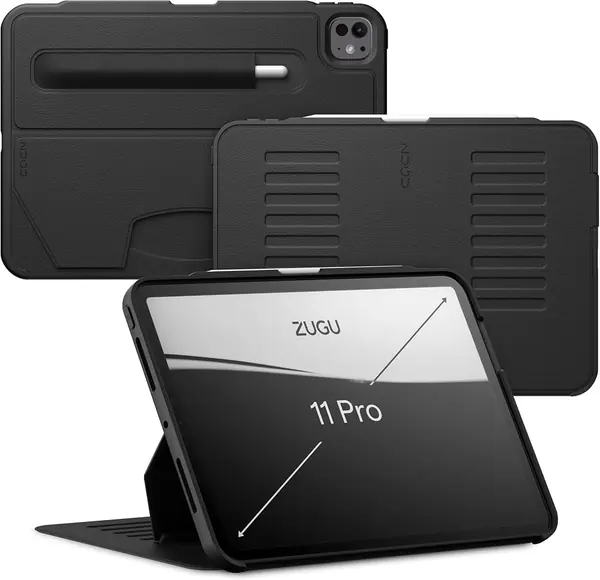
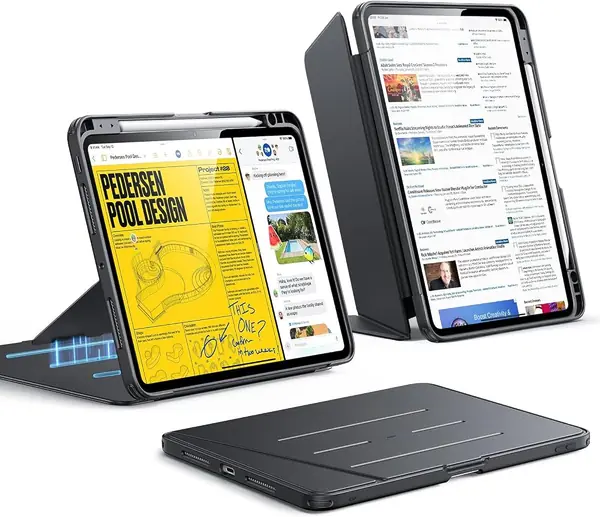
Plenty of cases on this page have a pocket for the Apple Pencil; the ZUGU is the one that charges the stylus while it sits in there, under a magnetic clasp that keeps it from sliding out in a bag. That single detail makes it the easiest case to live with if you take notes all day, because it ends the choice between keeping the Pencil safe and keeping it charged.

The stand is the other reason it leads this group. Eight magnetized positions run from near-vertical for reading down to a shallow angle for drawing, and the cover's magnets hold firmly enough that the tablet stays put on a lap or a sofa arm rather than only on a table. We kept returning to the steep settings for video and the low ones for sketching, and it never slipped out of either.

What the extra outlay buys is armor: a hybrid shell under faux leather, a five-foot drop rating, and a two-year warranty that only one other case here matches. It also weighs 510 grams, more than the iPad it holds. That is the one compromise, and it stops mattering the moment the stand takes the weight. Want something lighter that stands in portrait? That is the ESR Flip. Have an 11-inch Pro from 2022 or earlier? Neither will fit, and the Fintie Hybrid or the VIKESI is where you should be looking.

Pros

  • Pencil holder that charges the stylus in place
  • Eight magnetic angles that hold on a lap
  • Five-foot drop rating and a two-year warranty

Cons

  • Heavier than the iPad it protects
Our verdict

We recommend the ZUGU to anyone who wants one case that holds the Pencil, charges it, and props the screen at eight locked angles without wobbling.
Check Latest Price
2

ESR Flip Series Case Best for Portrait Browsing

92 /100
TKZ Score Outstanding

Key details

Fits
iPad Pro 11-inch M5 2025 / M4 2024
Stand
Portrait plus two angle modes
Weight
12 oz
Pencil Holder
Built-in edge slot
View on Amazon

The ESR Flip costs a good deal less than the ZUGU and weighs about a third less, and what you give up for that is angle positions and a drop rating. What you get is the only case in this group that stands the iPad upright in portrait, the orientation you want for reading, recipes, and feeds and the one a trifold cannot manage.

The stand earns its keep. The magnetized bracket locks into a shallow writing setting and a steeper viewing range, and the cover is stiff enough that it does not fold flat under the tablet's weight. We noticed that most on a sofa, where a flimsier trifold collapses and this one stays. The Pencil sits in its own slot along the edge, auto sleep and wake have been reliable, and the flat matte finish feels better in the hand than the slick shells on the budget cases.

Where it gives ground is armor. This is a slim folio, so it handles knocks, scratches, and a slide off the couch rather than a five-foot drop onto concrete. For most people with an M4 or M5 iPad Pro, that is the right trade: lighter in the hand, upright in portrait, and the money you save buys a glass screen protector.

Pros

  • Only case here that stands upright in portrait
  • Dedicated Pencil slot along the edge
  • Light 340-gram body

Cons

  • Slim folio, not a drop-rated shell
Our verdict

Buy the ESR Flip if the iPad mostly reads and watches rather than travels: it is the only case here that stands in portrait, and it is far lighter than the top pick.

Check Latest Price
3

SEYMAC Heavy-Duty Case Best Heavy-Duty

91 /100
TKZ Score Outstanding

Key details

Fits
iPad Pro 11-inch M5 2025 / M4 2024
Stand
360° rotating kickstand
Weight
1.1 lb
Included
Screen protector, hand and shoulder straps
View on Amazon

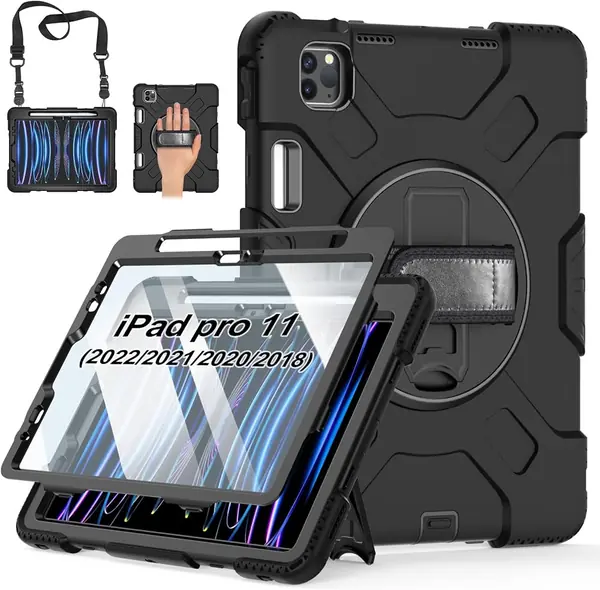
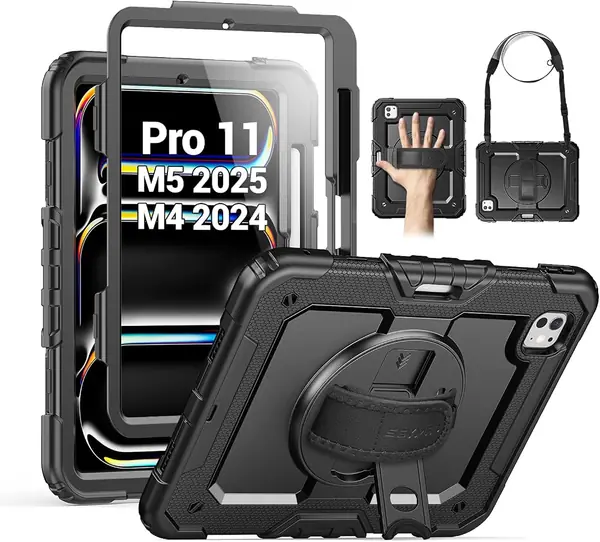
Some iPads never leave a desk. This case is for the one that does: the tablet that rides in a work bag, gets handed to a kid in the back seat, or comes out on a job site. The SEYMAC wraps the iPad in a hard polycarbonate frame inside a silicone skin, includes a screen protector you can install or leave out, and puts a rotating kickstand and a hand strap on the back. It is the case we hand over without worrying.

The straps are what make it genuinely different. The hand strap lets you hold the tablet one-handed while you type or read, and the detachable shoulder strap turns it into something you can sling across your body or hang from a car headrest as a back-seat screen. We like that the screen protector is optional, since some people want glass and some want the display bare.

The cost is size. At 1.1 pounds and 0.83 inch thick, the iPad stops feeling like an iPad and starts feeling like a rugged tablet, which is the point but not what everyone wants. The kickstand is stiff until it has been worked a few times, and the buttons need a deliberate press through the shell. For a kitchen counter and a couch, the ESR Flip or the ZUGU is a better daily companion; for concrete, this is the one built to survive it.

Pros

  • Hand strap, shoulder strap, and rotating kickstand
  • Built-in screen protector you can fit or skip
  • Silicone over polycarbonate for real drops

Cons

  • Buttons need a firm press through the shell
Our verdict

The SEYMAC is what we hand over when the iPad travels to job sites or kids' backpacks, the most protective case here for the newest iPad Pro, straps and protector included.

Check Latest Price
4

Akkerds Slim Case Best Budget for Newer Models

90 /100
TKZ Score Outstanding

Key details

Fits
iPad Pro 11-inch M5 2025 / M4 2024
Stand
Tri-fold, two angles
Pencil Holder
Built-in slot
Back
Soft TPU
View on Amazon

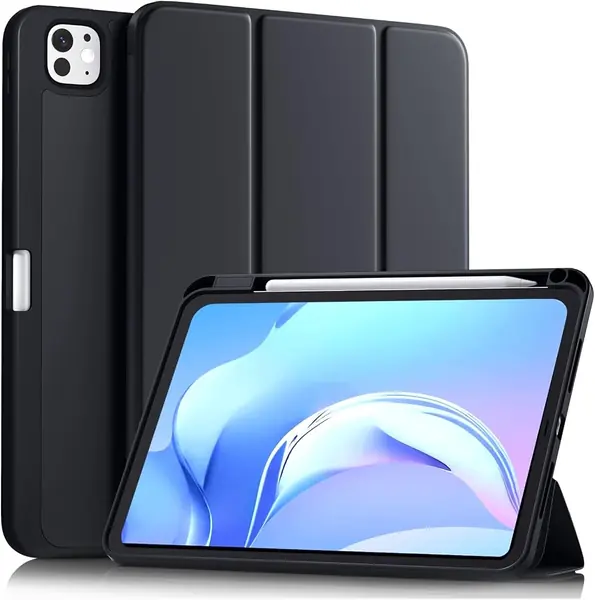
The Akkerds is the least expensive way on this page to put a cover and a Pencil slot on a 2024 or 2025 11-inch Pro. For that you get the standard kit: a trifold front cover that folds into a viewing stand and a typing stand, a soft TPU back, a built-in slot for the Pencil, and auto sleep and wake that works when you open and close it.

The basics are done well enough that we never felt we were making excuses for it. The cover wakes the screen, the PU exterior wipes clean, and the Pencil lives in its own slot instead of clinging to the edge of the iPad. Where the price shows is in the margins: the shell runs snug enough that a thin film protector can lift at the corners where it presses down, and the buttons take a firm push.

It also comes with nothing behind it. Akkerds lists no warranty, and there is no drop rating on the case, which puts this firmly in cover territory, for a tablet that stays home or travels in a sleeve. Judged that way it is a sensible buy: light, simple, and inexpensive enough that replacing it is not a decision. If the iPad goes everywhere with you, put the money into the SEYMAC instead.

Pros

  • Lowest-cost option for the M4 and M5 models
  • Trifold cover with viewing and typing angles
  • Pencil slot plus working auto sleep and wake

Cons

  • No warranty from the maker
  • Buttons need a firm push
Our verdict

The Akkerds covers an M4 or M5 iPad, holds the Pencil, and folds into a stand for the least money on this page, the right call if the tablet budget is already spent.

Check Latest Price
5

Fintie Hybrid Slim Case Best for Older Models on a Budget

89 /100
TKZ Score Excellent

Key details

Fits
iPad Pro 11-inch 1st-4th gen (2018-2022)
Back
Clear hard shell
Warranty
90 days
Pencil Charging
2nd Gen Pencil charges through case
View on Amazon

Most of the cases here are cut for the current 11-inch Pro, which leaves anyone with a 2018 to 2022 model in a smaller pool. The Fintie Hybrid covers all four of those generations, and it does it with a clear hard back that shows off the iPad, a built-in slot for the Pencil 2nd Gen, and magnetic charging that keeps working through the case.

Day to day it behaves like a good basic folio. The trifold front folds into a viewing stand or a typing stand, the magnets wake and sleep the screen, and the cutouts line up with the speakers and the camera. The color range is the other draw: the lilac is a true lilac rather than a washed-out pastel, and the clear back takes stickers if you want to make it yours.

What we do not love is how it ages. The fold softens with use and the front flap goes floppy, the fabric edge feels rough against your palm when the cover is folded behind the tablet, and the port cutout makes plugging in a charger more fiddly than it needs to be. None of that is a surprise at this end of the market; it is a case you will replace sooner than a premium one, and for a tablet that is already several years old, that is a fair deal.

Pros

  • Fits every 11-inch Pro from 2018 through 2022
  • Pencil charges through the case in its slot
  • Clear back that shows the iPad or takes stickers

Cons

  • Fold softens and the flap goes floppy
  • Rough edge when the cover is folded back
Our verdict

For a 2018 to 2022 11-inch Pro, the Fintie Hybrid is the one to start with: it fits all four generations, holds and charges the Pencil, and costs little enough to replace when the folds wear.

Check Latest Price
6

Miesherk Rugged Case Best for Rugged Older iPads

88 /100
TKZ Score Excellent

Key details

Fits
iPad Pro 11-inch 1st-4th gen (2018-2022)
Stand
360° rotating kickstand
Weight
1.1 lb
Included
Screen protector, hand and shoulder straps
View on Amazon

The install is the first thing we noticed: the Miesherk arrives as a front frame, a back cover, and a screen protector that goes on between them, and getting all three aligned takes patience the first time. Once it is together, the tablet is sealed in and the shell does not shift.

The feature list is the longest of the older-generation cases here: a 360-degree rotating kickstand, an adjustable hand strap, a detachable shoulder strap, precise cutouts, and a Pencil holder that supports wireless charging. Miesherk rates the shell to a military drop standard and backs it with a 365-day warranty, which beats most of this group.

Fit is the part to check. The shell runs tight. The upside is that the iPad does not move around; the downside is that seating it takes real effort, and the volume buttons do not always line up cleanly through the frame.

The kickstand is the piece that ages fastest, and a crack there after a few months of use is the failure to watch for. If you have a 2018 to 2022 iPad that goes to job sites and you want one purchase to cover screen, straps, and stand, this does all of it, as long as you check the buttons the day it arrives. For a 2024 or 2025 tablet, the SEYMAC does the same job with a cleaner fit.

Pros

  • Screen protector, hand strap, and shoulder strap included
  • 360-degree rotating kickstand stands any way
  • 365-day warranty and a charging Pencil holder

Cons

  • Kickstand can crack after a few months
  • Tight shell makes installation a fight
Our verdict

Choose the Miesherk for an older iPad that gets knocked around: screen protector, straps, kickstand, and a year of coverage, provided the buttons line up on yours.

Check Latest Price
7

VIKESI Multi-Angle Case Best for Propped-Up Viewing

87 /100
TKZ Score Excellent

Key details

Fits
iPad Pro 11-inch 1st-4th gen (2018-2022)
Stand
Three-bracket magnetic stand
Pencil Holder
Built-in slot
Warranty
2 years
View on Amazon

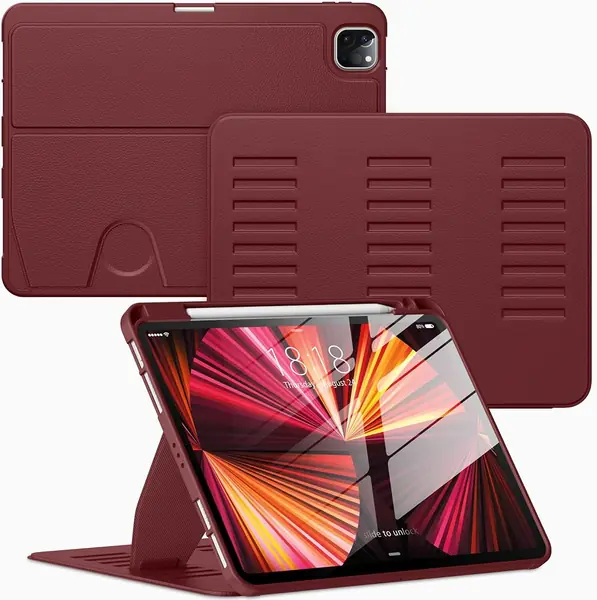
The VIKESI has one obvious omission: there is no tab to grab, so opening the cover means picking at the front edge with a fingernail. Everything under that cover is better than the price suggests. The fabric inside and out is softer than the slick PU on the budget cases, the cutouts for speakers and microphones are clean, and the Pencil sits in a slot that keeps it charged.

The stand is the reason to pick it. Instead of the usual single magnet strip, three brackets hold the cover across a range of angles, and the magnets are strong enough to keep the tablet where you put it, propped on a counter, tilted for drawing, or stuck to a fridge door while you cook. VIKESI backs the case with a two-year warranty and 30-day returns, more coverage than most of the older-generation options here.

The trade-offs are modest but real, and the missing tab is the one we noticed every time we opened it. At 0.65 inch the case is also a little thicker than the Fintie Hybrid, so it is not the one to pick if you want the flattest possible cover. What it is, is the best stand in this group of older-iPad cases, with the longest warranty of any of them, and for a tablet that spends its day propped up, that counts for more than a millimeter.

Pros

  • Three-bracket stand holds a wide range of angles
  • Two-year warranty and 30-day returns
  • Softer fabric than the budget folios

Cons

  • No tab to grip when opening the cover
Our verdict

When the iPad spends its day propped up, the VIKESI is the one: three-bracket stand, strong magnets, and the longest warranty in the older-model group.

Check Latest Price

How We Tested These iPad Pro 11-Inch Cases

We built the shortlist by reading each listing against the exact model year and screen size, since the 11-inch Pro has been sold in several generations and a case built for an older one can click on and still sit crooked over the camera lens. From there we cut anything that only stored the Pencil without charging it, anything with no stand at all, and anything that felt like a plastic bag with corners. That left 14 cases, and each one became our only protection for four months.

Most of the testing happened where the tablet actually lives: propped on the kitchen counter during dinner prep, flat on the couch for sketching, in a tote on the train, and on a tray table mid-flight. Every time we installed a case, we noted whether the tablet seated with a firm snap or needed real force at the corners, whether the volume and power buttons lined up or went mushy through the cover, and whether the magnetic closure still held the front flap shut when we carried it by one edge.

Durability got the ugly tests: drops from counter height onto hardwood, a tumble down carpeted stairs, and a week in a backpack next to keys and a metal water bottle. We checked corners for scuffs, edges for peeling, and clear back panels for scratches, then wiped each case down weekly because most of them were black and showed every fingerprint.

For the Pencil holder, we drained a Pencil, seated it in each case, and checked the charge level the next morning. Bulkiness we judged by carrying the tablet one-handed while reading and by whether it still slid into a backpack's laptop sleeve, and every stand angle got used for lap typing so we could see which ones wobbled.

How to Choose an Ipad Pro 11-Inch Case with a Pencil Holder

Match the case to your model number

The 11-inch Pro has been two different tablets as far as cases are concerned. The M4 (2024) and M5 (2025) models carry A2836, A2837, A3006 and A3357, A3358, A3359, with the front camera on the volume-button edge. The first four generations, A1980 through A2762, take a completely different shell. Find your number in Settings and match it against the case's own list.

A listing that says only "iPad Pro 11-inch" and lists no model numbers is one to skip, however good the photos look. This is the single trap in the category: the case that arrives for the wrong body does not fit loosely, it does not fit at all.

Decide whether the holder has to charge

A slot and a charging slot are two different features, and the difference decides whether the Pencil stays topped up. Some holders cover the back of the stylus and cut it off from the magnets that charge it, so you end up popping the tablet out of the case to charge the Pencil.

If the Pencil lives in the case, pay for a holder that charges while the stylus is stored, which the ZUGU does under its magnetic clasp. If you only stow the Pencil now and then, any slot plus the bare magnetic edge will do.

Pick the stand you will actually use

Trifold covers give you two positions and pack flat. Magnetic brackets give you more, and they hold better on a lap: the ESR Flip runs a shallow writing angle and a steeper viewing range, while the ZUGU lists eight positions across the whole arc. Rotating kickstands, on the SEYMAC and the Miesherk, are for standing the tablet up in the air or on something uneven.

Portrait is the setting shoppers forget to check. Reading, recipes, and feeds are vertical, and only the ESR Flip stands that way.

Weigh protection against what you will carry

Cases here run from under 300 grams to 1.1 pounds, and the heavy end buys real drop ratings, a molded screen protector, and a frame that survives concrete. The light end keeps the iPad feeling like an iPad.

If the tablet mostly moves between rooms, a slim folio plus a separate glass protector is the better combination. If it goes to job sites, into a work truck, or into a child's hands, the armored shells earn every ounce.

Check the warranty before you need it

Coverage here ranges from none at all to two years, and it is the cheapest insurance you will get on something that flexes every day. A 90-day window tells you what the maker expects of its own folds; a two-year term with a repair allowance signals the opposite.

Ask what is covered, too. The straps, the kickstand, and the screen protector are the parts that fail first, and a warranty that ignores them is mostly decoration.

Frequently Asked Questions

Final Verdict

For a 2024 or 2025 11-inch iPad Pro, the ZUGU is the case we recommend: the Pencil charges while it is stored, the stand holds eight positions, and the five-foot drop rating plus a two-year warranty make it one purchase that covers both protection and desk work.

Want something lighter for the couch and the kitchen counter? The ESR Flip stands in portrait and costs well under the ZUGU. And if your iPad is a 2018 to 2022 model, start with the Fintie Hybrid, then step up to the VIKESI if you want the better stand.