Best iPad Pro 13-Inch Cases of 2026

A 13-inch iPad Pro is a lot of glass to carry around. It's thin, it's expensive, and the first time you slide it into a tote without a case, you start thinking about what could happen to it. The right case fixes that and decides how you'll actually use the thing: flat on a desk, propped up for a movie, angled for typing.

The tradeoff is unforgiving: slim folios that look best barely cushion a drop, while armored shells can double the thickness of a tablet you bought for being thin. I've carried one daily for two years, and over the past four months my team tested 12 cases — magnetic folios, trifolds, hard backs, and full rugged shells — through commutes, couch sessions, and airplane tray tables. What separated them was magnet strength, stand stability, and how much weight we were willing to add.

The spec sheet also won't tell you whether the buttons are findable by feel or whether the cover holds its fold mid-typing, and it says nothing about whether a cheap case feels as solid as an expensive one. Both got checked, and the picks below reflect it.

The Best iPad Pro 13-Inch Cases

1

ESR Shift Series Best Overall
94 /100
TKZ Score Outstanding

Key details

Compatibility
iPad Pro 13-inch M5/M4
Stand
9 angles, portrait or landscape
Weight
1.23 lb
Pencil
Charging and storage
View on Amazon

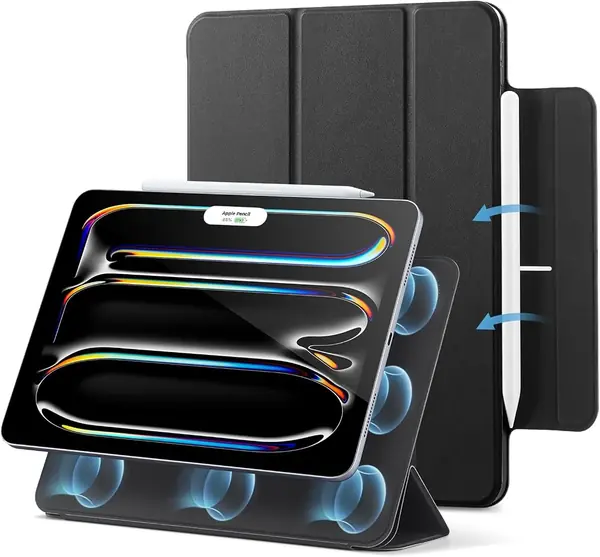
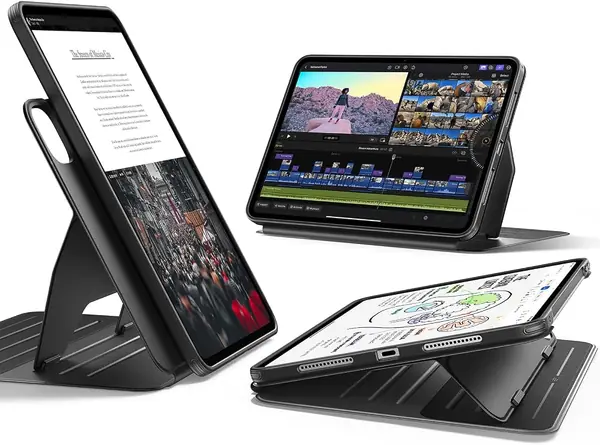
A 13-inch iPad is a lot of tablet to balance on a lap, and the ESR Shift Series is the case we recommend first because its stand is built for that job. Six viewing angles and three writing angles, with dual support brackets that lock into six magnetic grooves, make it the most adjustable case here. The front cover detaches completely, so you can use the back shell alone when you want a lighter hold or need to fit the iPad into a tighter spot.

The magnetic hold is the part that earns its keep. The wide brackets sit against the back of the case rather than a narrow trifold spine, and the cover can be set in portrait or landscape for recipes, video calls, or drawing. The Pencil has a recessed side groove and a storage spot, so it charges without being exposed to the bottom of a bag. We also appreciate that the cover reattaches magnetically instead of needing to be threaded into a frame.

This is not the lightest case in the group. The stand hardware and dual-layer back add heft, and the case feels substantial in hand. That trade-off is worth it if the iPad spends time on a desk, a lap, or a kitchen counter; for pure reading in bed, the ESR Rebound is easier to hold. The Shift is the one we reach for when we want the iPad to stand exactly where we put it.

Pros

  • Nine-angle stand with secure brackets
  • Cover detaches for a lighter setup
  • Pencil storage and charging built in

Cons

  • Costs more than the budget folios
Our verdict

We recommend the ESR Shift Series first because its nine-angle stand is the most secure and flexible here, and the cover detaches without leaving the iPad unprotected.
Check Latest Price
2

ZUGU Case Best Premium Protection

93 /100
TKZ Score Outstanding

Key details

Compatibility
iPad Pro 13-inch M5/M4
Stand
10 magnetic angles
Pencil
Holder with charging
Drop Protection
5 ft
View on Amazon

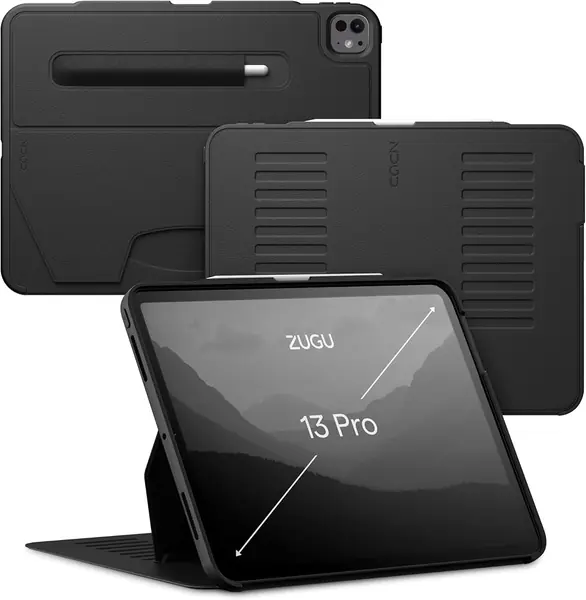
The ZUGU Case sits at the top of this group on price, and its pitch is a ten-angle magnetic stand, a five-foot drop rating, and an ultra-slim cover that still finds room for a charging Pencil holder. The outside is a smooth, solid-feeling hybrid material that looks more like a folio than a protective shell, and the front cover wakes and sleeps the iPad as it opens and closes.

We think it's the premium pick for someone who wants one case to move between a desk, a couch, and a commute without looking like a rugged tablet. The ten-angle stand is easy to set and holds its position, and the Pencil sits in a holder that charges through the case. The two-year warranty and one-time repair coverage are unusual for a premium case, and they take some of the sting out of the higher cost.

The open screen is the compromise: you get a cover and a slim shell, but no built-in protector, so grit and hard drops still need care. That keeps the ZUGU slim and pleasant to hold, and the magnetic stand is the payoff. If you work around a lot of dust or carry the iPad loose in a tool bag, the SEYMAC is the safer shape.

Pros

  • Ten-angle magnetic stand
  • Five-foot drop protection
  • Pencil holder with charging
  • Two-year warranty coverage

Cons

  • Heaviest case in this group
Our verdict

We think the ZUGU Case is the premium pick for anyone who wants a ten-angle stand, strong drop protection, and a Pencil holder without a rugged shell.

Check Latest Price
3

SEYMAC Case Best Rugged

92 /100
TKZ Score Outstanding

Key details

Compatibility
iPad Pro 13-inch M5/M4
Stand
360° rotating kickstand
Carry
Hand and shoulder straps
Protection
Built-in screen protector
View on Amazon

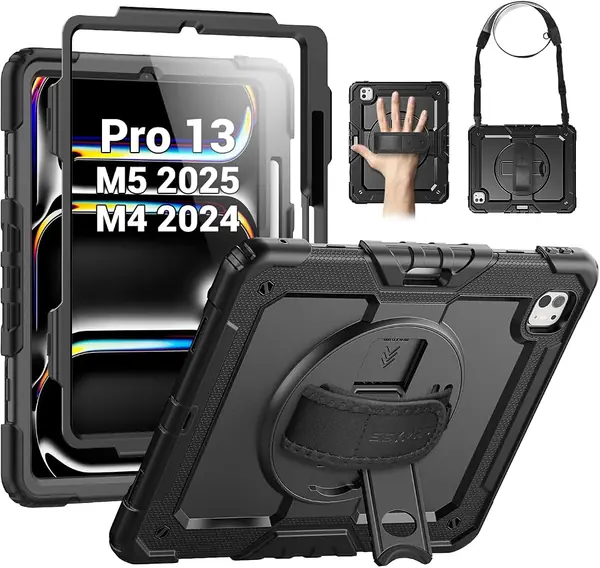
The SEYMAC Case is the one we hand to someone who wants the iPad to survive a job site, a truck cab, or a kid's backpack. The built-in screen protector is part of the frame rather than an add-on, the shockproof shell is built to take hits, and the case includes both a hand strap and a detachable shoulder strap. That is more carry hardware than any other pick here, and it changes how you move a 13-inch tablet around.

The 360-degree rotating stand is the other practical piece. It turns around the back for different viewing positions, and the hand strap makes one-handed holding much more realistic than a bare tablet. The Pencil has a holder, so it does not rely on a magnetic flap alone. We like that the protection and the carry system are designed together instead of being sold as separate add-ons.

The strap is the detail that sells it for fieldwork. Clip it across your body and the iPad rides at your side while your hands are free for a clipboard, a tool, or a child's hand. The hand strap is the better choice for reading on your feet, and the rotating stand covers the desk side. That combination is why it stays in the rugged slot.

Pros

  • Built-in screen protector
  • 360-degree rotating stand
  • Hand and shoulder straps included
  • Pencil holder included

Cons

  • Bulkier than slim folios
Our verdict

We recommend the SEYMAC Case for anyone who wants built-in screen protection, a rotating stand, and straps in one package.

Check Latest Price
4

ESR Rebound Series Best Slim

91 /100
TKZ Score Outstanding

Key details

Compatibility
iPad Pro 13-inch M5/M4
Stand
Two-way trifold
Weight
8.89 oz
Pencil
Magnetic charging support
View on Amazon

The ESR Rebound Series is the slim alternative to the Shift's removable-cover design: a 252-gram trifold with a two-way stand, a TPU cover, and a magnetic back that holds the front flap in place. The Pencil attaches magnetically along a recessed side groove, and the cover folds around it with a clasp rather than a full holder.

We like it for daily carry because it keeps the iPad's footprint close to the tablet's own and is the lightest case here. The two-way stand is stable enough for typing on a desk or watching a video on a tray table, and the magnetic attachment holds the cover firmly when you carry it by the edge. It is not a rugged case, and the open sides mean drops are still a risk. For a bag, a commute, and a lot of reading, that is the balance we want.

Pros

  • Lightest case in this group
  • Stable two-way stand
  • Magnetic Pencil charging support

Cons

  • Only two stand positions
Our verdict

We recommend the ESR Rebound Series to anyone who wants the lightest slim folio here, with a stable two-way stand and magnetic Pencil charging.

Check Latest Price
5

JETech Case Best Clear Back

90 /100
TKZ Score Outstanding

Key details

Compatibility
iPad Pro 13-inch M5/M4
Weight
11.8 oz
Pencil
Built-in holder with charging
Back
Clear hard PC
View on Amazon

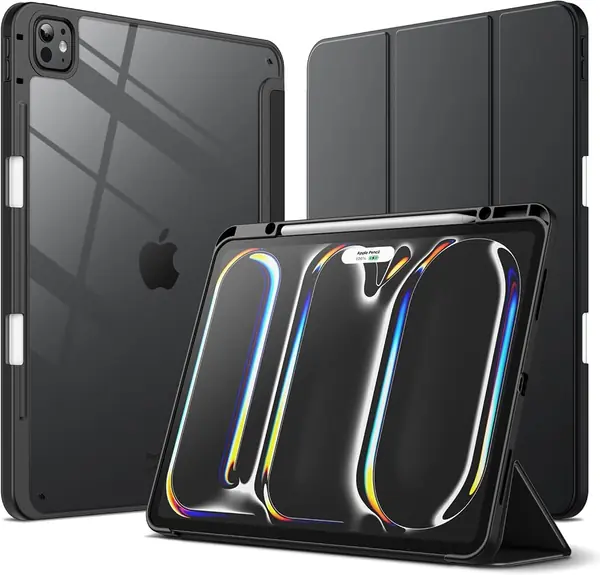
The JETech Case is the clear-back pick: a transparent hard polycarbonate panel shows off the iPad's finish while a flexible TPU bumper handles the edges. The front cover is a trifold with auto wake/sleep, and the built-in Pencil holder gives the stylus a slot instead of leaving it stuck to the side.

The clear back is not just cosmetic. If you use a skin, stickers, or a laser-etched name on the iPad, this is the case that lets them show through, and the black bumper keeps the look from turning into a plain clear shell. The Pencil holder charges the Pencil in place, and the trifold props the screen for typing or watching. The fit is snug enough that the iPad takes a little care to seat, which is a good sign for a case that will come in and out of a bag.

We think it's the best clear case here for someone who wants the iPad's color and finish to stay visible without giving up a stand or Pencil storage. The bumper adds a little width, but the case still feels slim in a bag. The clear panel is the star, and it does not muddy the iPad's color the way a frosted back can.

Pros

  • Clear back shows the iPad
  • Built-in Pencil holder with charging
  • Trifold stand and auto wake/sleep

Cons

  • No built-in screen protector
Our verdict

We recommend the JETech Case for anyone who wants to show off the iPad's finish without giving up Pencil storage or a stand.

Check Latest Price
6

ProCase Best Budget

89 /100
TKZ Score Excellent

Key details

Compatibility
iPad Pro 13-inch M5/M4
Stand
Trifold
Weight
11.3 oz
Back
Translucent frosted hard shell
View on Amazon

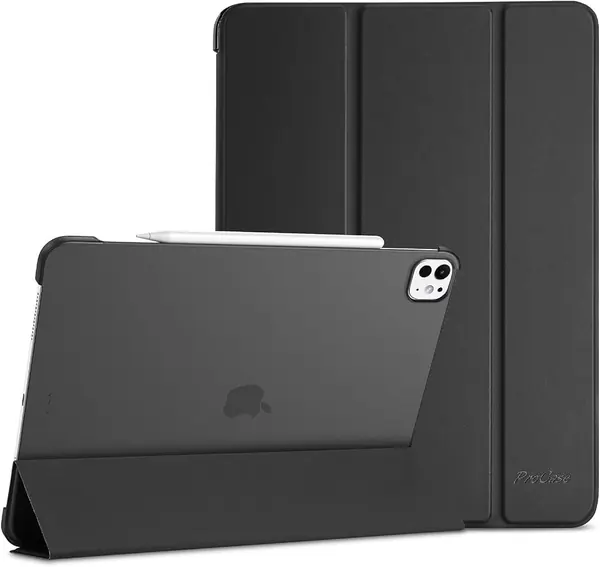
There is no Pencil holder on the ProCase, and that tells you most of what this case is about. It is a slim folio with a translucent frosted hard back, a folding front cover, and the basic auto wake/sleep magnets. The case is cut to work with Pencil Pro and USB-C Pencil, but the stylus rides against the iPad rather than in a slot.

The translucent back is the nice detail: it lets the iPad's color and any skin or sticker show through, while the frosted finish hides fingerprints better than a fully clear shell. The trifold cover folds into a stand for typing or video, and the magnet holds the cover closed in a bag. The cutouts leave the buttons and charging port easy to reach, and the case does not pretend to be a rugged one.

Our take is that it is the right minimal-spend folio for someone who leaves the Pencil at home or keeps it in a separate pouch. The frosted back and the light feel are what make it easy to live with, and the simple fold keeps the profile thin. It is a case for a desk, a coffee table, and a commute, not for a job site or a kid's backpack. If you want a Pencil slot, the JETech is the better budget alternative.

Pros

  • Frosted translucent back
  • Slim, light profile
  • Auto wake/sleep magnets

Cons

  • Cover can shift instead of sitting flat
Our verdict

We recommend the ProCase as a low-cost, slim cover for someone who wants basic front-and-back protection and does not need a Pencil holder.

Check Latest Price
7

Apple Smart Folio Apple-First Minimalism

85 /100
TKZ Score Excellent

Key details

Compatibility
iPad Pro 13-inch M5/M4
Stand
Sliding adjustable design
Weight
1 lb
Cover
Front and back magnetic folio
View on Amazon

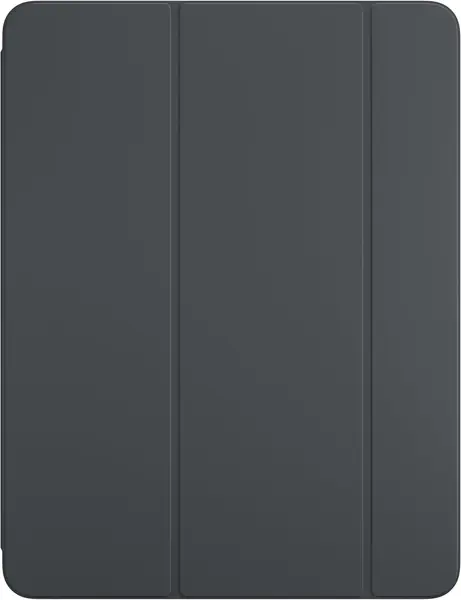
The Smart Folio costs more than most cases here, and its appeal is the first-party fit rather than a bulky shell. It covers the front and back, attaches magnetically with no frame around the screen, and uses a sliding hinge for greater adjustability. The fit is exact for the 13-inch iPad Pro M5 and M4.

The thin profile and finish are the draw. It adds very little to the iPad's footprint, and the front cover folds back flat for reading or sits at a slight angle for typing. The magnet also holds the folio to a steel fridge or wall, which is handy for a recipe or a video while your hands are busy.

The stand is the part to test before you commit. The iPad can slide out of the folded position if you nudge it, and the magnet does not lock the angle the way the ESR or ZUGU does. That is the difference between a folio that looks clean on a desk and one that stays put on a lap.

We think it's the right folio for someone who wants the official fit and the thinnest possible cover, mostly for desk and couch use. It is not the best value here, but if the first-party look is the point, it delivers that, and the magnetic back makes it easy to pop off when you want the iPad bare. The steel-wall trick is a small bonus that makes it more useful than its slim shape suggests.

Pros

  • Exact first-party fit
  • Thin magnetic front and back cover
  • Sliding stand and steel-surface hold

Cons

  • No side or corner coverage
Our verdict

We recommend the Apple Smart Folio to someone who wants the slimmest first-party cover for desk and couch use and can live without side protection.

Check Latest Price

How We Tested 13-Inch iPad Pro Cases

We started with a shortlist of roughly 40 cases sold for the current 13-inch Pro and cut it down by reading the one- and two-star reviews first — the complaints about covers letting go, stands creeping, and buttons that took two tries to press. From there we filtered for cases built around the current body and magnet layout, kept a spread of prices, and made sure every major format was in the room: detachable magnetic covers, trifolds, translucent hard backs, and full shells with straps and screen protection. Twelve made the cut, and we bought each one at retail.

Every case spent four months on the same tablet, rotating between my desk, the couch, a kitchen counter, a tote bag on the train, and an airplane tray table. We weighed each one on a kitchen scale with the tablet inside and noted which turned the Pro into something we didn't want to hold one-handed. To check the magnets, we held the tablet face-down and shook it over a cushion, then carried it across a room by the cover alone. For the stands, we folded each into every position it offered, typed a full page at each one, and pressed down on the top edge with two fingers to see whether the angle held. Button access was tested blind — power, volume, and charging, without looking.

Durability was the least graceful part. Cases got slid in and out of a bag dozens of times, stacked in a backpack next to keys, and tipped off a coffee table onto hardwood and carpet; afterward we checked corners for splitting and hinge seams for stretching. We also tracked the small things that decide value: whether the stylus still charged with the cover closed, whether auto wake/sleep fired each time the flap moved, and whether the cutouts lined up with the ports, cameras, and buttons without repositioning the tablet. Only a few came through all of it without a complaint.

How to Choose an Ipad Pro 13-Inch Case

Match the Model Number Before the Screen Size

The 13-inch iPad Pro M5 and M4 use model numbers A3360, A3361, A3362, A2925, A2926, or A3007. A case for the iPad Air 13-inch or an older 12.9-inch Pro is a different fit, even though the screens sound close. Check the A-number on the back of the tablet or in Settings before you order; a case that is merely close can leave the camera, buttons, or Pencil charging area misaligned.

Choose the Stand by Where You Use the iPad

Trifold folios are light and fine on a desk, but they can collapse on a lap. Multi-angle magnetic stands use brackets or grooves to lock the angle, and they are the better choice for drawing, typing, or video calls away from a table. The ESR Shift's nine angles and the ZUGU's ten-angle stand are the most adjustable here; the SEYMAC's rotating kickstand is the one to pick if you want a built-in hand strap. More angles do not automatically mean more stability: look for a wide support bracket or a deep groove.

Decide How Much Protection You Will Actually Carry

Slim folios cover the front and back but leave the edges exposed; rugged cases add a raised lip, port covers, and sometimes a built-in screen protector. The SEYMAC is the clear pick if the iPad rides in a work bag or gets handed around, while the ESR Rebound and ProCase are easier to live with on a desk. A higher drop rating is useful, but edge coverage and a screen lip matter more in everyday knocks.

Check Pencil Storage and Charging

The Apple Pencil charges through the iPad's side, so a case needs a recessed groove or a thin cover over that edge, not a thick block. A covered holder keeps the Pencil from falling off in a bag; a magnetic flap is quicker but less secure. The JETech and SEYMAC include a holder, the ESR Shift stores and charges the Pencil, and the ProCase works with the Pencil but gives you no storage slot. If the Pencil lives in your bag, pay for the holder.

Weigh the Case, Not Just the Tablet

A 13-inch iPad is already a two-handed device, and the case can add a lot. The ESR Rebound is the lightest here at 252 grams, while the ZUGU is 670 grams and the ESR Shift is 560 grams. That extra mass buys stand hardware and protection, but it changes how the iPad feels in bed or on a commute. If you mostly read or watch, start light; if you work standing up, the sturdier case earns its weight.

Frequently Asked Questions

Final Verdict

The ESR Shift Series is the case we recommend first: its nine-angle stand is the most stable and flexible here, the cover comes off when you want a lighter hold, and the Pencil has a proper charging home. If you need more protection, the SEYMAC adds a built-in screen protector and straps; if you want the lightest carry, the ESR Rebound is the one to grab. The ZUGU is the premium alternative when finish and a ten-angle stand matter more than weight.