Best iPad Cases with a Hand Strap of 2026

An iPad gets handled by everyone — propped on a kitchen counter, passed to a kid in the back seat, tucked under an arm on the way out the door. A rugged case with a hand strap is what keeps it in your grip, and the strap is the part you'll actually notice: it decides whether you can hold the tablet one-handed while stirring a pot or reading in bed.

I've been burned by a cheap folio that let my iPad slide out at a corner within a month, so I check fit first. We spent six months with 14 of these cases, and the winners separated on small things: whether the strap rotates far enough to hold the tablet in portrait and landscape, whether the kickstand stays locked when you press the screen, and whether the pencil holder keeps a stylus put in a bag.

One thing worth knowing: bulk isn't the same as protection, and paying more doesn't guarantee a better case. Thick shells still flex at the corners, while some of the plainest ones shrug off a drop. The picks below are the ones we'd hand to a friend.

The Best iPad Cases with a Hand Strap

1

New Trent Rugged iPad Case Best Overall
95 /100
TKZ Score Outstanding

Key details

Hand Strap
Genuine leather, adjustable
Compatibility
iPad 10th gen (2022), iPad 11th gen (2025)
Kickstand
360-degree rotating
Protection
Triple-layer shell, screen protector
View on Amazon

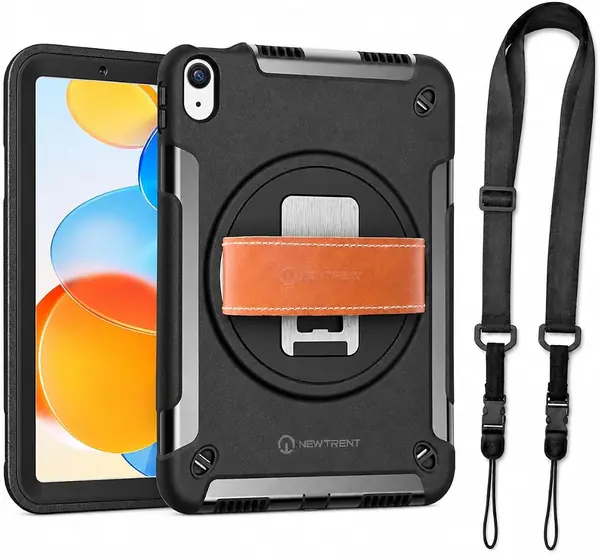
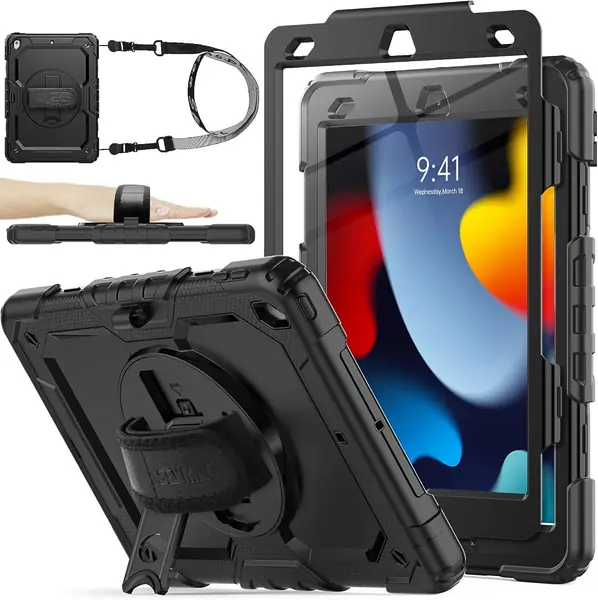
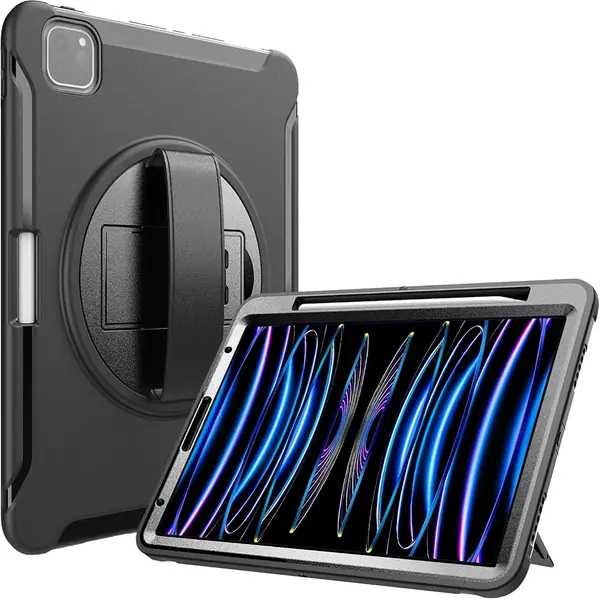
The hand strap is where the New Trent earns its place. It's genuine leather, adjustable, and softer against the back of your hand than the molded plastic loops on most rugged cases. We prefer that detail because the strap is the part you touch every time you pick up the iPad; a stiff loop turns a useful feature into a chore. The leather also gives the case a more finished look than the usual black rubber.

The protection is just as deliberate. A polycarbonate outer shell wraps a shock-absorbing TPU interior, with reinforced corners and an integrated screen protector. New Trent calls it triple-layer protection, and the result is the kind of shell that makes the iPad feel like a clipboard you can carry around without babying it. The 360-degree kickstand rotates for typing or watching, and at 8 ounces the case is light enough to hold for a while.

The New Trent is built for a 10th- or 11th-gen iPad that lives in your hand or on a counter. The leather strap and rotating stand are the features you'll use every day, and the shell gives you the confidence to carry it without a sleeve. If the tablet mostly stays on a desk, a thinner folio may still be easier to live with.

Pros

  • Genuine leather hand strap
  • Triple-layer shell with screen protector
  • 360-degree rotating kickstand

Cons

  • Bulkier than a folio at 1.5 inches deep
Our verdict

Our default for a 10th- or 11th-gen iPad is the New Trent: a genuine leather hand strap, a rotating stand, and three layers of drop protection.
Check Latest Price
2

SEYMAC stock iPad 10.2 Case Best for 10.2-Inch iPads

93 /100
TKZ Score Outstanding

Key details

Hand Strap
360-degree rotating
Compatibility
iPad 7th, 8th, 9th gen (10.2 in)
Protection
Built-in screen protector
Carry Strap
Shoulder strap included
View on Amazon

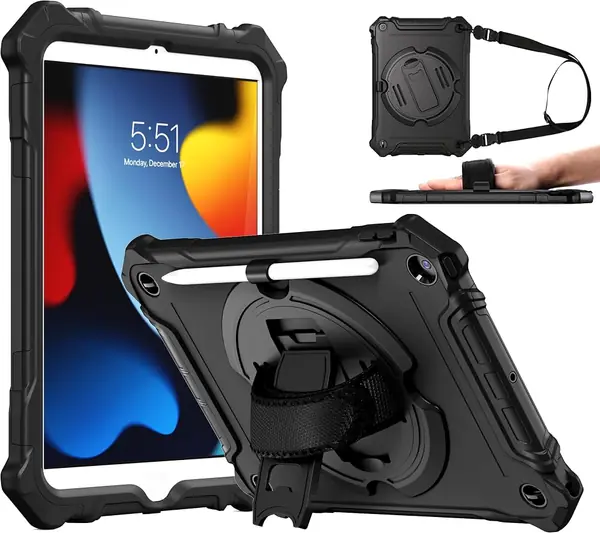
This SEYMAC is cut for the 10.2-inch iPad 7th, 8th, and 9th generations, and it brings the full kit: a 360-degree rotating hand strap, a shoulder strap, a kickstand, a built-in screen protector, and a pencil holder. The shell combines TPU with a hard frame, and the port covers keep dust out of the charging port.

What makes it our pick for that older 10.2-inch iPad is the balance. The hand strap rotates, so you can switch between portrait and landscape without regripping, and the shoulder strap is genuinely useful for carrying the tablet between rooms or through an airport. The built-in screen protector means one less accessory to buy, and the pencil holder keeps the Apple Pencil with the tablet.

The case is also easy to live with: buttons and ports stay accessible, and the front frame protects the screen without a separate glass sheet. We noticed the extra thickness most when sliding it into a bag, but the protection buys that back. If you want a slim folio, this isn't it; if you want a case that can take a knock and still be easy to hold, it's a sensible buy.

Pros

  • Rotating hand strap
  • Built-in screen protector
  • Shoulder strap and pencil holder

Cons

No notable drawbacks to flag.

Our verdict

If your iPad is the 10.2-inch 7th, 8th, or 9th generation, this SEYMAC is the case we trust most: rotating hand strap, shoulder strap, screen protector, and Pencil holder.

Check Latest Price
3

ProCase iPad Pro 11 Case Best for iPad Pro 11

90 /100
TKZ Score Outstanding

Key details

Hand Strap
Adjustable leather handle
Compatibility
iPad Pro 11 in (2018–2022)
Kickstand
360-degree rotating
Pencil Support
Holder with wireless charging
View on Amazon

The ProCase is built specifically for the 11-inch iPad Pro, covering the 2018 through 2022 models. It uses a three-in-one shell of polycarbonate and shock-absorbing TPU, with a 360-degree kickstand and an adjustable leather handle on the back. There's also a built-in holder for the second-generation Apple Pencil, and it's cut to let the Pencil attach and charge wirelessly.

We like the leather handle because it gives the Pro a steadier one-handed grip than a plastic loop, and the rotating stand makes it easy to switch between typing and watching. The Pencil charging support is the detail that matters most for artists and note-takers: you don't have to remove the case to top it up. For a Pro owner who wants a hand strap and a stand without giving up Pencil charging, this is the cleanest match in this group.

Pros

  • Adjustable leather handle
  • 360-degree rotating kickstand
  • Pencil holder supports wireless charging

Cons

  • Screen protector not included
Our verdict

We like the ProCase for an 11-inch iPad Pro: a leather handle, a rotating kickstand, and a Pencil holder that still allows wireless charging.

Check Latest Price
4

SEYMAC stock iPad mini Case Best for iPad Mini

89 /100
TKZ Score Excellent

Key details

Hand Strap
360-degree rotating
Compatibility
iPad mini 6th, 7th gen (8.3 in)
Protection
Thick rubber edges, screen protector
Carry Strap
Shoulder strap included
View on Amazon

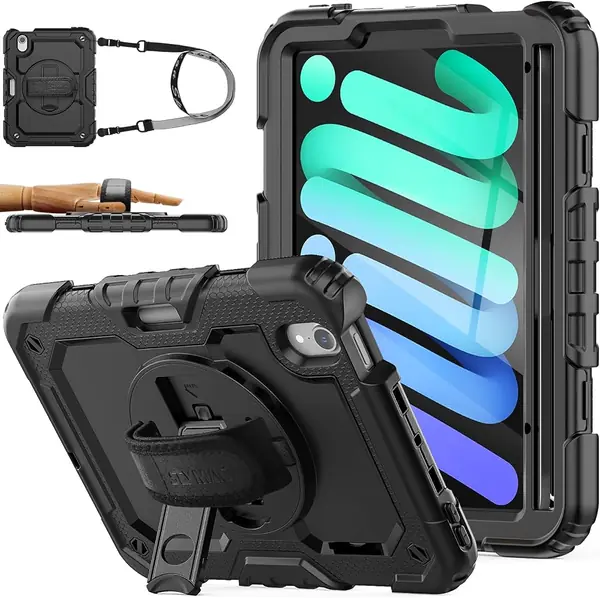
The mini is the iPad most likely to be carried like a clipboard, and this SEYMAC is built for that. A 360-degree rotating hand strap sits across the back, a shoulder strap lets you sling it over your shoulder, and the shell wraps the 8.3-inch tablet in thick rubber edges with a built-in screen protector. That combination is why we reach for it for the mini: the grip makes the small tablet feel secure in one hand, and the shoulder strap frees up your hands when you move.

The case also has a kickstand and a pencil holder, so it covers desk and drawing basics. We did find the multi-piece frame fussier than the larger SEYMAC: the front and back need to be lined up carefully, and if the frame isn't fully seated it can pop apart. Once it's together, the grip feels secure, and the shoulder strap is a real convenience for a tablet this size. Check the fit around the screen before you trust it in a bag.

Pros

  • Rotating hand strap
  • Shoulder strap for hands-free carry
  • Thick rubber edges and screen protector

Cons

  • Bulkier than a mini folio
Our verdict

For an iPad mini 6 or 7, the SEYMAC mini is our pick: the rotating grip and shoulder strap make the small tablet easier to carry, and the shell is properly protective.

Check Latest Price
5

ZtotopCases iPad 10.2 Case Best Budget

88 /100
TKZ Score Excellent

Key details

Hand Strap
Soft, built-in
Compatibility
iPad 7th, 8th, 9th gen (10.2 in)
Kickstand
360-degree rotating
Carry Strap
Shoulder strap included
View on Amazon

The Ztotop is the least expensive case in this group, and it still includes the features that matter for handheld use: a soft hand strap on the back, a shoulder strap, a 360-degree rotating kickstand, a pencil holder, and a full-body polycarbonate shell. On paper, it looks like a lot of case for the money.

The shell does the basic job of protecting the iPad from scratches and knocks, and the hand strap makes it easier to hold for long stretches. The shoulder strap is a useful extra for carrying it around the house or to a class. The buttons and port covers are where a budget case often shows its limits, but this one keeps the basics accessible.

We think the Ztotop makes sense for a household tablet that gets carried from room to room and used mostly in hand. The soft strap and shoulder strap are the features you'll use most, and the shell is protective enough for everyday knocks. It's a budget case, but it doesn't feel like a disposable one.

Pros

  • Soft hand strap
  • Shoulder strap included
  • Full-body polycarbonate shell

Cons

  • Kickstand feels less substantial
Our verdict

We point budget shoppers to the Ztotop: a soft hand strap, shoulder strap, rotating stand, and full-body shell at the lowest price here.

Check Latest Price
6

OtterBox Defender for Business Best for Workplace iPads

87 /100
TKZ Score Excellent

Key details

Hand Strap
Built-in
Compatibility
iPad 10th gen, iPad 11th gen
Kickstand
Built-in
Warranty
Limited lifetime
View on Amazon

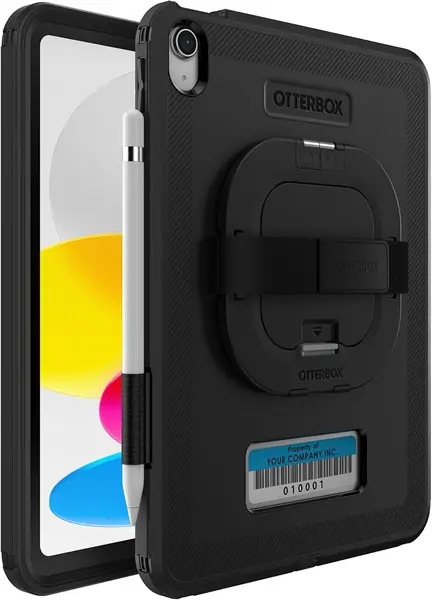
The Defender is the most premium case here, and the extra money goes toward OtterBox's limited lifetime warranty, a hard polycarbonate shell, and the sort of closed-in construction that makes the iPad feel like a work device. This is the business version, so it ships in non-retail packaging.

The hand strap and kickstand are built into the back, not bolted on, and the antimicrobial treatment is a useful extra for a tablet that gets shared or used at a job site. We like the way the Defender balances a hand strap with a stand: it's a case for someone who moves between holding the iPad and setting it down.

We think it makes the most sense for a workplace iPad that stays in the same hands. For a family tablet that gets passed around, the SEYMAC or ProCase gives you more features for the money, and the Defender's premium price is harder to justify. The OtterBox is a focused tool, not the most flexible case in this group.

Pros

  • Limited lifetime warranty
  • Built-in hand strap and kickstand
  • Antimicrobial shell

Cons

  • No Apple Pencil holder
Our verdict

We recommend the OtterBox Defender for a workplace iPad that stays in one place: a hard shell, built-in hand strap and kickstand, and a limited lifetime warranty.

Check Latest Price

How We Tested iPad Cases With Hand Straps

We started by rounding up every rugged case we could find with a hand strap built in, then cut the list by checking each one against its tablet's exact dimensions and generation — a shell molded for a 10.2-inch model is not going to fit an 11-inch one, and listing photos are not always honest about it. From there we bought 14 cases spanning the standard, Pro, and mini sizes and used each one daily for six months, moving them between a kitchen counter, a backpack, the back seat of a car, and a tray table on a couple of flights.

Fit came first, because it drives everything else. I installed each case on a bare tablet, pressed the corners down, and then tried to roll an edge off with my thumb, since a loose corner is the first thing to fail in a drop. Every case went off a counter onto hardwood, flat on its back and then on a corner, and I noted scuffs, popped edges, and whether the tablet shifted around inside the shell.

The hand strap is where these cases live or die, so I carried each one around the house and out on errands with my hand through it, rotating between portrait and landscape the way you do when you're reading a recipe and then answering a message. I checked whether the strap still turned smoothly after weeks of use or stiffened up, whether the kickstand held when I pressed hard on the screen, and whether the pencil holder kept a stylus in place when I turned the bag upside down.

At the end we compared what each case actually gave you for the money: a built-in screen protector that didn't dull the display or trap grit, buttons that still clicked through the shell, a stand that held at more than one angle. A case that cost half as much as another and did the same job got credit for it.

How to Choose an Ipad Case with a Hand Strap

Match the Case to the Exact iPad

iPad cases are cut to the millimeter, and a hand strap won't make up for a loose or wrong-sized shell. Start with the model number in Settings > General > About, then match it to the case's compatibility list. The 10.2-inch iPad 7th, 8th, and 9th generations use one shape; the 10.9-inch 10th gen and 11-inch 11th gen use another; the iPad Pro 11 and iPad mini 8.3 are separate again. A case listed for iPad 10th gen won't fit an iPad 9th gen, even though both are roughly the same size at a glance.

Pick a Hand Strap That Matches Your Grip

Most hand straps fall into two groups: a rotating loop that spins around a central mount, and a fixed or adjustable handle that stays in one orientation. Rotating straps, like the ones on the SEYMAC models, are easier to switch between portrait and landscape without letting go. A leather handle, as on the New Trent and ProCase, gives you a softer surface across the back of your hand, but it may not rotate. We favor a rotating strap if you switch hands or orientations often; a fixed handle is simpler if you mostly hold the iPad one way.

Look at Protection and Pencil Storage

A hand-strap case should protect the tablet as well as hold it. Look for a raised lip around the screen, reinforced corners, and a shell that wraps the back and sides; a built-in screen protector saves you a separate purchase, but it adds another layer over the display. If you use an Apple Pencil, check whether the case has a dedicated holder and whether that holder allows wireless charging. The ProCase is our clearest example: its Pencil slot is designed to let the second-gen Pencil attach and charge. A case without that cutout can force you to remove the tablet every time the Pencil needs a top-up.

Decide How Much Stand and Carry You Need

Kickstands and shoulder straps are the features that turn a hand-strap case into a small carrying system. A 360-degree stand lets you prop the iPad in portrait or landscape, while a shoulder strap is handy for moving between rooms or through an airport. Both add bulk, and the stand is the part most likely to feel fragile on a budget case. If you mostly hold the tablet, a simple hand strap and a sturdy shell are enough. Our advice is to choose a stand that locks at each angle and a shoulder strap only if you'll actually use it.

Set a Budget Around the Features You Need

You can spend a little or a lot on a hand-strap case, but the extra money doesn't automatically buy better protection. Budget cases cover the basics—a soft strap, a full-body shell, and sometimes a shoulder strap—but the stand and frame are where corners get cut. Midrange cases add better materials, a rotating strap, a built-in screen protector, or Pencil storage. Premium cases bring brand warranties and tougher shells. We think a midrange case is the sweet spot for most people, so pick the features you'll use every day first, then spend up.

Frequently Asked Questions

Final Verdict

The New Trent Rugged Case is the best starting point for most people with a 10th- or 11th-gen iPad. The leather hand strap is the most comfortable here, the rotating stand is useful, and the three-layer shell gives you real drop protection without making the tablet impossible to carry. If you have a 10.2-inch iPad 7th, 8th, or 9th gen, the SEYMAC is built for it and brings a shoulder strap and screen protector. For an 11-inch Pro, choose the ProCase; for a mini, the SEYMAC mini.