Best Styluses for Samsung Tablets of 2026

A stylus is never just a plastic finger. There are two families of them: capacitive pens with a soft rubber or mesh tip that simply stand in for your fingertip, and active pens that pair with the tablet — which is where palm rejection, pressure sensitivity, and the Air Command menu actually come from. Buy the wrong type for your tablet and every feature you saw in the demo video quietly fails to appear.

I write by hand constantly — meeting notes, margin scribbles, a to-do list that never gets shorter — so I have become unreasonably picky about how a nib feels dragging across glass. My team and I have spent the past four months putting 16 styluses through that same daily grind, from cheap capacitive multi-packs to rechargeable pens. What separated them had almost nothing to do with the box copy: tip quality, whether the ink kept pace with my handwriting, and whether the connection survived a week loose in a bag.

One thing first-time buyers tend to overlook is that a pen shipped with a handful of spare tips isn't a bonus, it's a maintenance plan — tips wear down, and a worn one drags and skips. It's also worth admitting you'll look at the thing every day, so color matters more than the specs suggest. Below are the ones worth your money, sorted by how you actually use a tablet.

The Best Styluses for Samsung Tablets

1

MEKO 3-in-1 Stylus Pen Best Overall
93 /100
TKZ Score Outstanding

Key details

Tips
Disc plus two rubber sizes
Power
Battery-free
Warranty
2 years
Pens Included
2
View on Amazon

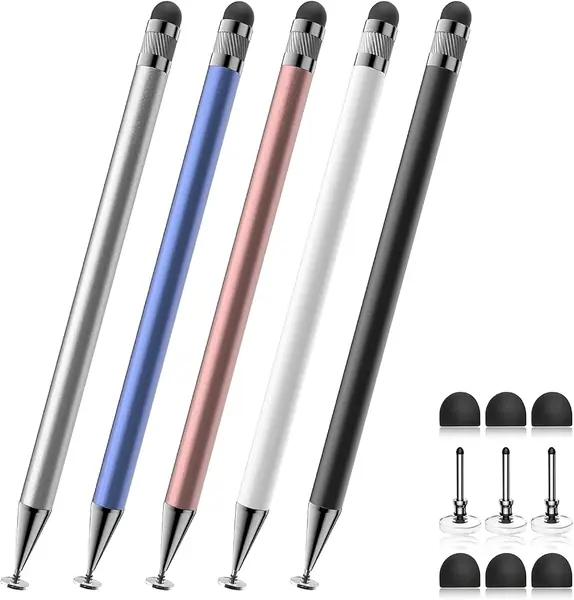
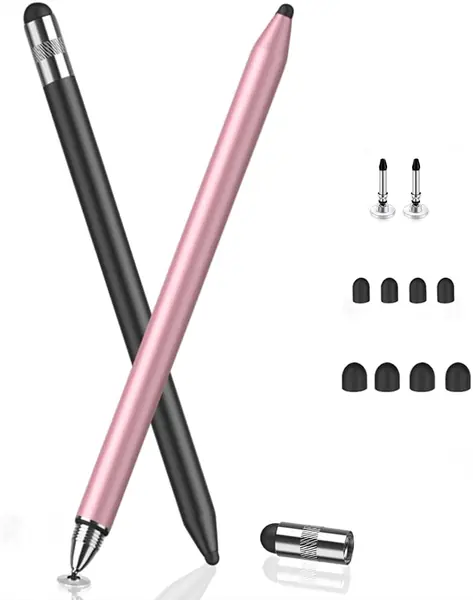
Three tips on one barrel is why this pen sits at the top of our list. There's a clear disc tip for handwriting and drawing, a small rubber tip for hitting small targets, and a wider rubber tip for scrolling, and you move between them by uncapping an end rather than digging through a drawer. It's the pen we hand to someone who has a Galaxy Tab and no idea which stylus fits it, because it never asks the question: MEKO rates it for every touchscreen, Samsung tablets included.

The disc is the tip we actually write with. Because the contact point is transparent, you can see exactly where the line will land, and the tip flexes through a wide writing angle, so a steep slant or an awkward grip still works. In a notes app it kept up with ordinary handwriting and left clean strokes. Line weight is the trade-off of any capacitive pen — the app decides how thick the line is, not how hard you press.

Nothing here needs charging, pairing, or an app. The aluminum body runs 5.9 inches and weighs about two-thirds of an ounce, which reads as a real pen in the hand rather than a plastic nub, and all three tips unscrew for replacement. The two-year warranty is unusually generous for a pen at this end of the range, and it makes the small parts feel less disposable.

Two practical notes from living with it. The disc picks up fingerprint film and starts to drag, and a pass with a microfiber cloth brings the glide back. And it rewards a light hand: this is a fine-point pen, not a pressure tool. If you already sketch on a Tab S9 or S7 FE with the pen that came in the box, keep that one for artwork and let this be the spare that lives in your bag.

Pros

  • Three tip styles in one pen
  • No charging, pairing, or app
  • All tips replaceable, two-year warranty

Cons

  • Disc tip can lag in drawing apps
Our verdict

For most Galaxy Tab buyers we start here: three tip styles, no charging, and it works on any Samsung tablet you already own.

Check Latest Price
2

Dogxiong Galaxy Tab S7 FE Stylus Best S Pen Replacement for Tab S7 and S7 FE

90 /100
TKZ Score Outstanding

Key details

Fits
Galaxy Tab S7 and S7 FE
In The Box
1 pen, 5 tips, tweezer
Bluetooth
Not included
Pressure Levels
4096
View on Amazon

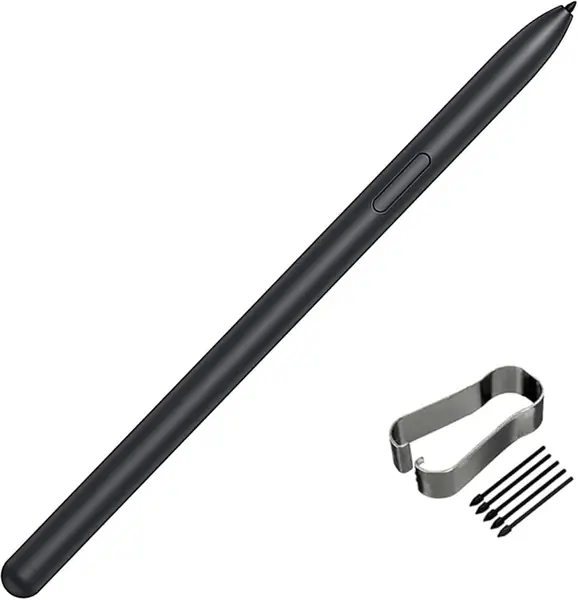
Losing the pen that came in the box is the most common reason people end up shopping for a Tab S7 FE stylus, and this replacement is built for precisely that. It works on the screen's digitizer rather than a battery, so there's nothing to charge and nothing to pair: pick it up and the tablet responds the way it did to the original. The listing scopes it to the Tab S7 and S7 FE, so confirm your model before ordering — these pens are cut for particular screens.

The number that matters is 4096, the pressure-level count it's rated for. That's what makes shading and thick-to-thin strokes possible, and it's the one thing no rubber or disc tip on this page can imitate. The side button works, notes and markup behave, and the point lands where you aim it. Five spare nibs and a tweezer come in the box, which is the right call for a part that wears.

As a writing tool for this tablet, it's the pick of the two digitizer pens here: the pressure rating is stated rather than implied, and the parts kit means a worn nib isn't a new pen. Whether you want it comes down to what you do on the glass. For Samsung Notes, annotation, and anything that reacts to pressure, yes. For scrolling and menu taps, a capacitive pen does the same job and never needs anything from you.

Pros

  • 4096 pressure levels for shading
  • Five spare nibs and a tweezer included
  • Nothing to charge or pair

Cons

  • No Bluetooth remote shutter or gestures
  • Nibs can break under normal use
Our verdict

If your Tab S7 or S7 FE lost its pen, this is the closest thing to getting it back: real pressure response and a spare-tip kit in the box.

Check Latest Price
3

WZF Galaxy Tab S9 FE Stylus Best for Galaxy Tab S9 FE and S10 FE

89 /100
TKZ Score Excellent

Key details

Fits
Galaxy Tab S9 FE and S10 FE series
In The Box
1 pen, 5 tips, tweezer
Tip Size
0.7 mm
Air Command
Supported
View on Amazon

Air Command is the giveaway that this is a replacement for Samsung's own pen rather than a capacitive stand-in: the side button pulls up the pen menu, and the 0.7 mm nib gives you the fine point that menu assumes. The barrel is magnetic, so it parks on the tablet's edge, and the kit adds five tips and a tweezer. Fit runs to the S9 FE, S9 FE+, S10 FE, S10 FE+, and S10 Lite — the newest FE family, and nothing older.

We rate it as the right pick for those tablets and only those; next to a Tab S7 it has nothing to talk to. Two things to know before you order. The listing promises Air Command and a fine tip but no pressure-level figure, so if shading matters, test that in the first week while a return is still straightforward. And fit is worth verifying on arrival rather than months later, because a pen cut for the wrong FE model simply won't answer the screen.

Pros

  • Air Command works from the side button
  • Covers the newest FE tablets
  • Five tips and a tweezer in the box

Cons

  • Magnetic hold can be weaker than the original's
Our verdict

The pick for a Tab S9 FE or S10 FE: Air Command, a 0.7 mm nib, and magnetic storage for less than the other digitizer pen here.

Check Latest Price
4

Bopomofo 5-Pack Capacitive Stylus Best Value Multi-Pack

88 /100
TKZ Score Excellent

Key details

Tips
3 disc and 6 rubber
Power
Battery-free
Warranty
3 months
Pens Included
5
View on Amazon

Five pens arrive in one box, each with a disc tip at one end and a rubber tip at the other, plus three spare discs and six spare rubber tips. That arithmetic is the whole argument: a stylus is a small object that lives beside a couch and vanishes into a backpack, and a second one in the kitchen drawer is worth more than a single better pen you keep losing. Each is 5.9 inches of alloy with a little heft, and the colors make it easy to assign one per person.

The disc end is the one to use for notes. It's transparent, so you can see the contact point, and it tracks small targets like checkboxes and on-screen keys far better than the rubber end, which is the blunt backup for scrolling and tapping. Nothing needs charging and there's no pairing step, so a pen that has been in a bag for a month still works the moment it comes out. Three months of warranty is the shortest coverage here, which is the honest reason to treat these as consumables rather than heirlooms.

Pros

  • Five pens and nine spare tips
  • Transparent disc shows the contact point
  • Battery-free and works on any capacitive screen

Cons

  • Tips can work loose and fall out
Our verdict

Five pens and nine spare tips in one box — we recommend the pack for any household where styluses quietly disappear.

Check Latest Price
5

Luntak Active Stylus Pen Best Budget Active Pen for Tab A Series

87 /100
TKZ Score Excellent

Key details

Fits
Galaxy Tab A8, A9, A9+, S9
Replacement Tips
3 POM tips
Magnetic
Yes
Charging Time
35 minutes
View on Amazon

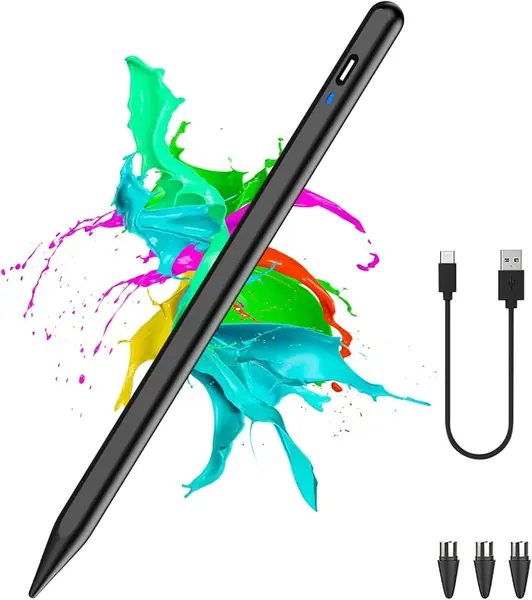
The first surprise is the double-tap. There's no cap to pull — you tap the top of the barrel twice, a small light comes on, and the pen is live; do it again and it sleeps. That took us about a day to stop thinking about. It's an active pen, which is why we reached for it with the A-series models: those screens have no digitizer, so a powered pen is the only route to a hard tip instead of a rubber nub.

Charging is quick over USB-C, and the POM tip is the hardest of anything here — closer to a fine-liner than to rubber, which is what you want for lists and small print. Three replacement tips come in the box, and one flat side is magnetic, so the pen parks on the tablet's edge instead of rolling off the table. It also drives phones and other Android slates, which makes it a reasonable bag pen for mixed devices.

Where it earns its place is the combination: rechargeable, magnetic, spare tips included, and priced below the digitizer pens. For notes, forms, and menus, that's the whole job done. The one thing it can't give you is the reason to buy a digitizer pen in the first place — pressure — and if you need that, you need a different tablet rather than a different stylus.

Pros

  • Fast USB-C charging
  • Magnetic side keeps it on the tablet
  • Three spare POM tips included

Cons

  • Not compatible with Tab S7+ or Tab S10
  • Can lag during fast handwriting
Our verdict

For a Galaxy Tab A8 or A9 with no digitizer, this rechargeable pen is the affordable route to a hard tip, a magnet, and a fast charge.

Check Latest Price
6

DOGAIN A16U Stylus Pen Best for A-Series Note-Taking

86 /100
TKZ Score Excellent

Key details

Fits
Galaxy Tab A9, A9+, A11, A11+
Warranty
12 months
Replacement Tips
4 POM tips
Charging
USB-C
View on Amazon

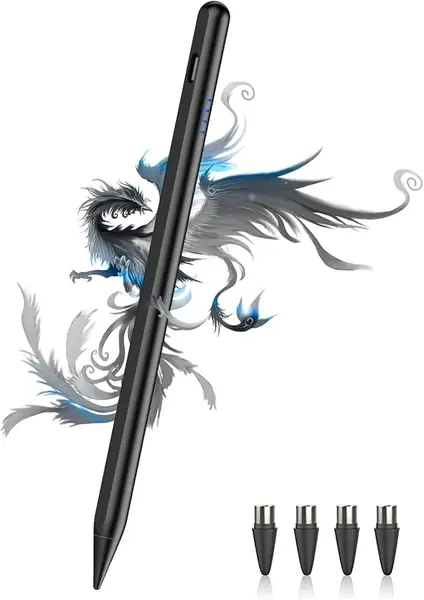
This is the same idea as the Luntak — a rechargeable active pen for Galaxy Tabs without a digitizer — with one addition that matters more than it sounds: a four-light power display. On a pen you have to switch on, knowing whether you have two bars or four before a meeting is the difference between a tool and a gamble.

The battery side is handled well. Charging runs over USB-C, the pen holds a long charge, and the lights step down as it drains instead of dying without warning. Double-tap the top to wake it; there's no pairing step and no app, so it's ready the moment the lights come up.

Four POM tips come in the box, and the hard tip is the reason to choose this over a rubber stylus: it feels like a pen on glass, holds a line for note-taking, and doesn't smear the way a soft tip can. It's also the most shareable pen here — the listing covers iPhones and other Android phones as well as the A-series tablets, so it can live in a bag and work on whatever you pull out.

The ground it gives up is precision: on a capacitive pen the line can break up when you write quickly, and fine detail work takes more patience than the hard tip first suggests. For notes, forms, and navigation it's one of the two pens we keep on the shortlist for an A-series tablet, and the power display is what tips it for anyone who has been stranded by a dead pen mid-sentence.

Pros

  • Four-light battery display
  • Four POM tips and a 12-month warranty
  • Magnetic storage on the tablet's side

Cons

  • No pressure sensitivity, so not for drawing
Our verdict

We point A-series buyers here when they want to see the battery level before a meeting: four POM tips, a magnetic side, and a charge light.

Check Latest Price
7

Abiarst 10-Pack Stylus Pens Best for Kids and Tapping

85 /100
TKZ Score Excellent

Key details

Tips
Soft rubber
Power
Battery-free
Pens Included
10
Clip
Built-in
View on Amazon

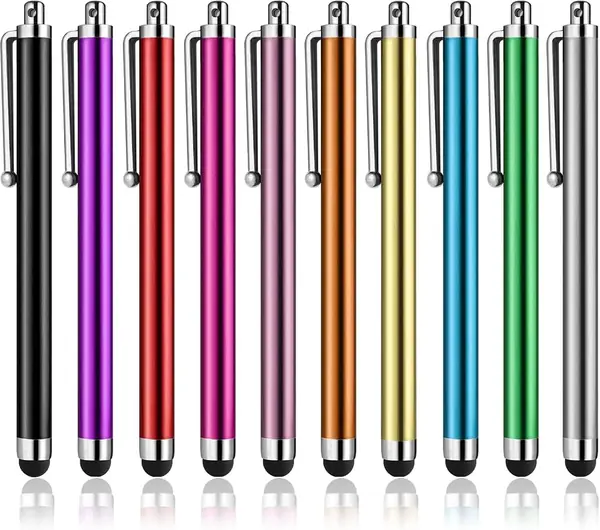
Short, a little chubby, and topped with a soft rubber nub: these are not pens you write paragraphs with, and there's no pretending otherwise. They're the ones you leave in the car, the kitchen drawer, and a kid's backpack, and at ten to a box that's a fair description of what most households actually need from a stylus.

The rubber tip is soft, needs only light pressure, and won't scratch a screen. The clip is our favorite detail, because it holds the pen in a pocket or on a folio cover instead of at the bottom of a bag. Colors are bright enough to spot across a room, which matters more than it should when you're buying ten of something. They work on any capacitive screen, Samsung tablets included, with no charging and no pairing.

Anything precise is where they fall short. A soft rubber nub covers more screen than a fine point does, so handwriting comes out wide and smudged, and heavy use takes a toll on the tips. For tapping through menus, playing games, and signing a delivery screen, ten pens that work on every Galaxy Tab is a sensible thing to keep in the house.

Pros

  • Ten pens for shared spaces
  • Soft tip that won't scratch
  • Built-in clip keeps it handy

Cons

  • Too blunt for neat handwriting
  • Rubber tips wear or come off
Our verdict

Ten short rubber-tip pens for the drawer, the car, and a kid's backpack — not the pen you buy for handwriting.

Check Latest Price

How We Tested the Best Styluses for Samsung Tablets

We started with a running list of styluses sold for Samsung tablets, read through customer reviews, and filtered by compatibility claims, tip style, and price. Pens that promised to work with literally every device on earth got cut, as did anything priced like an accessory for an accessory. We deliberately kept both active pens that pair and charge and passive capacitive pens, because Galaxy Tab owners split into both camps depending on whether their model supports S Pen features. That left 16 styluses, which we used for four months.

Each one went into rotation against the same set of tasks: notes in Samsung Notes during meetings, annotating a PDF in the afternoon, and sketching on weekends. We wrote the same paragraph with every pen and noted whether strokes lagged behind the nib, whether lines tapered when we pressed harder, and whether resting a palm on the screen left stray marks. Active pens were paired to a tablet and to a phone, timed from first tap to connected, then charged fully and run down through ordinary notetaking so we could count the days. We swapped tips mid-test on the models that included spares and checked whether the nib wobbled afterward.

Since a stylus spends most of its life loose in a bag, we dropped each from desk height onto tile and carried them in a tote alongside keys for a week, looking for cracks and scuffed tips. We measured length and weight in hand, held them for a full hour of writing to see where they dug in, and compared each pen's finish to its listing photo. Value came down to a simple count: how many tips came in the box and whether you can buy replacements later.

How to Choose a Stylus for a Samsung Tablet

Start With Your Tablet, Not the Pen

Galaxy Tabs that ship with a pen in the box have a digitizer layered into the screen, and only a pen built for that layer will write with pressure or ignore your palm. Tabs that ship without one, including the Tab A8 and A9, have no digitizer, so a powered or capacitive pen is the only option.

Look at what came in your box: a pen means a digitizer, no pen means you're shopping for a capacitive or active stylus. Then match the exact model name in the listing before you buy, because digitizer pens are cut for specific screens and won't improvise.

Pressure Sensitivity Is the Real Divide

A digitizer pen reports how hard you press and the tablet turns that into line weight, which is why shading, brush size, and thick-to-thin strokes work. Capacitive pens can't do it: the app decides the line, not your hand.

If you sketch, letter, or take notes you plan to read later, pay for the digitizer pen and check the listing actually states a pressure-level count. If you mostly tap, scroll, and sign, that money buys you nothing.

Tip Shape Decides What the Pen Is Good At

Three shapes cover this category. A clear disc tip is the most precise capacitive option because you can see the contact point, but it wants a clean screen and a light hand. A hard POM tip feels like a fine-liner and suits lists and small print, though it can skate on glass. A soft rubber tip is the bluntest and the gentlest on a screen, best for menus, games, and shared use.

Match the tip to the job rather than to the price. A ten-pack of rubber pens is the wrong tool for a lecture, and a disc tip is overkill for tapping through a menu.

Decide What You'll Charge and What You'll Lose

Digitizer pens and plain capacitive pens never need power. Active pens do, so you're trading a charging habit for a hard tip and sometimes a magnet. Choose an active pen only if it has a charge indicator or a fast top-up, because a dead pen at the start of a meeting is the failure that actually bites.

Then read the box contents. Tips are the wear item in this category, and a pen that arrives with five spares turns a broken nib into an inconvenience instead of a replacement purchase.

Frequently Asked Questions

Final Verdict

Our first recommendation for most Galaxy Tabs is the MEKO 3-in-1. It works on every Samsung tablet regardless of digitizer, needs no charging, and the disc tip is precise enough for real note-taking, with two rubber tips for everything else.

If your tablet came with a pen and you want pressure back, buy the Dogxiong for a Tab S7 or S7 FE and the WZF for the S9 FE or S10 FE family. If the stylus is mostly for menus, games, and shared use, the Abiarst ten-pack covers it for the least money here.