Best Protective iPad Cases of 2026

Here's the annoying truth about iPad cases: the two things you want most — real drop protection and a case that doesn't turn your tablet into a brick — rarely come in the same box. Armored models with built-in screen protectors shrug off a tumble down the porch steps but carry like a clipboard. The slim folding covers feel great and stand up nicely for a movie, until a corner hits the tile. A good case picks a side and then makes up for what it gave up.

We've spent four months living with 15 of them, snapping covers on and off, carrying iPads in backpacks and totes, propping them on airplane tray tables, and letting kids treat a couple like Frisbees. What separates the keepers is fit more than features: whether the shell hugs the corners, whether the cutouts line up around the camera and charging port, and whether the sleep/wake magnet catches every time the cover closes.

Each pick below protects well without making you dread picking the tablet up, and each one suits a different kind of day — lecture hall, job site, back seat, or all three.

The Best Protective iPad Cases

1

ZUGU iPad 10th/11th Gen Case Best Overall
96 /100
TKZ Score Outstanding

Key details

Stand
8-angle magnetic
Compatibility
iPad 10.9-inch 11th/10th gen (A3354, A3355, A3356, A2696, A2757, A2777)
Warranty
2 years
Drop Protection
5 ft
View on Amazon

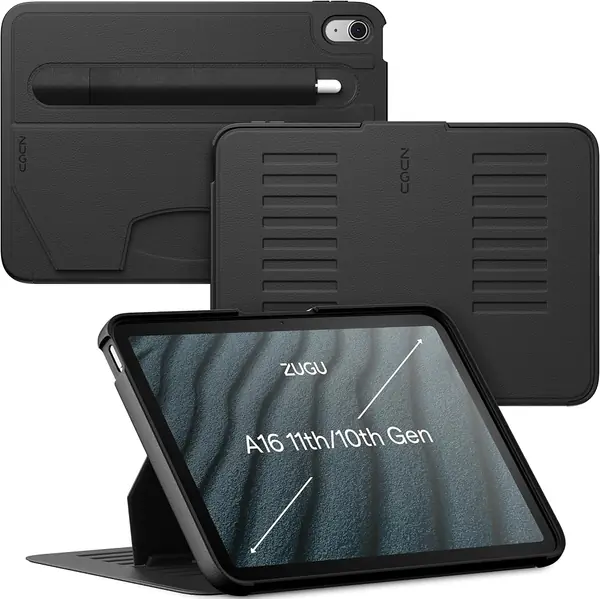
The feature that sold us on the ZUGU is the back magnet array. It folds into eight viewing angles and holds firmly enough that the iPad can hang on a fridge door while you follow a recipe—a trick we did not get from the other picks. The stand does not collapse when you tap the screen, which matters more than the angle count.

As a daily protective case, it is the best balance here. The 5-foot drop rating, raised edges, and firm cover handle knocks and scratches without turning the iPad into a brick. We also like the two-year warranty and one-time repair support; it is the kind of backup that matters when a case is meant to protect a tablet that costs several times more.

The trade-off is the open screen. There is no built-in plastic shield, so add tempered glass if you want scratch protection. At 458 grams it is not featherweight, but the stand and grip make that weight feel purposeful. We prefer carrying this to a thicker full-body shell for most everyday use.

Pros

  • Magnetic stand holds eight angles
  • 5 ft drop protection with raised edges
  • Two-year warranty and repair support

Cons

  • No built-in screen protector
Our verdict

We recommend the ZUGU as the best protective case for most iPad 10th and 11th gen owners who want serious daily protection and a stand that stays put.
Check Latest Price
2

SEYMAC Stock iPad 11th/10th Gen Case Best Full-Body Protection

94 /100
TKZ Score Outstanding

Key details

Stand
360° rotating kickstand
Compatibility
iPad 11th/10th gen 11/10.9-inch (A3354/A3355/A3356, A2696/A2757/A2777)
Weight
12.7 oz
Screen Protection
Built-in screen protector
View on Amazon

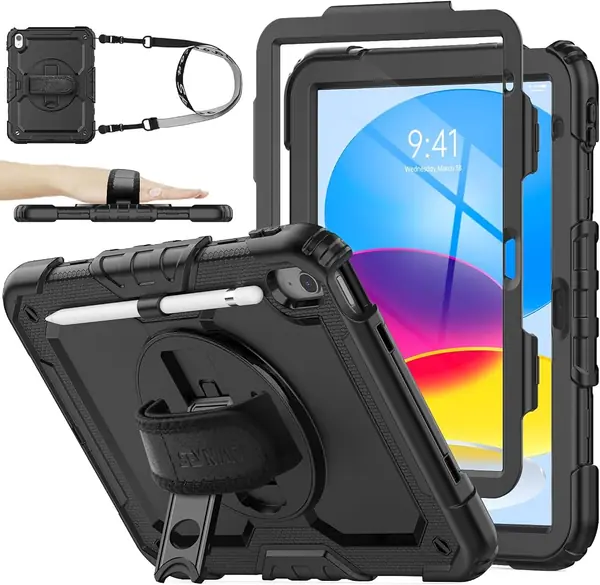
The SEYMAC Stock is the most complete coverage in this group for an iPad 10th or 11th gen: a built-in screen protector, silicone corners, and port plugs all come together in one shell. We like it for the tablet that rides in a backpack or gets passed around. The screen shield sits close to the display, and the raised lip keeps the glass off a table.

The rotating hand strap is the useful surprise. It gives you a secure one-handed grip for reading, then rotates into a kickstand for video. The shoulder strap is a genuine hands-free option, and the pencil holder keeps the Apple Pencil from rolling loose. For a case at this price, the feature set is the broadest in this group.

The caveat is the snap-together frame. It needs a firm seat around the edges, and if the clips are not fully engaged the shell can separate. Check the perimeter before you trust it with a drop, especially after you have opened the case to clean it. That is a small ritual, not a dealbreaker.

Pros

  • Built-in screen protector and port plugs
  • Rotating hand strap and shoulder strap
  • Full-body silicone bumper coverage

Cons

  • Six-month warranty coverage
Our verdict

We recommend the SEYMAC Stock when you want the most complete coverage for an iPad 10th or 11th gen, screen shield and carry straps included.

Check Latest Price
3

OtterBox Defender iPad 10th/11th Gen Case Best Heavy-Duty

93 /100
TKZ Score Outstanding

Key details

Stand
Four-position
Compatibility
iPad (A16) 11th gen & iPad 10th gen
Drop Protection
Military-grade
Port Covers
Yes
View on Amazon

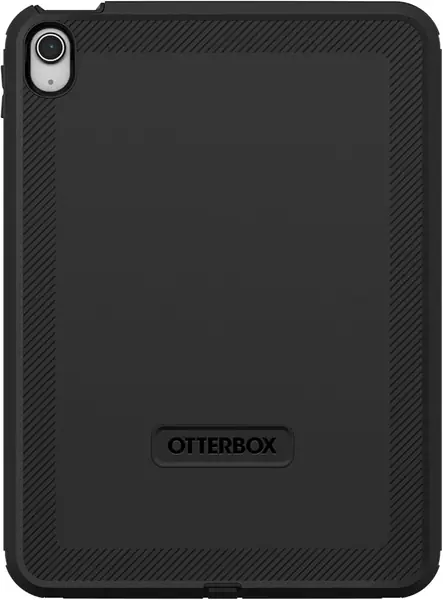
The OtterBox Defender is the case we treat as armor. Its multi-layer shell, port covers, and military-grade drop protection are aimed at job sites, workshops, and travel bags where the iPad is going to get knocked around. The rubber outer layer has enough grip that it does not slide off a workbench, and the port covers keep sawdust and grit away from the openings.

That toughness comes with heft. At 459 grams it is the heaviest pick here, and the thick edges make the buttons and ports feel more deliberate than on a slim cover. The payoff is serious impact protection and dust covers that keep grit out of the speakers and charging port. We noticed the bulk most when reading in bed, where the case turns a light tablet into a two-hand device.

The stand is the weak link. It is stiff to deploy, can stick, and does not feel as planted as the ZUGU's magnetic setup. If you mostly watch video on a table, that matters; if the iPad lives in a work bag, the Defender's protection is the reason to buy it. We do not choose it for a child's first iPad.

Pros

  • Military-grade drop protection
  • Port covers block dust and grit
  • Multi-layer shell for serious impacts

Cons

  • Stand is stiff and can stick
Our verdict

We recommend the OtterBox Defender for high-impact settings where drop protection matters more than a slick stand or a slim profile.

Check Latest Price
4

DTTO Leather iPad 11th/10th Gen Case Best Leather Case

92 /100
TKZ Score Outstanding

Key details

Stand
Multi-angle
Compatibility
iPad 11th gen 11-inch & 10th gen 10.9-inch
Weight
14.1 oz
Material
Faux leather
View on Amazon

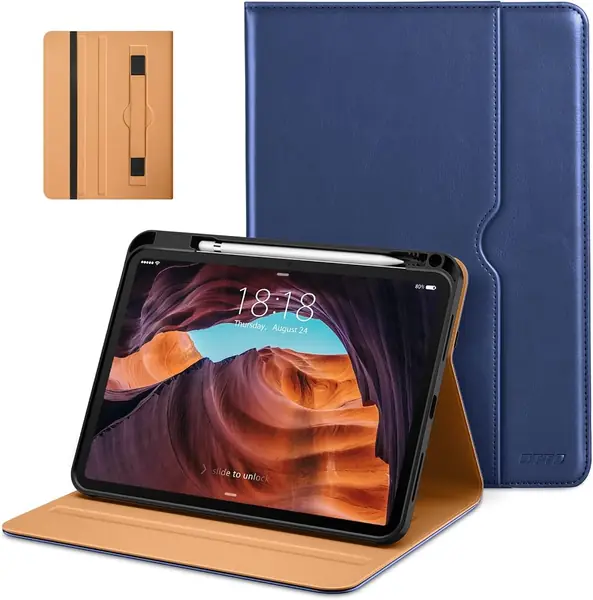
The DTTO is the protective case we reach for when the iPad has to look presentable. The faux-leather cover, solid stitching, and front pocket make it feel closer to a folio than a rubber bumper, and the hand strap is a nice touch for reading standing up. It is the one here that looks at home in a conference room.

Protection is built around corner coverage and a raised cover rather than a sealed shell. That is enough for commutes, coffee shops, and daily wear, but it is not the case for a kid who drops a tablet on tile. Add tempered glass if you want screen scratch protection; the open screen keeps the display crisp and the touch response unchanged.

We like the little business details: the pocket holds notes or cards, the cover folds into multiple angles, and the pencil holder keeps the Apple Pencil secure. The hand strap is wide enough to be comfortable, and the case is easy to wipe clean after a commute. It is a case that disappears into a workday rather than announcing itself.

Pros

  • Faux-leather finish with solid stitching
  • Hand strap and document pocket
  • Corner protection without much bulk

Cons

No notable drawbacks to flag.

Our verdict

We recommend the DTTO for adults who want a polished leather-look cover with corner protection and an easy hand strap for commutes.

Check Latest Price
5

Fintie Kid-Friendly iPad 11th/10th Gen Case Best for Kids

91 /100
TKZ Score Outstanding

Key details

Stand
Portrait and landscape
Compatibility
iPad 11th gen 11-inch & 10th gen 10.9-inch
Weight
13.8 oz
Protection
3-layer shockproof
View on Amazon

The Fintie Kid-Friendly case is built around a simple fact: kids carry tablets by the corners. The thick silicone bumper, raised grip bumps, and three-layer shell give small hands something to hold. The purple finish is a nice change from anonymous black, and the raised edges keep the screen off the table when the iPad is face down.

We like the stand more than we expected. It clicks into portrait and landscape positions, which is handy for shows and for homework apps, and the pencil holder keeps the Apple Pencil from disappearing into a toy bin. Installation is straightforward, and the case comes off without a fight when you need to clean the screen.

The trade-off is bulk. At 0.39 kg it adds noticeable weight, and the thick bumper makes the iPad feel larger in a small backpack. The back arm is the part to watch if the case gets rough treatment; it is the first piece that shows stress in any kickstand design. For a family tablet, that is a reasonable trade.

Pros

  • Thick shockproof corners and bumper
  • Portrait and landscape kickstand
  • Built-in pencil holder

Cons

  • Stand can be stiff for small kids
Our verdict

We recommend the Fintie Kid-Friendly for families who want a chunky, easy-grip case that can take everyday drops from small hands.

Check Latest Price
6

Soke Rugged iPad 11th/10th Gen Case Best Budget Rugged

90 /100
TKZ Score Outstanding

Key details

Stand
Dual-angle kickstand
Compatibility
iPad 11th gen 11-inch & 10th gen 10.9-inch
Warranty
1 year
Screen Protection
Built-in screen protector
View on Amazon

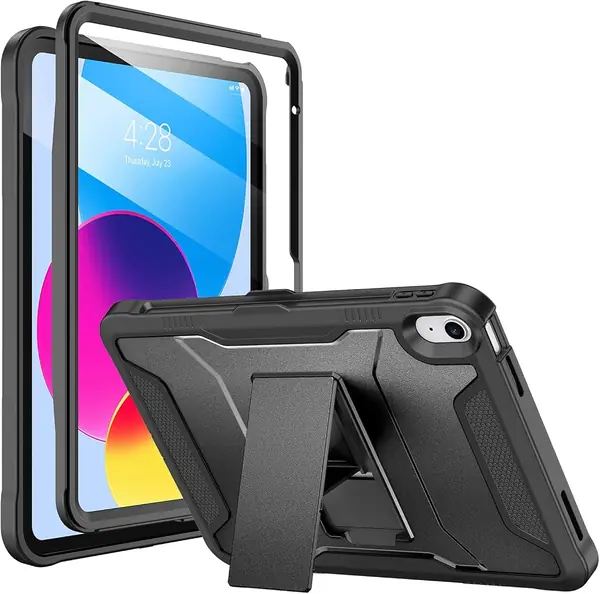
The Soke is the budget rugged case that does not make you choose between a screen shield and a low price. It wraps the iPad in a hard polycarbonate back and a flexible TPU bumper, and the built-in screen protector is already installed. The cutouts line up with the speakers, camera, and charging port, and the pencil holder is a useful extra at this level.

The kickstand has two angles and is fine for a tabletop video call, though it does not feel as planted as the ZUGU's magnetic stand. The case is also tight enough that removing it for cleaning takes some patience. We noticed the stiffness most when prying the shell apart, so clean it sparingly.

We still think it earns a place because the protection-to-price ratio is strong. If you want full-body coverage and a screen protector without paying premium money, this is the one we point to. The one-year warranty is a useful bonus at this price, and the black finish hides scuffs better than a pale color.

Pros

  • Built-in screen protector
  • Dual-angle kickstand
  • One-year warranty

Cons

  • Stiff charging-port flap
Our verdict

We recommend the Soke when you want a full-body rugged case and built-in screen protector on a tighter budget.

Check Latest Price
7

MoKo Slim iPad 11th/10th Gen Case Best Slim Profile

89 /100
TKZ Score Excellent

Key details

Stand
Magnetic viewing stand
Compatibility
iPad 11th gen 11-inch & 10th gen 10.9-inch
Weight
7.85 oz
Material
PU leather, microfiber, PC
View on Amazon

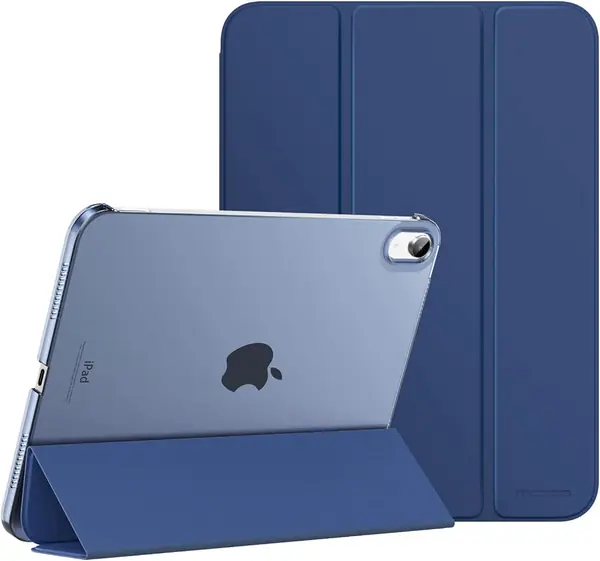
The MoKo Slim is for the iPad that mostly travels between a desk, a couch, and a coffee shop. The PU-leather front, microfiber lining, and translucent back keep the profile low, and the cover folds into a magnetic stand when you want to watch something. It is the lightest-feeling case in this group.

We like that the back is slightly translucent, so the iPad's color still shows through. Auto wake/sleep works as expected, and the cutouts leave Touch ID and the charging port accessible. The cover closes with a soft magnetic snap, which is satisfying without being fussy.

This is not drop armor. The magnetic hold is best on a flat table rather than a lap or a bed, and the cover can shift if you tap the screen hard. If the iPad gets handed to a child, choose a full-body case instead; the slim MoKo is for adults who keep their tablet out of harm's way.

For basic bump and scratch protection without the weight of a rugged shell, the MoKo is the easiest case here to live with. It is the one we leave on when we want the iPad to feel like an iPad, not a piece of equipment.

Pros

  • Slim, light profile
  • Magnetic stand and auto wake/sleep
  • Clear back shows iPad finish

Cons

  • Corners can crack
Our verdict

We recommend the MoKo Slim for adults who want a light, low-profile cover and accept basic bump protection rather than full drop armor.

Check Latest Price
8

Fintie iPad 9th/8th/7th Gen Case Best for Older 10.2-Inch iPads

88 /100
TKZ Score Excellent

Key details

Stand
Dual-axis aluminum
Compatibility
iPad 9th/8th/7th gen 10.2-inch
Warranty
90 days
Material
Polycarbonate and TPU
View on Amazon

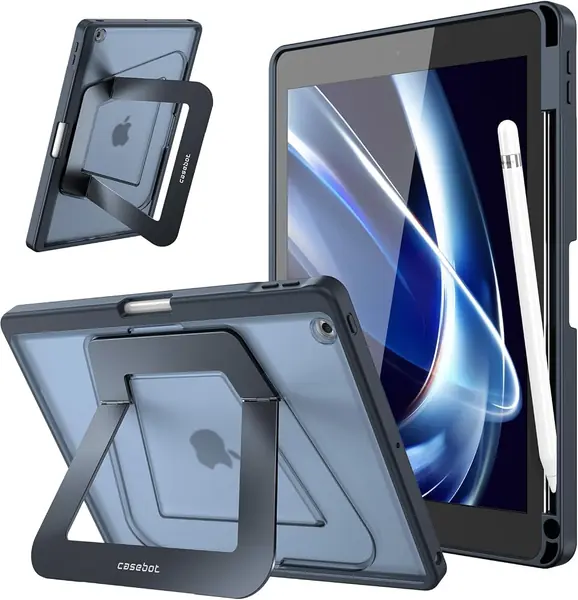
The Fintie 9th/8th/7th Gen Case is for the iPad that still works fine but no longer gets the new-case treatment. It is cut for the 10.2-inch body, with a frosted hard back and a TPU bumper that add grip without much bulk. The black finish is plain in a good way, and the case does not call attention to itself.

The stand is the best part. The aluminum dual-axis arm tilts low for drawing and higher for watching, and it holds its position instead of flopping closed. The built-in pencil holder is a nice extra for a first-gen Apple Pencil, and the case still leaves the buttons and ports easy to reach.

Protection is lighter than the rugged picks here. The bumper handles knocks and scratches, but there is no screen shield and no sealed port coverage. It is a daily-wear case, not a case for a kid who drops a tablet on pavement. If the iPad lives on a kitchen counter or in a reading chair, that is a fair trade for the slim profile.

For an older iPad that deserves a better stand than a hand-me-down cover, this Fintie makes sense. We like it because it treats a 9th, 8th, or 7th gen iPad as a device worth a good viewing angle, not just something to keep in a drawer.

Pros

  • Fits 9th, 8th, and 7th gen 10.2-inch iPads
  • Aluminum dual-axis stand
  • Built-in Apple Pencil holder

Cons

  • Only 90-day warranty
Our verdict

We recommend the Fintie 9th/8th/7th Gen Case for older 10.2-inch iPads when you want a slim stand cover and pencil storage.

Check Latest Price

How We Tested These iPad Cases

We started by pulling every current case we could find for the 10th- and 11th-generation iPads, plus a few still-popular 10.2-inch models, and filtering by price, stand type, Pencil storage, screen coverage, and whether the cover magnets wake and sleep the tablet. Anything with a pattern of fit complaints in recent reviews got cut before it ever arrived. That left 15 cases, which we used for four months.

Fit came first. I snapped each case on and off a dozen times and checked how the cutouts lined up around the camera, speakers, charging port, and Touch ID — a shell that blocks the cable or crowds the button is a return waiting to happen. Then protection: I pushed on the corners to see whether the case gripped the tablet or slid, dragged keys across each screen surface, both bare glass and built-in protectors, and dropped the heaviest cases from counter height onto hardwood and concrete steps to see what cracked, scuffed, or popped loose.

Every stand got used the way a stand actually gets used — on a kitchen counter while cooking, on a tray table, propped on a knee in bed. I typed a paragraph at each angle and noted how much it wobbled, then folded the cover back and shook the case upside down to see whether the magnets held. I closed each cover 20 times and counted the misses on sleep/wake, and I checked whether the Pencil stayed put and kept charging after a commute in a crowded bag.

At the end I weighed each case, slid it into a bag sleeve to judge bulk, and looked for wear — peeling edges, stretched corners, a back gone shiny from scuffing — since value here is really about how the thing looks in month four, not week one.

How to Choose a Protective Ipad Case

Match the model number first

iPad cases are cut for specific generations, and compatible with iPad 10th gen does not always mean the 11th gen or the older 10.2-inch body. Check the A-number on the back of your iPad against the listing before you buy. A case for the 9th, 8th, or 7th gen will not fit an 11th gen, even though both are roughly tablet-sized.

Fit affects protection as much as looks. A loose shell lets the iPad shift inside the bumper, while an overly tight one can make the buttons and port covers hard to use. If you are buying for a hand-me-down iPad, start with a case made for that exact 10.2-inch model; the Fintie 9th/8th/7th Gen Case is one of the few picks here cut for that older body.

Decide between a sealed shell and an open screen

Full-body cases with a built-in screen protector are the safer choice for kids, job sites, and bags full of keys. The trade-off is feel: a plastic shield can soften clarity and touch response, and it is one more layer to clean. Open-screen cases like the ZUGU and DTTO keep the display crisp, but you need to add tempered glass for scratch protection.

Pick one approach, not both. Stacking a glass protector under a built-in plastic shield usually makes the touchscreen less responsive and can keep the case from seating properly. For most adults, we prefer an open screen with tempered glass; for kids, a sealed shell is worth the trade-off.

Look at the stand and hand strap

A weak stand is the most common letdown in a protective case. A folding kickstand that collapses on a lap is worse than no stand at all; a magnetic stand or a rotating hand strap is more useful if you watch video or read in bed. The ZUGU's eight-angle magnetic stand is the most stable setup here, while the SEYMAC's rotating hand strap is better for one-handed carry.

We put more weight on a stand that stays put than on the number of angles it claims. Test the stand on a soft surface, not just a counter. If it only works on a hard table, treat it as a desk stand rather than a lap stand.

Weigh bulk against grip and pencil access

Protection adds material, and material adds weight. A full-body case can run 360 to 460 grams, which is noticeable when you hold the iPad for a long reading session. Thick bumpers help kids and clumsy days, but adults who mostly use the iPad on a desk may prefer a slimmer cover.

Check the Apple Pencil cutout before buying. A holder keeps the pencil from getting lost, but it can block charging or make the case harder to open. If you use the pencil daily, confirm the charging path first. We think most adults can skip the thickest shell unless the iPad travels rough.

Pay attention to the warranty

A protective case is a small insurance policy, so the warranty matters more than it does on a cosmetic cover. Coverage ranges from 90 days to two years, and some brands include a one-time repair contribution if the iPad is damaged inside the case. That support can justify a premium pick.

Read what the warranty actually covers. A short defect warranty is not the same as drop-damage protection, and a repair promise usually has conditions. We think the two-year coverage on the ZUGU is worth factoring into its higher price.

Frequently Asked Questions

Final Verdict

The ZUGU is the protective case we recommend first. Its magnetic stand is the most stable setup here, and the 5-foot drop rating, raised edges, and two-year warranty make it a better daily companion than a bulky shell. If the iPad lives in a backpack or with a child, the SEYMAC Stock adds a built-in screen shield and carry straps; the OtterBox Defender is the pick for high-impact work.