Best iPad Pro Cases of 2026

A case for an iPad Pro has two jobs that pull against each other: keep a very expensive sheet of glass off the floor, then get out of the way so you still want to hold the thing. The armored ones turn a one-pound tablet into a brick; the slim folios look great until the first drop. The good ones do both without blocking the Pencil's charging or turning the volume buttons into mush.

Over the past five months my team has lived with 14 iPad Pro cases across both screen sizes, and the pattern had almost nothing to do with price. Nearly everything survived a waist-high drop. What separated them was fit and finish: magnets strong enough to keep the cover shut inside a tote, cutouts that line up with the microphones rather than near them, buttons you can find without looking.

Fit is the thing shoppers underrate — a case cut for one generation can leave a speaker grille half-covered on another. The picks below cover both sizes, sorted by how you actually use yours.

The Best iPad Pro Cases

1

ZUGU iPad Pro 11-inch Case Best Overall
93 /100
TKZ Score Outstanding

Key details

Fits
iPad Pro 11-inch (M4/M5)
Stand
8-angle magnetic
Weight
1.12 lb
Pencil Support
Holder with charging
View on Amazon

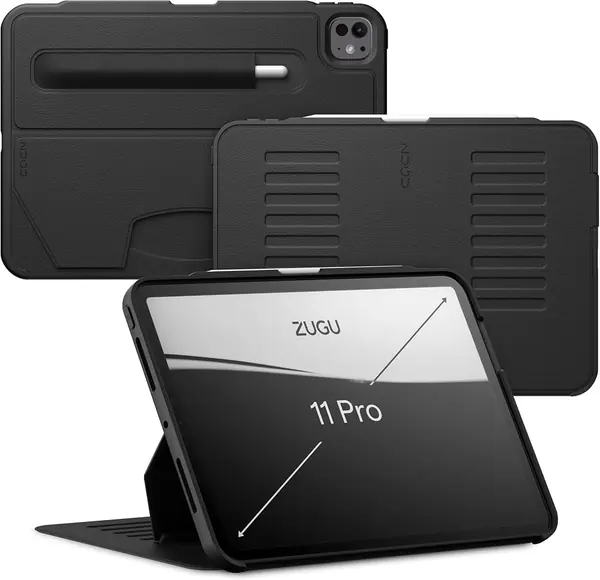
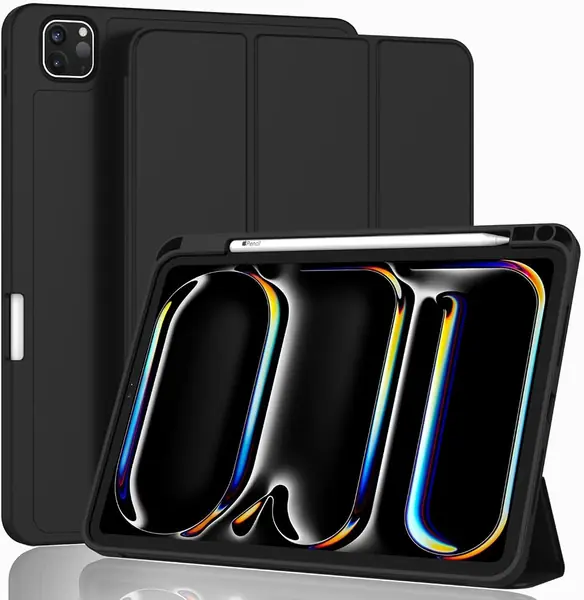
The ZUGU's eight-angle magnetic stand is the reason it earns our top pick: the cover folds into a stable easel, and the magnets click into their slots instead of relying on a floppy hinge. The case is rated for 5-foot drops, yet it stays slim enough to slide into a backpack. We especially like that the Apple Pencil sits in a dedicated holder and still charges, so protection does not cost you a topped-up Pencil. For an everyday 11-inch Pro case, that combination is the one to beat.

The fit is specific to the 11-inch M4 and M5 Pro models, so check the A-number before ordering; it will not cover an older 11-inch Pro or an iPad Air. Auto sleep/wake works through the cover, and the faux-leather exterior looks more finished than a plain TPU shell. The stand is the part we keep coming back to: it holds a typing angle and a viewing angle without the tablet sliding down, which is not something we can say for every folio here.

The trade-off is weight. At 510 grams, the ZUGU adds noticeable heft to a tablet that is supposed to be easy to carry, and we minded it most when reading in bed. The case still feels balanced in the hand, and the stand's stability is worth some of that bulk. If you want a lighter, cheaper folio, the Akkerds is the budget route; if you need a tank, the SEYMAC is the other direction. The weight is the price of the stable stand.

Pros

  • Stable eight-angle magnetic stand
  • Pencil holder with charging
  • Slim shell rated for 5-foot drops

Cons

  • Premium price compared with budget folios
Our verdict

A premium pick for 11-inch M4/M5 Pro owners who want a slim case with a genuinely stable magnetic stand and Pencil charging.
Check Latest Price
2

SEYMAC iPad Pro 13-inch Case Best Rugged 13-Inch

92 /100
TKZ Score Outstanding

Key details

Fits
iPad Pro 13-inch (M4/M5)
Stand
360° rotating kickstand
Weight
1.3 lb
Protection
Built-in screen protector
View on Amazon

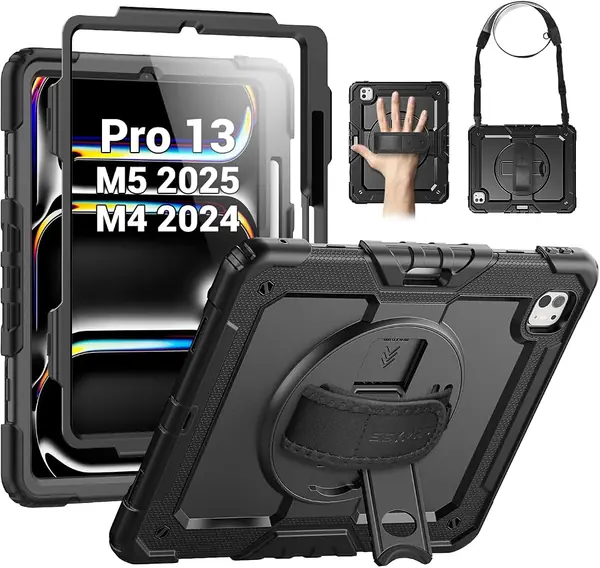
A 13-inch iPad Pro is a lot of glass to trust to a thin folio, and the SEYMAC treats it accordingly. The case wraps the tablet in a hybrid polycarbonate-and-silicone shell, adds a built-in screen protector, and gives you a 360-degree rotating kickstand plus a hand strap and a detachable shoulder strap. This is the case for a tablet that rides in a tool bag, a truck, or a kid's backpack.

The rotating stand is the feature that earns its place: it lets you swing the iPad between portrait and landscape without re-propping the whole case, and the hand strap makes it secure to carry one-handed. The shoulder strap is genuinely useful when your hands are full, and it detaches when you want a simpler setup. We did find the built-in screen protector fussy to seat without air bubbles, so take your time with that step before you press it down.

The SEYMAC covers the 13-inch M4 and M5 models, and the cutouts line up with the ports and buttons. The shell stays put around the edges, and the hand strap remains useful for one-handed reading. The shoulder strap is the first thing to remove when you want to shed bulk. It is not a slim, nearly invisible cover; it is a case built for the tablet to survive the day.

Pros

  • Heavy-duty shell with built-in screen protector
  • 360-degree rotating stand and hand strap
  • Detachable shoulder strap for hands-free carry

Cons

  • Bulky 1.3-pound build
Our verdict

The heavy-duty choice for a 13-inch Pro that travels to job sites, schools, or messy houses, with a rotating stand and straps to keep it close.

Check Latest Price
3

ZryXal iPad Pro 13-inch Case Best Budget 13-Inch

91 /100
TKZ Score Outstanding

Key details

Fits
iPad Pro 13-inch (M4/M5)
Stand
Dual viewing angles
Weight
10.3 oz
Pencil Support
Holder with magnetic clasp
View on Amazon

The ZryXal is the low-cost way into a 13-inch folio. It uses a PU leather front, a microfiber lining, and a soft TPU back, with a recessed side groove for the Pencil and a magnetic clasp. The trifold cover gives you two standing positions, and the case supports auto sleep/wake. If you want a simple cover for a tablet that mostly stays on a desk, the basics are here.

We think it's a sensible budget pick, but only if you can live without reliable Pencil charging through the case. The holder is there, yet the Pencil does not consistently charge in the slot, so you may need to charge it on the open side or remove the case. That is the kind of compromise that makes sense for a student who mostly types and watches video, not for someone who sketches all day.

The dual angles are fine for typing and watching, and the soft TPU back is easy to wipe clean. Auto sleep/wake works as expected. The case is light enough to leave on for commutes. It is a simple folio that does simple things well, and it makes no claim to be a rugged shell.

Pros

  • Low-cost folio for the 13-inch Pro
  • Soft TPU back and microfiber lining
  • Dual viewing angles with auto sleep/wake

Cons

  • Cover magnets can slip in stand mode
  • Fit can be slightly loose or misaligned
Our verdict

A budget 13-inch folio for casual desk and couch use, provided you do not count on the case for reliable Pencil charging.

Check Latest Price
4

Fintie iPad Pro 11-inch Case Best for Older 11-Inch Pros

90 /100
TKZ Score Outstanding

Key details

Fits
iPad Pro 11-inch (2018–2022)
Stand
Tri-fold viewing and typing
Weight
9.88 oz
Pencil Support
Holder with wireless charging support
View on Amazon

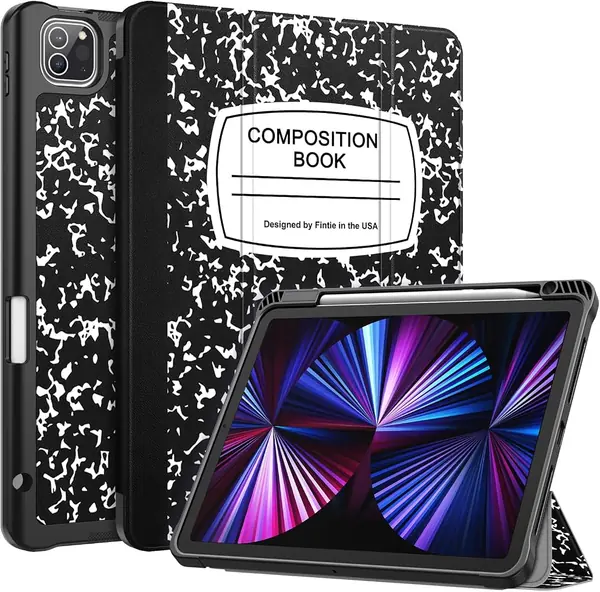
The Fintie looks like a composition notebook, which is either the reason to buy it or the reason to skip it. We like it because the disguise is practical: the cover protects the screen, the raised edges keep the camera and corners out of trouble, and the built-in Pencil holder keeps the stylus from rolling away in a bag. For an older 11-inch Pro, it is a charming, low-cost folio that does not look like every other black rectangle.

It fits the 2018 through 2022 11-inch Pro generations, so check your model against the A-numbers before ordering. The tri-fold cover gives you viewing and typing positions, and the magnetic strip handles auto sleep/wake. The fit can sit slightly loose on some units, so seat the tablet evenly and check the corners. The Pencil holder is the more secure way to carry the stylus; the magnetic side alone is not as dependable. On a desk, the stand is steady enough for video and typing.

Pros

  • Notebook-style cover stands out
  • Built-in Pencil holder
  • Raised edges protect screen and camera

Cons

  • Only fits 2018–2022 11-inch Pro
  • Cover can wear at the folds over time
Our verdict

A charming, low-cost folio for 2018–2022 11-inch Pros, with a built-in Pencil holder and enough protection for everyday bag life.

Check Latest Price
5

VIKESI iPad Pro 12.9-inch Case Best for Older 12.9-Inch Pros

89 /100
TKZ Score Excellent

Key details

Fits
iPad Pro 12.9-inch (3rd–6th gen)
Stand
Three-bracket magnetic
Pencil Support
Holder
Warranty
2-year
View on Amazon

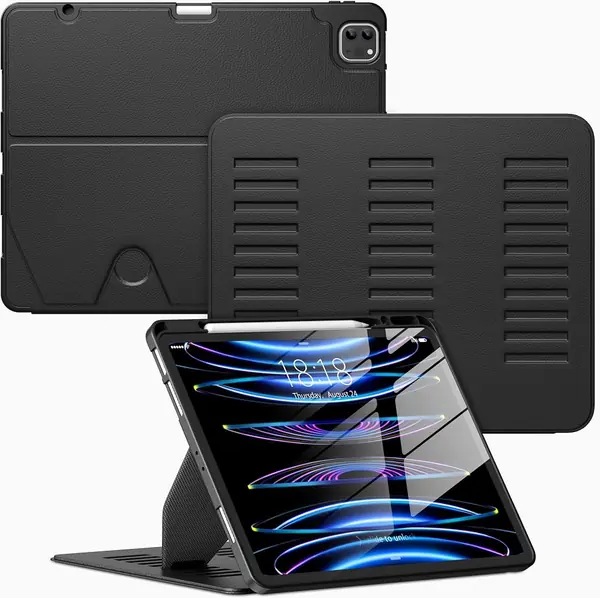
Most folio stands rely on one or two magnets; the VIKESI uses a three-bracket magnetic stand aimed at making a 12.9-inch iPad less likely to tip. That is the right problem to solve, because the big Pro is heavy enough to make a flimsy stand feel like a bad joke. The case also has a pencil holder, auto sleep/wake, and a soft-backed hybrid shell.

It covers the 12.9-inch Pro from the 3rd through 6th generations, so it is for the 2018–2022 models, not the newer 13-inch M4/M5. The stand is the part we appreciate most: the magnets hold the cover in several positions, and the three-bracket structure gives you more confidence when you tap the screen. The button cutouts line up, and the shell stays put around the edges.

We think it's the stand-first pick for an older 12.9-inch Pro: the magnetic hold is strong, the viewing angles are easy to change, and the case feels sturdier than its price suggests. It is not a rugged case, and it will not survive the same abuse as the OtterBox, but it keeps the tablet upright and the Pencil in place. The stand is the reason to choose it; the rest is competent.

Pros

  • Three-bracket magnetic stand holds steady
  • Fits 2018–2022 12.9-inch Pro
  • Pencil holder and auto sleep/wake

Cons

  • Only fits older 12.9-inch models
  • Can be stiff to open at first
Our verdict

The stand-first pick for 2018–2022 12.9-inch Pros, with a three-bracket magnetic stand that holds the big tablet steady.

Check Latest Price
6

Akkerds iPad Pro 11-inch Case Best Budget 11-Inch

88 /100
TKZ Score Excellent

Key details

Fits
iPad Pro 11-inch (M4/M5)
Stand
Two angles
Pencil Support
Built-in holder
Back
Soft TPU
View on Amazon

The Akkerds is a soft-back folio with a pink PU cover, and the first thing we noticed is how much less plastic it feels like than the typical budget case. The TPU back has some give, the cover folds into a triangular stand, and the built-in Pencil slot keeps the stylus with the tablet. It is a simple design, but the soft-touch materials make it pleasant to pick up.

It fits the 11-inch M4 and M5 Pro models, not the older 11-inch generations. The case supports auto sleep/wake and gives you two viewing angles, one for typing and one for watching. The fit is the part to check: the shell can sit slightly loose around the edges, and the cover's magnetic closure is not as firm as the ZUGU's. Seat the tablet carefully and make sure the cover aligns before you trust it in a bag.

We think it's a good budget folio for a tablet that stays around the house or goes to class in a sleeve. The soft back is comfortable to hold, and the two angles cover the basics. It is not the case for someone who needs a rock-solid stand; the ZUGU is the upgrade. The soft back is the detail we keep coming back to; it makes a budget case feel less disposable.

Pros

  • Soft TPU back is comfortable to hold
  • Two viewing angles and auto sleep/wake
  • Built-in Pencil holder

Cons

  • Only fits 11-inch M4/M5 Pro
Our verdict

A light, low-cost folio for 11-inch M4/M5 Pros, best for around-the-house use and simple typing or viewing.

Check Latest Price
7

OtterBox Defender iPad Pro 12.9-inch Case Maximum Drop Protection for Older 12.9-Inch Pros, with a Fussy Stand.

87 /100
TKZ Score Excellent

Key details

Fits
iPad Pro 12.9-inch (3rd–6th gen)
Stand
Folding cover stand
Weight
1.63 lb
Protection
Multi-layer drop protection
View on Amazon

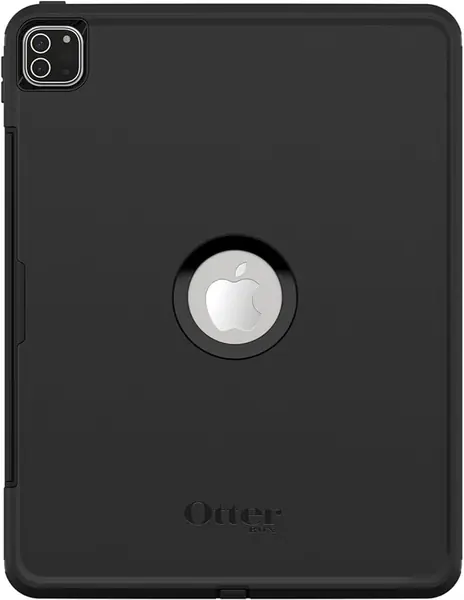
The OtterBox Defender is the tank of this group, and that is both the appeal and the problem. The multi-layer shell and folding cover are built to take impacts, and the port covers keep dust out of the speakers and charging port. If you have an older 12.9-inch Pro and you want the most protection you can bolt to it, this is the case that makes sense.

It fits the 3rd through 6th generation 12.9-inch Pro, not the newer 13-inch M4/M5. The folding cover works as a stand, and the case has a built-in screen protector and a Pencil holder. The protection is the reason to buy it: the shell feels substantial, and the covers keep the screen and ports out of the way when the tablet is in a bag.

The Pencil holder is the fussy part: it is difficult to keep the stylus on the stand when you switch between writing and watching. The hard shell can also crack at the corners after a drop, and the fit is not always consistent. The protection is still the reason to choose it over a slim folio, but the case asks you to accept some inconvenience.

We think it's a specialist case: choose it for maximum drop protection on an older 12.9-inch Pro, not for an elegant desk setup. The VIKESI is the better all-around folio for the same tablet, and it is less expensive. But if the tablet lives in a workshop, a truck, or a busy house, the OtterBox's bulk is the point. The bulk is the point, and the Pencil holder is the compromise.

Pros

  • Maximum drop protection for older 12.9-inch Pro
  • Port covers keep dust out
  • Built-in screen protector

Cons

  • Only fits older 12.9-inch Pro
  • Heavy 0.74 kg build
Our verdict

A maximum-protection choice for older 12.9-inch Pros, with the caveat that the Pencil holder and hard shell demand some patience.

Check Latest Price

How We Tested the Best iPad Pro Cases

We started with a list of every case we could find for both iPad Pro screen sizes — the current M4 and M5 models plus the older generations plenty of people are still carrying — and cut anything that didn't claim Apple Pencil support and auto sleep/wake. That left 14, all bought at retail so we were handling what you'd actually unbox. Testing ran five months.

The cases went where tablets go: kitchen counters, tote bags, coffee shops, airplane tray tables, and a lot of couch. We folded each stand into every position it offered, typed a few paragraphs with it on a lap, and propped it up to watch video, noting whether the whole thing crept backward or tipped. Once a day we stuck the cover to a refrigerator door and nudged it to see how far the magnets slid, then upended a bag to check whether the front flap stayed shut.

For charging, we ran the Pencil dead, left it attached overnight, and read the battery percentage in the morning. Buttons got pressed through the material and with a fingernail to confirm that volume, power, and Touch ID still registered, and we plugged a USB-C cable in without removing the case. Alignment we checked against the camera, microphones, and speaker grilles, since a cutout can be a millimeter off and still look right from across the room. Every case took a waist-high drop onto carpet, then onto concrete, and we noted where the scuffs landed and whether the corners stayed tight.

At the end we weighed what each one cost against what it actually did, because price turned out to be a poor predictor of protection — a couple of the cheapest cases held up better than ones costing three times as much.

How to Choose an Ipad Pro Case

Match the Exact Model, Not Just the Size

Apple has used the same 11-inch and 12.9-inch screen sizes across several generations, but the camera, speaker, and button cutouts move. A case for the 11-inch M4/M5 Pro is not the same as one for the 2018–2022 11-inch Pro, and a 12.9-inch case will not fit the 13-inch M4/M5. Before you order, find the A-number on the back of the tablet and match it to the listing's compatibility list. We check the A-number first, even when the title says iPad Pro. If the seller lists only a screen size, that is not enough.

Decide Between a Slim Folio and a Rugged Shell

Most cases fall into two camps. A slim folio adds little bulk, covers the screen, and usually folds into a stand; a rugged shell adds a multi-layer bumper, port covers, and sometimes a built-in screen protector. The rugged route is the right call for a tablet that travels in a backpack, gets used by kids, or goes to job sites. The slim route is easier to carry and nicer on a desk. We think most 11-inch Pro owners are happiest with a slim folio, while a 13-inch Pro that leaves the house regularly benefits from more protection.

Test the Stand on the Surface You Actually Use

Angles on a spec sheet tell you how many positions a stand has, not how stable it feels. Magnetic folio stands are easy to adjust, but they can slip on a soft surface or when you tap the screen hard. A mechanical kickstand or a multi-bracket stand is more planted, though it adds bulk. If you mostly type at a desk, a two-angle trifold is enough. If you draw or watch video in bed, look for a stand with a firm magnetic hold or a wider base. The ZUGU's magnetic stand and the VIKESI's three-bracket design are the two approaches we like most here.

Treat Pencil Storage and Charging as Separate Jobs

A Pencil holder keeps the stylus from getting lost; it does not guarantee that the Pencil charges through the case. Some folios leave the charging side open, some use a recessed groove, and some cover the Pencil completely. If you use the Pencil every day, check that the case supports magnetic charging before you buy, and test it with the case on. A holder that requires you to remove the case for a charge is a daily annoyance. The ZUGU and SEYMAC both make Pencil storage part of the design; the budget ZryXal is the one to check most carefully.

Weigh Bulk, Weight, and Carry Options

A case that adds a pound is a different tablet. The ZUGU 11-inch case is listed at 510 grams, and the SEYMAC 13-inch at 1.3 pounds; both are stable, but you feel them when you hold the tablet for a long reading session. Hand straps and shoulder straps make a heavy case easier to carry, especially for field work or kids, but they also make it harder to slide into a sleeve. If portability comes first, choose a slim folio and skip the straps. If the tablet travels with you all day, the straps can be worth the bulk.

Frequently Asked Questions

Final Verdict

The ZUGU 11-inch case is our default for the 11-inch M4/M5 Pro because it gets the everyday details right: a magnetic stand that holds its angle, a Pencil holder that charges, and a slim shell rated for 5-foot drops. It costs more than a budget folio, and at 510 grams you feel it, but it is the case we reach for first.

If you have a 13-inch Pro or need more protection, choose the SEYMAC. For an older 11-inch Pro, the Fintie is the better fit, and the VIKESI is the stand-first choice for an older 12.9-inch Pro.