Best Wireless Microphones for Cameras of 2026

Camera microphones record the room; a wireless lav records the person. That's the whole trade: clip a transmitter to a collar, park the receiver on the hot shoe, and the voice arrives clean instead of hollow. The trouble is that these kits look identical on a spec sheet and behave nothing alike in the field.

I've shot enough interviews in loud kitchens and on windy porches to be picky. Over the past six months, my team and I have tested 12 kits, from ultralight clip-ons to two-transmitter sets with charging cases, and the differences that show up in the edit are rarely the ones printed in bold. Range gets the attention; what ruins a take is a dropout at eight feet, noise cancellation that makes a voice sound underwater, or a battery that quits between setups.

What separates the good ones is boring: a case that charges everything overnight, a backup recording for when the link stumbles, a clip that holds without dragging a collar out of shape, and pairing that's finished before your subject sits down. The picks below are the kits I'd hand to a friend before a shoot.

The Best Wireless Microphones for Cameras

1

DJI Mic Mini Best Overall
95 /100
TKZ Score Outstanding

Key details

Max Range
400 m
Battery With Case
Up to 48 hrs
Transmitter Weight
0.35 oz
Transmitters
2
View on Amazon

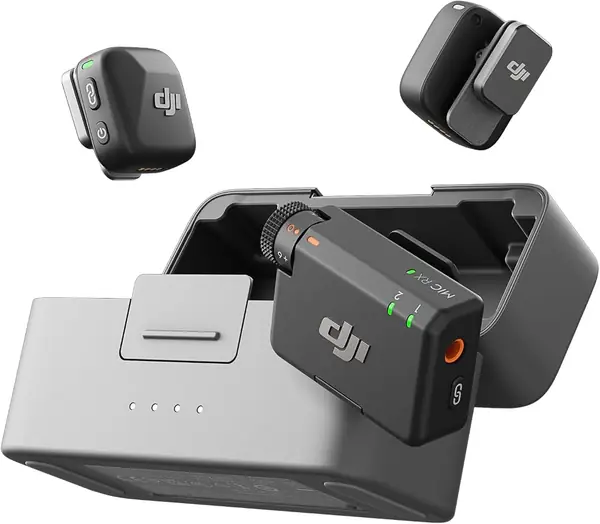
The Mic Mini is the kit we hand to someone who has never bought a wireless microphone, and it takes the top spot by leaving nothing essential out of the box. Two transmitters, a receiver, a 3.5mm TRS camera cable, a USB-C phone adapter, windscreens, and a charging case rated for up to 48 hours of combined use all arrive together. Plug the receiver into a camera's mic jack, switch on, and you are recording before the subject has finished introducing themselves.

Ten grams per transmitter is the number that matters in daily use. We have clipped these to collars and T-shirt necks and then forgotten about them, which is not true of the larger mics here. The two noise-cancelling levels are set on the transmitter itself — Basic indoors, Strong when there's traffic or a crowd — and automatic limiting quietly saves the take when someone laughs or sets a cup down too hard.

Where the Mic Mini needs planning is the phone side. The 3.5mm cable into a camera is the connection that behaves; iPhone recording leans on the adapter and on the app you shoot with. Test that path the same day the box arrives, not the morning of a shoot.

Four hundred meters of rated range is far more than a two-person interview needs, and it held up better than we expected when we walked between rooms with the receiver on a table. The other perk is DJI-specific: a transmitter pairs straight to the Osmo cameras and gimbals without the receiver, which trims the rig for handheld work.

Pros

  • Complete camera kit with cable and adapters
  • 10 g transmitters disappear on a collar
  • Up to 48 hours from the charging case
  • Two noise-cancelling levels plus auto limiting

Cons

  • iPhone recording depends on the adapter and app
Our verdict

For most people shooting video on a camera, we recommend the Mic Mini: two tiny transmitters, a case that keeps them charged for days, and the shortest path from box to recorded audio.
Check Latest Price
2

Hollyland Lark M2 Best for Mixed Device Kits

94 /100
TKZ Score Outstanding

Key details

Max Range
300 m
Battery With Case
Up to 40 hrs
Transmitter Weight
0.32 oz
Receivers Included
Camera, USB-C, Lightning
View on Amazon

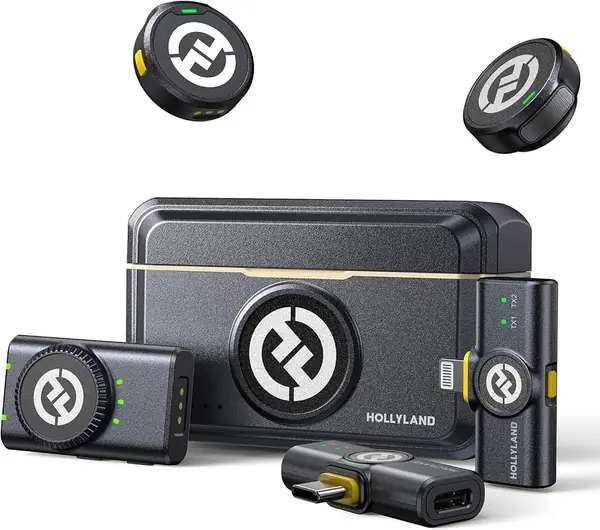
Three receivers come in the Lark M2 case — one for a camera, one USB-C, one Lightning — and that is the whole reason this kit is on the list. Most systems here give you a camera receiver and leave the phone adapter as a separate purchase. This one lets a shoot move from a mirrorless body to an iPhone to an Android tablet without a trip to the accessories drawer.

We noticed the mount before we noticed the sound. The transmitter weighs 9 grams and sticks to fabric with a magnet or hangs from a silicone necklace, so there is no lapel clip digging into a collar and nothing to adjust when you hand the second mic to a guest. That is the detail we appreciate most here, and the magnet is strong enough to be a mild nuisance — it will find a belt buckle or a metal table edge, so keep the transmitter clear of both.

The audio is 48 kHz/24-bit with a 70 dB signal-to-noise ratio, and noise cancelling switches on and off with one button on the transmitter rather than through a menu. We like that placement: nobody wants to pass a receiver to an interviewee and ask them to hold still while a setting changes. Range is rated at 300 meters, and the case adds up to 40 hours.

For a camera-first shooter, the included camera receiver and the 3.5mm TRS cable are the parts that earn their place; the two phone receivers are what keep the kit useful on days the camera stays home. You pay a little more than the Mic Mini gets you and give up some rated range — the extra receivers are what the money buys.

Pros

  • Three receivers cover camera, USB-C, and Lightning
  • 9 g transmitter mounts with magnet or necklace
  • Noise cancelling toggles on the transmitter
  • Up to 40 hours with the charging case

Cons

  • Pricier than the Mic Mini with less rated range
Our verdict

If your footage comes off a camera one day and a phone the next, we point you to the Lark M2: three receivers in one case and a 9 g transmitter that mounts anywhere.

Check Latest Price
3

DJI Mic 2 Best for Backup Recording

93 /100
TKZ Score Outstanding

Key details

Max Range
250 m
Transmitters
2
Onboard Recording
32-bit float, up to 14 hrs
Receiver Controls
OLED, dial, headphone out
View on Amazon

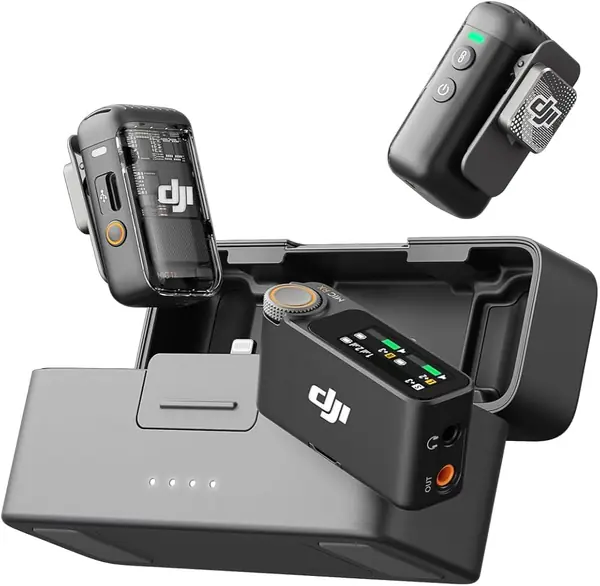
Every transmitter in the Mic 2 records its own copy of the audio, up to 14 hours of it, in 32-bit float. That is the reason to spend more than the Mic Mini. If the wireless link drops, a body blocks the signal, or a subject wanders too far, the take still exists inside the transmitter, and clipped peaks stay recoverable. We treat it as insurance, and it is the kind you cannot bolt on later.

The receiver carries the other half of that argument. It has an OLED screen, a control dial, and a headphone jack, so we set gain and watched levels on the unit mounted at the camera instead of digging a phone out of a pocket mid-setup. Transmitters arrive pre-linked, range is rated at 250 meters, and the case tops everything up between setups.

What we check on this one is hardware rather than sound. A second transmitter that never powers up is the failure that hurts most, so record a minute on each transmitter before a shoot you cannot repeat. The Mic 2 is the kit we leave in the bag for the day that has to go right.

Pros

  • 32-bit float backup on every transmitter
  • Up to 14 hours of internal recording
  • Receiver with display, dial, and headphone out

Cons

  • Pricier than the Mic Mini with the same channel count
  • iPhone audio runs through DJI's app
Our verdict

We recommend the Mic 2 for shoots you cannot redo: each transmitter keeps a 32-bit float copy of the audio, and the receiver lets you set levels without a phone.

Check Latest Price
4

RØDE Wireless PRO Best for Pro Sets

92 /100
TKZ Score Outstanding

Key details

Max Range
260 m
Onboard Recording
32-bit float
Timecode
Built in
Included Lavaliers
2
View on Amazon

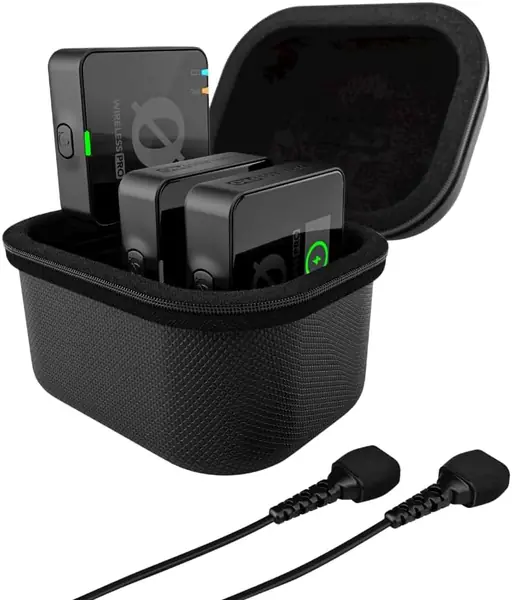
This is the kit for a two-person professional set: two transmitters, a receiver, a charging case, and two Lavalier II microphones in the box, which no other system here includes. RØDE rates the range at 260 meters and backs the hardware with a five-year warranty, and the accessory case holds the MagClips, furry windshields, and cables you would otherwise be buying separately all season.

Timecode is what changes a working day. With timecode running, footage from two cameras and the audio line up in the edit without a clapper board or a hand-sync pass, and the 32-bit float recording on each transmitter means a loud room cannot ruin a take outright. That pair of features is what separates the PRO from the cheaper kits here, and it is worth the money if you cut between angles.

Where it asks more of you is noise. Outdoors it picks up more background than we wanted, and pulling the input down to compensate leaves the voice thin, so the furry windshields and a close mic position do real work with this system. Inside a quiet room, that same sensitivity is what makes the included lavaliers sound as good as they do.

Pros

  • Timecode keeps multi-camera shoots in sync
  • 32-bit float safety recording on each transmitter
  • Two Lavalier II mics included
  • Five-year warranty

Cons

  • Picks up outdoor background noise
  • iPhone connection can drop mid-take
Our verdict

For two-camera professional work, the Wireless PRO earns its price: timecode, 32-bit float backup on each transmitter, and two lavaliers in the case.

Check Latest Price
5

NEEWER CM28 Best Budget with Onboard Recording

91 /100
TKZ Score Outstanding

Key details

Max Range
200 m
Audio Format
48 kHz/16-bit
Onboard Storage
4 GB per transmitter
Backup Recording
Up to 9 hrs of WAV
View on Amazon

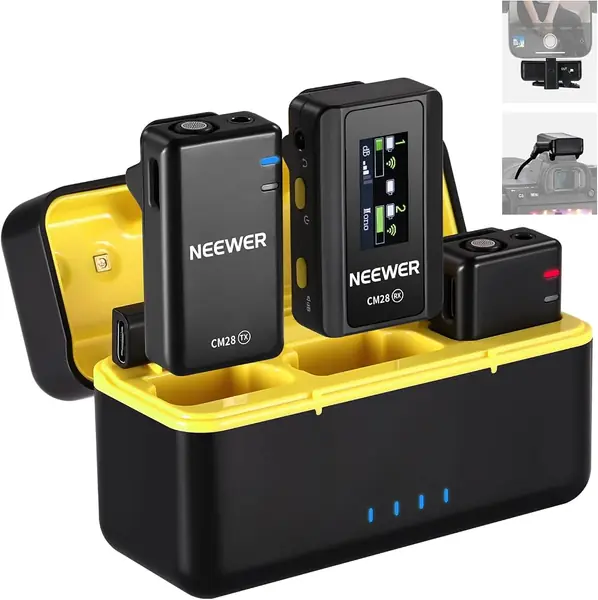
A solo shoot with nobody watching the receiver is where the CM28 makes sense. Each transmitter holds 4 GB and records up to nine hours of 48 kHz WAV on its own, so a take survives a dropped signal or a subject who walks behind a wall while you are busy framing. At this money, that is a lot of insurance to have in a pocket.

The rest of the kit is straightforward. Noise cancelling switches on with a click on the transmitter, the receiver feeds a camera over 3.5mm, and the charging case carries enough for a long day — roughly nine hours per transmitter and eight per receiver on a full charge. Range is rated at 200 meters, which covers most indoor work and a good deal of outdoor work.

What you accept at this price is build and consistency. The housing is plastic and feels it, and the audio is not always as clean as the DJI or RØDE systems; a scratchy take usually traces back to the supplied cables, so swap the 3.5mm lead before you blame the microphone. For a solo creator who wants a backup file and a second transmitter without spending much, that is a fair trade.

Pros

  • 4 GB of onboard recording per transmitter
  • Nine hours of uncompressed WAV backup
  • One-click noise cancelling on the transmitter
  • Charging case included

Cons

  • Plastic build feels entry-level
Our verdict

We recommend the CM28 to solo shooters on a tight budget: each transmitter records its own nine-hour WAV backup, which is rare at this price.

Check Latest Price
6

MAONO T5 Best for On-The-Fly Voice Fixes

90 /100
TKZ Score Outstanding

Key details

Max Range
1,000 ft
Battery With Case
Up to 40 hrs
Transmitter Weight
0.32 oz
Voice Presets
4 EQ modes
View on Amazon

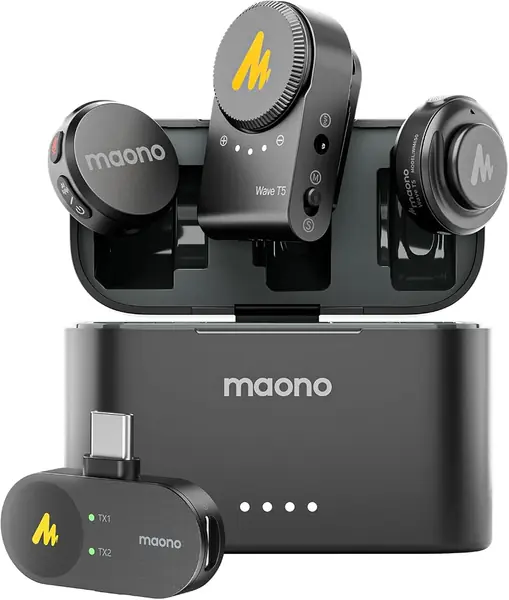
Four voice presets sit on the T5's transmitter, and one tap picks between them. That sounds like a gimmick until you are recording someone with a boomy voice in a bare room and want the fix at the mic rather than in the edit. Having the control within reach of the person wearing it is what makes it useful.

The rest of the hardware holds its own against kits in the same bracket. Transmitters weigh 9 grams and mount with a magnet or a necklace, the case carries up to 40 hours, and the box includes two receivers — one USB-C and one for a camera — so a phone shoot and a camera shoot do not need separate kits. The 48 kHz/24-bit audio and 120 dB SPL ceiling handle loud rooms better than the price suggests, and the long-press button doubles as a remote shutter for your phone.

Where the T5 earns its place is the combination: a fix at the mic for a problem you would otherwise solve in post, plus both receivers in one case, at about the same money as a two-transmitter kit with a camera receiver alone. That is most of the way to a working setup, and it is the reason this one stays on the list despite a shorter record than the DJI systems.

Two things to check in the first week: that the iPhone receiver connects to the phone you actually own, and that the charging case is charging the transmitters rather than sitting there looking charged. Both have been the weak points on this system, and both are easy to confirm before a shoot depends on them.

Pros

  • Four one-tap voice presets
  • 9 g transmitters with magnet and necklace
  • Camera and USB-C receivers both included
  • Up to 40 hours with the case

Cons

  • iPhone receiver connection can be unreliable
  • Charging case can arrive dead
Our verdict

We recommend the T5 for creators who want to shape their voice on the fly: four presets, a 9 g transmitter, and camera and USB-C receivers in the same box.

Check Latest Price
7

PQRQP S20 Best for First-Time Buyers

89 /100
TKZ Score Excellent

Key details

Max Range
820 ft
Battery With Case
Up to 48 hrs
Audio Format
48 kHz/24-bit
Connections
Lightning, USB-C, 3.5 mm
View on Amazon

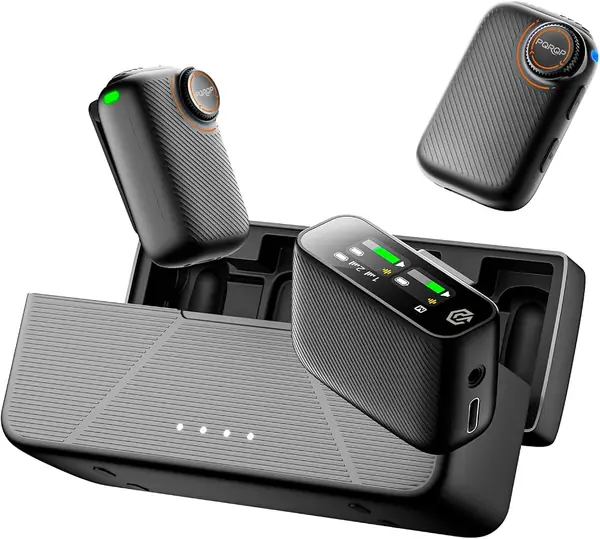
Forty-eight hours is the number the S20 leads with, and the case is what delivers it: two transmitters and a receiver ride in a battery case that recharges them over and over. Per charge you get far less than that, which is normal for this category — the case is the part that gets a kit through a trip without a wall outlet.

The connection story is broader than most entry-level kits. The receiver feeds a camera through 3.5mm, and the box includes Lightning and USB-C adapters for phones, so the same set covers a DSLR, an iPhone, and an Android handset. Audio is 48 kHz/24-bit with a safety track that pulls the level back when things get loud, and range is quoted at 820 feet.

Set expectations on the hardware. The housing is plastic, the controls are simple buttons, and there is no app to fine-tune gain curves or firmware. What you get is the standard pairing: power on, plug in, and both transmitters are already talking to the receiver. Nothing about setup will slow down a first shoot.

Where the S20 stops is the professional edge. There is no ecosystem to pair into, no app for firmware fixes, and no monitoring to speak of, so the ceiling arrives sooner than it does on a DJI or Hollyland system. It is a way to start recording clean audio, not a system to grow into.

Pros

  • 48 hours of use with the charging case
  • Camera, Lightning, and USB-C connections
  • 48 kHz/24-bit audio with a safety track

Cons

  • Plastic build with no app or fine adjustment
Our verdict

We recommend the S20 as a first kit: camera, iPhone, and Android connections in one box, with a charging case that keeps it ready between shoots.

Check Latest Price

How We Tested the Best Wireless Microphones for Cameras

We started by pulling together every kit a working shooter might actually buy: sets that connect to a camera, a phone, and a laptop, two-transmitter kits with charging cases, and compact clip-on units that promise onboard recording as a backup. We dropped anything that couldn't cover more than one of those devices, narrowed the field to 12 kits, and bought them at retail so nothing arrived pre-paired by a marketing team.

Testing ran across six months of real shoots. I clipped transmitters to t-shirts, sweater necks, and jacket lapels to see which mounts dragged a collar out of shape and which magnetic plates held through fabric. We recorded the same 90-second script on every kit, then listened back on studio headphones, a phone speaker, and a laptop to hear what the noise cancellation did to a human voice — several modes shaved off the hiss and half the consonants with it. For battery life, we ran continuous takes with a stopwatch until each transmitter died, then timed a full recharge in the case.

Reliability got its own abuse. We walked each kit down a long backyard until the signal dropped, noted the distance, and watched whether the receiver recovered on its own or needed a reboot. We unplugged receiver cables mid-take to see whether the onboard backup recording caught the audio, stuffed everything loose into a tote for a week of commuting, and re-paired each unit until pairing stopped being polite. Every kit was judged on what came back in the file — clean voice, no dropouts, honest battery — not on the numbers on the box.

How to Choose Wireless Microphones for Cameras

Match the receiver to the camera you shoot

Start at the receiver, not the microphone. A camera needs an analog feed into its mic jack, which in practice means a receiver with a 3.5mm TRS output and a cable to match. Some kits that advertise phone, camera, and tablet support ship only phone receivers in the box, and the camera cable turns out to be a separate purchase.

If you shoot a camera and a phone in the same week, a kit with separate camera, USB-C, and Lightning receivers, like the Hollyland Lark M2, is worth a small premium over swapping adapters on location. If every shoot is a camera shoot, one receiver is enough.

Read the range figure as line-of-sight

Every range claim here is measured with a clear path between transmitter and receiver: 200 meters on the NEEWER CM28, 400 on the DJI Mic Mini. Bodies, walls, and a crowd all cut into that, and the number tells you less than whether the link holds when someone turns their back and walks.

Test the walk you plan to shoot, with recording running, before the day that matters. If your subject will be more than a room away, favor a kit whose link is known to hold indoors over the biggest number on the box.

Count battery in the transmitters, then in the case

Two figures matter and they are usually quoted together: how long a transmitter runs alone and how many recharges the case adds. The transmitters here land between roughly seven and fourteen hours, and the cases push total use to 30, 40, or 48 hours.

The transmitter number is the one that decides whether a shoot day works, because a case in a bag cannot power a mic on a collar. Check whether the kit records while charging, too — the MAONO T5 lists it, and it saves a lunch-break scramble.

Decide whether you need onboard recording

Onboard recording is the difference between a lost take and an inconvenience. Cheaper systems write 16-bit WAV to built-in storage; the DJI Mic 2 and RØDE Wireless PRO record in 32-bit float, which preserves clipped peaks well enough to rescue them.

For one-take interviews, weddings, or anything with a client watching, the backup is worth paying for. If you shoot scripted content you can repeat, put the money into transmitters and mounting instead.

Weigh mounting and noise handling together

A 9-gram transmitter with a magnet disappears on a shirt; a heavier clip-on pulls at a collar and shows in the frame. Magnets are the more flexible mount, but they grab buckles, zippers, and metal furniture, so keep a clip in the bag as well.

Noise cancelling handles steady background — traffic, air conditioning, a café — and does much less for wind, which is what the furry windshields are for. Record thirty seconds with it on and off before you trust either setting on a paid job.

Frequently Asked Questions

Final Verdict

Buy the DJI Mic Mini. It is the kit that gets a two-person shoot recording with the least fuss and the fewest extras: a camera cable in the box, transmitters light enough to forget you are wearing, and a case that covers a long day. For most people shooting video on a camera, that is the whole job.

Spend up only for a reason you can name. The DJI Mic 2 if every take needs a backup recording, the RØDE Wireless PRO if you cut between cameras and want timecode, or the Hollyland Lark M2 if much of your work ends up on a phone.