Best Tablet Holders for Bed

There's a specific sound a tablet makes when it slides off your chest at 11 p.m. and hits the floor, and a specific ache you get in your wrist from holding one up for an hour instead. A good bed holder solves both problems at once: it keeps the screen at eye level so your neck isn't cranked forward for an entire chapter, and it keeps the tablet parked where you left it so your hands are free to do absolutely nothing. That's the whole job.

I've been reading library e-books in bed for years, and I've learned that the two things first-time buyers get wrong are stiffness and furniture. A gooseneck's rigidity matters far more than its reach — a long, floppy arm that can't hold a 12.9-inch tablet at eye level will be drooping toward your face by week three. And a clamp is only as good as the surface it grabs, so measure the thickness of your headboard or nightstand edge before you commit. Over the past six months, we've lived with 12 holders across three formats — soft pillow docks, clamp-on arms, and floor stands with weighted bases — and the gaps between them were not subtle.

What follows are the ones that survived nightly use, from holders that let you read flat on your back to stands that hold a tablet steady while you sit up and type. Different beds and different bodies want different setups, and every pick below earned its spot the same way: it was still doing its job in month six.

The Best Tablet Holders for Bed

1

KDD Tablet Pillow Holder Best Overall
94 /100
TKZ Score Outstanding

Key details

Mount Style
Lap pillow
Device Fit
4 to 13 inches
Viewing Angles
Three
Foldability
Folds flat
View on Amazon

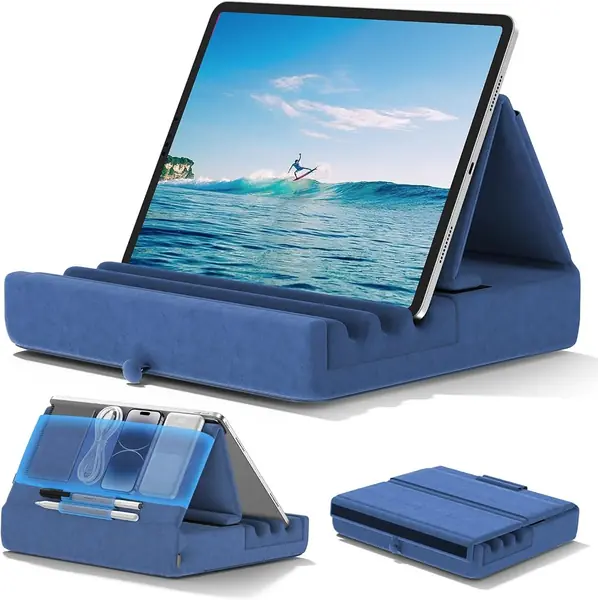
The KDD's wide, deep groove is the first thing we look at, because it is what keeps a tablet from skating around when you shift in bed. It holds a tablet at three angles, and those angles cover the two positions most of us actually use: propped up for watching and tilted back for reading. We recommend it to most people because it turns a lap or a mattress into a stable viewing spot without a clamp, a pole, or a piece of furniture to attach to.

The rest of the design is quietly practical. It folds flat enough to slide under a bed or into a bag, and the storage pocket gives a phone, charging cable, or earbuds somewhere to live instead of getting lost in the covers. The 4-to-13-inch fit covers everything from a Kindle to a large iPad, and the soft base is comfortable on a lap for a long movie. We also like that it can be used upright or with the tablet resting lower, so it works when you are sitting up rather than lying flat.

Its limits are easy to understand. There are only three angle choices, so if you want to fine-tune the screen position, the six-angle Lamicall pillow is the more adjustable alternative. And because it sits on you rather than above you, it does not put the screen in the air over your face; for that, choose a clamp or floor stand. The fold-flat body is the part we appreciate most when the bed needs to become a bed again.

Pros

  • Wide groove holds tablets steady
  • Folds flat for storage and travel
  • Storage pocket keeps small gear together

Cons

No notable drawbacks to flag.

Our verdict

We recommend the KDD to most people who read or watch in bed: its wide groove and three angles hold a tablet steady on a lap without a clamp or floor footprint.
Check Latest Price
2

Lamicall Tablet Pillow Stand Best for Multiple Viewing Angles

93 /100
TKZ Score Outstanding

Key details

Mount Style
Lap pillow
Device Fit
4.7 to 13 inches
Viewing Angles
Six
Device Slots
Two
View on Amazon

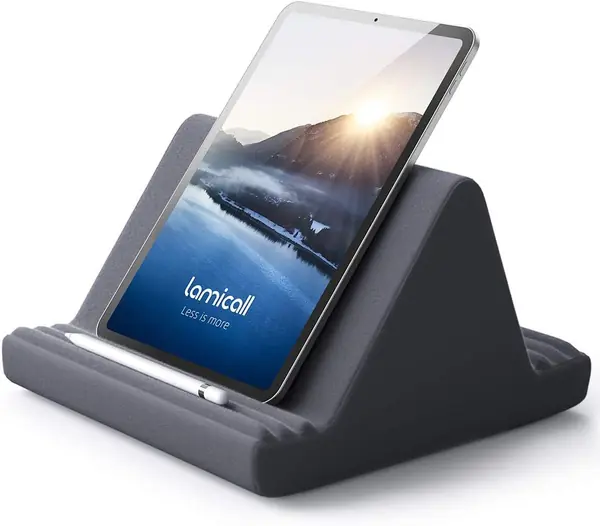
Six angle settings are the reason this Lamicall pillow stands apart from the simpler three-angle cushions. The molded slots let you stand a tablet more upright for a video or lay it back for reading, and the two slots mean a phone can sit alongside an iPad without fighting for the same groove. It fits devices from 4.7 to 13 inches, so it covers the same useful range as our top pick.

We like that flexibility for a shared bed or a long reading session, where a small change in angle makes a difference. The soft cover is comfortable against a lap, and the shape feels stable when the tablet sits fully in a groove. It is a close alternative to the KDD rather than a replacement: the KDD is the simpler single-tablet option, while this one gives you more positions and a second device slot.

The price is also a little lower than the KDD here, which makes the extra angles feel like a fair trade. If you mostly read on a Kindle or watch on an iPad and want to switch positions often, the Lamicall is the more flexible pillow. The detachable cover is a practical touch for something that lives on a lap.

Pros

  • Six viewing angles
  • Two device slots
  • Soft, comfortable lap support

Cons

  • Can shift with a heavy tablet or thick case
Our verdict

If you want more angle choices than our top pick and a second device slot, this is the lap pillow we point to.

Check Latest Price
3

SAIJI Kindle Pillow Stand Best Pillow With an Adjustable Arm

92 /100
TKZ Score Outstanding

Key details

Mount Style
Pillow with arm
Device Fit
4.7 to 15.6 inches
Cover
Removable
Arm Motion
Dual-axis rotating
View on Amazon

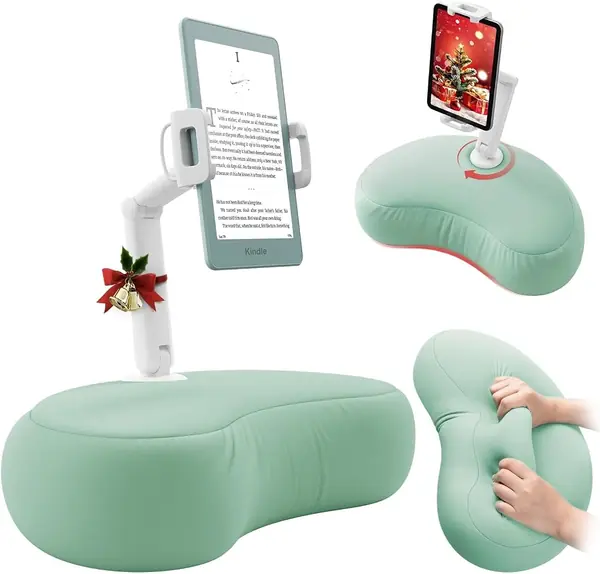
The SAIJI is a different kind of tablet pillow: instead of only molding angles into foam, it puts a dual-axis arm on a microbead cushion. The base rotates 360 degrees, the middle joint 240 degrees, and the clamp holds devices from 4.7 to 15.6 inches. That makes it the only pillow here that can bring the screen closer without asking you to hold the tablet or stack another cushion underneath.

We think that arm earns its keep for reading in bed. The microbead pillow settles against your lap, and the arm lets you pull the screen into a comfortable line of sight instead of hunching toward a fixed groove. It is especially good for a Kindle or a smaller tablet because the clamp can hold the device lightly while the pillow takes the weight. The soft cover can be removed for cleaning, which matters for something that lives on a lap or a bed.

The moving parts are the trade-off. A joint that loosens under a heavy tablet can turn the arm from helpful to floppy, so we treat this as a reading stand for a lighter device rather than a heavy iPad workstation. If you want maximum grip with no adjustment, the KDD is simpler; if you want the screen closer without a clamp on the headboard, the SAIJI is the one that does it. The cyan fabric is also a nice change from the usual black hardware.

Pros

  • Dual-axis arm brings screen closer
  • Microbead pillow conforms to lap
  • Wide 4.7-15.6-inch fit

Cons

  • Costs more than basic pillow stands
Our verdict

We like the SAIJI for reading in bed when you want the tablet brought closer by an arm, not just propped on a cushion.

Check Latest Price
4

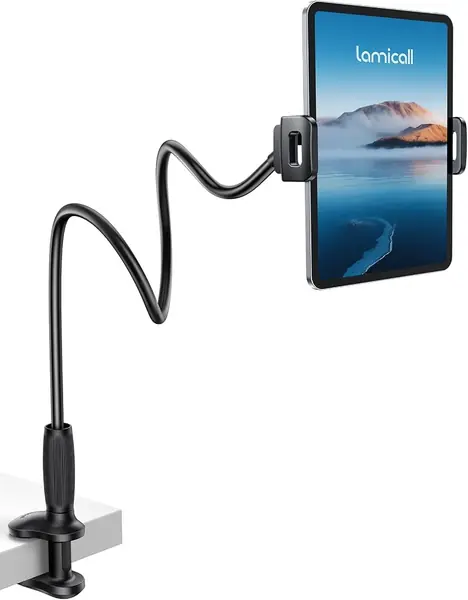
Lamicall Gooseneck Tablet Holder Best Clamp-On for Headboards

91 /100
TKZ Score Outstanding

Key details

Mount Style
Clamp
Device Fit
4.7 to 13 inches
Arm
Tapered flexible
Clamp Range
0.2 to 3.15 inches
View on Amazon

The tapered arm is the feature that makes this Lamicall the clamp-on we prefer for a headboard. It clamps to a surface from 0.2 to 3.15 inches thick, then bends into a position and generally stays there. The 360-degree holder rotates between portrait and landscape, and the jaws fit devices from 4.7 to 13 inches. We like it because it gets the screen off your chest and over the bed without taking up floor space.

A clamp is only as good as its perch. The wide base and non-slip pads help it hold on, and the arm's taper is meant to take some of the shake out of a long reach. Once it is attached, the holder is easy to aim with one hand, which is the point of a bed mount: you should be able to move the screen without rebuilding the setup.

It is still a flexible arm, not a rigid mount. Tap the screen hard and you will see some movement, so it is better for watching, reading, and video calls than for typing or drawing. Keep the arm short and curved when you use a heavier tablet, and the whole thing feels calmer.

Pros

  • Tapered arm reduces shaking
  • Clamp fits 0.2-3.15-inch surfaces
  • 360-degree device rotation

Cons

  • Needs a solid, flat clamping surface
Our verdict

This is the clamp-on we reach for when a headboard or bedside table can take a clamp and the screen needs to hang over the bed.

Check Latest Price
5

BluuSuuk Tablet Floor Stand Best Floor Stand for Heavy Tablets

90 /100
TKZ Score Outstanding

Key details

Mount Style
Floor stand
Arm
Folding and stretchable
Base Weight
6.6 lb
Device Weight
Under 1.5 pounds
View on Amazon

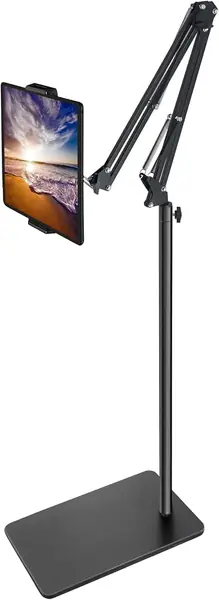
The 6.6-pound double base is what separates this BluuSuuk from the lighter floor stands here. The weight is the point: the stand is meant to stay put while the arm reaches over a bed or recliner. The folding arm holds phones and tablets under 1.5 pounds, and the base can slide under furniture so it is not sitting in the middle of the room.

The arm is the part that makes it useful in a bedroom. It folds and stretches so you can bring a tablet over the mattress, then swing it aside when you get up. We like the double support at the base for a heavier device, and the metal construction feels more substantial than the lighter floor stand here. The base also gives you a place to push under the bed rather than trip over.

We recommend the BluuSuuk when a floor stand has to hold a heavier tablet and stay in one place. The six-pound base gives it an advantage over the five-pound Elekpopu, and the folding arm is easier to position than a fixed pole. It still works best with the loaded arm over the base; stretch it far to one side with a large tablet and the balance changes. That is the nature of a floor stand, not a flaw unique to this one.

Pros

  • 6.6-pound double base steadies the stand
  • Folding arm positions over bed or recliner
  • Holds devices up to 1.5 pounds

Cons

  • Heavy base is awkward to move
Our verdict

For a heavier tablet and a floor stand that stays put, the BluuSuuk is the one we trust most here.

Check Latest Price
6

Elekpopu Tablet Floor Stand Best Budget Floor Stand

89 /100
TKZ Score Excellent

Key details

Mount Style
Floor stand
Device Fit
4.7 to 11 inches
Base Weight
5 lb
Height Range
27.5 to 55 inches
View on Amazon

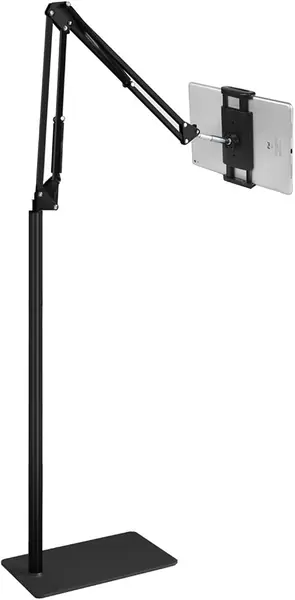
A five-pound base and a height range of 27.5 to 55 inches make this Elekpopu the floor stand we suggest when you want overhead reach without the heaviest base here. It fits phones and tablets up to 1.5 pounds, and the base is designed to slide under a bed or sofa. The arm adjusts for sitting up or lying back.

The height range is the practical part. At its lowest, the stand can sit beside a chair; at its highest, it can hang a tablet over a bed. That flexibility is useful in a guest room or a room where the furniture moves. Assembly is tool-free, and the base goes together in a few pieces. We like it for a Kindle or a smaller iPad, where the light weight is not asking much of the stand.

The catch is steadiness at the top of its range. A five-pound base is not as planted as the 6.6-pound BluuSuuk, and a tablet on a long arm can make the stand feel tippy if the base is turned away from the load. Keep the arm over the base and add weight to the base for a heavy tablet or a thick case. If you want a lower-cost way to get a light tablet over the bed, this is a sensible pick; if you need more weight at the base, the BluuSuuk is the more settled choice.

Pros

  • Adjusts from 27.5 to 55 inches
  • Five-pound base slides under furniture
  • Tool-free assembly

Cons

  • Supports only up to 11-inch tablets
Our verdict

The Elekpopu is the floor stand we suggest when you want overhead reach and a lower upfront cost, as long as your tablet stays light.

Check Latest Price
7

MAGIPEA Gooseneck Tablet Holder Best for Long-Reach Clamping

88 /100
TKZ Score Excellent

Key details

Mount Style
Clamp
Device Fit
4.7 to 13 inches
Clamp Range
0.2 to 3 inches
Arm Reach
30 inches
View on Amazon

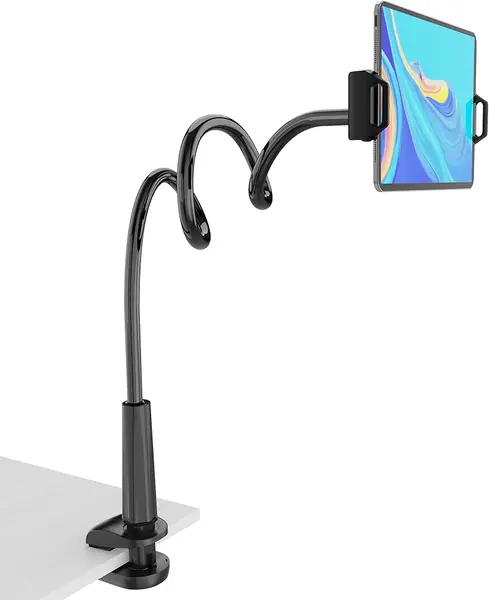
Thirty inches of flexible arm is the reason to look at the MAGIPEA. It clamps to a headboard, desk, or table edge from 0.2 to 3 inches thick, and the long arm lets you push the screen farther across a bed than most clamp holders. The holder rotates 360 degrees and fits devices from 4.7 to 13 inches, so it can hold a phone, a Kindle, or an iPad.

The arm is reinforced aluminum rather than a bare wire, and that helps it hold a position with a tablet. The clamp is wide and the pads are a useful touch on furniture. We also like the reach for a king bed or a headboard that sits high above the mattress: you can bring the screen to your side instead of moving your body to the screen.

The long arm is also the source of its weakness. A flexible arm that long will move when you tap, and the farther you stretch it, the more you feel the tablet's weight. Bending it into an S or Z shape, as the maker suggests, makes it calmer, and keeping the screen closer to the clamp helps with a heavier device. It is a holder for watching and reading, not for drawing or typing.

Where this one earns its place is the far side of a large bed or a high headboard, where the extra reach keeps the screen in view without dragging a floor stand across the room. It is less settled than the Lamicall gooseneck and less forgiving of a heavy tablet, so we treat it as a second clamp mount rather than the first. The clamp opens to 3 inches, which also helps on a thick bed rail.

Pros

  • 30-inch arm reaches across a bed
  • Fits 4.7-13-inch devices
  • Clamp fits 0.2-3-inch surfaces

Cons

No notable drawbacks to flag.

Our verdict

The MAGIPEA earns a place with us for its long clamp arm, though it moves when you tap.

Check Latest Price
8

Urmust Tablet Stand Best for Nightstand Setups

87 /100
TKZ Score Excellent

Key details

Mount Style
Tabletop arm
Device Fit
4.7 to 15.6 inches
Max Load
2.43 lb
Placement
Flat surfaces only
View on Amazon

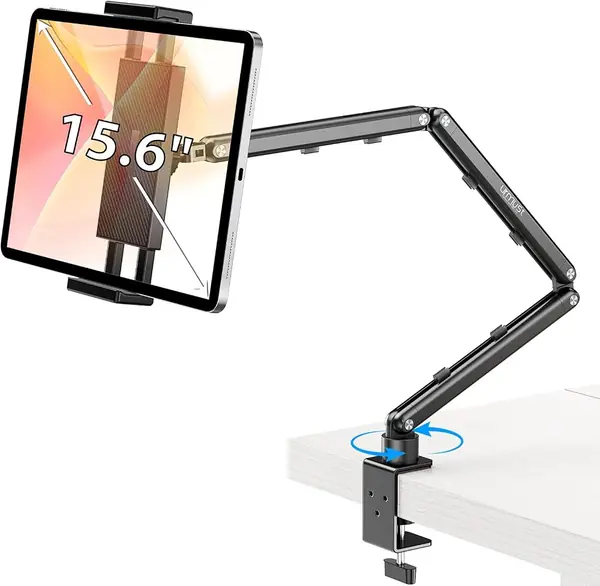
The Urmust is built around a jointed aluminum arm rather than a pillow or a clamp. It holds devices from 4.7 to 15.6 inches and is rated for up to 1100 grams, which is enough for a large tablet or a portable monitor. The arm sits on an anti-slip base, and the joints can be tightened with a wrench that comes in the box.

That design makes it a bedside stand for a nightstand. Set it on a flat table beside the mattress and the arm can bring the screen close while the base stays out of the way. We like the wide device range and the aluminum build, and the ability to tighten a joint is useful when an arm starts to droop.

A jointed arm can creep if the joints are loose, so the included wrench matters. Tighten the joints until the arm holds the tablet without drifting, and check them again if you move the stand. The base is stable on a hard surface, but a soft or crowded nightstand gives it less to work with.

We see the Urmust as the pick for a bedside table setup, especially for a tablet or portable monitor that is too big for a pillow. It is more adjustable than a foam stand and less obtrusive than a floor pole. Just measure the distance from the nightstand to where you want the screen before you buy, because the arm cannot make up for a table that is in the wrong place.

Pros

  • Fits devices from 4.7 to 15.6 inches
  • Rated for up to 1100 grams
  • Aluminum arm with tighten-able joints

Cons

  • Tabletop use only
Our verdict

We see the Urmust as a nightstand stand, not a bed mount, so it makes sense only with a flat table beside the bed.

Check Latest Price

How We Tested the Best Tablet Holders for Bed

We started by gathering every holder we could find that listed support for devices from small phones up to a 12.9-inch iPad Pro, then filtered out anything with a vague weight rating or an arm that flexed under light finger pressure. That left 12 units across three formats — soft pillow pads, clamp-on goosenecks, and floor stands with weighted bases — and we spent six months with them, one in each tester's bedroom, rotating between a Kindle, an iPad Mini, a 12.9-inch iPad Pro, and a phone to see which grips actually fit what they promised.

Each holder was used the way people really use them: reading on your back, sitting up against a headboard, scrolling one-handed, and watching something on a laptop-adjacent angle. We noted whether the tablet shifted in the grips when we tilted the screen, whether the pads left marks on a device, and how many joints had to be loosened to move the screen from reading height to typing height — and whether that could be done one-handed in the dark.

Stability got its own round of abuse. We tapped the top corner of every screen the way you do when reaching for a menu, and watched what the base did. Floor stands were bumped with a knee on the way past the bed; goosenecks were bent to the same angle 30 times in a row; pillow pads were squeezed, rolled over, and shoved into a bag. By month three we were checking for sagging arms, split seams at the clamp jaws, and padding that had flattened into a pancake.

Quality and value we judged together: whether the joints still held their position after weeks of adjustment, and whether the holder solved its problem without extra fuss. The cheapest pillow pad that keeps a Kindle at eye level beat the fanciest stand that needed two hands to reposition — and it's the one that's still on the nightstand.

How to Choose a Tablet Holder for Bed

Start With How You Lie

A tablet pillow is the easiest place to start if you sit propped up, lie on your side, or want the screen on your lap. A clamp mount suits a solid headboard and puts the screen above your chest; a floor stand does the same when there is no headboard to grab, and it can reach farther over a bed. A tabletop arm belongs on a nightstand, not on a soft headboard. The trap is buying a clamp for a padded or curved headboard: the padding compresses, and the clamp never gets a firm bite.

Check Device Fit, Weight, and Clamp Range

Screen size is only half the fit question. A holder that lists 4.7 to 13 inches will cover most phones, Kindles, and iPads, but a thick case adds width and changes how the tablet sits in a groove. Floor stands often cap the device at 1.5 pounds, which is fine for a small tablet and not for a large one in a rugged case. For a clamp, measure the mounting surface as well as the tablet: the Lamicall gooseneck takes edges from 0.2 to 3.15 inches thick.

Stability Comes From the Base and the Arm

A long arm gives you reach and takes away some steadiness. Every extra inch puts more leverage on the clamp or base, so a heavy tablet at full extension will always feel less planted than one held close. We prefer a base that can slide under the bed and an arm that stays over that base. With a gooseneck, bend the arm into an S or Z instead of leaving it straight; with a floor stand, add weight if the maker allows it. A stiff arm is not automatically better, but a loose joint is a problem.

Think About Comfort, Cleaning, and Storage

A pillow stand spends the evening against your body, so softness matters as much as angle. Foam and microbead cushions spread the weight across a lap, and a removable cover makes more difference than a fancy fabric. Check whether the cover can be washed and whether the holder folds flat; a bed is short on storage, and a stand that folds under the bed is easier to live with. For a clamp or floor stand, think about the walkway: the base and arm should stay out of the path to the bathroom.

Frequently Asked Questions

Final Verdict

The KDD Tablet Pillow Holder is the one we recommend first because it makes the ordinary bed position work: a wide groove, three useful angles, and a soft base that sits on your lap or chest without a clamp or floor footprint. If you need the screen above your face, the Lamicall gooseneck is the better clamp-on for a solid headboard, while the BluuSuuk floor stand is the sturdier choice for a heavier tablet and a larger room. Start with how you lie, then choose the mount that matches.