Best Smartphone Gimbals of 2026

Every phone video shot while walking has the same giveaway: a jolt at each heel strike and a frame that drifts off the subject. A gimbal is the fix — three motorized axes holding your phone level while your hand does whatever it does. What the shelf doesn't say is that they're not equally good at it: some hold a lock on a kid sprinting through the sprinkler, others lose the face the moment someone crosses the frame.

I've been shooting with gimbals since they needed their own bag, and I've also been the person who bought one, used it twice, and shelved it because setup took longer than the shoot. That's why ease of use became the filter here. My team spent six months with 10 gimbals, filming travel days, school plays, and product clips on a kitchen counter.

Here's what I'd tell a first-time buyer: tracking decides whether you keep reaching for it, and battery life decides whether you finish the day. Those two, plus stabilization, build quality, and value, separated the picks below — not the length of the mode list.

The Best Smartphone Gimbals

1

DJI Osmo Mobile 7P Best Overall
91 /100
TKZ Score Outstanding

Key details

Weight
13 oz
Folded Size
190mm x 95mm x 46mm
Max Phone Weight
10.6 oz
Battery Life
10 hours
View on Amazon

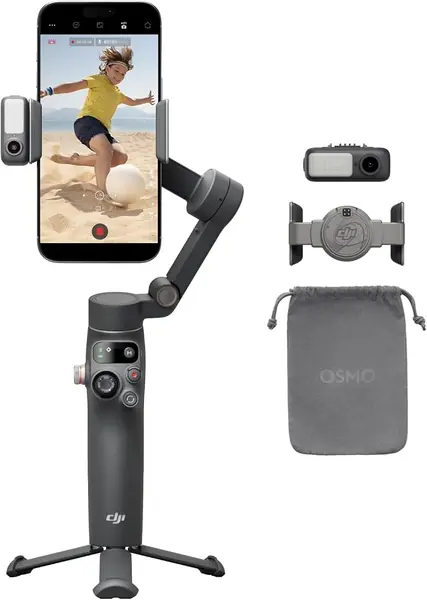
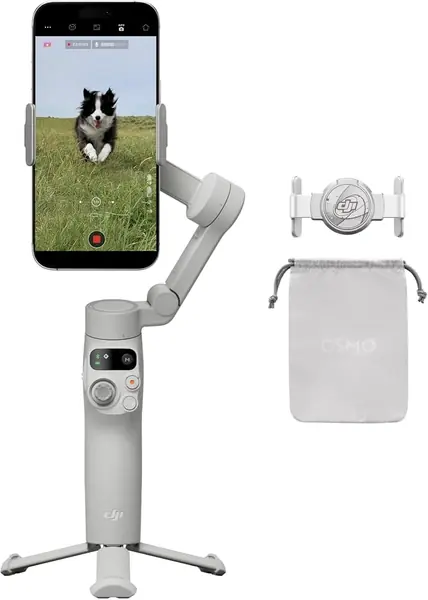
The Osmo Mobile 7P costs about the same as the older Osmo Mobile 6, which makes the choice between them a short one: the newer gimbal adds a multifunctional module that tracks your subject, receives audio from a DJI wireless mic and throws a small fill light, plus a magnetic clamp and an arm that powers the whole thing on as you unfold it. Same money, more crew.

That module is why this is our top pick. Tracking is the feature that decides whether a gimbal earns a place in your bag, and the 7P's tracking is the most dependable of the DJI models here — lock onto a face and the motors follow it across a room, which is what turns a phone on a stick into a second camera operator. The built-in extension rod and tripod make the same trick work hands-free: stand it on a table, walk out of frame, and it keeps you centered while you talk.

Two things are worth knowing before you commit. ActiveTrack, the ShotGuides templates and most of the smart modes live inside DJI's Mimo app, so if your workflow is the iPhone camera app or a social app's recorder, this gimbal won't track there. And the hardware isn't uniform — a unit that won't hold a charge, or a casing that cracks within a couple of months, is the failure to watch for. Buy where returns are painless and put it through a full day inside the first week.

What settles it for us is the audio. The module receives DJI Mic 2 and Mic Mini transmitters, so a wireless lav feeds straight into the phone's recording without a second receiver clipped to your belt. For interviews and vlogs, that's one less box in the bag and one less thing to charge.

Pros

  • Tracking, mic reception and fill light in one module
  • Extension rod and tripod built into the handle
  • Unfolds to power on with a magnetic clamp
  • Most dependable tracking of the DJI models here

Cons

  • Tracking only works inside the DJI Mimo app
  • Heavier and bulkier than the Osmo Mobile 7
Our verdict

We recommend the Osmo Mobile 7P as the default phone gimbal: reliable subject tracking, a built-in rod and tripod, and wireless mic audio in one kit.
Check Latest Price
2

Insta360 Flow 2 Pro Best for Native iPhone Tracking

88 /100
TKZ Score Excellent

Key details

Weight
12.6 oz
Folded Size
97.9x178.4x36.7mm
Pan
360° infinite pan
Tracking
Native in 200+ apps
View on Amazon

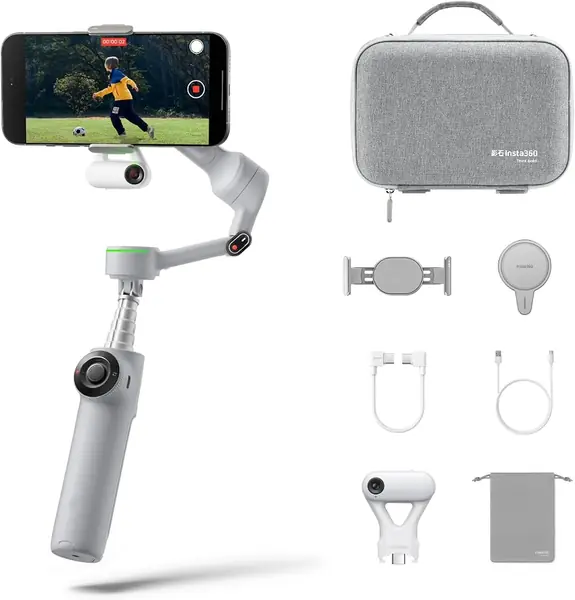
Nearly every gimbal here asks you to shoot inside its own app, and your footage then lives in that app's gallery while you dig it out for editing. The Flow 2 Pro is the exception: it tracks natively in the iPhone's camera app and in more than 200 other apps, so a subject lock survives while you record with the software you already use. That is the whole reason to pay premium money for it.

Android owners get there a different way. The bundle includes a clip-on AI Tracker that does the following on its own, independent of the phone's camera software, so the same shot works on a Galaxy or a Pixel. Around that core, Insta360 adds 360-degree infinite pan — the head keeps rotating past the point where other gimbals stop and unwind — multi-person framing that holds a whole group in shot, and active zoom tracking that keeps following a subject as you push in. For sport, concerts and family events, it's the most flexible tracking setup in this guide.

The price of that flexibility is complexity. Free Tilt and zoom tracking are genuinely useful once you've found them, but they sit behind a learning curve, and the people who get the most out of this gimbal watched the tutorials before their first shoot. Set it up once, save your favorite mode, and it stops feeling complicated — which is the point where the extra money starts to look reasonable.

Pros

  • Tracks inside the iPhone camera app and 200+ others
  • 360° infinite pan keeps rotating without unwinding
  • Multi-person and zoom tracking for sport and events

Cons

  • Android tracking depends on the clip-on AI Tracker
  • Extra modes take real practice to learn
Our verdict

Buy the Flow 2 Pro if you record in the iPhone's own camera app: no other gimbal here tracks your face there.

Check Latest Price
3

DJI Osmo Mobile 7 Best Ultralight

87 /100
TKZ Score Excellent

Key details

Weight
10.6 oz
Folded Size
179*95*39 mm
Max Phone Weight
10.6 oz
Battery Life
10 hours
View on Amazon

Three hundred grams is the number that matters on the Osmo Mobile 7. That's a couple of ounces lighter than the 7P and light enough to vanish into a jacket pocket, which means it comes with you instead of staying in a drawer. You give up the module and the arm for it — no extension rod, no mic receiver, no fill light.

What's left is the part most people actually use: DJI's stabilization, ActiveTrack 7.0 in the Mimo app, ShotGuides templates that walk you through a shot list, and legs that fold out of the handle so the gimbal stands on a table by itself. It's the least expensive DJI here, and for a first gimbal or a second one that lives in a travel bag, that's a better trade than the extra hardware on the 7P.

The missing arm is the catch if you film yourself. A gimbal plus a phone sits close to your face, and there's no way to push the camera out for a wider frame or a group shot, so people who start here and later want the reach tend to buy again. If you already know you want that reach, go straight to the 7P.

Durability is the other thing to watch. A unit that flops instead of holding steady, or one that won't power on, is the failure to catch early — test it inside the return window rather than saving the first real outing for a trip. On a restaurant table or a hotel desk, though, the tripod legs do more for your footage than any extra mode.

Pros

  • Lightest gimbal in this guide at 300 grams
  • Tripod legs fold out of the handle
  • DJI stabilization for the least money in the lineup
  • App-guided shots make the first session easy

Cons

  • No extension rod for group shots or high angles
  • No mic receiver or fill light
Our verdict

Choose the Osmo Mobile 7 if it has to disappear into a jacket pocket: 300 grams, a built-in tripod and DJI stabilization for the least money in the DJI lineup.

Check Latest Price
4

hohem iSteady V3 Ultra Best Remote Control

86 /100
TKZ Score Excellent

Key details

Weight
15.1 oz
Folded Size
3.9*1.7*6.3 in
Max Phone Weight
14.1 oz
Battery Life
9 hours
View on Amazon

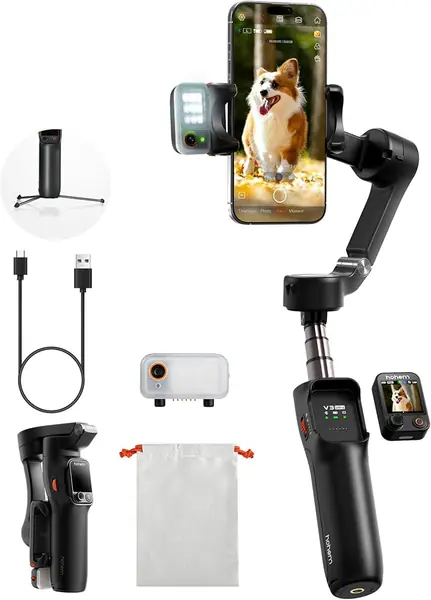
Clip the remote off the handle and the V3 Ultra becomes a two-piece kit: the gimbal stands on its tripod across the room while a 1.22-inch touchscreen shows you the shot and you steer from up to 33 feet away. That's a different way of working from the phone-in-hand gimbals here, and it's what we like most about it — a cooking demo, a product review or a workout stops being a one-person scramble.

The rest of the kit is built around that idea. A magnetic AI tracker follows faces, pets and objects, a fill light sits on the same module with brightness and color temperature you can change from the remote, and an 8-inch rod swings the camera up over a crowd or down to a plate. Nine hours of stated runtime covers a shooting day, and the 14-ounce payload takes a large phone without complaint.

It's heavy for what it is: just over 15 ounces before a phone goes on, and you feel it at the end of a long handheld take. That's the trade for the remote — most of the time you'll have it standing on its tripod anyway, which is where this gimbal makes sense.

Pros

  • Detachable touchscreen remote works to 33 feet
  • Magnetic AI tracker plus adjustable fill light
  • 8-inch rod and tripod built in
  • Nine hours of stated battery

Cons

  • Motor drift can appear on some units
Our verdict

Buy the V3 Ultra if you film alone and want to see the frame from across the room — the detachable touchscreen remote is the reason it's here.

Check Latest Price
5

hohem iSteady M7 Best for Long Shoots

85 /100
TKZ Score Excellent

Key details

Weight
1.4 lb
Folded Size
13.22*2.24*6.26 inch
Max Phone Weight
1.1 lb
Battery Life
12 hours
View on Amazon

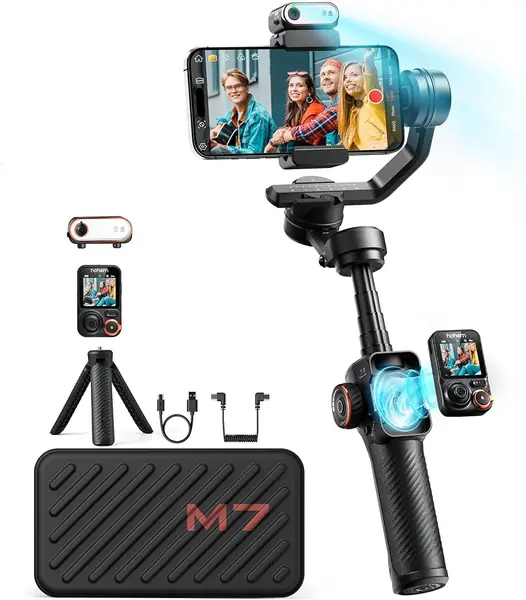
A pound and a half of gimbal that folds to over a foot long: the M7 expects a bag, not a pocket. What the weight buys is 12 hours of stated runtime — enough for a full day with room to top up your phone from the gimbal's battery — and the biggest control surface in this guide, a detachable 1.4-inch touchscreen remote that shows the shot while you work.

The hardware list is the longest here too: a magnetic AI tracker with an RGB fill light, a 7.6-inch aluminum rod, and a payload rating that swallows a large phone in a case with room left over. For a wedding, a market shoot or a day of interviews, battery and reach together mean fewer compromises than the mid-priced picks ask you to make.

It is also the fussiest gimbal to live with. Balancing a phone on the M7 takes longer than clamping one to a DJI, the menus reward an hour with the manual, and at the top of this list's prices it's a deliberate purchase rather than an experiment. What you get for the effort is a rig that behaves like production gear: remote in one hand, rod extended, fill light dialed in without touching the phone.

Give it a full day inside the return window. The moving parts are where any gimbal of this size eventually gives trouble, and a unit that arrives tight and calibrated is worth more than a discount.

Pros

  • 12-hour battery with reverse phone charging
  • 1.4-inch detachable touchscreen controller
  • 7.6-inch rod and RGB fill light
  • 1.1-pound payload handles big phones

Cons

  • 1.4 pounds before you add a phone
  • Long balance-and-learn setup
Our verdict

Choose the M7 if you shoot long days and want a viewfinder remote with 12 hours behind it; it's the most capable rig here, and the heaviest.

Check Latest Price
6

COMITOK L7C Pro Budget First Gimbal

80 /100
TKZ Score Excellent

Key details

Weight
12.8 oz
Folded Size
6*4.3*1.8 inches
Max Phone Weight
9.92 oz
Battery Capacity
2600 mAh
View on Amazon

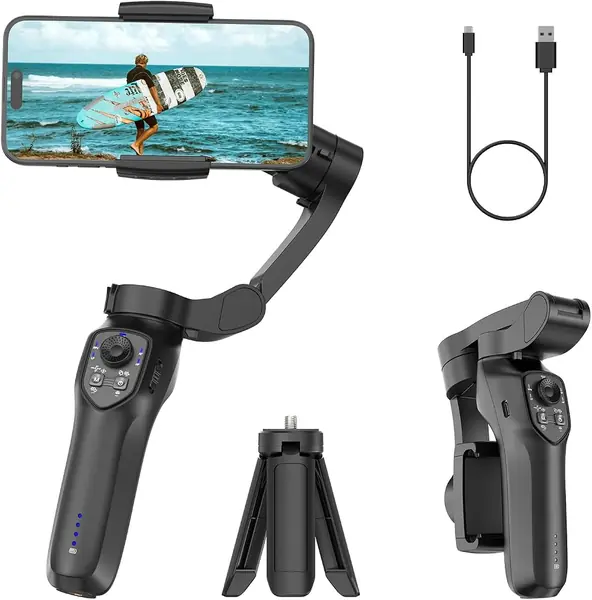
The lowest price in this guide buys a real three-axis gimbal rather than a motorized selfie stick: three motors, a 2600 mAh battery, a fold to roughly 6 by 4.3 by 1.8 inches, and a clamp COMITOK says needs no leveling before you shoot. For someone testing whether they'll actually use a gimbal, that's the whole pitch.

The feature list outruns the money. Inception, dolly zoom, slow motion, time-lapse, panorama and face or object tracking all run through the Comitok app, and a grip tripod and wrist strap come in the box. The payload ceiling is the number to check: 9.9 ounces doesn't leave much room for a large phone in a rugged case, and a gimbal working at its limit is a gimbal working harder than it should.

Where it gives ground is the motors and the connection. This is the least steady stabilizer in the group, and the app link decides whether a take happens at all, since the smart modes live behind it. Coming from a bare phone, it's still a visible upgrade for travel clips and family video. Coming from a DJI, you'll feel the difference in the first minute.

Pros

  • Three-axis motors at the lowest price here
  • Clamp needs no leveling before shooting
  • 2600 mAh battery and a compact fold
  • Grip tripod and wrist strap included

Cons

  • Least steady stabilization in this group
  • Smart modes depend on the app staying connected
Our verdict

Buy the L7C Pro as a cheap first gimbal for travel and family video, with the stabilization and app polish of a budget device.

Check Latest Price

How We Chose and Tested the Best Phone Gimbals

We started with every gimbal still on sale that could hold a current phone in a case, then cut by price band and by the features shoppers actually compare: subject tracking, a built-in fill light, an integrated extension rod, a tripod base, and rated runtime. We read reviews less for star ratings than for the complaints that kept repeating — wobble, apps dropping connection, arms that drift. Ten models survived, and each got roughly six months of ordinary filming.

Stabilization and tracking ran on the same loop: a half-mile walk with deliberate heel strikes, a jog behind a stroller, and a dog that wouldn't hold still. We watched footage back for jolts at footfalls, horizon creep, and whether the frame snapped back after a subject passed behind a tree or a stranger crossed the lens. Gimbals that lost the subject and needed a tap to reacquire got flagged — that's the point where you stop trusting it and start steering by hand.

Ease of use got timed instead of rated: bag to first balanced shot, one-handed, no tutorial. We mounted each with a thick case and a card wallet stuck to the back, since hardly anyone films with a bare phone. Battery life came from a full-to-dead run outdoors, and we checked whether the phone gained charge or just drained slower.

Durability was tested the least gentle way available: a week riding loose in a daypack with keys and a water bottle, then a look at folded-arm play and any joint that had started clicking. After dusk we compared fill lights on faces and checked extended rods for wobble at full length. Value came last — how many of those features we actually reached for.

How to Choose a Smartphone Gimbal

Three Axes, or It's a Selfie Stick

A real gimbal has three motors — one each for pan, tilt and roll — and listings are loose about this. A single-motor device that spins 360 degrees will follow your hand around, but it won't hold the horizon steady when you walk, which is the entire job. Look for the words 3-axis in the specifications and a stated payload in grams or ounces.

Everything in this guide has three motors and a published phone weight limit. That combination is the fastest way to tell a stabilizer from a motorized selfie stick, whatever the product photos suggest.

The App You'll Actually Shoot In

Most gimbals only track a subject when you record inside the maker's app, which means your footage lands in that app's gallery and you edit around it. That's a fair trade if you like the templates and shot guides, and a daily irritation if you'd rather use the iPhone camera or a social app's built-in recorder.

Decide this before anything else, because it eliminates more gimbals than any other question. The Insta360 Flow 2 Pro is the one here that tracks natively inside the iPhone camera app and hundreds of others; the DJI and hohem picks do their best work inside their own software.

Payload, Balance and the Phone in Your Pocket

Every gimbal states a maximum phone weight, and phones plus cases plus a magnetic wallet card add up faster than people expect. Weigh your phone in the case you actually carry and leave roughly 20 percent of headroom; a gimbal working at its ceiling drains faster and drifts more.

Balance matters just as much. Clamp the phone so it sits roughly level before you power on, then fine-tune with the arm. Even gimbals that advertise no leveling need the phone's weight centered, or the motors spend the whole take correcting.

Carrying Weight Versus Reach

Weight runs from 300 grams to well over a pound in this group, and the light ones get carried. For travel and walk-and-talk shooting, the 300-gram DJI Osmo Mobile 7 is a genuine advantage over its bigger siblings — it's the difference between a pocket and a decision.

Reach is the opposite trade. A built-in extension rod turns the gimbal into a short selfie stick for group shots and high angles, and it's the first thing solo shooters miss when they buy the smaller model. Work out which one you need before you order, because buying twice costs more than either.

Battery and the Extras Worth Paying For

Stated runtime among these picks runs from 9 to 12 hours, and that's a ceiling: motors under load, active tracking and a heavier phone all pull it down.

The extra that changes how you work is a detachable remote or touchscreen. It lets you run the gimbal from across a room instead of walking back to your phone between takes. If you film alone, that's worth more than another hour of runtime.

Frequently Asked Questions

Final Verdict

The DJI Osmo Mobile 7P is the phone gimbal we point most people to. For about what the older Osmo Mobile 6 costs, it adds a module that tracks your subject, takes audio from a DJI wireless mic and lights your face, plus an extension rod and tripod that turn it into a one-person crew.

If you shoot in the iPhone's camera app rather than DJI's, the Insta360 Flow 2 Pro is the better buy. And if the gimbal only earns its place when it's small enough to forget, the 300-gram Osmo Mobile 7 is the one that actually travels.