Best Microphones for YouTube of 2026

Bad audio is the fastest way to lose a viewer. People will sit through a slightly soft focus or a crooked frame, but they click away the moment a voice sounds hollow, echoey, or buried under a fan. The fix isn’t a full studio build—it’s matching the microphone to the way you actually record: talking to a camera at a desk, walking around with a wireless clip-on, or swapping between a laptop, phone, and camera.

Over the past six months, I’ve lived with 12 microphones—USB condensers, dynamic XLR mics, and wireless systems with charging cases—and the differences showed up in ordinary places: a spare-bedroom desk, a shared living room, and a backyard vlog walk. Setup mattered as much as sound, and so did reliability: some mics recorded in under a minute, while others needed an interface, a stand, and a crash course in gain staging. The ones I kept reaching for also held their connection when I switched from laptop to phone to camera. Below, I’ve sorted the picks by how you actually record, not by price.

The Best Microphones for YouTube

1

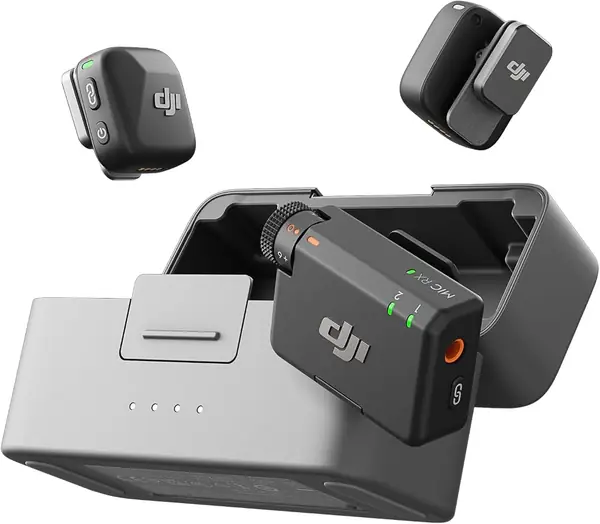
DJI Mic Mini Best Overall
97 /100
TKZ Score Outstanding

Key details

Transmitters
2 TX + 1 RX
Battery With Case
Up to 48 hours
Transmitter Weight
0.35 oz
Connects Via
USB-C, 3.5 mm, Bluetooth
View on Amazon

Ten grams is the number that matters here. A transmitter clipped to a collar or tucked behind a jacket button disappears on camera, with no chunky body dragging a neckline out of shape, and after the first take we stopped thinking about it. The charging case holds both transmitters and the receiver, so the kit is topped up whenever you grab it, and we came to value that more than any single figure on the box.

The set also covers more ground than the price suggests. Two transmitters let you mic yourself and a guest, the receiver runs to a camera over the included 3.5 mm cable or into a phone or laptop through the USB-C adapter, and DJI's own cameras and the Osmo Pocket take the audio directly. That range of setups is why one kit handles a talking-head video, an interview, and a desk recording.

On sound we paid attention to the two noise-cancelling levels, Basic indoors and Strong for a street or a busy café, and to the automatic limiting that stops a sudden laugh from clipping. The battery claim is the one that changes how you pack: up to 48 hours with the case, which is a week of shooting without hunting for a cable.

The catch is the iPhone. The receiver is USB-C, so an older Lightning phone needs an adapter, and some recording apps ignore an external mic until you change a setting. On a USB-C phone, a camera, or a laptop it is the least fiddly mic here: plug in, clip on, record.

Pros

  • Transmitters disappear on camera at 10 g
  • Charging case holds both transmitters and the receiver
  • Two transmitters cover interviews and collabs

Cons

  • Older Lightning iPhones need an adapter
Our verdict

Our default for YouTube: clip it on and your voice sounds close and clean whether you film on a phone, a camera, or at your desk.
Check Latest Price
2

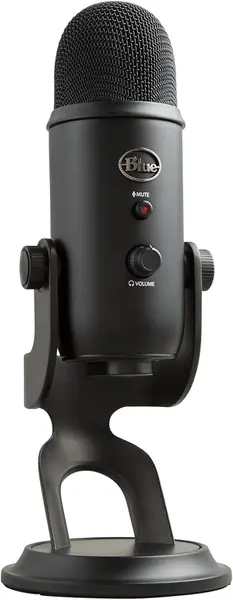
Blue Yeti Best USB Desk Mic

96 /100
TKZ Score Outstanding

Key details

Connection
USB
Pickup Patterns
Four
Weight
3.5 lb
Onboard Controls
Gain, mute, volume, pattern
View on Amazon

The Yeti hears the room. Sit it on a desk beside a keyboard and the clatter comes along with your voice; in a bare room you get some of the walls back in the take. That is what a large three-capsule condenser does, and it is why placement matters more with this mic than with the clip-on sets here.

Move it off to the side and closer to your mouth and it earns its keep. The four pickup patterns cover a solo voice, an interview across the desk, and an instrument, and every control sits on the body: gain, mute, pattern, headphone volume. We like that nothing needs a window opened mid-recording, and the headphone jack monitors with no delay, so you hear what the file will sound like while you record it. One USB cable to the computer is the whole setup.

It is also big. The stand and the mic want a permanent corner of the desk, and this is not something you pack for a shoot; set it up once and the size stops registering, but if you record in three different places each week you will resent carrying it.

Pros

  • Four pickup patterns on one mic
  • Gain, mute, pattern, and volume on the body
  • Headphone monitoring with no delay

Cons

  • Durability is inconsistent over the first year
Our verdict

We recommend the Yeti when your recording happens at a desk and you want one mic that covers solo voice, a two-person interview, and room sound.

Check Latest Price
3

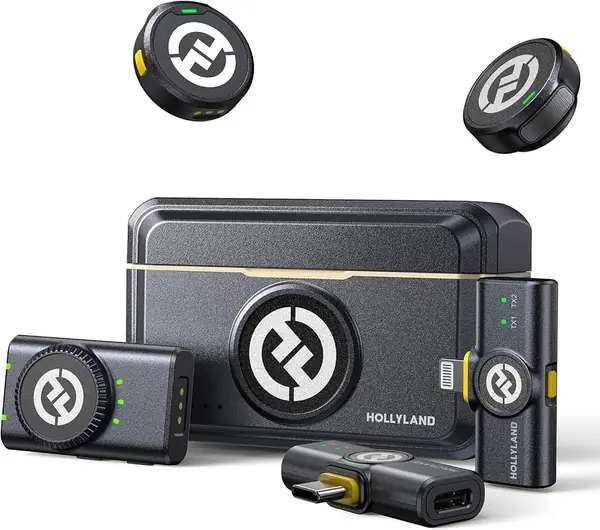
Hollyland Lark M2 Best for iPhone Creators

95 /100
TKZ Score Outstanding

Key details

Transmitters
2 TX + 3 RX
Battery With Case
Up to 40 hours
Transmitter Weight
0.32 oz
Audio Format
48 kHz/24-bit
View on Amazon

Three receivers ride in the case: one for a camera, one USB-C, one Lightning. That is the argument for the Lark M2 in a line — nothing to adapt, nothing to lose, and the same kit moves from a phone shoot to a camera shoot without repacking. We have lost enough dongles over the years to rate that highly.

The transmitters weigh 9 g and mount three ways: a magnet, a magnetic clip, or a silicone necklace case, so one can sit inside a shirt or hang around your neck. Audio is 48 kHz/24-bit with a 70 dB signal-to-noise ratio, noise cancelling switches on with one press, and the camera receiver carries a mono/stereo toggle. The magnets hold through cloth; keep them off metal fixtures, which is the one thing that pulls a transmitter loose.

Against the DJI set you give up some battery and range — up to 40 hours with the case and a 300 m range, against 48 hours and 400 m — and you pay more for the privilege. What you get back is the Lightning receiver and the mounting options. That trade only runs the wrong way if every hour of battery counts; otherwise the extra receiver is the more useful thing to have sitting in the case.

Pros

  • Camera, USB-C, and Lightning receivers included
  • 9 g transmitters with magnet and necklace mounts
  • Up to 40 hours of charging in the case

Cons

  • Pricier than the DJI with less battery
Our verdict

For phone-first creators, especially anyone still on a Lightning iPhone, the Lark M2's three receivers make it the safer buy.

Check Latest Price
4

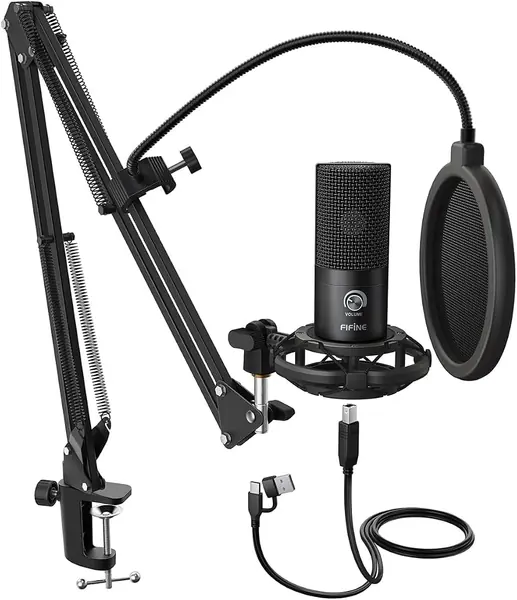
FIFINE T669 Best Budget Kit

94 /100
TKZ Score Outstanding

Key details

Connection
USB-A and USB-C
Included
Boom arm, shock mount, pop filter
Cable Length
8.2 ft
Polar Pattern
Unidirectional
View on Amazon

The clamp decides whether a boom-arm kit works. The T669's C-clamp needs a desk edge it can bite, and a thick top, a rounded edge, or a lip underneath can leave the arm hanging, so measure before you order. Get that right and the rest takes minutes: the arm rotates about 180 degrees vertically and 135 degrees forward, enough to put the mic in front of your face and swing it away afterward.

For a first YouTube setup this is the bundle we point people to. The box has the mic, the arm, a shock mount, a pop filter, a windscreen, and an 8.2-foot USB cable — everything but the desk — and the gain knob sits on the mic body, so levels are set without opening software. It is the least expensive pick here, and the only one that arrives ready to mount.

The pop filter and windscreen are basic but usable, and the arm is the first thing to upgrade if you record daily, since it is a moving part with joints that work loose. The mic itself is the steady piece of the kit, and at this price that is the right way round.

Pros

  • Mic, arm, shock mount, and pop filter in one box
  • Gain knob on the mic body
  • Least expensive complete setup here

Cons

  • Condenser picks up room and keyboard noise
Our verdict

We point beginners at the T669: it is the least expensive way here to get a mic off the desk and onto a proper arm, and it sounds good doing it.

Check Latest Price
5

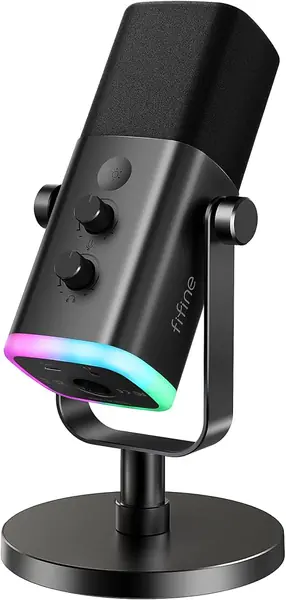
FIFINE AM8 Best for Noisy Rooms

93 /100
TKZ Score Outstanding

Key details

Connection
USB-C and XLR
Frequency Response
50 Hz–16 kHz
Capsule
Dynamic
Monitoring
Headphone jack with volume
View on Amazon

A dynamic capsule is the closest thing to cheap room treatment. The AM8 is much less sensitive than the condensers here, so a fan, a keyboard, and the flat echo of an untreated room stay out of the take, which is why we hand it to anyone recording in a normal apartment. The trade is proximity: with the grille close to your mouth the voice is full, and from across the desk it thins out.

It is also the most flexible inexpensive mic in this group. USB-C gets you recording straight out of the box, XLR is waiting when you add an interface, and the body carries a mute button, a headphone jack with its own volume, a gain control, and an RGB ring with three modes and more than ten colors. The base takes both 3/8-inch and 5/8-inch threads, so it moves onto a boom arm without an adapter.

Plan for two things. The XLR cable and a boom arm are not in the box, so the upgrade path costs more than the mic did. And reliability is the soft spot, with some units developing static or stopping altogether, so test yours hard in the first weeks while a return is still easy.

Pros

  • Dynamic capsule keeps room noise out
  • USB-C now, XLR when you upgrade
  • Mute, gain, and headphone monitoring on the body

Cons

  • XLR cable and boom arm not included
Our verdict

We hand the AM8 to anyone recording in a room they cannot treat: the dynamic capsule keeps echo and fan noise out, and XLR is there later.

Check Latest Price
6

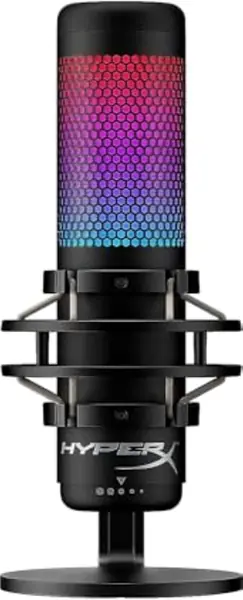
HyperX QuadCast S Best for Gaming Streams

92 /100
TKZ Score Outstanding

Key details

Connection
USB-C to USB-A
Pickup Patterns
Four
Mute
Tap-to-mute with LED
Mount
Built-in shock mount
View on Amazon

This is the one built to be seen. The RGB ring wraps the body and throws color onto the wall behind it, which is either the point of your channel or one more light in the shot, and the finish holds up on camera. On a desk with a lit keyboard and a mousepad it looks like it belongs; on a plain white desk it looks like a gadget from somebody else's setup.

Two features earn it a place beyond looks. The elastic shock mount suspends the capsule, so keyboard taps and desk bumps stay out of the recording, and the top of the mic is a tap-to-mute sensor with an LED that shows at a glance whether you are live. On a stream that is the control you touch most, and having it on the mic instead of buried in software is why it stays on our shortlist.

The catch is the software. Lighting and EQ run through an app that is Windows-only, so Mac owners get the hardware without the customization, and some PCs need a different USB port before they see the mic at all. On Windows with a gaming setup it is an easy fit; on a Mac, a plain plug-and-play USB mic costs you less trouble.

Pros

  • Shock mount stops keyboard bumps reaching the capsule
  • Tap-to-mute with a visible status light
  • Four patterns cover couch streams and room sound

Cons

  • Some units stop working within a year
Our verdict

If your YouTube channel is a gaming stream with a lit-up desk, the QuadCast S fits the setup and gives you a mute you will actually use.

Check Latest Price
7

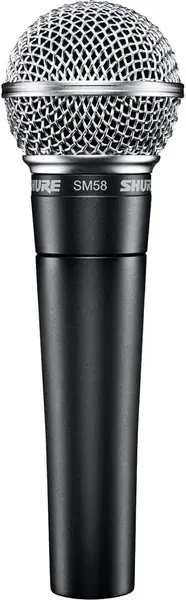
Shure SM58 Best for Interface Owners

91 /100
TKZ Score Outstanding

Key details

Connection
XLR
Included
Stand adapter and bag
Frequency Response
50 Hz–15 kHz
Type
Cardioid dynamic
View on Amazon

The SM58 is an XLR microphone, and that is the first thing to get straight: there is no USB port, so it needs an audio interface or a mixer between it and your computer, plus an XLR cable that is not in the box. Add those up and the mic is the cheapest part of owning it.

What you get for the trouble is the toughest mic here. The body is metal, the capsule is shock-mounted, the spherical grille has a pop filter built into it, and the cardioid pattern is tight enough that a small room stops mattering. It has been dropped, borrowed, and thrown in vans for decades precisely because none of that bothers it.

For YouTube it works best on a boom arm with the grille close to your mouth. It flatters a close, projected voice and does little for a quiet one across the desk, and it will not give you the airy room sound a condenser does. That is the trade: it records the person talking and not much else.

The case for buying one is durability and predictability — nothing here needs software, nothing is fragile, and a small room does not upset it the way it upsets a condenser. The case against is everything around it, which is why we rank it below the plug-and-play picks for a first channel and above them for anyone already recording through an interface.

Pros

  • Survives drops, bags, and van life
  • Pop filter built into the grille
  • Cardioid pattern keeps room noise out

Cons

  • Requires an audio interface and XLR cable
Our verdict

We recommend the SM58 for anyone who already owns an audio interface and wants a vocal mic that survives everything; without one, the bill runs past the mic.

Check Latest Price

How We Tested These YouTube Microphones

We built the shortlist from the formats YouTube creators actually use: USB mics that plug into a computer, XLR dynamics that need an interface, and wireless clip-on systems that pair with a phone or camera. We filtered out anything that couldn’t record clean speech in a normal room, then narrowed by price, mounting options, and whether the mic worked across more than one device. That left 12 microphones, which we used for six months.

The core test was a two-minute scripted intro at a spare-bedroom desk, a live-stream-style segment, and a seated two-person conversation in a shared living room. We timed the first setup out of the box, then repeated it on a desktop, a laptop, a phone, and a camera to see how often we swapped cables, installed software, or hunted for an adapter. Once recording, we listened for hollow room tone, hiss, plosive pops, and whether a voice sounded natural.

We made background noise on purpose: a desk fan on low, a phone buzzing on the table, a mechanical keyboard nearby, the fridge humming in the kitchen, and a TV at normal volume in the living room. We noted which mics pulled the noise in and which kept the voice forward, then tested mute, gain, and headphone monitoring while recording. For wireless systems, we walked from the apartment to the backyard to check dropouts and clipped and unclipped the transmitters to see how the mounts held up.

Finally, we packed and unpacked each kit, coiled the cables, and checked stands, shock mounts, and charging cases for wobble, loose threads, and flimsy latches. We compared raw recordings at the same speaking volume and asked whether the extra features justified the cost. The mics that survived connected quickly, rejected everyday room noise, and sounded like the person speaking.

How to Choose a Microphone for Youtube

Start With Where the Camera Is

If you sit at a desk and talk into a fixed setup, a USB microphone on a stand or boom arm is the simplest thing to own: one cable, no batteries, no receiver to lose. The moment you move — handheld shots, walking vlogs, filming yourself from across a room — a wireless lavalier gets the mic onto your collar, where your voice is.

That difference is bigger than any spec sheet. A desk mic recorded from the far side of a room sounds distant and hollow; a clip-on transmitter recorded in the same room sounds close. Decide which kind of video you make most, then buy for that.

Match the Connector to Your Devices

Check the port before anything else. A USB-C receiver covers most Android phones, newer iPhones, and any laptop; a Lightning receiver is what an older iPhone needs, and buying one separately later is the mistake to avoid. Count the adapters in the box and the receivers in the case, not the transmitters.

XLR is the third path, and it needs an audio interface plus a cable that is usually not included, which is real money on top of the mic. Budget for the whole chain or stay with USB and wireless, both of which record straight into a computer or a phone.

Patterns, Capsules, and the Room You Cannot Fix

Cardioid is the pattern for one voice: it favors what is in front of the mic. Omni and bidirectional exist for two people or a whole room, and they hear everything, so a pattern switch is only useful in a quiet space. Sensitivity matters just as much — a condenser picks up a keyboard and a fan, a dynamic capsule does not.

An untreated room often sounds better on a cheaper dynamic mic than on an expensive condenser, because the dynamic simply hears less of the room. Whichever you choose, work close to the grille and keep the gain low.

The Parts That Fail First

Clamps, arm joints, and USB connectors break long before a capsule does. Before you buy a boom-arm kit, measure your desk edge: a C-clamp needs a flat lip it can grip, and a thick or rounded top leaves the arm hanging. Kits with an arm included save money up front and cost it back in wobble.

On wireless sets, the charging case is the power supply for everything, so if it dies the whole kit is down. Plug in the receiver, work the clamp, and charge the case in the first week, while a return is still simple.

Frequently Asked Questions

Final Verdict

For most YouTube channels the DJI Mic Mini is the one to buy. It clips on in seconds, works with a phone, a camera, or a laptop, and the case keeps both transmitters charged, so the same kit covers a vlog, an interview, and a desk recording.

If your recording never leaves the desk, the Blue Yeti gives you four pickup patterns and real controls for about the same money. And if your phone still has a Lightning port, put the difference toward the Hollyland Lark M2 instead of an adapter.