Best Lavalier Microphones of 2026

Bad audio is the one mistake you can't edit out. I once recorded an interview in a tiled hotel bathroom and spent two evenings trying to un-reverb a conversation that sounded like it was happening inside a coffee can. A clip-on wireless mic fixes that in about ten seconds: it puts a tiny microphone an inch from the person's mouth, and the room stops being part of the recording.

Over six months, my team and I tested nine wireless lavalier kits, clipping them to collars, hoodies, and one silk shirt that fought back. Range is the least useful number on the box — every one of these crossed a parking lot fine; the signal dies when the subject turns and their body blocks the transmitter. A charging case you don't have to think about and, on the better kits, an onboard backup recording are what actually save a shoot.

You don't need to spend the most to sound professional. You need a mic that connects to the phone or camera you already carry, that a nervous interviewee forgets they're wearing, and that still has battery at hour four. Everything below cleared that bar.

The Best Lavalier Microphones

1

DJI Mic Mini Best Overall
96 /100
TKZ Score Outstanding

Key details

Transmitters
2
Max Range
400 m
Battery With Case
48 hours
Transmitter Weight
0.35 oz
View on Amazon

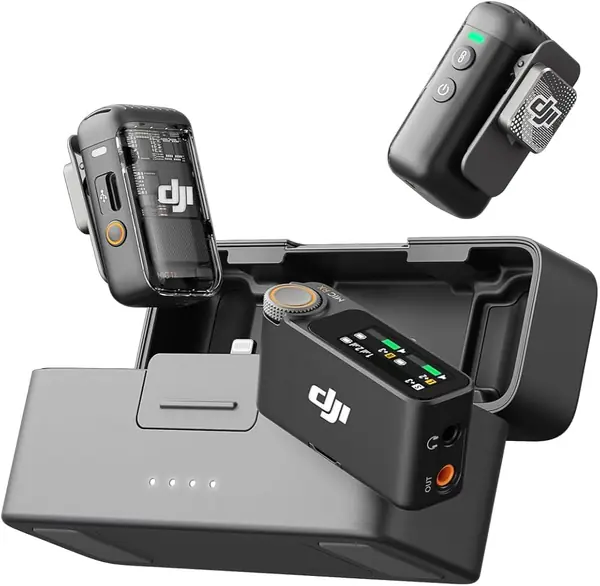
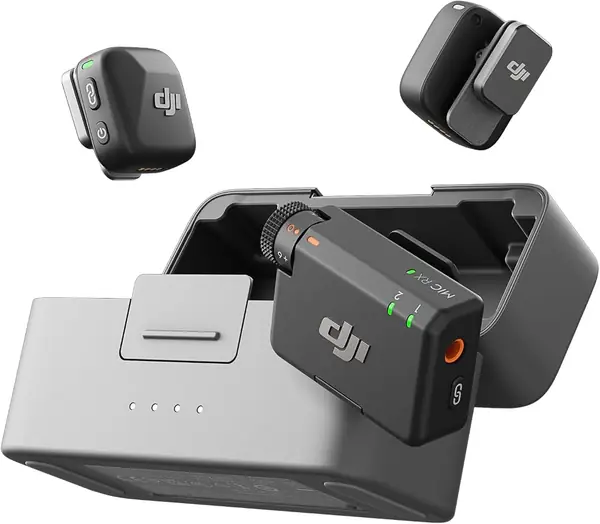
At 10 grams, the Mic Mini's transmitter is light enough that a shirt collar holds it without sagging, and each one ships with a magnet clip you can slide under a lapel instead of clipping on top of it. It isn't the very lightest transmitter in this guide — the Hollyland sets shave a gram or two off — but nobody watching will notice, and we much prefer the case it travels in. Two transmitters, the receiver, and the charging case fit in a jacket pocket, which is the shape most people actually need.

That case is the reason this is our default. DJI rates the set at 48 hours of combined use, with the case topping both transmitters up between shoots without a cable, so the mics are ready rather than merely charged. Two noise-cancelling levels are on tap — Basic for a quiet room, Strong for a street — and automatic limiting catches a sudden laugh before it clips the take. We leave Strong on outdoors and switch to Basic the moment we step inside, which is what the two settings are for.

Shoot on a DJI camera or one of the Osmo devices and the transmitters pair with it directly, skipping the receiver entirely. Everyone else goes through the receiver: 400 m of rated range, a 3.5 mm cable for cameras, and a USB-C adapter for phones. Range numbers assume a clear line of sight, so treat 400 m as headroom rather than a promise about a hotel ballroom.

One thing to check before ordering: the box includes a USB-C phone adapter and a 3.5 mm camera cable but no Lightning adapter, so an older iPhone needs one of its own. USB-C phones plug straight in. Everything else is there — two clip magnets, two pairs of windscreens, and a pouch — and there is very little to learn before the first take.

Pros

  • Two transmitters and a receiver charge in one case
  • Up to 48 hours of combined use with the case
  • 10-gram transmitters with magnet clips for hidden mounting

Cons

  • Lightning iPhones need a separate adapter
Our verdict

We recommend it to almost anyone: ten-gram transmitters, a case that recharges both, and 48 hours of combined use for less than the step-up kits.
Check Latest Price
2

Hollyland Lark M2 Best for Mixed Device Kits

95 /100
TKZ Score Outstanding

Key details

Transmitters
2
Battery With Case
40 hours
Transmitter Weight
0.32 oz
Receivers Included
3 (camera, USB-C, Lightning)
View on Amazon

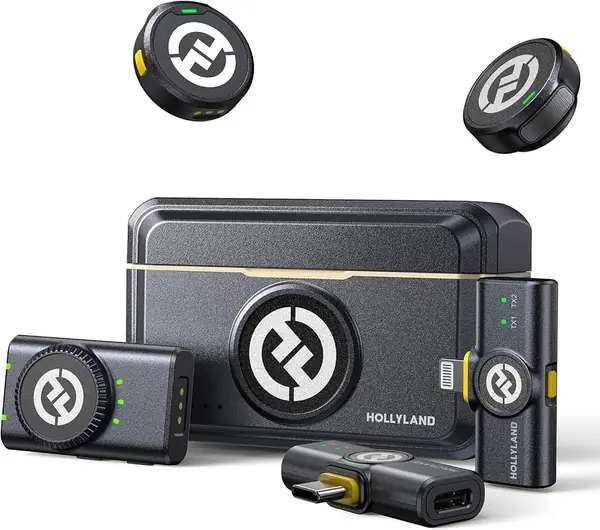
Open the Lark M2's case and you find three receivers: one for a camera's 3.5 mm jack, one USB-C, one Lightning, alongside the two transmitters. That is the whole pitch, and it is a good one. Instead of buying an adapter for every device you own, you carry a receiver for each and swap in whichever matches the shoot.

Swapping a receiver takes a second, and it is the kind of small friction we notice more the longer we shoot: no dongle to lose, no wondering whether the phone will recognize whatever is plugged into it. The transmitters weigh 9 grams and mount two ways — a magnet clip that sits under fabric, or a silicone necklace case that turns the mic into a pendant when a clip would show on camera. Keep the magnet away from railings and mic stands, because it will find them.

Hollyland quotes 10 hours per transmitter with noise cancelling off, and the case carries enough for about 40 hours of shooting. Audio is captured at 48kHz/24-bit with a 70dB signal-to-noise ratio, the range is rated at 300 m, and the camera receiver switches between mono and stereo — which matters the moment two people are talking and you want them separated in the edit.

Pros

  • Three receivers cover camera, USB-C, and Lightning
  • 9-gram transmitters with magnets and a necklace mount
  • About 40 hours of use with the charging case

Cons

  • Noise cancelling cuts into the 10-hour transmitter runtime
Our verdict

This is the kit we hand people who shoot on a camera and a phone in the same week; three receivers cover all of it.

Check Latest Price
3

Hollyland Lark A2 Best Budget

94 /100
TKZ Score Outstanding

Key details

Transmitters
2
Battery With Case
42 hours
Transmitter Weight
0.3 oz
Audio Format
48kHz/24-bit
View on Amazon

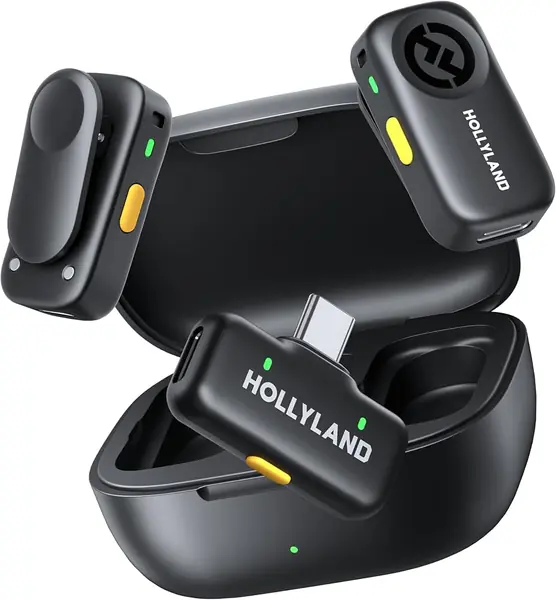
Two transmitters, a receiver, and a charging case, near the bottom of this group's price range: the Lark A2 is the set we point people toward when the budget is real but the ambition is not small. You give up receiver options and some polish. You keep the two things that actually change a shoot, which are a second mic for a second person and a case that recharges both.

The numbers are honest for the money: 48kHz/24-bit capture, a signal-to-noise ratio of at least 68dB, and 120dB of SPL headroom so a loud laugh does not fall apart. AI noise cancellation and an auto-limit function handle the two things that ruin phone-recorded speech, a noisy room and a sudden spike, and at 8.5 grams the transmitters clip onto a collar and disappear.

What it does not cover is cameras and Lightning iPhones. The kit ships with a USB-C receiver and nothing else, so a mirrorless body or an older iPhone is out unless you add a receiver of your own. Each transmitter runs about 7 hours, or 9 in power-saving mode, and the case brings the total to 42. For a USB-C phone creator that is a complete kit; for anyone with a camera bag it is half of one.

Pros

  • Two transmitters and a recharging case at entry level
  • 48kHz/24-bit audio with auto-limit protection
  • 8.5-gram transmitters that hide on a collar

Cons

  • USB-C receiver only
Our verdict

Two transmitters, a recharging case, and clean 24-bit capture make this the set for phone-first creators on a tight budget.

Check Latest Price
4

DJI Mic 2 Best Backup Recording

93 /100
TKZ Score Outstanding

Key details

Transmitters
2
Max Range
250 m
Internal Recording
32-bit float, up to 14 hours
Receiver
OLED display, headphone out
View on Amazon

The Mic 2 is the Mic Mini's bigger sibling, and the difference that matters is not size. Each transmitter records to its own memory in 32-bit float for up to 14 hours, independently of whatever the receiver is doing, so a wireless dropout or a clipped shout stops being a lost take.

The receiver is the other half of the argument: a bright OLED display, a headphone output so you can monitor while you shoot, and a 250 m range. The box includes both a USB-C and a Lightning phone adapter as well as a 3.5 mm camera cable, which covers the devices that send you shopping with the Mic Mini. Signal-to-noise is rated at 85dB, and intelligent noise cancelling is on board.

That backup recording is the reason to spend up, and it earns its keep on anything you get one shot at — a wedding, a single-take interview, a subject who says the words once. Bluetooth pairing with a phone is the fussy route to go; the adapters in the box are the reliable one, so use them and treat the transmitter's own recording as insurance rather than as the plan.

Pros

  • Each transmitter records 32-bit float audio on its own
  • Up to 14 hours of internal recording per transmitter
  • OLED receiver with a headphone output for monitoring

Cons

  • Bulkier on a collar than our top pick
Our verdict

Worth the extra for anything you cannot reshoot, because every transmitter keeps a 32-bit float copy of the take.

Check Latest Price
5

Rode Wireless PRO Best Premium Set

92 /100
TKZ Score Outstanding

Key details

Transmitters
2
Max Range
260 m
Internal Recording
32-bit float
Included Lavaliers
2
View on Amazon

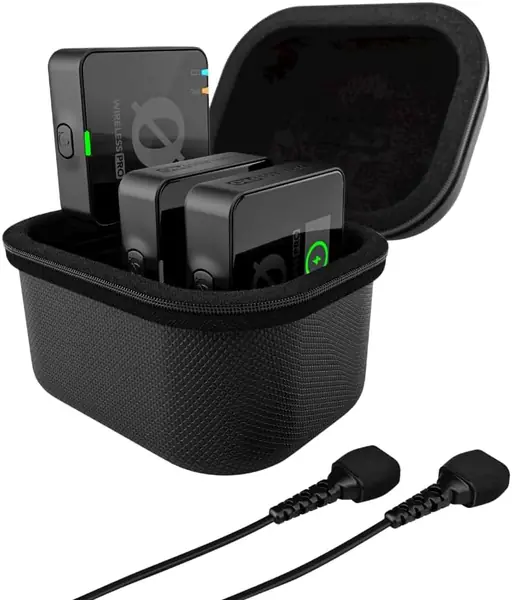
The Wireless PRO is built for the part of a shoot that goes wrong in the edit: matching sound to picture. Timecode runs through the system, so footage from two or three cameras lines up without a clapper board or a manual nudge, and 32-bit float recording on each transmitter means a take that clips is still recoverable.

That combination is why we keep it at the top of this group's range rather than recommending it to everyone. It is the set for a two-person interview on a set with more than one camera, where a reshoot is not an option and an editor will thank you for synchronized, unclipped audio. Two Rode Lavalier II mics come in the case, which is unusual here, and the included cables cover cameras, USB-C, and Lightning.

The rest is professional detail: 260 m of line-of-sight range, MagClip mounts, furry windshields, and a 3.5 mm output for a camera or a mixer. What it is not is small. The case is the biggest in this guide, and if you mostly shoot solo on a phone, a pocket set does the same job with less to carry.

Pros

  • Timecode keeps sound and picture in sync across cameras
  • 32-bit float backup recording on both transmitters
  • Two Rode Lavalier II mics come in the case

Cons

  • Biggest and heaviest case in this group
Our verdict

The set we trust for multi-camera, two-person work, where timecode and a 32-bit float backup save the edit.

Check Latest Price
6

Rode Lavalier GO Best Wired

91 /100
TKZ Score Outstanding

Key details

Capsule
4.0 mm
Connector
3.5 mm TRS
Polar Pattern
Omnidirectional
Frequency Range
20Hz - 20kHz
View on Amazon

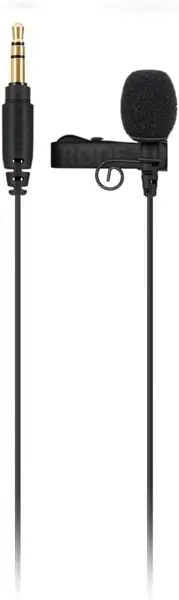
There is a cable attached, and that is the point. The Lavalier GO has no battery, no receiver, and no pairing routine: it is a 3.5 mm lav that plugs into whatever is recording and stays plugged in until you are done.

The capsule is 4.0 mm across, small enough to sit under a shirt button and be forgotten, and the omnidirectional pattern means you do not have to aim it — clip it high on the chest and talk. Rode supplies a foam pop shield for hard consonants, a clip with cable management built in, and a pouch, and the response runs from 20Hz to 20kHz.

We keep one of these for seated interviews and camera-mounted work, where a wire is not a constraint and a battery is one more thing to forget. Its sound is only as good as the jack it meets, though, and a 3.5 mm lav is the pickiest thing in this guide to match up — check that your camera input or wireless transmitter expects a TRS lav before you buy, because a mismatch shows up as hiss rather than as silence.

Pros

  • No battery or pairing to manage
  • 4.0 mm capsule hides easily under clothing
  • Clip with built-in cable management and a pop shield

Cons

  • Tethered to the recorder by a fixed cable
  • Sound depends on the input it is plugged into
Our verdict

No battery, no pairing, no dropouts — a 3.5 mm lav we keep for seated interviews and fixed cameras.

Check Latest Price
7

PQRQP 3-in-1 Wireless Mic Best for Mixed Phone Ports

90 /100
TKZ Score Outstanding

Key details

Transmitters
2
Max Range
328 ft
Audio Format
48kHz/24-bit
Receiver Connections
Lightning, USB-C, 3.5 mm
View on Amazon

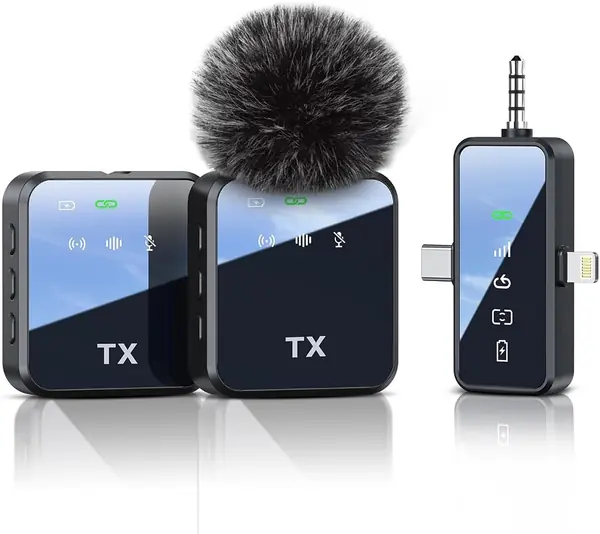
A mute button and a reverb setting are not what we look for first in a lavalier, but they are what sets the PQRQP apart at this end of the market. The mute is the useful half: one press kills the mic while keeping the wireless link alive, which is the right way to handle a cough or a quick aside.

The receiver is the real argument. One unit covers Lightning, USB-C, and a 3.5 mm camera jack, so a house with an old iPhone, a newer Android phone, and a mirrorless camera needs one kit rather than three. Two transmitters come in the box, the range is rated at 328 ft over 2.4GHz, and the audio is captured at 48kHz/24-bit.

Small conveniences fill out the rest: a battery indicator light, volume control on the receiver, and roughly 10 hours per charge. There is no charging case here — each transmitter charges over USB-C from the included cable — so plan on a power bank or an outlet at the end of a long day.

Where it earns its place is as the second kit, the one that lives in a bag for a phone interview or a family shoot, where reverb is a bit of fun and the mute button is the feature you actually reach for. Treat the range figure as line-of-sight, keep the receiver in the same room, and test the link before you trust it with anything you cannot repeat.

Pros

  • One receiver covers Lightning, USB-C, and 3.5 mm
  • Two transmitters with instant mute and reverb
  • 48kHz/24-bit capture with volume control

Cons

  • No charging case in the box
Our verdict

A sensible second kit for a household with mixed phones, thanks to one receiver covering Lightning, USB-C, and 3.5 mm.

Check Latest Price

How We Chose and Tested the Best Lavalier Microphones

We started with a long list of every wireless lavalier kit we could find that ships with a charging case and works with both a camera and a phone, then filtered by price, connection type, and whether the maker sells replacement cables and windscreens on their own. Nine kits made the cut, and we lived with them for six months — at desk recordings, in walking interviews, on a windy rooftop, on a two-person shoot where both transmitters ran at once, and through one all-day event where battery life stopped being theoretical.

For sound, each kit recorded the same scripted paragraph and the same unscripted conversation, and we listened back on studio headphones and on a phone speaker to hear what a client would hear. We noted sibilance, how much of the room came through, and whether the limiter clamped down hard on a sudden laugh. For noise, we ran a box fan and a mini-split directly at the subject and tracked whether the voice stayed out front or pumped and chopped as the mic chased the hum.

Charged to full, each kit ran continuously until it died — we timed it and counted how many top-ups the case delivered. We timed setup with a stopwatch from unzipping the case to recording on a phone, then handed the kit to a friend with no audio experience and watched where they got stuck. Every transmitter and receiver was dropped from waist height onto a wood floor, and we repeated 20-minute takes to log dropouts. Finally, we paired each kit to an iPhone, an Android phone, a mirrorless camera, and a laptop to count the adapters required, and weighed what came in the box — lav mics, wind muffs, cables — against the price.

How to Choose a Lavalier Microphone

Start With the Receiver, Not the Mic

A Lightning iPhone, a USB-C phone, and a camera with a 3.5 mm mic jack are three different connections, and no single cable covers all three. Count the receivers in the box before you buy: the Hollyland Lark M2 includes a camera receiver, a USB-C receiver, and a Lightning receiver, while the Lark A2 ships with USB-C only. If you shoot on more than one device, that difference is worth more than a marginally better capsule.

Read the adapter list rather than the headline, too. A kit sold as an iPhone lapel mic can still leave you sourcing a dongle, which is exactly the gap in the DJI Mic Mini's box: a USB-C phone adapter and a 3.5 mm camera cable, but nothing for Lightning.

Wired or Wireless

A wired lavalier has no battery, no radio, and no pairing, so it cannot drop out or run flat; it also cannot follow you across a room. Choose wired when the person talking stays put — a seated interview, a desk, a fixed camera — and wireless when anyone walks, gestures, or shares a frame with a second speaker. Wired also means the result depends on the input, so match the connector to your camera or interface before you commit.

Range figures for wireless sets are measured with a clear line of sight, so halve whatever the box claims for a crowded room. Every wireless system here runs on 2.4GHz, which is a busy band at events and in apartment buildings.

Battery Life and the Charging Case

Two numbers matter and they are not the same: how long one transmitter runs, and how much the case adds. A transmitter with 7 to 10 hours covers a full shoot day; a case rated at 40 to 48 hours covers a trip, and that is the number that keeps a kit usable, because you recharge the case rather than remembering to charge two mics.

Noise cancellation and higher transmission power shorten per-charge runtime — the Lark M2's 10 hours is quoted with processing off. For multi-day events, buy on the case total.

Noise Cancelling, Limiting, and a Backup Recording

Noise cancelling on a lavalier is processing, not a magic trick: it helps against steady sound like traffic or a fan, and it can hollow out a voice in an already quiet room, which is why the better kits give you levels instead of one setting. Limiting protects a take from a sudden laugh or shout.

The bigger insurance is internal recording. The DJI Mic 2 and Rode Wireless PRO each keep a 32-bit float copy on the transmitter, so a wireless glitch or a clipped peak can be recovered later. For anything you cannot reshoot, that is the feature worth paying for.

Clips, Magnets, and Wearing a Mic Discreetly

Transmitters here weigh between about 8.5 and 10 grams, light enough that a collar does not sag, and most include a magnet clip that sits under fabric so nothing shows on camera. A silicone necklace mount is the alternative when a clip would cross a neckline. Keep magnets away from railings, mic stands, and metal furniture, because they will grab.

Whichever mount you use, add the windshield every time you step outside. Wind noise is the fastest way to ruin audio that was otherwise clean, and the furry covers included with the Hollyland sets handle it better than bare foam.

Frequently Asked Questions

Final Verdict

Start with the DJI Mic Mini. Ten-gram transmitters, a case that recharges both, 48 hours of combined use, and a price in the lower part of this group's range make it the set we recommend to almost anyone who wants clean speech without carrying a bag of adapters.

If your shoots move between a camera and phones of both connector types, the Hollyland Lark M2's three receivers are worth the step up. If everything you own is USB-C and the budget is tight, the Lark A2 covers the same ground for less.