Best iPad Keyboards of 2026

A keyboard case is the least glamorous thing you'll buy for an iPad, and the one that decides whether it replaces your laptop or lives in a drawer. Add keys and a hinge badly and the tablet that was supposed to be featherweight turns top-heavy, slides off your knees, and stops fitting the bag you bought it for. Do it right and you get real keys when you're working, a bare screen when you're reading, and nothing extra to carry or charge.

I type on an iPad most mornings, and after six months with a dozen keyboards, I care less about key travel than about whether the whole thing stays put when I shift on the couch. Start with the connection: a Smart Connector keyboard draws power from the iPad and pairs the second it touches down, while a Bluetooth model carries its own battery. Fit is the other trap: these are cut for specific generations. The picks below run from full laptop replacements to slim keyboards that look like part of the iPad.

The Best iPad Keyboards

1

Logitech Combo Touch Best Overall
93 /100
TKZ Score Outstanding

Key details

Compatibility
iPad 10th gen and A16
Weight
1.26 lb
Connection
Smart Connector
Keyboard
Backlit, full-size
View on Amazon

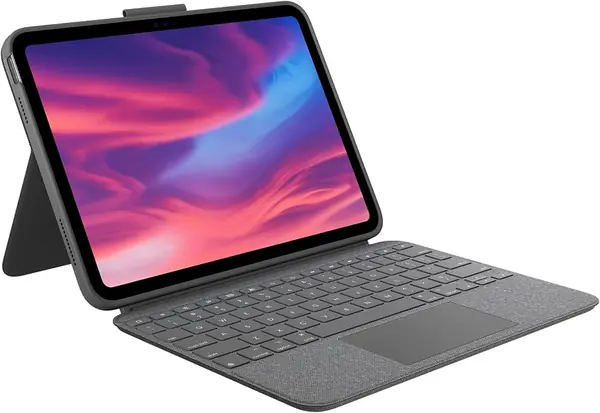
The Combo Touch solves the small annoyance that makes a lot of iPad keyboards feel like accessories: it never needs charging. It draws power through the Smart Connector, so we pair it once and forget it. The backlit keys are full-size and well spaced, and the large trackpad supports the gestures we already use on the iPad. The keyboard detaches, leaving a protective case and an adjustable stand for reading or sketching.

That flexibility is why it earns our top spot. We like that it works as a laptop-style typing deck and as a stand for watching or drawing without making you choose one mode for the day. The keys feel stable, and the trackpad is the closest thing here to using a laptop. The woven-fabric cover adds grip and protection, and the whole thing feels more substantial than the budget cases.

The Combo Touch is the one we reach for when the iPad has to do a laptop's job for an afternoon. The backlit keys are easy to read in a dim room, and the shortcut row covers the iPad controls we use most. The fabric cover also gives the whole setup a softer, less plasticky feel than most budget cases.

Pros

  • No charging or pairing routine
  • Large multi-gesture trackpad
  • Detachable keyboard with four use modes

Cons

  • Adds noticeable weight at 572 grams
  • Snug fit makes removal harder
Our verdict

The Combo Touch is our default iPad keyboard for daily typing: it never needs charging, and its trackpad and stand feel built for real work.
Check Latest Price
2

Apple Magic Keyboard Folio Best Apple-Designed Folio

92 /100
TKZ Score Outstanding

Key details

Compatibility
iPad A16 and 10th gen
Weight
1.96 lb
Design
Two-piece magnetic
Function Row
14 keys
View on Amazon

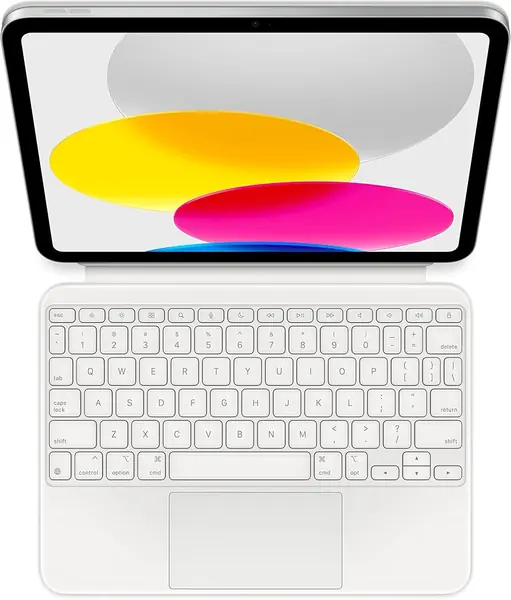
Apple's Magic Keyboard Folio takes a different approach from most keyboard cases: it splits into a detachable keyboard and a magnetic back panel, so the iPad can stand on its own while the keyboard sits wherever you want it. We like that for couch use and for times when the screen needs to be closer to your eyes. The trackpad is precise, the 14-key function row is genuinely useful, and the keys have the quiet, crisp feel we associate with Apple's laptop keyboards.

The split design earns its keep when you want the screen at eye level and the keyboard flat on a desk, or when you want to pull the keyboard onto your lap without propping up the whole tablet. The function row gives you quick access to brightness, volume, and media controls, which we missed on simpler folios. The keyboard attaches magnetically and draws power from the iPad, so there is no charging cable to pack.

The trackpad is the other reason we keep coming back. It is large enough for three-finger gestures and doesn't require the exaggerated swipes that smaller trackpads do. For writing, editing, and moving between apps, it feels less like a tablet accessory and more like a laptop input device.

Pros

  • Detachable keyboard and magnetic back panel
  • Large, precise built-in trackpad
  • 14-key function row for shortcuts

Cons

  • Heavy at 1.96 pounds
  • Two pieces can separate in a bag
Our verdict

For Apple loyalists who want a detachable, laptop-like typing setup, the Magic Keyboard Folio is the one we choose, premium price and all.

Check Latest Price
3

Apple Magic Keyboard Best for iPad Pro

91 /100
TKZ Score Outstanding

Key details

Compatibility
iPad Pro 11-inch M4/M5
Weight
1.6 lb
Charging
USB-C pass-through
Trackpad
Glass, haptic feedback
View on Amazon

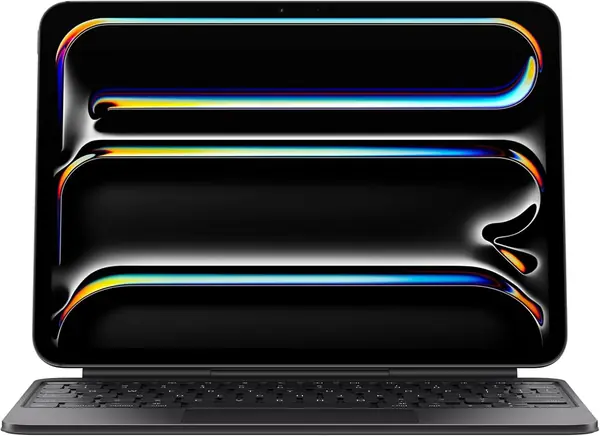
The Magic Keyboard for iPad Pro 11-inch is the most specialized keyboard here: it fits the M4 and M5 iPad Pro models and nothing else. That narrow compatibility is the first thing to check, because this is not a case you can hand down to an older iPad or a 10th-generation model. If you have the right tablet, though, it turns the iPad into the closest thing to a laptop Apple sells.

The aluminum build and two-cantilever hinge give it a rigidity that most folios can't match. The screen floats above the keyboard at a smooth range of angles, and the keys have a short, crisp travel that we found easy to type on for long stretches. The glass trackpad with haptic feedback is the best pointing device in this group; gestures feel immediate, and the function row covers brightness, volume, and media controls.

We think the Magic Keyboard is worth it for iPad Pro owners who use the tablet as a primary work device and want the typing experience to disappear. The stiff hinge and aluminum deck are what make it feel like a piece of hardware rather than a cover, and the trackpad is the one we trust most for precise editing. It is a focused, expensive tool, and it makes the most sense when the iPad is already your main computer.

Pros

  • Rigid aluminum build and stable hinge
  • Glass trackpad with haptic feedback
  • Backlit keys and function row

Cons

  • Heavy at 1.6 pounds
  • Top-heavy on soft surfaces
Our verdict

iPad Pro 11-inch M4 or M5 owners get the most laptop-like typing and trackpad experience from the Magic Keyboard; we think it justifies its focused design.

Check Latest Price
4

typecase Touch Best Rotating Case

90 /100
TKZ Score Outstanding

Key details

Compatibility
iPad A16 and 10th gen
Weight
1.43 lb
Backlight
11 colors
Hinge
360-degree rotating
View on Amazon

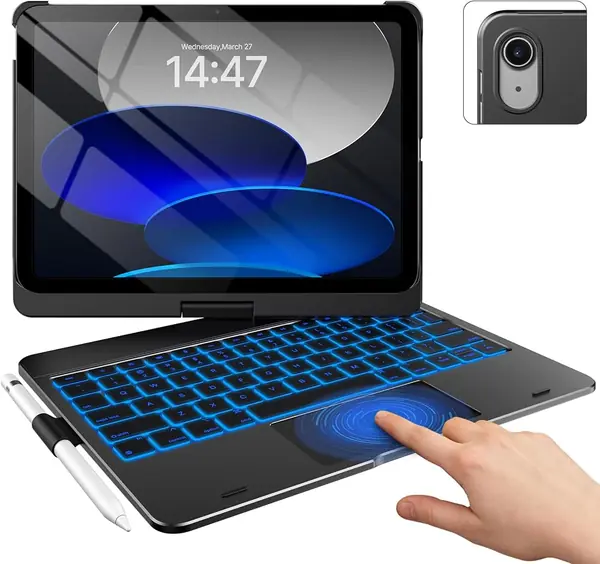
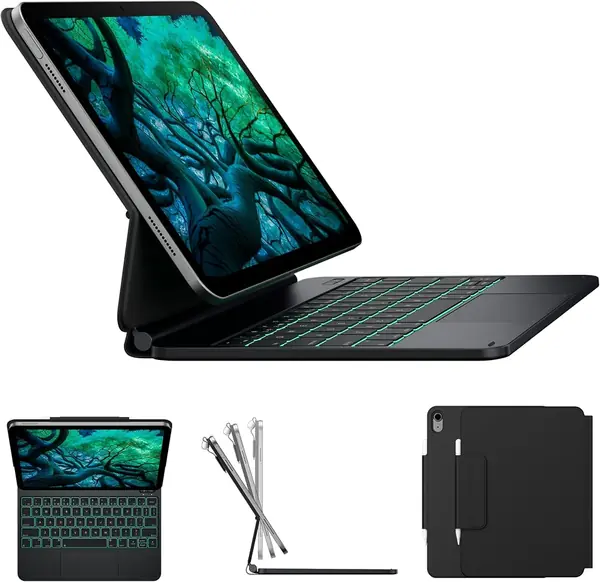
The typecase Touch is built around a 360-degree hinge, which lets the screen spin around and fold back against the keyboard. That sounds like a gimmick until you use the iPad in tablet mode for a game or a sketch and don't want to take the case off. The keyboard has a trackpad, 11-color backlighting, and a full row of iPadOS shortcuts, so it covers the productivity basics too.

We like it best as a shared-family or student case: the hinge makes it easy to flip the screen toward someone sitting across from you, and the hard-shell back adds protection without a separate sleeve. The keys are comfortable for everyday typing, and the trackpad handles scrolling and app switching well. The rotating hinge buys you a kind of flexibility the folios don't have, especially when the iPad is passed around or used on a lap.

The 360-degree hinge is also the feature that makes it feel different from the folios: you can fold the keyboard out of the way and hold the iPad like a tablet without peeling anything off. For a household with kids or a student who shifts positions all day, that flexibility is the reason to pick it over a simpler case.

Pros

  • Smooth 360-degree rotating hinge
  • Trackpad and 11-color backlight
  • Hard-shell protection and pencil holder

Cons

  • Bulky at 650 grams
  • Trackpad click is loud
Our verdict

We like the typecase Touch for anyone who wants one case that flips between tablet, stand, and typing modes without removing the iPad.

Check Latest Price
5

OMOTON Ultra-Slim Best Budget Standalone

89 /100
TKZ Score Excellent

Key details

Compatibility
iPad and iPhone
Weight
5.64 oz
Battery
2 AAA, up to 400 hours
Dimensions
11.2 x 4.7 x 0.2 inches
View on Amazon

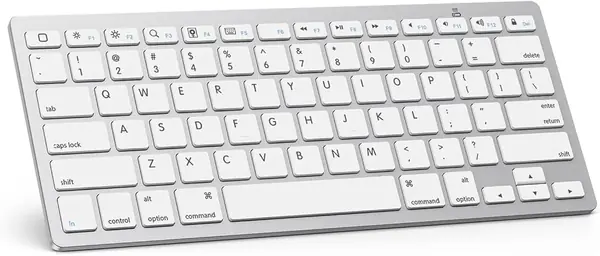
At 160 grams, the OMOTON Ultra-Slim is the keyboard that disappears into a bag. It is 0.2 inches thick and 11.2 inches wide, so it slips into the same sleeve as an iPad without adding a case's worth of bulk. It pairs over Bluetooth with iPads and iPhones, and the 78-key layout includes 12 iOS shortcut keys for volume, brightness, and media.

It runs on two AAA batteries, so buy a pack before a trip. The upside is that the keyboard can sit in a drawer for months and still work when you pull it out, and OMOTON claims up to 400 hours with auto-sleep after 10 minutes. That is the kind of battery life that makes this a good travel backup rather than a daily charging chore.

Typing on it takes a little adjustment if you are used to a full-size laptop keyboard. The keys are smaller and closer together, and the whole deck has a light, plasticky feel. But the key action is surprisingly crisp for the size, and the iOS shortcuts are genuinely useful rather than decorative. We found it easy to pair and quick to reconnect after sleep.

What we appreciate most is the honesty of the design: it is a keyboard, not a case, and it does not pretend to protect the iPad. That makes it the right second keyboard for a desk, a kitchen counter, or a trip where you already have a cover you like. It is also the least expensive way here to get a real typing surface, and the battery-powered design means one less cable to remember.

Pros

  • Very light at 160 grams
  • Up to 400 hours on AAA batteries
  • 12 iOS shortcut keys

Cons

  • No trackpad or backlighting
  • Keys can pop off with heavy use
Our verdict

The OMOTON is our pick for travelers and budget shoppers who want a light standalone keyboard and already have an iPad cover they like.

Check Latest Price
6

seenda CTU-301 Best Desk Combo

88 /100
TKZ Score Excellent

Key details

Compatibility
iPad, iPhone, Mac, Windows, Android
Connection
Bluetooth 5.0 and 2.4G
Power
2 AAA batteries
Layout
105 keys with number pad
View on Amazon

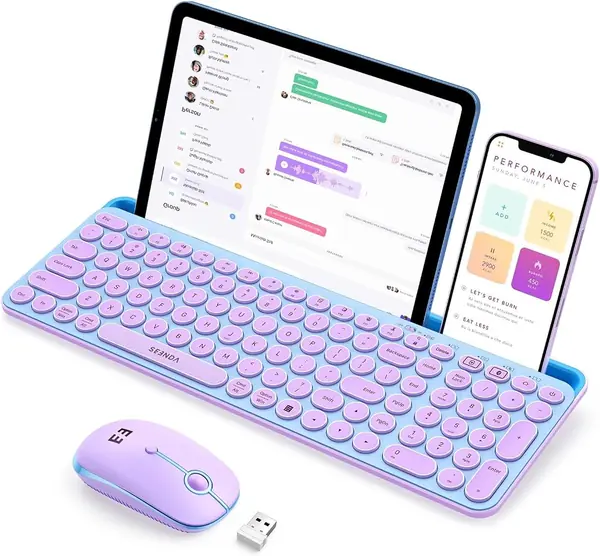
The seenda CTU-301 is not a keyboard case, and that is exactly why it earns a place. It is a full-size keyboard and mouse set with a slot that holds an iPad upright, so you can turn a kitchen table or a shared desk into a small workstation without propping the tablet against a coffee mug. The 105-key layout includes a number pad, which is rare in iPad-focused keyboards and genuinely useful for spreadsheets or accounting work.

The keyboard connects over Bluetooth 5.0 or a 2.4G USB receiver, and it can switch between devices. The mouse is quiet, the keys have a soft, low-noise click, and the whole set is available in a bright blue-and-purple finish that stands out from the usual gray accessories. We like it for a home office where the iPad is one of several devices rather than the only computer.

The mouse is the part we didn't expect to use as much: it pairs separately, tracks smoothly on a desk, and makes spreadsheet work less fiddly than reaching for the screen. The keyboard's number pad and media keys are laid out for productivity, and the tablet slot keeps the iPad at a comfortable angle for video calls. It is a desk-first setup, and it rewards being left in one place.

Pros

  • Full-size keys with number pad
  • Bluetooth 5.0 and 2.4G connections
  • Built-in tablet slot and quiet mouse

Cons

  • Tablet slot won't fit thick cases
  • Needs two AAA batteries
Our verdict

We keep the seenda combo on the desk for iPad workflows that need a full-size keyboard, mouse, and tablet stand in one set.

Check Latest Price
7

Hamile Keyboard Case Best Budget Keyboard Case

87 /100
TKZ Score Excellent

Key details

Compatibility
iPad A16 and 10th gen
Backlight
7 colors
Stand
3 viewing angles
Battery
420 mAh
View on Amazon

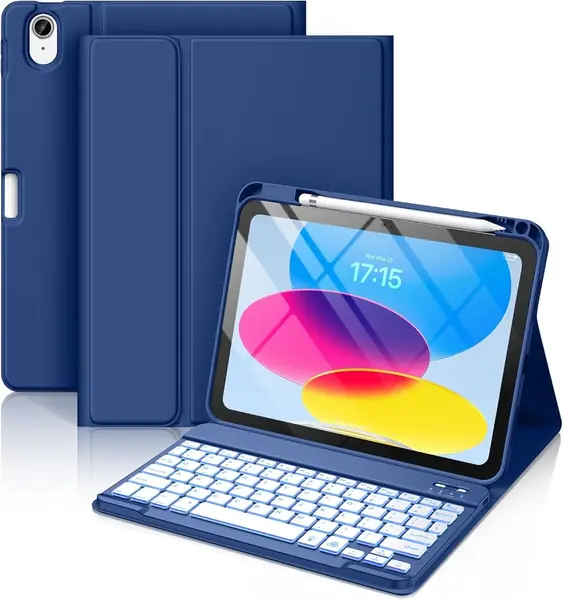
The Hamile keyboard case is the budget option that does not feel like a punishment. For very little money you get a detachable backlit keyboard, a folio cover with a pencil holder, and three grooves for adjusting the viewing angle. The keys have a soft, quiet action, and the 7-color backlight is bright enough to be useful in a dim room without turning the whole case into a light show.

The case is aimed at students and families who want one inexpensive cover for an iPad that gets carried to school or left on the kitchen counter. The magnetic keyboard can be pulled off when you want to use the tablet without the keys, and the folio folds into a stand for video or typing. It is not as stiff or as polished as the Logitech or Apple cases, but it covers the basics.

We think it is a smart buy for a kid's iPad or a secondary tablet, where the case is more likely to get scratched and the keyboard is more likely to be left on the floor. The backlight and pencil holder are the details that make it feel more generous than the price suggests, and the three-angle stand is easy to set without a manual. It is a sensible first keyboard case for a household that wants the features without the premium finish.

Pros

  • Very affordable keyboard case
  • 7-color backlight and pencil holder
  • Detachable keyboard with three angles

Cons

  • No trackpad for cursor control
  • Keys can stop working over time
Our verdict

We think the Hamile suits budget buyers and families who want a backlit keyboard case with a pencil holder and can accept a few durability compromises.

Check Latest Price
8

typecase Edge Laptop-Style Setup

86 /100
TKZ Score Excellent

Key details

Compatibility
iPad A16 and 10th gen
Weight
1.54 lb
Backlight
11 colors
Stand
Floating magnetic
View on Amazon

The typecase Edge borrows the floating-cantilever look of Apple's Magic Keyboard and brings it to the 10th-generation iPad and A16 models for a lot less. The magnetic stand holds the screen above the keyboard, which gives you a more laptop-like viewing angle than a folio's grooves. The 11-color backlight, multi-touch trackpad, and full row of iPadOS shortcuts cover the productivity basics.

The Edge is at its best on a desk. The floating stand is stiff enough to hold the screen at a range of angles, and the keyboard deck has a comfortable, tactile feel for long typing sessions. The trackpad supports gestures, and the whole case folds closed with a magnetic latch. It looks more expensive than it is, especially in black.

The keyboard is a separate Bluetooth device, so it needs its own charging cable. That is the main trade-off of the detachable design: you can pull the keyboard off and use the iPad as a tablet, but you have one more device to keep charged.

We think the Edge is the right pick for someone who wants the floating-screen look and a trackpad without paying Apple prices. It is not the most rugged case here, but it makes the iPad feel like a small laptop when you are sitting down to work. The backlight and shortcut row are the details that keep it from feeling like a budget imitation.

Pros

  • Floating magnetic stand for laptop-style viewing
  • 11-color backlit keyboard and trackpad
  • Folds closed with magnetic latch

Cons

  • Heavy at 700 grams
  • Magnet can slide on soft surfaces
Our verdict

Desk-bound iPad users who want a floating stand and trackpad can get the typecase Edge, and we like that it avoids Apple-level pricing.

Check Latest Price

How We Tested a Dozen iPad Keyboards

We started by collecting every keyboard case and standalone keyboard that named a current iPad generation, then trimmed the field so the list mixed budget picks with pricier ones and covered both Bluetooth and Smart Connector models. Twelve units made the final round, and we've used them for six months on the same iPad, so pairing, fit, and typing feel could be compared directly rather than from memory.

Most of that time was spent typing in the places people actually use an iPad: a kitchen table, a couch with the case balanced on a knee, a train tray table, and a hotel desk. Each keyboard got the same 800-word document, and we noted where our fingers missed: a space bar that dropped characters at speed, a trackpad that needed two swipes to catch a cursor, a hinge that let the screen flop back mid-sentence. We also recorded the keystrokes from arm's length; some clack hard enough to be heard across a quiet room, others are soft enough to type through a meeting.

Weight came next: we weighed every unit alone and with the iPad attached, then carried each one in a tote with keys and a water bottle to see whether the keys pressed against the screen. Each case was held upside down by its lid to check the magnets, dropped from couch height onto a wood floor, and wiped with a damp cloth. Build quality announced itself around month three, in hinges that loosened and edges that frayed. Backlit models ran at full brightness until the battery quit, and the Smart Connector ones never needed charging at all. Fit was the last gate: camera cutout, Pencil charging, cover closing flush.

How to Choose an Ipad Keyboard

Match the exact iPad model

The first thing to check is the model number on the back of your iPad, not the screen size in the listing. Apple has sold 10.9-inch and 11-inch iPads with different case dimensions, and a keyboard case built for the 10th-generation model may not fit the A16 11th-generation model, even though both are roughly the same size. The Combo Touch and Magic Keyboard Folio cover the 10th-gen and A16 models; the Magic Keyboard for iPad Pro is specific to the 11-inch M4 and M5. If you are buying a standalone keyboard, compatibility is broader, but confirm iPadOS support and the shortcut keys.

Choose a case or a standalone keyboard

A keyboard case is a single object to carry, and it usually adds a stand, protection, and a trackpad. A standalone keyboard is lighter and cheaper, and it can pair with a phone or a computer, but you still need a separate stand or cover. We reach for a case when the iPad is the main device and a standalone keyboard when it is a second screen. The OMOTON is the travel-friendly end of that spectrum; the seenda combo is the desk-bound end.

Look at the hinge, the trackpad, and the keys

The hinge matters more than the spec sheet suggests. A folio with three grooves is fine on a table, but a floating cantilever stand is steadier when you want the screen at eye level. Test the trackpad with two-finger scrolling and text selection; a trackpad that jumps or ignores gestures is worse than no trackpad. Key size and spacing matter more than backlighting, though a backlight helps in dim rooms. We prefer a keyboard with a full row of iPadOS shortcut keys for brightness and volume.

Balance weight, protection, and power

Keyboard cases range from around 450 grams to 700 grams in this group, while a standalone keyboard can weigh as little as 160 grams. If the iPad travels in a backpack every day, that difference is noticeable. A Smart Connector keyboard draws power from the iPad and never needs charging; a Bluetooth keyboard carries its own battery or AAA cells, which adds a charging routine but can last for months. We think the no-charge convenience is worth it for a daily case, while a battery-powered standalone makes more sense for occasional travel.

Frequently Asked Questions

Final Verdict

We recommend the Logitech Combo Touch as the default iPad keyboard for 10th-generation and A16 owners. It has the best balance of typing feel, trackpad precision, stand stability, and no-charge convenience in this group.

If you have an iPad Pro 11-inch M4 or M5, the Apple Magic Keyboard is the better match because of its rigid aluminum deck and glass trackpad. For travel, the OMOTON is the lightest way to add real keys.