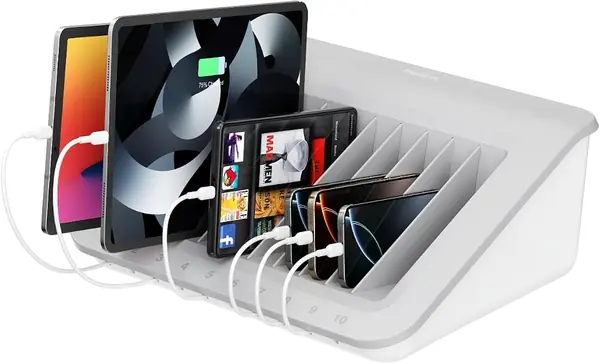
Best iPad Charging Stations of 2026

In my house, the outlet by the kitchen counter becomes a parking lot around 8 p.m. — two iPads, a couple of phones, headphones, and whatever e-reader got left in the car. A good charging station doesn't shrink that pile, but it does turn it into one tidy block with a single cord running to the wall. What it really fixes is the search: no more hunting for a free adapter while a tablet sits at 4 percent.

Over the past six months, my team and I have lived with 12 of these stations, from six-port blocks that fit on a nightstand to 24-port units built for a shared workroom. The pattern held up across all of them: total wattage matters more than port count, and the ports you actually reach for are the USB-C ones.

Here's the thing first-time buyers miss. The big number on the box is the total for every port combined, not per port, so a wide station with a modest total will split that power and leave a nearly dead iPad crawling. Then check what's in the box — plenty of these ship with no cables, or with USB-A cords when your iPad wants USB-C. What follows is what survived our counters, and who each one suits.

The Best iPad Charging Stations

1

Zobirez 10-Port Charging Station Best Overall
90 /100
TKZ Score Outstanding

Key details

Ports
10 (5 USB-C, 5 USB-A)
Included Cables
10
Total Output
750W
USB-C Output
120W each
View on Amazon

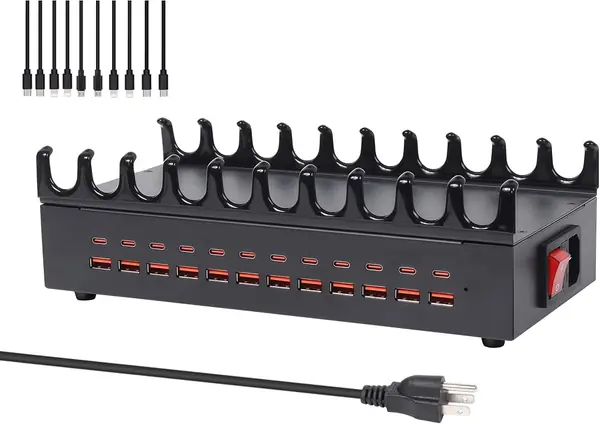
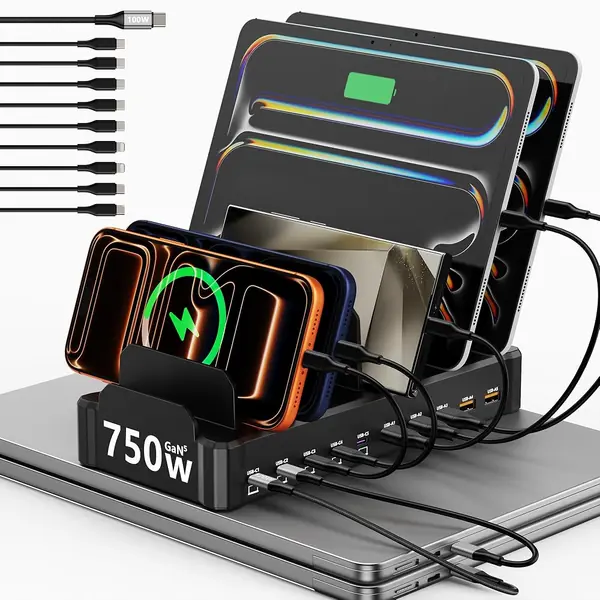
The first thing we noticed about the Zobirez 10-Port Charging Station is the slot design. Instead of removable dividers that can pop loose when a tablet leans back, it uses a one-piece slotted organizer. That matters more than it sounds: an iPad in a folio case sits upright, and there are no loose fins to lose or reseat every time someone grabs a device. The black body is plain, but it looks purposeful on a desk rather than like a plastic toy.

What sold us is the power. All five USB-C ports are rated up to 120W each and the five USB-A ports up to 30W each, for 750W total. We tested it with an iPad, a couple of phones, and a laptop in the mix, and the station had more headroom than any other ten-port pick here. The ten included cables—mostly short, plus one longer 100W USB-C to USB-C—meant we could set up a full row without raiding a cable drawer. That combination is why this is the one we recommend first for a mixed household.

The fixed slots are the trade-off. They are sturdy, but they do not open wider for a chunky kid-proof case the way removable dividers can. For a slim folio or a bare tablet, that is no issue. For a household where tablets wear thick bumpers, check the fit before you commit. Everyone else gets the best balance here of fast charging, sturdy organization, and enough ports to keep the whole shelf happy.

Pros

  • Five high-power USB-C ports
  • One-piece slots hold tablets upright
  • Ten cables included

Cons

No notable drawbacks to flag.

Our verdict

We recommend the Zobirez for most households because its five high-power USB-C ports and one-piece slots handle iPads, phones, and even a laptop without the usual divider fuss.
Check Latest Price
2

Lcssio 8-Port Charging Station Best for Small Households

89 /100
TKZ Score Excellent

Key details

Ports
8 (5 USB-C, 3 USB-A)
Included Cables
6
Total Output
300W
Fast Ports
Dual 65W
View on Amazon

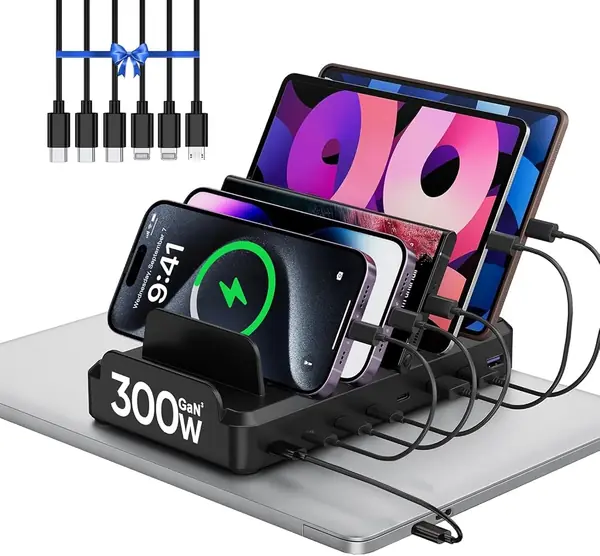
A charging station can solve the cable mess and still take over the counter. The Lcssio 8-Port Charging Station is the one we recommend when space is tight: it is compact, the slots are a single molded piece, and the top two USB-C ports are rated for 65W each. We set it up with an iPad and a phone on the fast ports and a couple of smaller devices on the rest, and it felt like a dedicated charging spot rather than a plastic rack.

Eight ports is the right number for a small household. You get five USB-C and three USB-A, 300W total, and six included cables. We appreciated the one-piece body because there are no dividers to lose, and the anti-slip pads keep it from sliding when someone pulls a cable. The 65W ports are the useful part: they are enough to charge a tablet or a small laptop quickly, while the USB-A ports handle earbuds and older phones.

The limit is scale. With all eight ports full, the 300W total is shared, so a row of iPads and a laptop will charge more slowly than they do on the Zobirez. For two or three tablets plus phones, this is the neater choice; for a big family, go up to a larger station.

Pros

  • Dual 65W USB-C ports
  • Compact one-piece body
  • Six cables included

Cons

  • Fixed slots may be tight for very thick cases
Our verdict

We keep this one on the counter when space is tight: eight ports, dual 65W USB-C, and sturdy slots make it the better fit for a small household.

Check Latest Price
3

Dywcdnice 20-Port Charging Station Best for Large Families

88 /100
TKZ Score Excellent

Key details

Ports
20 (10 USB-C, 10 USB-A)
Included Cables
10
Total Output
270W
Dividers
11 removable
View on Amazon

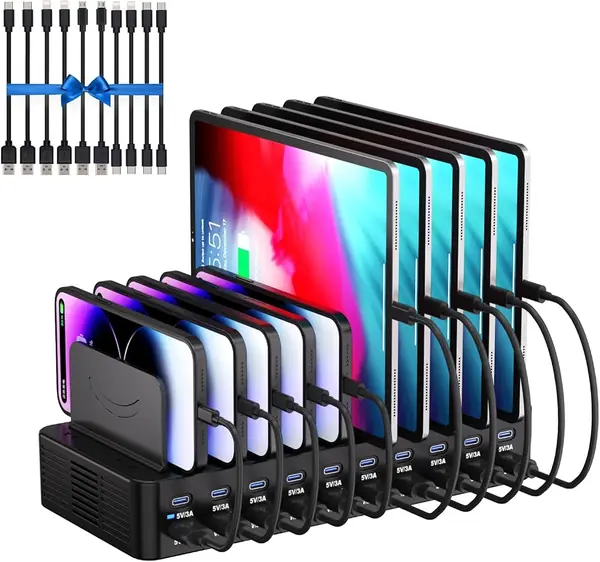
Twenty ports is a lot of charging. The Dywcdnice 20-Port Charging Station is aimed at the household where everyone has a phone, a tablet, and a pair of earbuds, and the cables have taken over a drawer. It includes ten mixed cables and eleven removable dividers, so you can set the slots around an iPad in a case or a stack of smaller devices. The black plastic body is basic, but the layout is sensible.

We like the port mix: ten USB-C and ten USB-A, with 270W total. In our testing, the 20 ports were more about organization than speed: it handled a row of phones and a couple of iPads, and the ten cables are a genuine convenience. The dividers are the flexible part. They let you create a wide bay for a tablet, and you can rearrange them as your device mix changes.

The layout is best for a family that wants one central spot for phones and tablets, not a laptop dock. If you need laptop-class power, the Zobirez or Moezuti is the better fit. If your tablets wear thin cases and you set the dividers deliberately, the Dywcdnice earns its counter space.

Pros

  • Twenty ports with ten USB-C
  • Ten cables included
  • Removable dividers adjust for tablets

Cons

  • Removable dividers can loosen under tablet weight
  • 270W total is modest for 20 ports
Our verdict

For a big family with a drawer full of devices, the Dywcdnice's 20 ports and 10 cables are genuinely useful, as long as you set the removable dividers with care.

Check Latest Price
4

Yoodarmx 24-Port Charging Station Best for Classrooms and Offices

87 /100
TKZ Score Excellent

Key details

Ports
24 (12 USB-C, 12 USB-A)
Included Cables
10
Total Output
400W
Slots
One-piece iron
View on Amazon

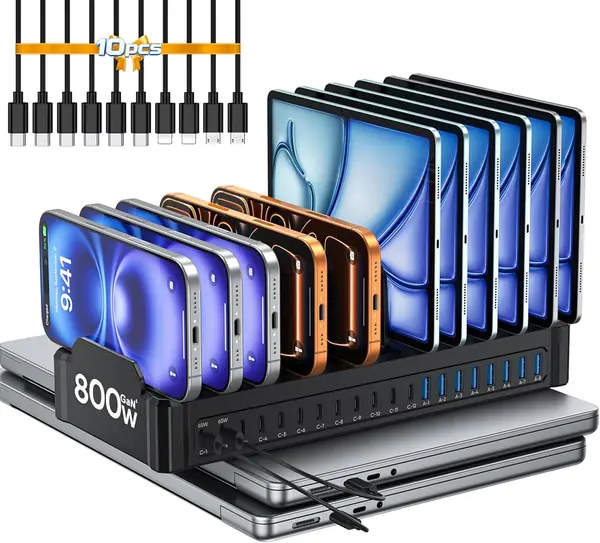
The Yoodarmx 24-Port Charging Station looks more like a piece of network equipment than a countertop accessory, which is exactly why it suits a classroom or a shared office. Its one-piece iron body has 24 slots, 12 USB-C and 12 USB-A, and it comes with ten cables. We tested it as a shared charging rack, and the metal body felt steadier than the plastic stations when several people were plugging in at once.

The 400W total output is the number to watch. It is plenty for a cart of tablets and phones, but a room full of Chromebooks will still need its own power plan. For iPads, the USB-C ports are the ones to use, and the upright slots keep the screens visible so you can see which device is ready. We appreciated the on/off switch and the simple black finish; this is a station that can live on a shelf without looking like a hobby project.

It is not a compact home pick. The 24 slots invite you to fill them, and a family of four will pay for capacity it does not need. Buy it for the shared room, not the bedside table.

Pros

  • Twenty-four ports with twelve USB-C
  • One-piece iron body
  • 400W total for tablets and phones

Cons

  • Only 10 cables for 24 slots
Our verdict

We recommend the Yoodarmx when several people share one charging spot; its metal 24-slot body is built for classrooms and offices, not a single bedside table.

Check Latest Price
5

Moezuti 20-Port Charging Station Best for Laptops and Tablets

86 /100
TKZ Score Excellent

Key details

Ports
20 mixed USB-C/USB-A
Included Cables
10
Slots
One-piece
Top USB-C Output
Dual 65W
View on Amazon

The dual 65W USB-C ports are what set the Moezuti 20-Port Charging Station apart. Most multi-device stations treat USB-C as an afterthought; here the top two ports are rated to charge a MacBook or a large tablet at speed, and the rest of the 20 mixed ports can handle phones, earbuds, and smaller tablets. We used it as a laptop-and-iPad station on a desk, and the difference was obvious when the laptop was in the mix.

We think it's the best choice here for a tech-heavy desk. The one-piece slots are sturdy, and the ten short cables are enough to get started. The two fast ports are clearly at the top, so the devices that need the most power are not fighting over a shared USB-A bank. The station also has a clean, compact feel for a 20-port unit, which we did not expect.

The rest of the station is ordinary USB charging, which is fine for phones and accessories but not for a second laptop. Twenty ports is also more than most homes need. For a desk with one laptop, two tablets, and a pile of accessories, it is a smart buy; for a phone-only family, the Lcssio is simpler.

Pros

  • Dual 65W USB-C ports
  • Twenty mixed ports
  • Ten short cables included

Cons

  • Only two high-power USB-C ports
Our verdict

We like the Moezuti for a desk that mixes a laptop with tablets and phones, because its two 65W USB-C ports do the heavy lifting the other 18 ports cannot.

Check Latest Price
6

ELAORY 6-Port Charging Station Best Budget

85 /100
TKZ Score Excellent

Key details

Ports
6 USB-A
Included Cables
6
Total Output
50W
Dividers
Removable
View on Amazon

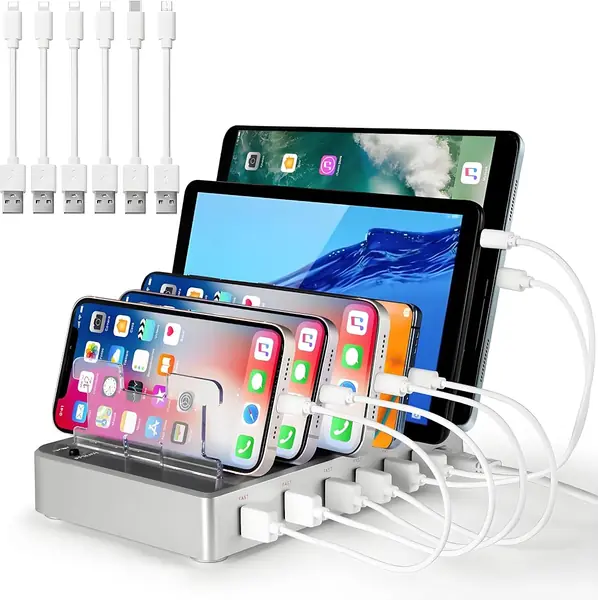
The ELAORY 6-Port Charging Station is the budget pick, and it does not pretend otherwise. Six USB-A ports, a 50W total output, six included cables, and removable dividers—this is the station you put on a kitchen counter for phones, a couple of tablets, and earbuds. It is the least expensive way here to get a dedicated charging spot with cables in the box.

We liked it for a family that does not need laptop power. The six cables include a mix for Apple and Android devices, and the stand holds a tablet upright at a readable angle. The 50W total is the catch: with six devices plugged in, an iPad will charge more slowly than it does on the USB-C picks. For overnight charging, that is less of an issue.

The dividers are removable and not especially rigid; if you are mostly charging phones, that is fine. If an iPad in a heavy case is going to be shoved in every night, spend more for a one-piece slot design. The ELAORY is a good first station for a small family, not the last word in fast charging.

Pros

  • Six cables included
  • Removable dividers adjust for tablets
  • Lowest-cost station here

Cons

  • No USB-C ports
Our verdict

The ELAORY is the one we point to when the budget is tight and the devices are mostly phones and a couple of tablets, not a house full of laptops.

Check Latest Price
7

Unitek 10-Port Charging Station Best for USB-A Device Collections

84 /100
TKZ Score Excellent

Key details

Ports
10 USB-A
Included Cables
None
Total Output
60W
Dividers
11 removable
View on Amazon

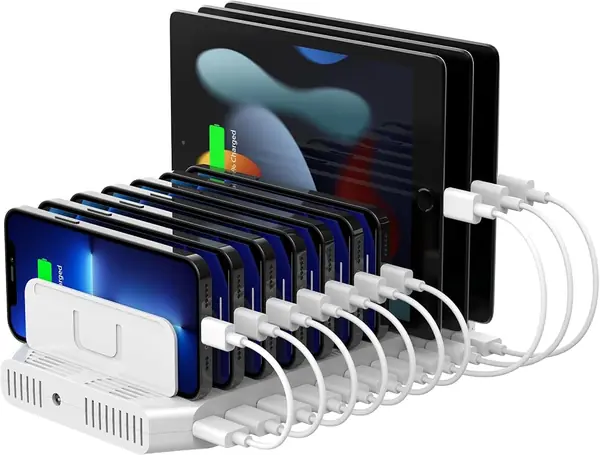
The Unitek 10-Port Charging Station is a ten-port USB-A rack with eleven detachable dividers, a 60W total output, and a plain white body. It is the kind of station that works best when you already own a drawer of cables: there are no charging cables in the box, so you supply the lengths and connectors that match your devices.

We recommend it for a shared charging shelf where the devices are mostly phones, e-readers, and older tablets. The 10 ports are easy to label and the removable dividers let you set wider bays for a tablet in a case. The 60W total is modest, so this is not the station for a row of iPads that need to charge quickly. It is a place to park devices overnight and keep the cables contained.

The station is USB-A only, so newer USB-C tablets will need their own cable and will charge at standard USB-A speed. Buy it for simple, high-count organization, not for fast charging. It is also light enough to move between a desk and a shelf when the room changes.

Pros

  • Ten USB-A ports for shared charging
  • Removable dividers set wider bays
  • Simple, compact USB-A setup

Cons

  • Dividers do not stay seated firmly
Our verdict

We recommend the Unitek only if you already own the cables and want a simple ten-port USB-A rack for shared charging, not a fast-charging hub.

Check Latest Price
8

Belkin 10-Device Charging Station Best for Classroom Storage

83 /100
TKZ Score Excellent

Key details

Outlets
10 AC
Dimensions
18 x 14 x 7 in
Device Slots
Wide-angle
Surge Protection
Built-in
View on Amazon

The Belkin 10-Device Charging Station is a storage rack with ten AC outlets and built-in surge protection, designed for a classroom or a device cart where tablets and laptops arrive with their own chargers. The wide-angle slots hold a mix of devices, and the grey body is built to be moved between rooms or mounted on a cart. That makes it a different purchase from the compact countertop stations here.

We recommend it when the job is storing and charging a set of school devices, not when you want to plug in a phone and an iPad on the kitchen counter. Ten AC outlets mean every device keeps its own charger, which is simpler for a school that already owns them. The surge protection is a real plus in a room where devices are plugged in and out all day. The 18-by-14-inch footprint and 9.2-pound weight mean it needs a dedicated surface.

For a classroom with a few iPads and Chromebooks, it is a practical organizer. For a home with a single tablet, it is more rack than you need. The wide slots are the draw; the AC-outlet design is the boundary.

Pros

  • Ten AC outlets with surge protection
  • Wide slots hold tablets and laptops
  • Built for classroom carts and labs

Cons

  • No USB ports, so bring your own chargers
  • Cord basin fills quickly with laptop chargers
Our verdict

The Belkin earns its place in a classroom or device cart, where ten AC outlets and wide slots matter more than a compact footprint or USB ports.

Check Latest Price

How We Tested iPad Charging Stations

We started by pulling every multi-port station we could find that named tablets and iPads as intended devices, then filtered by port mix (how many USB-C versus USB-A), stated per-port wattage, whether cables came in the box, and how much counter space the footprint ate. That left 12 units, which moved into our homes for six months — kitchen counters, nightstands, a home office desk, and, for the biggest ones, a shared workroom where six people plug in without asking.

Charging speed was measured rather than eyeballed. We drained a 10.9-inch iPad to 10 percent, plugged it into the highest-wattage USB-C port, and logged the battery percentage at the 30-minute mark and again at full. Then we plugged in everything else at once — phones, a laptop, earbuds — and repeated the run to see whether a station held its speed or quietly divided it among whoever showed up.

Organization got tested one-handed, the way it happens at bedtime: we slid iPads in and out with folio cases still on, to see whether the adjustable dividers kept their spacing or walked out of position, and whether the whole stand tipped when a tablet went in. We counted the cables in each box against what we actually needed, and noted how many ports sat unused because no matching cord came with the unit.

Durability was the least gentle part. Cables got pulled sideways at the connector instead of straight out, stations moved between rooms every week, and a few took knocks off the counter edge. Six months in, we checked whether the plugs had loosened and tallied what each station cost per usable port.

How to Choose an Ipad Charging Station

Start With the Port Mix

A high port count can still be a poor iPad station if those ports are all USB-A. USB-C Power Delivery is the faster route for a modern iPad, and it is the port we look for first. Count the USB-C devices in your house—iPads, recent phones, a Switch, a laptop—and make sure the station has enough USB-C ports for the ones you charge together.

USB-A is fine for earbuds, older phones, and overnight charging. The Zobirez's five USB-C ports are generous; a six-port budget station with only USB-A is a different tool. Match the mix to the devices you actually plug in, not to the biggest number on the box.

Check Wattage Against the Load

Wattage is not a single score. A station's total output is shared across every device, and per-port ratings tell you what one device can get. A 24-port, 400W station sounds powerful until you divide it across a full cart; a five-port, 100W station can be fine for overnight phones but slow for iPads.

Look for at least one high-output USB-C port for the iPad and enough total headroom for the rest. The Lcssio's dual 65W ports and 300W total are a more useful balance for a small household than a huge port count with thin power.

Look at the Slots, Not Just the Stand

The slot design decides whether the station stays tidy. Removable dividers let you set a wide bay for an iPad in a case, but they can pop loose or break under a heavy tablet. One-piece slots are sturdier and simpler, but they are less forgiving of very thick cases.

If kids will be dropping tablets into the station, favor one-piece. If you need to fit a chunky protective case, check the slot width before buying. The Dywcdnice's removable dividers are flexible; the Zobirez and Lcssio are the sturdier choice.

Decide Whether Cables Are Included

Cables are part of the cost even when they are not part of the box. A station with ten short cables is ready to use; a station with none can be cheaper if you already own the right lengths. Short cables keep the counter neat, but they can be too short for a device on the far edge.

Check the mix of USB-C, Lightning, and micro-USB, and count how many of your devices need each. The Unitek includes no cables at all; the Zobirez and Moezuti include ten.

Plan the Room and the Load

A station belongs where devices actually land: a kitchen counter, a desk, a classroom cart. Measure the footprint before you buy, especially for the Belkin, which is 18 by 14 inches and weighs over nine pounds. Shared stations need a switch, stable slots, and enough ports for the people who will use them.

Keep the station ventilated and do not exceed its rated output. If you need to charge laptops with their own chargers, an AC station like the Belkin makes more sense than a USB hub. For a bedside table, four to six ports are usually enough.

Frequently Asked Questions

Final Verdict

For most homes, we recommend the Zobirez 10-Port Charging Station. It has the best balance here of iPad-friendly USB-C power, sturdy one-piece slots, and enough ports for a family without turning the counter into a server rack. The ten included cables make it ready on day one.

If your space is tighter, the Lcssio is the smaller, still-fast alternative. If you are equipping a classroom or a device cart, the Yoodarmx and Belkin solve different problems: the Yoodarmx for USB charging at scale, the Belkin for ten AC outlets and stored laptops.