Best E-Ink Tablets for Note Taking of 2026

An e-ink tablet is the purchase you talk yourself out of three times before you finally make it — usually the week another paper notebook fills up and the page you need is nowhere. The promise: one slim slab holding every meeting note, marked-up PDF, and book, on a screen that doesn't glow like a phone or interrupt you. When it works, it clears the half-used notebooks off your desk.

My team and I have spent the past six months carrying eight of them to meetings, into coffee shops, and to bed. The differences that matter aren't on the box — they're how far the ink trails your pen, whether fine print is sharp enough to read, and whether the battery has life left on a Thursday night.

Two things I'd tell a first-time buyer. Color e-ink is genuinely useful for highlighting, but it softens the contrast of black text, so it's a trade more than an upgrade. And the AI features — summarize this meeting, turn this page into text — live or die on your penmanship. The picks below sort by what you'll do with one.

The Best E-Ink Tablets for Note Taking

1

reMarkable Paper Pure Best Overall
86 /100
TKZ Score Excellent

Key details

Display
10.3-inch monochrome E Ink
Weight
12.7 oz
Included Pen
Marker Plus
Ink Latency
21 ms
View on Amazon

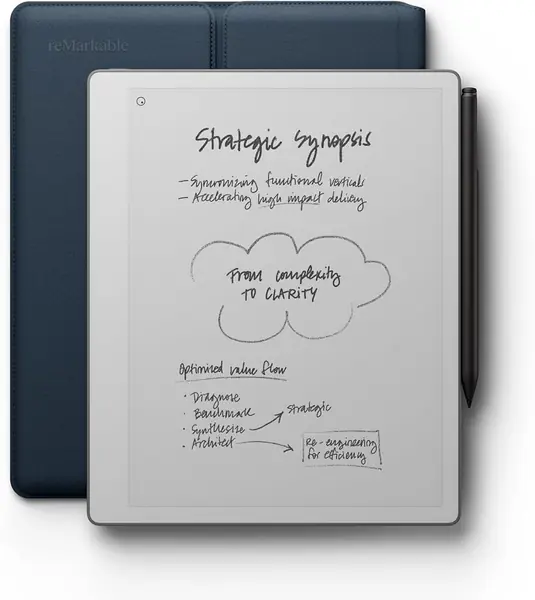
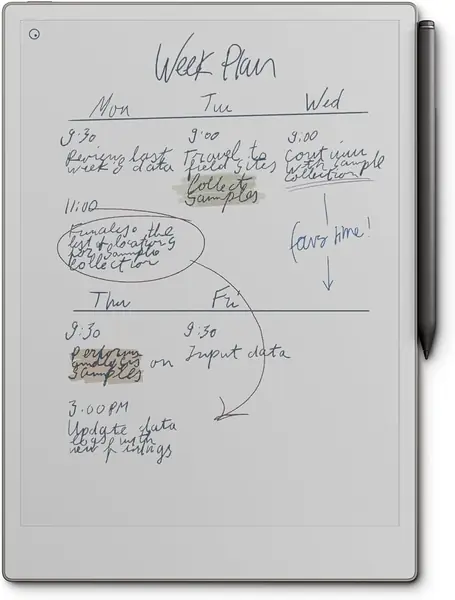
The 21 ms ink latency is the first thing we noticed, and it is the right number to lead with: the Paper Pure is built to make handwriting feel immediate, not to run apps. Its 10.3-inch monochrome screen is the third-generation panel, whiter and higher contrast than earlier versions, and the included Marker Plus gives the pen a paper-like friction. We think the single-purpose design is the point. With no browser and no notifications competing for attention, meeting notes and PDF markup stay in front of you.

At 360 g, the tablet is light enough to hold in one hand while you write standing up, and the 10.3-inch canvas has room for a full page, a document margin, or a meeting template. We used the templates for project notes and liked that folders and tags keep a long list of notebooks from turning into a pile. Handwriting conversion is useful for turning a page of notes into text, though the original ink is usually more expressive.

The ownership catch is the subscription. Basic writing works without it, but search and some sync tools sit behind reMarkable's paid plan. If you want that organizing layer, budget for it; if you mostly write and file by hand, the core experience is complete. What the Paper Pure does best is make daily note taking feel quiet, direct, and paper-like.

Pros

  • 21 ms ink feels immediate
  • 10.3-inch paper-like writing surface
  • Marker Plus and folio included

Cons

  • No front light for dark rooms
Our verdict

For focused handwritten notes, the Paper Pure is our pick: 21 ms ink, a paper-like 10.3-inch screen, and the Marker Plus included.
Check Latest Price
2

Kindle Scribe Colorsoft Best for Reading and Color

85 /100
TKZ Score Excellent

Key details

Display
11-inch color E Ink
Storage
64 GB
Weight
14.1 oz
Front Light
Built-in
View on Amazon

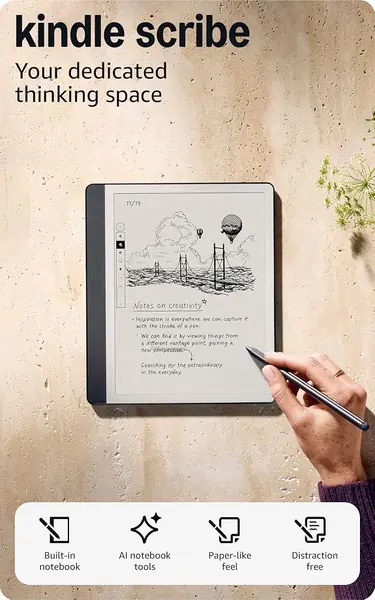
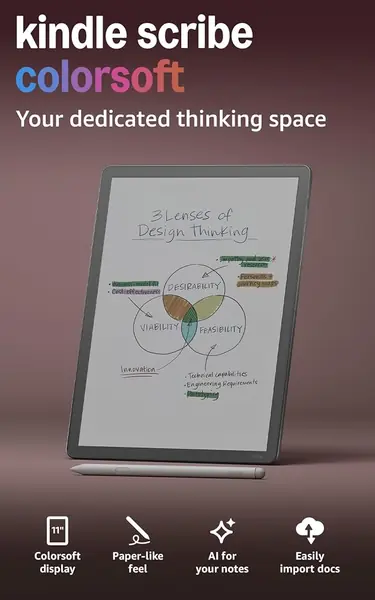
The 11-inch Colorsoft display is the reason to pick this Kindle over a black-and-white Scribe: color highlights, color book covers, and a front light that makes notes and reading possible in bed without a lamp. The included pen never needs charging, and the 5.4 mm, 400 g body is comfortable for a long session. We think the color layer is best used for highlighting and annotating, not for glossy photos.

Where it earns its place is as a reader that also writes. Kindle books, PDFs, and imported documents all live in the same library, and the notebook tools include AI summaries and handwriting conversion. We found the writing surface smooth and responsive, and the front light is a genuine advantage if you read at night. The 11-inch canvas is generous for margin notes and two-column PDFs.

This is not the purest writing tablet in the group. The note tools are simpler than reMarkable's, and the color markup is more useful for highlights than for detailed artwork. But if your day includes Kindle books and color annotations, those are trade-offs we are happy to make. The result is the more versatile of the two Kindle Scribes here.

Pros

  • 11-inch color E Ink with front light
  • Included pen never needs charging
  • Kindle library plus AI note tools

Cons

  • Color screen is darker than black-and-white
Our verdict

We like the Kindle Scribe Colorsoft for readers who want color highlights, a front light, and Kindle books alongside handwritten notes.

Check Latest Price
3

reMarkable Paper Pro Best Large Color Canvas

84 /100
TKZ Score Excellent

Key details

Display
11.8-inch color E Ink
Storage
64 GB
Weight
1.2 lb
Battery Life
2 weeks
View on Amazon

The 11.8-inch Canvas Color display is the reason to choose the Paper Pro, and we think it is the best large color canvas here: enough room for a full PDF page, a diagram, or a page of notes with color highlights. The color is not glossy or vivid like an LCD, but it is useful for marking up documents and separating ideas. If you need color and space, this is the reMarkable to get.

The Marker Plus has a built-in eraser, which makes correcting a stroke quick, and the 64 GB of storage leaves room for PDFs and notebooks. The tablet is rated for two weeks of battery, and the low-glare screen is comfortable for long reading sessions. Handwriting conversion and folders work as they do across the reMarkable line, and the larger surface makes split-screen note taking less cramped.

The color is a tool, not a toy: it is for separating ideas in a diagram or highlighting a document, not for editing photos. The bigger canvas is the point, and it changes how much you can keep in view at once. When you need that much room, the Paper Pro is the reMarkable that fits.

Pros

  • 11.8-inch color writing canvas
  • Marker Plus with built-in eraser
  • 64GB storage and two-week battery

Cons

  • Heavy at 1.2 pounds
  • Reliability can be uneven
Our verdict

We choose the Paper Pro for large color PDF markup and sketches; the 11.8-inch canvas is the roomiest here, and the color is a tool rather than a toy.

Check Latest Price
4

Penstar eNote 2 Best Value Note-Taking Bundle

83 /100
TKZ Score Excellent

Key details

Display
10.3-inch, 300 ppi
Storage
128 GB
Pressure Levels
8,192
Battery
6,500 mAh
View on Amazon

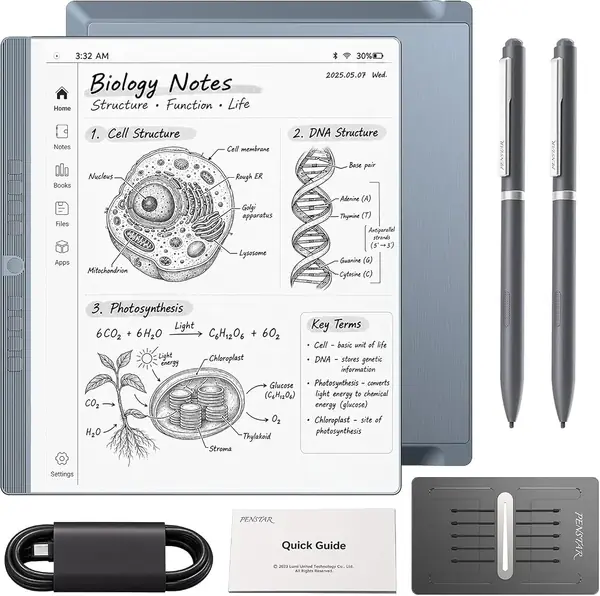
Penstar ships the eNote 2 as a full kit: two B5 pens, a leather folio, spare nibs, a charging cable, and 128 GB of storage. That is the value story, and it matters because many e-ink tablets make you buy the pen and cover separately. The 10.3-inch screen is the other draw: 300 ppi, strong white-and-black contrast, and a paper-like surface.

The pen offers 8,192 pressure levels, and the tablet includes a four-microphone array, voice-to-text, and AI meeting summaries. We found the writing experience precise and the screen easy to read for long stretches. The built-in tools are aimed at students and meeting-heavy work: record a session, turn speech into text, and keep the summary with the notes. Two pens in the box also means you have a spare if one goes missing.

Where it earns a place is as a complete note-taking kit for someone who wants the pen, folio, and storage settled in one order. The stylus-only input is a plus for left-handed writers because your palm never registers. If your priority is a bundle that covers the basics without add-on shopping, this is the one.

Pros

  • Complete kit with two pens and folio
  • 300 ppi screen with strong contrast
  • AI meeting summaries and voice-to-text

Cons

  • Menus and apps can feel slow
  • App selection is limited
Our verdict

We point students and meeting-heavy workers to the Penstar eNote 2: two pens, a folio, 128GB, and AI note tools arrive in one complete kit.

Check Latest Price
5

Like-New Kindle Scribe 32GB Best Budget Entry

82 /100
TKZ Score Excellent

Key details

Storage
32 GB
Included Pen
Premium Pen
AI Tools
Notebook summarization
Condition
Certified like-new
View on Amazon

The Like-New Kindle Scribe is the budget route into this category: Amazon certifies it to look and work like new, gives it the same limited warranty as a new device, and includes the Premium Pen and 32 GB of storage. That combination removes the biggest barrier for a student or a reader who wants handwriting without stepping up to the newest Scribe.

The writing experience is the familiar Scribe one: a pen-on-paper feel, a pen that never needs charging, AI notebook summarization, and Send to Kindle for PDFs and documents. The 32 GB capacity is generous for notebooks and a shelf of books. We like that the refurbished unit is not a stripped-down version; it is the same Scribe, just certified.

This is the sensible way to get a Kindle that writes without paying for the color model. The 32 GB capacity leaves room for a semester of notes, and the same-as-new warranty takes the risk out of buying refurbished. For straightforward notes and reading, it does the job.

Pros

  • Certified like-new with same warranty
  • Premium Pen and 32GB included
  • AI notebook summarization

Cons

  • No color display for highlights
  • Older interface can feel slow
Our verdict

We send budget-minded students and Kindle readers to the Like-New Kindle Scribe: same warranty, Premium Pen, 32GB, and AI summaries.

Check Latest Price
6

VIWOODS AiPaper Best for Crisp Monochrome Reading

81 /100
TKZ Score Excellent

Key details

Display
10.65-inch Carta 1300
Stylus
W2 Stylus Pro included
Pressure Levels
4,096
Resolution
2560 x 1920
View on Amazon

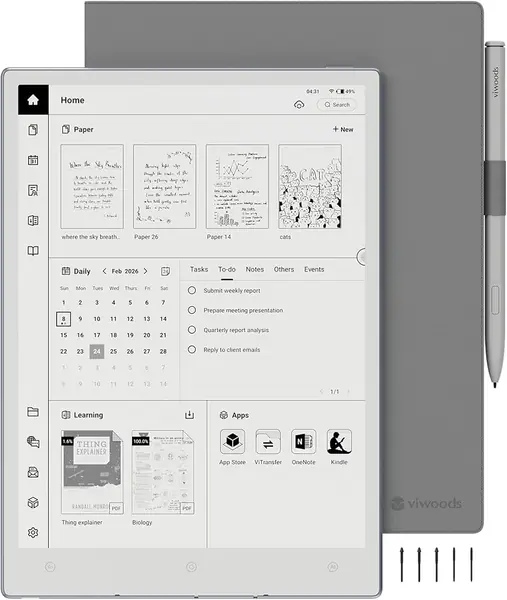
The 10.65-inch Carta 1300 display is the first thing to notice: at 2560 x 1920, text looks like a book page, and the matte surface keeps glare down. The included W2 Stylus Pro has 4,096 pressure levels and a 750-micron pen gap, and writing feels direct and controlled. We think the screen is the star, especially for long reading sessions.

This is a strong fit for long-form readers who also take notes. Android 13 gives you access to productivity apps, email, and calendar sync, and the AI tools can turn handwriting into text and help organize meeting notes. The daily planner and PDF annotation features make it more than an e-reader. It is a focused device, not an iPad replacement, but for reading and writing it is coherent.

It is happiest when you stay inside its reading and writing tools. The daily planner, PDF annotation, and app access make it more than an e-reader, but the AiPaper is not trying to be a full tablet. If you want a crisp monochrome screen and a good pen in a quieter package, it is worth a look.

Pros

  • Carta 1300 screen is crisp and easy on eyes
  • W2 Stylus Pro included with 4,096 pressure levels
  • Android 13 with productivity apps

Cons

  • Long-term software support is unclear
  • Apps can hang or feel unpolished
Our verdict

We think long-form readers who take notes should consider the VIWOODS AiPaper, where the crisp Carta 1300 screen and included W2 stylus do the work and the app layer stays secondary.

Check Latest Price
7

Musnap Ocean 7-inch Best for Compact E-Reader Notes

80 /100
TKZ Score Excellent

Key details

Display
7-inch E Ink
Storage
64 GB
Stylus
Sold separately
RAM
4 GB
View on Amazon

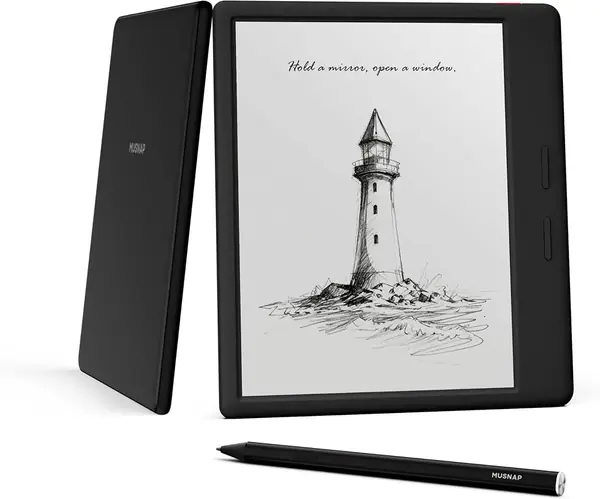
The Ocean's 7-inch E Ink screen is the smallest here, and that is the point: it slips into a jacket pocket for reading and quick notes. The page-turn buttons and Android app support make it feel like a compact reader first and a note tablet second. If you want a small E Ink device that can also capture a list, this is the shape.

The 7-inch screen is clear, the page-turn buttons are clicky, and the octa-core processor with 4 GB of RAM keeps app switching quick. Android gives you access to reading apps and a file manager, and 64 GB of storage is generous for books. We found it comfortable for one-handed reading, which is the main job.

The size that makes it pocketable also makes it cramped for PDF markup and diagrams; a 10-inch tablet is a better writing surface for anything more than a short note. It is not a full-time note-taking tablet, and it does not pretend to be.

We recommend it as a compact second device rather than a primary note tablet. The 7-inch screen and Android app support make it a good travel reader, and the pen adds a useful capture tool. The limitations are the ones you accept for a pocketable size.

Pros

  • 7-inch size slips into a bag
  • Android apps and page-turn buttons
  • 64GB storage and 4GB RAM

Cons

  • Stylus is sold separately
  • Battery life is inconsistent
Our verdict

We keep the Musnap Ocean for pocketable reading and quick handwritten lists; it is not a page-sized notebook.

Check Latest Price

How We Tested E-Ink Tablets for Note Taking

We started with about 20 e-ink writing tablets and cut anything without a pressure-sensitive pen, a front light, or a way to export notes as text or PDF. That left eight, from a 7-inch reader with handwriting to an 11.8-inch color tablet with a reading light. Each arrived with pen and folio, and we set it up like a buyer would: signed in, imported a week of PDFs, and adjusted the pen settings until the handwriting looked like ours.

Then every tablet ran the same week. A Monday staff meeting where we wrote for 45 minutes with a stopwatch going, watching how far the ink trailed the pen tip. An afternoon marking up a 30-page report with highlights and margin notes. A nightly reading session in a dark bedroom to judge the front light, and on the color models a magazine spread in daylight, to see whether the tint muddied the page. Each also rode in a tote bag for a week so we could feel the weight and check whether the pen stayed put.

Battery got its own test: charged to full, then used an hour a day for notes and reading until it hit 20 percent. For handwriting recognition we wrote the same paragraph of names, dates, and dollar figures on each and compared the text that came out; for the AI summarizers we sat through the same 20-minute meeting and read what each device made of it. We also scribbled slow diagonals and fast loops to find where the ink lost track.

Last, we lived with them — a week without charging, a software update mid-test, a pen left uncapped in a bag. What separated the good ones wasn't a spec on the box: it was whether the notes we took were notes we'd actually go back and read.

How to Choose an E Ink Tablet for Note Taking

Start With the Pen and the Writing Surface

Latency and surface texture matter more than raw pressure numbers. A responsive pen and a slightly textured screen make handwriting feel natural; a slippery glass panel can make even a high-pressure stylus feel vague. The reMarkable Paper Pure's 21 ms ink and paper-like surface are why it leads this group for pure note taking. Check whether the pen is included and whether replacement nibs are easy to find. Pressure levels are useful for sketching, but for everyday notes, feel and palm rejection matter more.

Choose a Screen Size You Will Carry

Most note takers are best served by a 10- to 11-inch screen: enough room for a page, a PDF margin, or a meeting template without feeling cramped. The 10.3-inch reMarkable Paper Pure weighs 360 g; the 11-inch Kindle Scribe Colorsoft is 400 g. A 7-inch model like the Musnap Ocean is pocketable but tight for diagrams. If you mainly write lists and read, small works; if you mark up documents, go larger.

Decide Between Front Light, Color, and Monochrome

A front light is the feature that lets you write or read in a dim room; without it, you need good overhead light. Color E Ink is useful for highlighting, diagrams, and book covers, but it usually looks softer and darker than a black-and-white panel. The Kindle Scribe Colorsoft and reMarkable Paper Pro add color; the Paper Pure stays monochrome for sharper contrast. Choose color for markup, monochrome for the crispest text.

Check Sync, Search, and Subscription Rules

Note-taking is only half the job; the other half is finding the note later. Look at how the tablet exports PDFs, converts handwriting to text, and syncs to cloud services. Some reMarkable search and sync features sit behind a subscription, while Kindle and Android-based devices tie you to their own ecosystems. Before buying, confirm the export formats you need and whether the features you rely on are free. A digital notebook that traps your notes is not saving you time.

Budget for the Pen, Folio, and Tips

The sticker price is not the whole cost. Some tablets include the pen, folio, and spare nibs; others sell the stylus separately. The Penstar eNote 2 is a complete kit, while the Musnap Ocean needs its Musnap pen before handwriting works. Replacement tips wear down, especially with daily use, so check the cost and availability. A slightly more expensive bundle can be the better value if it saves you a second order.

Frequently Asked Questions

Final Verdict

For most people who want a dedicated handwriting tablet, the reMarkable Paper Pure is the one we recommend: a 10.3-inch paper-like screen, 21 ms ink, a 360 g body, and the Marker Plus in the box. It keeps you focused on notes instead of apps. If you want a front light, color highlights, and Kindle books, choose the Kindle Scribe Colorsoft. If you want a complete kit or a lower entry point, the Penstar eNote 2 and Like-New Kindle Scribe make more sense.