Best Wireless Headphones for iPhone of 2026

Your iPhone has no headphone jack and isn't picky about Bluetooth codecs, so the logos on the box tell you less than you'd expect. What matters is whether the eartips seal, whether the pads press on your glasses, and whether the controls land under your thumb. The right pair is the one you stop noticing: it connects the moment you open the case, holds a charge through a week of calls, and quiets the train car enough for a podcast.

That's what we went looking for. My team and I spent seven months with 12 pairs — earbuds, on-ear, and over-ear models — on subway platforms, in open-plan offices, on flights, and through long afternoons at a desk. We judged sound quality first, then noise cancellation, battery life, build quality, value, and ease of use.

We also weighed what iPhone owners actually compare: spatial audio, transparency modes, and handing one pair back and forth between a phone and a laptop. Fit settled more winners than any spec sheet did. Below, the picks are grouped by where you listen — commute, gym, desk, flight.

The Best Wireless Headphones for iPhone

1

Apple AirPods Pro 3 Best Overall
93 /100
TKZ Score Outstanding

Key details

Battery Life
Up to 8 hours with ANC
Noise Control
Active Noise Cancellation
Charging Case
USB-C
Extra Features
Heart rate sensing, Live Translation
View on Amazon

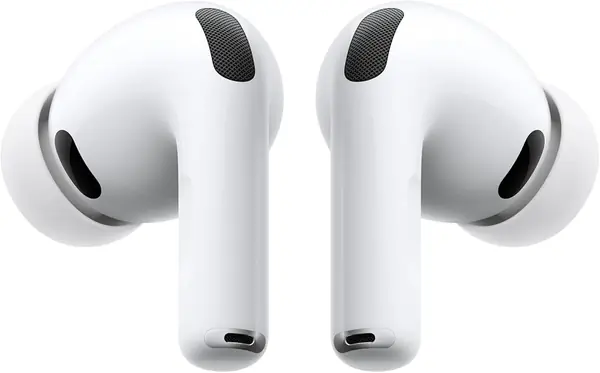
Heart-rate sensing across 50 workout types, Live Translation through Apple Intelligence, and a hearing aid feature: the AirPods Pro 3 do three things no other pair here attempts, and they run them from the iPhone already in your pocket. That's the real argument for Apple's price — not the logo on the case, but features that exist only because the buds and the phone come from the same company.

Most of our listening happened with cancellation switched on, and it's the strongest of any set here. Apple claims it removes up to twice the noise of the Pro 2, and in a kitchen with a dishwasher and a TV both running, the gap between these and a budget ANC pair is the gap between quiet and muffled. The sound is full and detailed, with bass that has weight behind it rather than just volume.

Battery runs to 8 hours with cancellation on, or up to 10 in transparency with the hearing aid feature going, and the case charges over USB-C. Live Translation is the one feature worth checking before you commit: it leans on Apple Intelligence, so it follows your iPhone's software rather than the buds themselves.

The hearing aid feature is the one we didn't expect to matter and now mention first. For anyone with mild hearing loss it turns a pair of earbuds into something closer to a hearing device, with no separate hardware to buy or charge. That, more than the sound, is the case for buying Apple's own.

Pros

  • Strongest noise cancellation in this guide
  • Heart-rate sensing, Live Translation, hearing aid mode
  • Eight hours of listening with ANC on
  • Deepest iPhone integration of any pick here

Cons

  • Sealed tips don't suit every ear
  • Priciest earbuds in this guide
Our verdict

We recommend these to anyone with an iPhone who wants one pair to cover everything — the cancellation and the Apple-only features are worth the premium.
Check Latest Price
2

Soundcore by Anker Q20i Best Value Over-Ear

92 /100
TKZ Score Outstanding

Key details

Battery Life
40 hours with ANC on
Noise Control
Hybrid active noise cancellation
Weight
8.64 oz
Wired Option
3.5 mm AUX cable included
View on Amazon

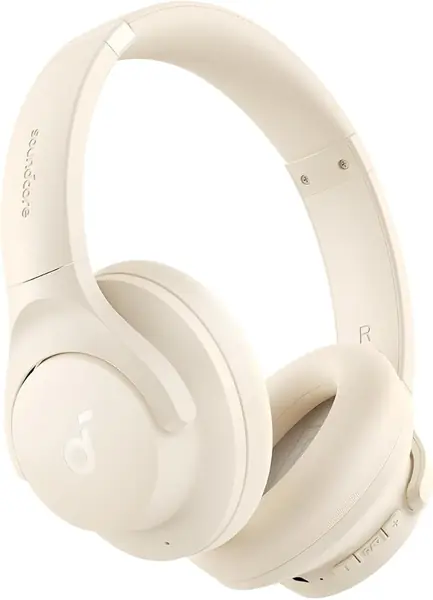
The pitch is short: 40 hours of listening with noise cancellation on, a 3.5 mm cable in the box for the day the battery finally runs out, and two devices connected at the same time. Very little else here does all three, and no other over-ear in this guide comes close on price — which is why we keep the Q20i in the value slot.

Four microphones run the hybrid cancellation, and it works where it counts: engine drone on a bus or a plane drops away to almost nothing, while conversation at the next table still gets through. The tuning is bass-forward out of the box, good for podcasts and pop and a little thick on acoustic material until you open the app and pull the low end back.

The app is where this pair earns more than its price. There are EQ presets and a custom curve, plus a switch between cancellation, normal, and transparency, and the two-device pairing is genuinely hands-off: a call on the iPhone cuts into a video playing on a laptop, then hands it back when you hang up. The earcups are roomy and the band is padded, which is what makes the 40-hour number usable.

Pros

  • Forty hours of listening with ANC on
  • Two devices connected simultaneously
  • 3.5 mm cable included for wired listening
  • App EQ plus transparency and normal modes

Cons

  • No water resistance rating
  • Runs loose on smaller heads
Our verdict

These are what we hand to anyone who wants over-ear noise cancellation without flagship money: forty hours, two devices at once, and a cable in the box.

Check Latest Price
3

Beats Studio Pro Best Premium Over-Ear

91 /100
TKZ Score Outstanding

Key details

Battery Life
Up to 40 hours
Noise Control
Active Noise Cancelling
Weight
9.2 oz
Wired Audio
USB-C lossless and 3.5 mm
View on Amazon

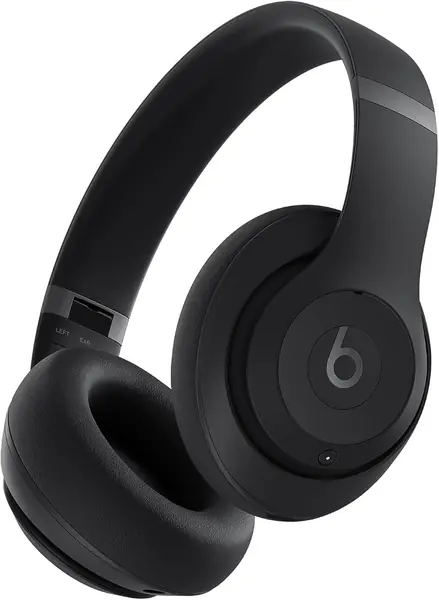
A USB-C port that carries lossless audio is the detail most shoppers skim past, and it's what makes the Studio Pro more than a good-looking pair of Beats. Plug in and the Bluetooth radio steps aside: the headphones take a digital signal straight from the iPhone and do the conversion themselves, which is as close to a wired setup as you get without carrying a second device.

Cancellation is capable rather than class-leading. It flattens engine noise and open-plan chatter, and it isn't in the same league as the AirPods Pro 3. The better trick is personalized spatial audio with head tracking — start a film on a plane and the sound stays anchored to the screen when you turn, instead of swinging around inside your skull.

What keeps us reaching for these is how little there is to manage. Forty hours means a charge roughly twice a month, one-touch pairing puts them on the iPhone before the case is fully open, and they fold flat into a bag. For travel and long workdays, that's the whole job description, done.

One-touch pairing works on Android too, which is rare for a set built this firmly around Apple. That makes the Studio Pro a decent hand-me-down when you change phones, and a sensible pick for a household that isn't all one platform.

Pros

  • USB-C lossless plus 3.5 mm wired audio
  • Forty hours of battery with ANC
  • Spatial audio with dynamic head tracking
  • One-touch pairing on Apple and Android

Cons

  • Headband and hinge are the weak point
  • Clamp runs tight on larger heads
Our verdict

An Apple user who wants over-ear isolation and a wired escape hatch should look here: USB-C lossless, forty hours, and spatial audio that tracks your head.

Check Latest Price
4

Sony WH-CH520 Best Lightweight On-Ear

90 /100
TKZ Score Outstanding

Key details

Battery Life
Up to 50 hours
Noise Control
None
Charging
USB-C quick charging
Multipoint
Two devices
View on Amazon

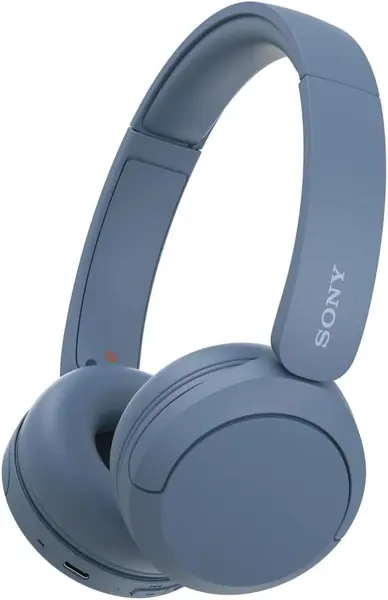
Fifty hours is not a typo. The WH-CH520 will run a week of commutes on a single charge, and a quick top-up covers the morning you forget to plug in — the kind of number that quietly removes charging from your routine. The swivel cups and adjustable band mean they slip on and off one-handed.

What they don't do is cancel noise, and that's the trade to accept. On a train the pads do some of the work, but engine rumble comes through where the Q20i shuts it out. We keep coming back to these for the office and for walking, where hearing a car behind you is a feature rather than a flaw, and multipoint pairing hops between a laptop and an iPhone without a trip to the settings menu.

Pros

  • Up to 50 hours on a single charge
  • Multipoint pairing for two devices
  • Light swivel-cup on-ear frame
  • EQ customization in the Sony app

Cons

  • On-ear pads press after a few hours
  • No water resistance rating
Our verdict

Long days away from a charger are what these are for: fifty hours a charge, light on the head, and no cancellation to drain the battery.

Check Latest Price
5

Apple AirPods 5 Best Open-Fit

89 /100
TKZ Score Excellent

Key details

Noise Control
Active Noise Cancellation
Fit
Open, no ear tips
Charging Case
USB-C
Chip
H2
View on Amazon

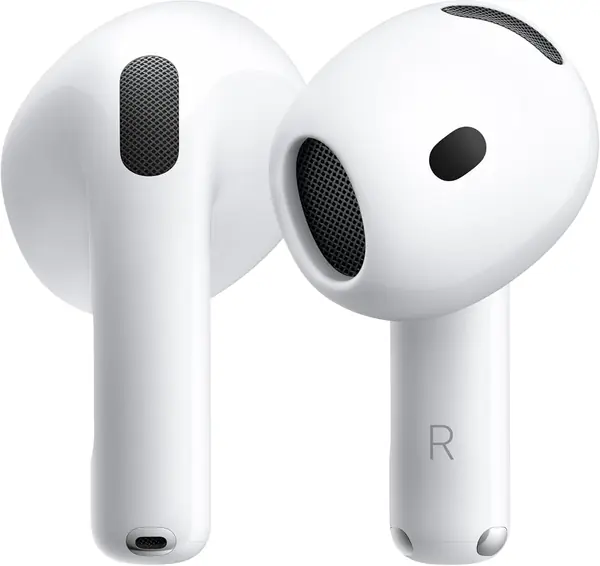
Some ears will not hold a silicone tip, and for those ears the AirPods 5 are the pair we hand over: no tip, no seal, nothing to push into a canal that doesn't want it. They rest in the bowl of the ear instead, and the cancellation still works — not as deeply as the Pro 3, but enough to take the edge off a train or an open-plan office, which is more than tip-free designs usually manage.

Everything else is present: Adaptive Audio that blends cancellation with transparency, Conversation Awareness that drops the volume when you start talking, Live Translation through Apple Intelligence, and the H2 chip doing the processing. The trade is isolation — without a seal, low frequencies get through — so a loud flight is still loud, which is the price of a bud you never have to seat.

Pros

  • No ear tips to seat or replace
  • Active noise cancellation without a seal
  • Adaptive Audio, Conversation Awareness, Live Translation
  • USB-C charging case

Cons

  • Fit varies from ear to ear
  • Too new for a long-term track record
Our verdict

If silicone tips have never stayed put in your ears, these are the iPhone pair we recommend: open-fit comfort, real cancellation, and the Apple feature set for less.

Check Latest Price
6

Soundcore by Anker P20i Best Budget Earbuds

88 /100
TKZ Score Excellent

Key details

Battery Life
10 hours, 30 with case
Driver
10 mm dynamic
Water Resistance
Water resistant
EQ Presets
22 in the app
View on Amazon

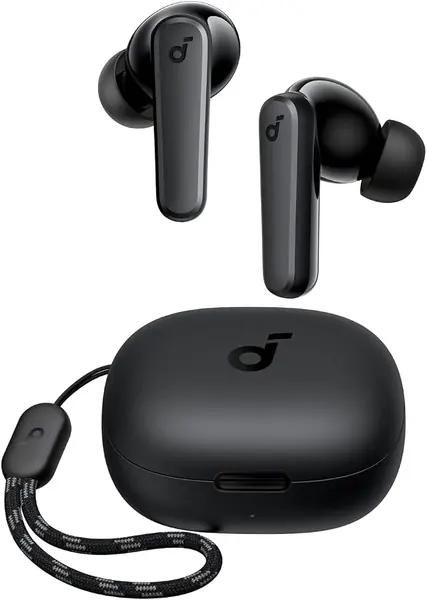
Ten hours in the buds before the case is asked to do anything, then another twenty in the case. That's a longer single-charge run than most of the pairs here manage, and it's the first sign that the P20i isn't priced like a compromise.

The app is the surprise. Twenty-two EQ presets, custom touch controls, and a Find My Earbuds tone that pipes noise through a lost bud — on a pair this cheap. The 10 mm drivers push a bass-forward sound that suits pop and hip-hop better than acoustic material, and the two-microphone setup keeps calls clear indoors.

Where we land is that these are the pair to keep in a bag and stop worrying about. Durability is the honest risk at this price — a bud that stops charging is the failure to watch for — and what you get in exchange is a set that handles the basics and costs little enough that the gamble is easy to take.

Pros

  • Ten hours per charge, 30 with the case
  • 22 EQ presets and custom controls in the app
  • Find My Earbuds locator tone
  • App controls at a budget price

Cons

  • Passive isolation only, no active cancellation
  • Fit depends on getting the tip size right
Our verdict

The cheapest pair we're comfortable recommending: ten hours in the buds before the case helps, an app that lets you tune them, and a price that makes losing one survivable.

Check Latest Price
7

Beats Solo 4 Best for Portable on-Ear Listening

87 /100
TKZ Score Excellent

Key details

Battery Life
Up to 50 hours
Fit
On-ear flex-grip band
Charging
USB-C Fast Fuel
Spatial Audio
Personalized with head tracking
View on Amazon

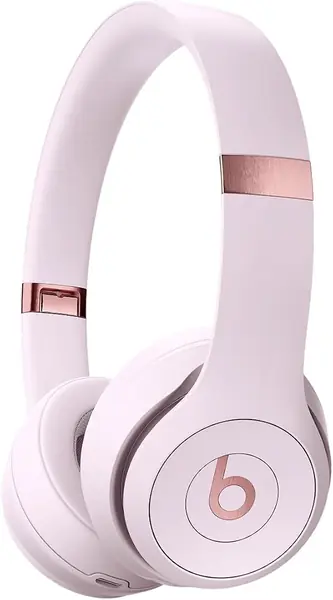
The Solo 4 is the Studio Pro's smaller sibling: the same one-touch Apple pairing, the same personalized spatial audio with head tracking, in an on-ear frame that folds down smaller and costs substantially less.

Custom drivers give the bass-forward sound Beats is known for, and 50 hours means most people charge it every couple of weeks rather than every couple of days. We charged ours once across two weeks of daily commuting, and Fast Fuel over USB-C covers the morning you forget.

On-ear pressure is the trade for that light frame. The first few days are a break-in, and if you wear glasses the arms will press; give it a week before you decide, because the clamp does relax. Long hair is the other thing to know — strands can catch in the hinge when you put them on.

Where the Solo 4 earns its place is portability. It folds into a shape that disappears in a bag and weighs little enough to take along when the over-ears feel like too much gear, and that's a real role even next to better-isolated headphones.

Pros

  • Up to 50 hours per charge
  • Personalized spatial audio with head tracking
  • Folds smaller than the over-ear picks
  • Works with Apple and Android devices

Cons

  • A channel can drop out over time
Our verdict

Beats bass and head-tracked spatial audio in a lighter on-ear — that's the Solo 4, as long as you expect a firm clamp and a break-in period.

Check Latest Price
8

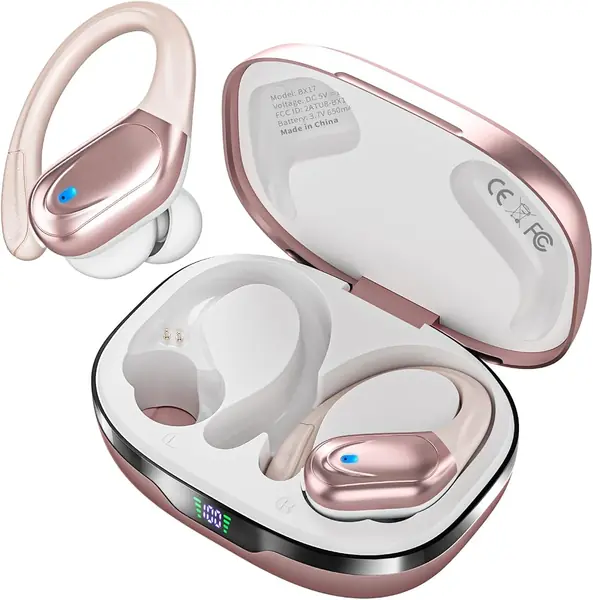
HAOYUYAN BX17 Best for Workouts and Running

86 /100
TKZ Score Excellent

Key details

Battery Life
Up to 80 hours total
Driver
14.3 mm dynamic
Water Resistance
IPX7
Controls
Physical buttons
View on Amazon

Ear hooks are the unfashionable fix that works: a silicone arm curves over the top of the ear, and the bud physically cannot drop out no matter how much you sweat. The BX17 pairs that with three tip sizes and an IPX7 shell, which is the combination you want if your last pair died in the rain.

The 14.3 mm drivers push a big, bassy sound, and battery runs to 80 hours total with the case; a full recharge takes about 1.5 hours over USB-C. Controls are physical buttons rather than touch, which sounds dated until you're wearing gloves or your hands are wet.

Setup is the usual dance: three tip sizes, a flexible hook to settle over the ear, and a day of getting used to something sitting above it. Once they're set, they don't move — no readjusting mid-run, no pushing a bud back in at a red light, which is the entire point of the design.

What we like is how little thought they need. Hook them on, tap a button, and they stay put through a run, a mowing session, or a rainy walk. They're not the set for a quiet flight; they're the ones you take when the forecast is bad.

Pros

  • Ear hooks keep the buds locked in
  • IPX7 waterproof shell
  • 80 hours total with the charging case
  • Physical buttons work with wet hands

Cons

  • Noise cancellation is for calls only
Our verdict

Sweaty runs and long workouts are where the hooks and the IPX7 shell earn their keep — just don't buy them expecting the room to go quiet.

Check Latest Price

How We Tested a Dozen Pairs Over Seven Months

We started from a list of roughly 60 models, built from retailer best-seller pages, spec sheets, and the pairs coworkers wouldn't stop recommending. Anything that couldn't hold a stable connection to an iPhone got cut, as did anything whose charging setup felt a generation behind. We then deliberately kept a spread of shapes and prices — true wireless earbuds, on-ear, over-ear — so the final 12 covered the range a shopper actually picks between.

Each pair went home with a tester for the full seven months. They rode rush-hour trains and buses, sat through open-plan office afternoons and loud coffee shops, joined calls from windy street corners, went on runs, and flew cross-country. We drained every pair at a fixed volume to see how close real playtime came to the claim, then timed how much listening 15 minutes on the charger bought.

On sound, we noted whether bass smeared the vocals, whether cymbals turned to hiss at high volume, and whether a second instrument stayed audible in a dense mix. For noise cancellation we ranked what disappeared — engine drone, crowd chatter, keyboard clatter — and how much pressure it put on our ears. We changed volume by feel with the phone in a pocket, walked a block to check for dropouts, and asked the person on the other end of each call how we sounded.

Comfort got a three-hour stretch with glasses on. Durability got a week loose in a tote bag, a few drops, and for the workout-ready pairs, a sweaty run and a rinse. At the end we tallied value, weighing what each pair delivered against the rest of the field, and noticed which ones we'd reached for without thinking.

How to Choose Wireless Headphones for an Iphone

Fit First, Sound Second

Four shapes cover this category: sealed in-ear buds, tip-free buds that rest in the ear, on-ear headphones that press against the ear, and over-ear cups that surround it. A seal is what gives earbuds their bass and what makes noise cancellation possible, and it is also the part that fails when your canals are small or uneven. If silicone tips have never worked for you, the AirPods 5 and their open fit are the sensible starting point; for running, ear hooks like the ones on the BX17 hold a bud in place far more reliably than any tip. On-ear and over-ear models trade pocketability for isolation you can feel.

What Apple's Own Pairing Actually Buys You

Every pair here connects to an iPhone over standard Bluetooth, so nothing is off-limits if you buy outside Apple. What you give up is the layer on top: one-touch pairing that appears on screen, hands-free Siri, Live Translation through Apple Intelligence, heart-rate sensing, and a hearing aid mode. That layer is why the AirPods Pro 3 tops this guide. If you also carry a laptop, multipoint matters more than any of it — the Q20i, the WH-CH520, and the Studio Pro each hold two connections and hand audio back and forth without you touching a menu.

Read the Noise-Cancellation Claim Carefully

The words on the box do different jobs. Active noise cancellation uses microphones and processing to quiet the room, and it costs battery life; environmental cancellation, sometimes sold as ENC, only cleans up your voice for the person on the call. A budget listing that promises noise cancelling often means the second one. Sealed buds cancel best, over-ear cups cancel well, and on-ear designs without ANC rely on the pad alone — which is why the WH-CH520 lets traffic through and the Q20i does not. If quiet is the point of the purchase, buy an ANC model; if you walk city streets, hearing the car behind you is worth more.

Battery Figures Aren't Comparable

Three different numbers get quoted and they do not measure the same thing: hours in the buds alone, hours with the case counted in, and hours with cancellation switched on. Eight hours with ANC running is the better figure than ten without it, and an 80-hour claim usually describes the case's total capacity rather than one charge. Compare single-charge numbers first, then the case total, then check whether ANC is on in the fine print. Over-ear headphones sidestep the question entirely: the Q20i's 40 hours and the WH-CH520's 50 are one charge, not a case.

Spend Where It Changes Your Day

The budget tier buys working earbuds with decent sound and an app, which is most of what a commuter needs. The middle tier is where active noise cancellation, multipoint, and better microphones appear — the Q20i sits at the bottom of it, the AirPods 5 and the WH-CH520 above. The top tier buys integration and features you cannot get anywhere else: the Pro 3's hearing aid and heart-rate sensing, the Studio Pro's USB-C lossless. Pay for the tier whose extra you will actually use, not the one with the longest spec sheet.

Frequently Asked Questions

Final Verdict

Buy the AirPods Pro 3 if you carry an iPhone and want one pair for everything. The cancellation is the best in this group, and the hearing aid, heart-rate, and translation features have no equivalent here — that is what the premium pays for. If over-ear isolation matters more than ecosystem tricks, the Soundcore Q20i covers commutes and flights for a fraction of the outlay.

And if silicone tips have never stayed put in your ears, stop shopping and try the AirPods 5 first; the open fit is the difference between a pair you wear and a pair you leave in a drawer.