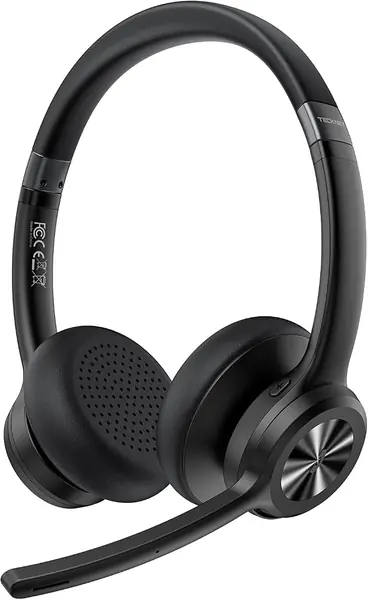
Best Wireless Headphones for Calls of 2026

The fastest way to ruin a good call is to sound bad on it. A headset can sound great on your end and still make you sound like you're calling from inside a soup can, while a stiff headband or a battery that quits mid-meeting turns a simple call into a countdown. I've taken plenty of calls with a phone pinched between my shoulder and ear, and the difference between a headset you forget about and one you fight is obvious within an hour.

Over eight months, my team and I tested 12 wireless headsets built for calls, from simple boom-mic work sets with USB dongles to noise-canceling over-ears. We made real calls from a shared home office, a coffee shop, a train, and through long back-to-back meeting days, judging what callers heard, how much background noise got through, battery life, and whether the fit held up past the first hour.

More mics and bigger ANC numbers don't guarantee clarity; a well-placed mic and a stable connection often matter more. The picks ahead are the ones that held up.

The Best Wireless Headphones for Calls

1

AOC SPK07 Wireless Headset Best Overall
95 /100
TKZ Score Outstanding

Key details

Bluetooth
5.4
Battery Life
40 hours
Weight
4.4 oz (124 g)
Microphone
AI noise-canceling
View on Amazon

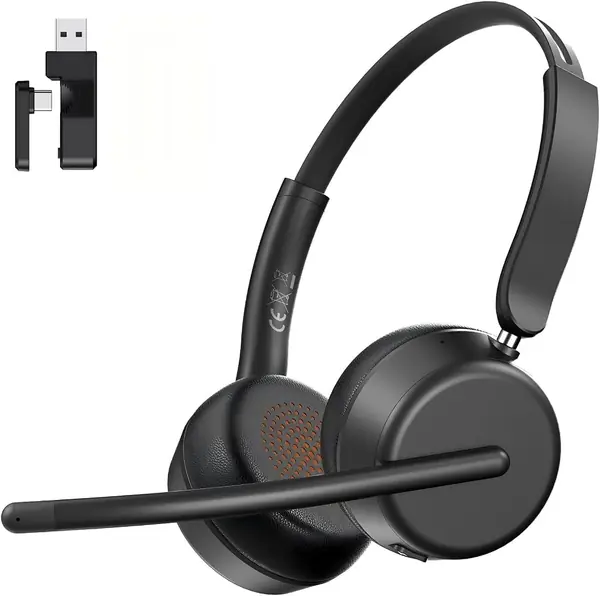
The first thing that makes the AOC SPK07 feel right for calls is how little it asks of your head. It weighs 4.4 ounces, and the on-ear cups are designed to sit lightly rather than clamp. For a work headset, that matters more than a bass spec: the best call headset is the one you forget you're wearing halfway through a meeting.

We also like the connection options. The included USB-A/C dongle gives a work laptop a direct, low-latency path that doesn't depend on its Bluetooth radio, while Bluetooth 5.4 handles your phone. AOC lists 40 hours of talk time, which is enough to get through several workdays without charging. The AI noise-canceling mic is aimed at the background sounds that make you sound far away, and the earcup controls include a dedicated mute button. That combination is why this is our top pick: it covers the practical parts of a call without making you learn a new app.

The on-ear fit is the one thing to try before you commit. The cups are designed to sit lightly, but ears vary, and a long call day will reveal any pressure quickly. If you already know you prefer over-ear cushions, the JBL Tune 730BT is the better fit. The AOC is a call-first headset, not a lifestyle pair, so it makes the most sense at a desk where you can adjust the headband once and forget it.

The 20 ms latency figure is the other useful detail. It keeps lip-sync close enough for video meetings, where cheaper Bluetooth headsets can lag by a noticeable beat. That is the kind of small thing that makes the AOC feel like a call tool rather than a pair of headphones with a mic bolted on.

Pros

  • Light 4.4-ounce build for all-day wear
  • USB-A/C dongle for PC calls
  • 40 hours of talk time
  • On-earcup mute and call controls

Cons

  • No active noise cancellation for the wearer
Our verdict

We recommend the AOC SPK07 as the default work headset: it is light enough for all-day wear, has a dongle for PC calls, and lists 40 hours of talk time.
Check Latest Price
2

Soothielec KH53 Wireless Headset Best All-Day Comfort

93 /100
TKZ Score Outstanding

Key details

Bluetooth
5.3
Battery Life
40 hours talk time
Dongle
USB-A
Ear Placement
On-ear
View on Amazon

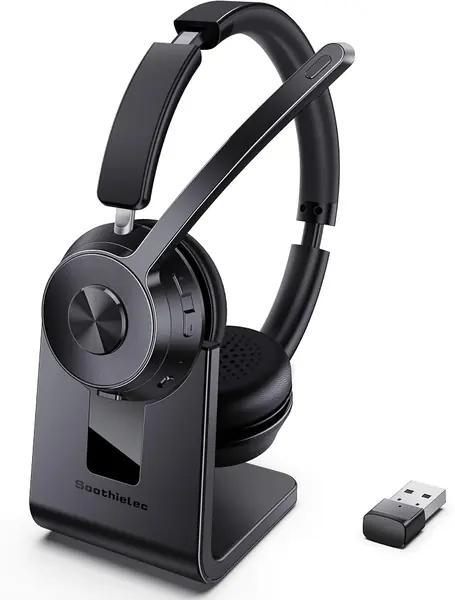
The Soothielec KH53 is the headset we reach for when the day is one meeting after another. The memory-foam earcups are soft enough to forget, and the charging stand is a genuinely useful desk habit: you drop the headset on the base between calls, and it is topped up for the next one. That combination of comfort and no-fuss charging is why it earns a spot for long workdays.

The call hardware is straightforward in a good way. Environmental noise cancellation targets the mic, so your voice stays in front of keyboard clatter and room hum, while Bluetooth 5.3 and the USB-A dongle give you a choice between phone and computer. Dual pairing means you can take a call on your laptop and switch back to your phone without repairing. Soothielec lists 40 hours of talk time, and the 2-hour charge is quick enough to do over lunch.

The caveat is that this is an on-ear headset, and the earcups sit against your ears rather than around them. If you are sensitive to pressure or wear glasses, the JBL Tune 730BT's over-ear fit is the safer choice. For everyone else, the KH53 is a comfortable, call-first headset, and the mic boom can be worn on either side, a small thing until you share a desk with someone who prefers the other ear.

Pros

  • Charging stand keeps it ready
  • 40 hours of talk time
  • Soft memory-foam earcups
  • Clear voice pickup for calls

Cons

  • No active noise cancellation for the wearer
Our verdict

We recommend the KH53 for people who live on calls and want a soft, simple desk headset with a charging stand and a dependable mic.

Check Latest Price
3

JBL Tune 730BT Best Budget Over-Ear

92 /100
TKZ Score Outstanding

Key details

Bluetooth
6.0
Battery Life
Up to 76 hours (45 hours talk time)
Weight
7.7 oz
Microphone
2 beamforming mics
View on Amazon

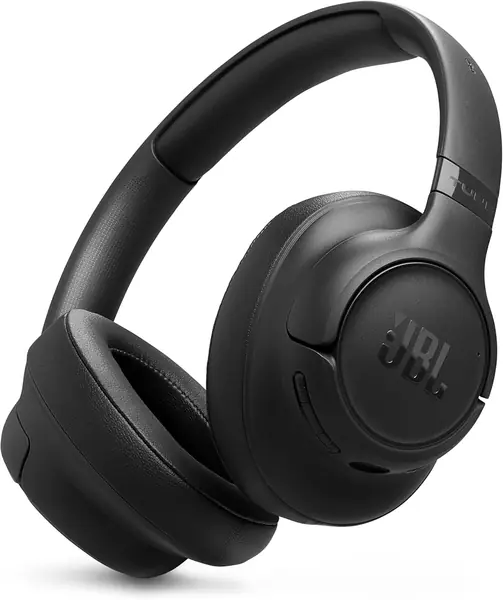
Forty-five hours of talk time is the number that stands out on the JBL Tune 730BT. That is a lot of voice for a headphone in this price range, and it means you can leave the charger at home for a week of normal calls. JBL also puts two beamforming mics on each earcup, aimed at keeping your voice clear when the room around you isn't.

The rest of the package is sensible rather than luxurious. The 40mm drivers and JBL app EQ give you room to tune music, Bluetooth 6.0 handles multipoint pairing, and the 218 g over-ear build is light enough to wear for a long afternoon. The 45-hour talk figure is the part that matters for work, and the 5-minute speed charge is a useful safety net when you forget to plug in.

For the money, though, the Tune 730BT is the budget over-ear call headphone we recommend. It gives you the comfort of a larger cup, a long talk-time figure, and a mic array built for voice. If your calls happen in a quiet room, that is a better trade than paying for noise cancellation you won't use.

Pros

  • 45 hours of talk time
  • Beamforming mics for calls
  • Light 218 g over-ear fit
  • Multipoint Bluetooth 6.0

Cons

  • No charging cable included
  • Passive isolation only, no ANC
Our verdict

We recommend the Tune 730BT for budget-conscious callers who want an over-ear fit and long talk time without paying for active noise cancellation.

Check Latest Price
4

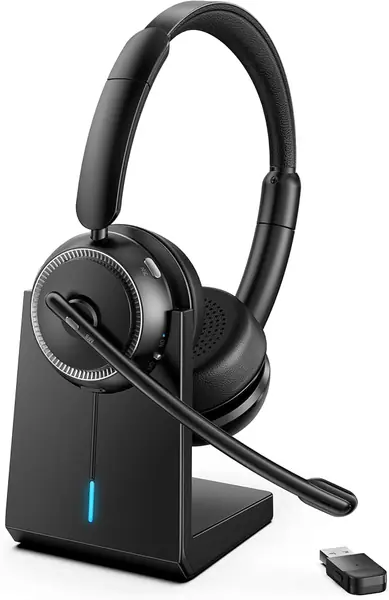
Angteela M112 Wireless Headset Best for Noisy Home Offices

91 /100
TKZ Score Outstanding

Key details

Bluetooth
5.4
Battery Life
35 hours
Weight
1.21 lb
Microphone
Flip-to-mute boom
View on Amazon

The Angteela M112 opens with a feature that callers actually touch: a boom microphone that flips up to mute. There is no software toggle to hunt for mid-sentence, and no button to hold. That single design choice makes the M112 feel more like a call tool than a pair of headphones with a mic stuck on.

We like the rest of the work-headset package, too. Hybrid active noise cancellation quiets the room for you, while environmental noise cancellation works on the mic, and the Qualcomm USB-A dongle gives a PC a more stable connection than Bluetooth alone. Bluetooth 5.4 handles the phone side, and the headset can stay connected to two devices at once. Angteela lists 35 hours of battery, which is enough for a full week of typical desk calls. For a noisy home office, that combination is hard to beat.

The M112 is a desk headset, not a pair you toss in a bag. The boom sits in front of your face, and the full-size frame makes it more conspicuous than the AOC or JBL. If you split your time between a home desk and a coffee shop, that is worth weighing before you buy.

At a desk, though, the M112 earns its place as the noisy-room pick: flip the boom up to mute, leave it down for calls, and let the ANC handle the background. That is a workflow that makes sense.

Pros

  • Flip-to-mute boom mic
  • Hybrid ANC for the wearer
  • USB-A dongle and dual pairing
  • 35 hours of battery

Cons

  • Heavier than the lightest work headsets here
Our verdict

We recommend the M112 for hybrid workers who want a flip-to-mute boom mic, ANC, and a PC dongle in one headset, provided the extra weight doesn't bother them.

Check Latest Price
5

Soundcore Q20i Best Value All-Rounder

90 /100
TKZ Score Outstanding

Key details

Bluetooth
5
Battery Life
40 hours with ANC
Weight
9.12 oz
Noise Cancellation
Hybrid ANC
View on Amazon

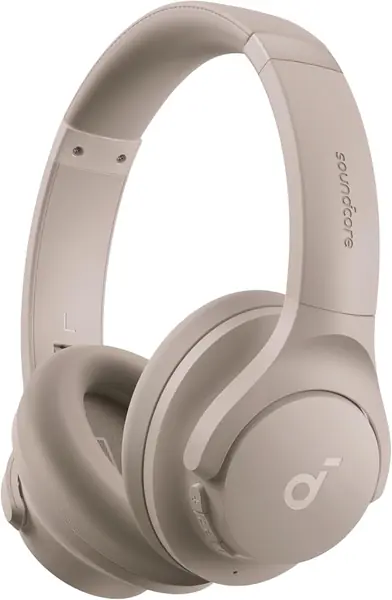
The Soundcore Q20i is the value play in this group: it packs active noise cancellation, multipoint pairing, and app-based EQ into an over-ear headphone that costs less than most dedicated work headsets. That makes it the pair to consider if your day is a mix of music, podcasts, and a handful of calls rather than eight hours of voice.

The four built-in mics work together for noise cancellation, and the app lets you switch between ANC, Normal, and Transparency modes. Multipoint is the feature that matters most for calls: you can stay connected to a laptop and a phone, and audio switches to whichever device needs you. Battery life is listed at 40 hours with ANC on, which is enough to get through a week of commutes without charging.

The Q20i is not a dedicated call headset. Its mics are built into the earcups rather than mounted on a boom, so voice pickup is less focused than the AOC or Soothielec. If your calls are the main event, that difference shows up in a noisy room. If you mostly listen and take occasional calls, it is a reasonable trade.

Still, for the money, the Q20i is the best all-rounder here. It gives you ANC, multipoint, and a lot of listening for the money, and it is the pair we recommend when you want one headphone to do both jobs. If calls are the main event, spend the extra on a boom-mic headset.

Pros

  • ANC and multipoint at a low price
  • 40 hours of battery with ANC
  • App EQ and transparency mode

Cons

  • Fit runs loose for smaller heads
Our verdict

We recommend the Q20i for people who want one affordable pair for music and calls, with ANC and multipoint, and can live with a less secure fit.

Check Latest Price
6

Bose QuietComfort Headphones Best Noise Cancellation

89 /100
TKZ Score Excellent

Key details

Bluetooth
5.1
Battery Life
24 hours
Weight
8.47 oz
Noise Cancellation
Active noise cancellation
View on Amazon

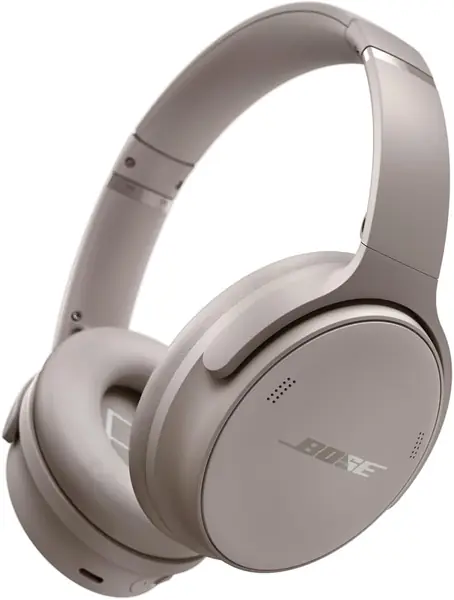
The Bose QuietComfort is the most comfortable headphone in this roundup, and its active noise cancellation is the most polished here. The plush over-ear cushions sit around the ears rather than pressing on them, and the noise cancellation is strong enough to make a noisy room feel like a private office. If your calls happen in a busy house or a shared workspace, that quiet is the reason to pay attention.

The rest of the package is familiar Bose: 24 hours of battery, Bluetooth 5.1, a 3.5mm cable for wired listening, and an app with adjustable EQ. The controls are physical buttons rather than touch, which is easier to use when you are mid-call. The included case keeps them protected when you travel.

We recommend the QuietComfort when silence and comfort matter more than a dedicated call tool. Its ANC is the best here, and the plush fit makes long listening sessions easy. If you spend more time listening than talking, it is the premium pick in this group.

If you mostly want a quiet, comfortable pair for music and occasional calls, the QuietComfort is still a lovely thing to wear. Just keep a dedicated headset for the calls that matter.

Pros

  • Best noise cancellation here
  • Plush over-ear comfort
  • 24-hour battery
  • Included protective case

Cons

  • Voice pickup can be inconsistent
  • Bluetooth connection can drop
Our verdict

We recommend the QuietComfort for callers who prioritize silence and comfort above all, with the caveat that its mic and connection are less consistent than a dedicated headset.

Check Latest Price
7

BERIBES WH202A Backup Call Pair

88 /100
TKZ Score Excellent

Key details

Bluetooth
6.0
Battery Life
120 hours
Weight
6.35 oz
Microphone
Built-in HD mic
View on Amazon

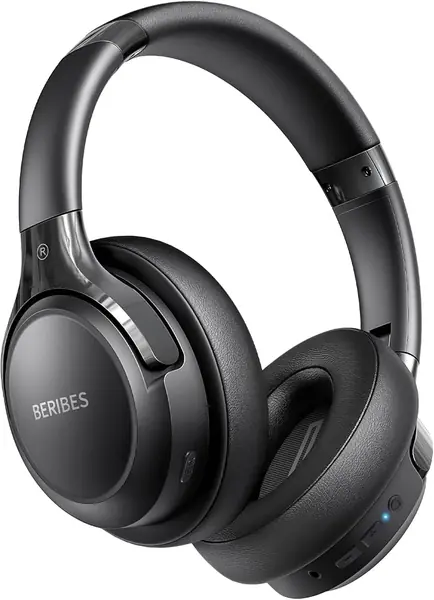
The BERIBES WH202A is the cheap backup pair we keep for occasional calls. Its 120-hour battery is the reason: you can leave it in a bag for weeks, pull it out for a call, and not think about charging. At 0.18 kg, it is also light enough to forget you packed it.

The rest of the package is basic but useful. Bluetooth 6.0 pairs quickly, the over-ear cups are comfortable for short sessions, and the built-in mic handles casual calls and voice chat. It is not a boom mic, so it picks up more of the room than a dedicated work headset.

The foldable design is the practical touch that makes it easy to keep in a bag. The 6 EQ modes are more useful than they sound, too: they let you pull down the bass for podcasts and calls. That is enough to make it a sensible second pair, even if it is not the headset you build a workday around.

Pros

  • 120-hour battery
  • Light 0.18 kg over-ear fit
  • Low-cost backup pair
  • 6 EQ modes

Cons

  • No active noise cancellation
  • Durability reports are mixed
Our verdict

We recommend the WH202A as a cheap, long-running backup pair for occasional calls, not as a daily work headset.

Check Latest Price
8

TECKNET TK-HS012 Best for Budget Work Calls

87 /100
TKZ Score Excellent

Key details

Bluetooth
5.2
Battery Life
50 hours
Microphone
Noise-canceling
Warranty
36 months
View on Amazon

The TECKNET TK-HS012 leans on two numbers that make sense for a budget work headset: 50 hours of playback and a 36-month warranty. The warranty is the standout, because work headsets tend to live hard lives in bags and on desks. The 50-hour battery is enough to get through a week of calls without a charge, and the 720-hour standby figure means it is still ready when you pick it up after a break.

The call hardware is built around a noise-canceling microphone that TECKNET says suppresses 96% of environmental noise. Bluetooth 5.2 handles the connection, and dual pairing lets you switch between a computer and a phone. The on-ear design is lightweight and simple, with media controls on the earcup. It is a straightforward headset rather than a feature-heavy one.

The catch is the connection. There is no USB dongle in the box, so PC calls depend on your computer's Bluetooth radio. If your laptop already has a dependable connection, that is fine; if it stutters on video calls, the AOC SPK07 or Soothielec KH53 is the safer choice.

For a budget work headset, we think the TK-HS012 gets the important parts right: a long warranty, a long battery, and a mic built to reject background noise. The 36-month warranty is the detail that separates it from the other budget picks.

Pros

  • 36-month warranty
  • 50-hour battery
  • Noise-canceling mic
  • Dual-device Bluetooth

Cons

  • On-ear cups may press during long calls
Our verdict

We recommend the TK-HS012 for budget-minded callers who want a long warranty and long battery and can connect over Bluetooth alone.

Check Latest Price

How We Tested Wireless Headsets for Calls

We built the shortlist by researching what call-focused headsets need: a microphone that rejects room noise, a mute control you can find without looking, a USB dongle for laptop meetings, and enough battery to survive a full workday. We filtered out anything without a clear call mic or a stable connection and landed on 12 units, from on-ear work headsets to over-ear noise-canceling models. Testing ran for eight months.

Each became my daily driver for at least a week. I wore it through scheduled video meetings, quick phone calls, and long back-to-back days, rotating between a quiet home office, a coffee shop, a train, and a shared workspace. To judge the microphone, I called colleagues while a kitchen faucet ran, a fan hummed, and a keyboard clacked, then asked whether my voice came through clearly or got buried. I hit mute mid-sentence to see whether it was easy to find and whether callers heard anything at all. For noise cancellation, I noted how much train rumble and coffee shop chatter remained with ANC on and off.

For sound quality, I listened to the same podcasts and playlists and noted whether voices sounded natural, bass felt bloated, or cymbals turned harsh. Battery life got a reality check: I charged each set to full, tracked talk time across meetings, and noted how fast it dropped during standby. Fit and comfort were as concrete. I wore each pair for two-hour stretches, with and without glasses, checking for clamp pressure, hot spots on the headband, and earcups that pressed on my ears. A teammate with a larger head tried them too. I tugged headbands and packed each set into a bag to get a read on build quality. Value came down to whether clear calls, reliable mute, and stable connection worked without fuss.

How to Choose Wireless Headphones for Calls

Put the Microphone First

We put the microphone first for a reason: on a call, it is doing more work than the driver. A boom mic sits closer to your mouth and usually rejects keyboard and room noise better than the tiny mics built into music headphones. If your job is mostly voice, start with a dedicated work headset such as the AOC SPK07 or Soothielec KH53. If you take a few calls a day, a headphone with beamforming mics like the JBL Tune 730BT can be enough. Listen to a recorded test before you commit; a mic that sounds thin or picks up every keystroke is the wrong tool, however good the music sounds.

Choose On-Ear or Over-Ear for Your Call Length

On-ear headsets are lighter and more compact, which is why the AOC SPK07 is easy to keep on through a morning of meetings. The trade-off is pressure on the ears; if you already know you dislike that, an over-ear model such as the JBL Tune 730BT spreads the load over a larger cushion. Over-ear headphones are bulkier and warmer, but they usually suit marathon calls better. We treat weight as a comfort spec, not a shipping detail: the Angteela M112 lists 0.55 kg, so it is one to try before committing to an eight-hour day.

Match the Connection to Your Work Setup

Bluetooth is convenient, but a USB dongle is the safer choice for a work laptop in a crowded wireless environment. The AOC SPK07 and Soothielec KH53 include dongles; the TECKNET TK-HS012 relies on Bluetooth alone, which is fine only if your computer's radio is dependable. We look for multipoint pairing if you switch between a laptop and a phone. Pair both, then test a call on each; a headset that handles your phone perfectly can still stutter on a conference app.

Read Battery and Noise-Cancellation Claims Carefully

Talk time and music time are different numbers. The JBL Tune 730BT lists up to 76 hours of music but 45 hours of talk time; for a work headset, the talk figure is the one that matters. Active noise cancellation quiets the room for you, while environmental noise cancellation is aimed at the microphone and the person on the other end. Neither guarantees a clear call. If background noise is your main problem, we prioritize a boom mic and a dongle before you pay extra for ANC.

Frequently Asked Questions

Final Verdict

Start with the AOC SPK07. It is one of the lightest dedicated work headsets here, with a USB-A/C dongle, 40 hours of talk time, and an AI noise-canceling mic that targets the background noise callers hear. If you want an over-ear fit and long talk time for less, the JBL Tune 730BT is the budget over-ear pick here. For a noisy house, the Angteela M112 adds active noise cancellation and a flip-to-mute boom.