Best Wired Headphones for Android of 2026

My wireless earbuds died eleven minutes into a call last spring, and the wired pair rattling around at the bottom of my bag saved the meeting. They plugged in, worked instantly, and never asked for a charge. That's the quiet appeal of a wired USB-C set: no pairing menus, no battery anxiety, no firmware updates — just sound the moment you connect, every time.

The catch is that USB-C audio is a looser category than it looks. On some pairs the inline volume buttons talk to Android properly; on others they barely register. A few sound thin because the driver was an afterthought. We spent four months plugging 16 pairs into phones, tablets, and laptops, wearing them through commutes, calls, and long afternoons at a desk.

Here's what first-time buyers miss: in an in-ear pair, fit is the noise cancellation. A good seal muffles a train car; a bad one has you cranking the volume to compensate. The picks below earned their spots on hours-long comfort, cables that survive a pocket, and controls that actually do what the buttons promise.

The Best Wired Headphones for Android

1

Sony IER-EX15C Best Overall
90 /100
TKZ Score Outstanding

Key details

Connector
USB-C
Controls
Volume +/- and multi-function button
Ear Tips
Silicone, multiple sizes
Audio Support
USB Audio Class 1.0
View on Amazon

USB Audio Class 1.0 is the least exciting line on this box, and it's the one that decides whether the earbuds work at all. It's the standard way Android phones send audio out of a USB-C port, and Sony lists support for it by name, so the phone recognizes the pair and routes sound to it without an app, a menu, or a pairing step. That single line is why this is our pick for most Android owners ahead of better-known pairs that leave the question open.

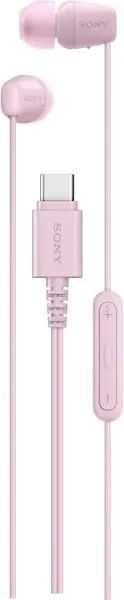
The remote is laid out the way we prefer: separate volume up and down keys plus a multi-function button for play, pause, and calls. Volume having its own two keys matters more than it sounds, because a single do-everything button means holding it down while somebody is mid-sentence.

Sound comes down to the seal far more than the spec sheet. The 20 Hz to 20 kHz driver figure tells you almost nothing on its own; the silicone tips, which come in several sizes, are what actually deliver bass and shut out the bus. Spend a minute fitting the right tip, and the serrated cable does the rest — the ridges are why the cord doesn't knit itself into a knot in a pocket.

What you don't get is active noise cancellation: the isolation here is passive, from the tips, which is plenty in an office and not much on a subway. The listing is pink only, so this isn't the pair for someone who wants black. And because the cable is the part that fails on every pair in this category, keep the receipt.

Pros

  • Stated USB Audio Class 1.0 support for Android
  • Separate volume keys plus a call button
  • Multiple silicone tip sizes for a real seal

Cons

  • No case or cable clip in the box
  • No water-resistance rating for workouts
Our verdict

Our default for Android phones: it follows the USB audio standard your handset already speaks, adds in-line volume and call controls, and asks less than most pairs here.
Check Latest Price
2

Apple EarPods USB-C Best for Calls

89 /100
TKZ Score Excellent

Key details

Connector
USB-C
Controls
Remote for volume, playback, calls
Fit
Open-fit earbud, no seal
Mic
Built-in, with Siri access
View on Amazon

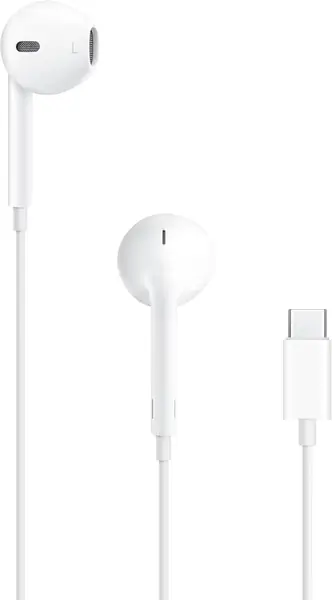
There's no silicone tip on the EarPods, and that shapes everything else about them. The plastic housing rests in the bowl of your ear instead of plugging the canal, which is why they stay comfortable through a long call and why you can still hear a car coming across a parking lot. It's also why they do almost nothing about a noisy bus — a trade we take happily for comfort this consistent.

The microphone and remote are what make them worth carrying. The mic sits on the cord near your mouth rather than in the housing, so you sound like you're on a headset instead of a speakerphone, and the remote handles volume, playback, and answering without unlocking the phone. Podcasts, calls, and background music are the jobs these do most convincingly; critical listening isn't.

Two things to know. The housing is one size, so the fit is whatever your ear shape makes it — secure for some, loose for others. And the pair doesn't always get along with non-Apple phones: some Android handsets never switch audio over to them. Try them on your own handset while the return window is open, and keep an eye on the plug and the stem, which is where these tend to give out.

Pros

  • Open fit stays comfortable for hours
  • Built-in mic and remote for calls
  • Plugs in with no pairing or charging

Cons

  • Some Android phones don't recognize the pair
  • Weak at the plug and stem over time
Our verdict

We reach for these when the day is mostly calls: the open shape stays comfortable for hours and the built-in mic keeps you audible on the other end.

Check Latest Price
3

BLXSounds 2-Pack Best Two-Pack Value

88 /100
TKZ Score Excellent

Key details

Connector
USB-C
Cable
3.9 ft, tangle-free
Driver
14.2 mm dynamic
Pack Count
2 pairs
View on Amazon

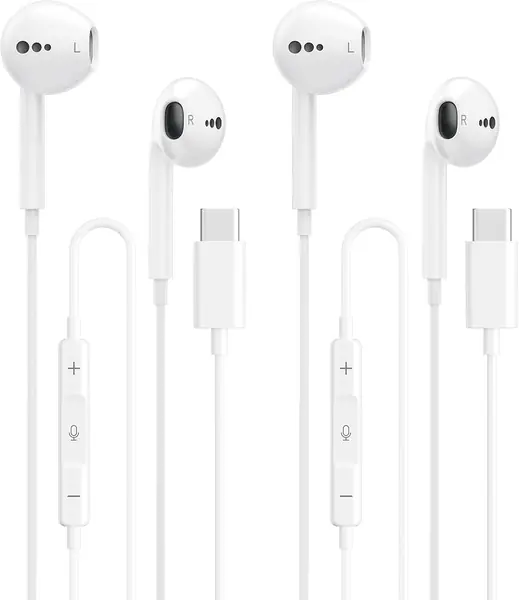
The second pair is the feature. Two sets of USB-C earbuds arrive for roughly what one name-brand pair costs, and that changes how you treat them: one lives in a backpack, one stays in a desk drawer, and neither has to survive as the only pair you own.

The cable is 3.9 feet, which is the number to think about before ordering. That's right for a phone in a pocket and short enough that the cord isn't looping around your elbow on a walk, but if you plan to lean back from a laptop all afternoon it will feel tight.

At 14.2 mm, the driver is the biggest of the in-ears here, and bass is where these feel most confident — voices stay sharp enough for calls while music has some weight behind it. The remote covers volume, track skip, pause, and answering. The mic is the part that surprised us: callers get a clean signal instead of the muffled, distant sound cheap buds usually manage.

Three sizes of tips come in the box along with a 12-month warranty, but no pouch. Longevity is the open question with any pair at this tier, and that's the other argument for buying two.

Pros

  • Two pairs so a loss isn't a crisis
  • Clear mic for calls
  • Big 14.2 mm driver puts out real bass

Cons

  • 3.9-foot cable is short for desk use
  • No pouch in the box
Our verdict

We keep one in the bag and one at the desk: clear mic, working buttons, and a spare on hand when one goes missing.

Check Latest Price
4

ADOOPE USB-C Over-Ear Best Over-Ear

87 /100
TKZ Score Excellent

Key details

Connector
USB-C
Cable
1.2 m braided
Driver
40 mm dynamic
Design
Foldable, rotating ear cups
View on Amazon

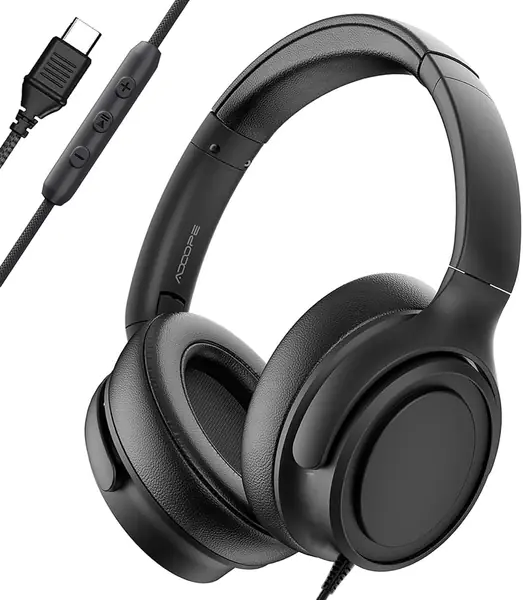
If earbuds start to ache somewhere in the second hour, the fix is to stop putting things in your ear canal. These sit around the ear instead, on memory foam cushions, with rotating cups and an adjustable headband to find an angle that doesn't press.

The 40 mm drivers and the closed-back seal give you bass a cheap in-ear can't match, and the cushion seal does more for a noisy room than we expected — no battery, no noise-cancelling circuitry, just foam against your head. For a lecture hall or a shared office, that's usually enough.

The 1.2-meter braided cord is the right length for a phone in a pocket, and the frame folds down small enough to disappear into a backpack at about a quarter of a kilogram. Calls run through the built-in mic, with volume and playback on the cord.

The compromise is sound. Speech and calls come through clearly, but music with a lot going on sounds flat next to the in-ears here, which is why these are the right pair for classes and calls and not the right pair for a music upgrade.

Pros

  • Memory foam cushions suit long sessions
  • Passive isolation without a battery
  • Folds flat for a backpack

Cons

  • No carry bag in the box
  • Frame and cushion covers are the wear points
Our verdict

Our pick for anyone whose ears ache after an hour in earbuds: soft cushions, a folding frame, and enough passive isolation for a classroom.

Check Latest Price
5

AILZPXX Magnetic USB-C Best for Neck-Wear Storage

86 /100
TKZ Score Excellent

Key details

Connector
USB-C
Controls
Three-button remote with mic
Design
Magnetic neck-wear
In The Box
Case, cable clip, 2 spare tip pairs
View on Amazon

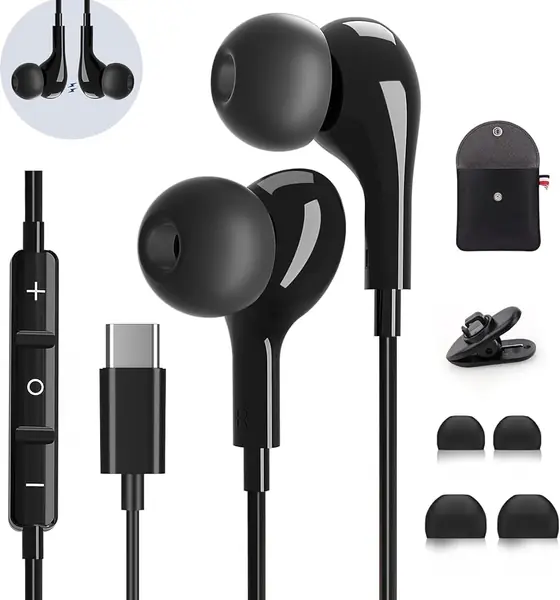
The magnet on these doesn't clip to your shirt — it pulls the two earbuds together into a loop, so when a call ends or an album does, they hang around your neck instead of going back into a pocket. It's a small thing, and it's the one we keep coming back to, because it's the difference between a pair you use all day and a pair you keep digging out.

The kit is the part we didn't expect at this price: a hard carrying case, a cable clip, and two spare pairs of ear tips in small and large. Tips are the first thing to disappear, and the clip keeps the cord off your collar, which is what stops a jacket from yanking a bud out when you turn your head.

Inside, a dynamic driver handles the audio with a built-in DAC chip doing the digital-to-analog conversion, and a three-button remote covers volume, playback, and calls. It's a USB-C-only design, so it's the wrong buy for an older Android handset with a round jack — for that, look at the Sony MDR-EX15AP on this list.

Pros

  • Magnet holds the buds as a neck loop
  • Case, cable clip, and spare tips included
  • Three-button remote with built-in mic

Cons

No notable drawbacks to flag.

Our verdict

A tidy pick if your buds spend half the day around your neck: the magnet keeps them together and the kit covers the parts you lose.

Check Latest Price
6

Sony MDR-EX15AP Best for Phones with Jacks

85 /100
TKZ Score Excellent

Key details

Connector
3.5 mm
Cable
Y-type with cord slider
Driver
9 mm dome type
Ear Tips
Hybrid silicone, S/M/L
View on Amazon

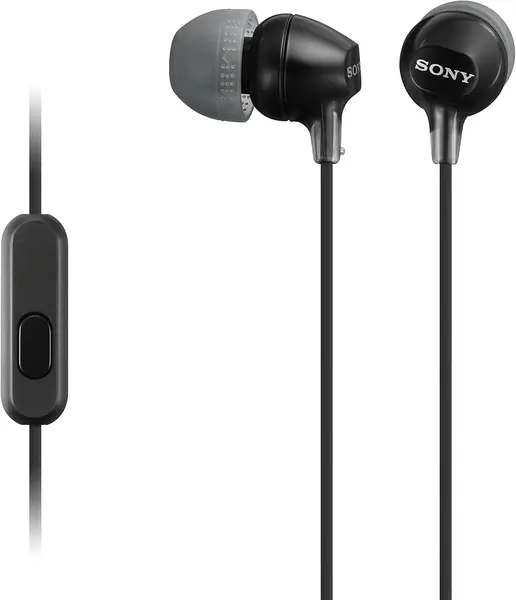
Plenty of Android phones still ship with a round headphone jack, and if yours is one, a 3.5 mm pair is cheaper, simpler, and doesn't tie up the charging port. This is the one we point to: a mic and a media button on the cord, a 9 mm driver, and hybrid silicone tips in small, medium, and large.

The Y-shaped cord with a slider is the detail we appreciate most. You cinch the split so the cable stops swinging and catching on a jacket zip, which is the small annoyance that makes people give up on wired buds entirely.

The honest caveat is lifespan. The failure that turns up with this design is one channel going quiet, and at this price the sensible move is to treat the pair as replaceable rather than repairable. Volume is decent for the money, and podcasts and calls are where it makes most sense.

It won't help if your phone has no jack at all. That's the whole decision — if your handset is USB-C only, the Sony IER-EX15C at the top of this list is the same idea with the plug you actually have.

Pros

  • Mic and media button for calls
  • Cord slider keeps the cable tidy
  • Three silicone tip sizes included

Cons

  • One channel can go quiet over time
Our verdict

For Android phones that still have a round headphone jack, this is the pair we hand people: a working mic, three tip sizes, and a cord that stays tidy.

Check Latest Price

How We Tested Wired USB-C Headphones

We started by pulling every USB-C wired pair we could find at major retailers, then reading spec sheets and customer reviews to cut the ones that needed a dongle, an app, or a firmware update to work. Anything without an inline mic and remote was out. Sixteen pairs made the cut, across a range of prices.

Testing ran four months, and the pairs lived where wired headphones actually live: a crowded bus commute, back-to-back video calls at a desk, evening walks, an apartment's worth of laundry folding and dishwashing, and one long flight.

Each pair got a full eight-hour workday of wear, and I noted where pressure built up — inside the ear canal, on the outer ear, behind the jaw after a few hours. I recorded the same voice memo through every microphone and played it back in a noisy room, and I ran the same three tracks through each pair, one bass-heavy and one acoustic. Every set was plugged into a phone, a tablet, and a laptop to see whether it connected instantly or needed a re-seat. Pressing the inline volume rocker, I checked whether it moved the phone's own slider or only the earbuds, and I cycled through every included ear tip to find which gave a real seal.

For durability, I balled each cable into a jacket pocket every day for a week, then tugged the strain relief to see whether it held. Portability came down to how a pair rode in a pocket and whether the cord turned into a knot by lunch. Noise cancellation was judged honestly — these are passive — so I played a recording of a train car at fixed volume and noted how much got through with a good seal versus a bad one. Value was the last call: what a pair cost against how long I'd trust it to survive a bag.

How to Choose Wired Headphones for Android

Match the Plug to the Port You Actually Have

USB-C is the default on most Android phones, so a USB-C pair is the simple answer — with one catch. The port has to carry audio, and on a small number of handsets and tablets it doesn't. Plug the pair in and play something while the return window is still open. The second catch is charging: with buds in the port, you can't top up while you listen, which matters on a travel day.

If your phone still has a round jack, a 3.5 mm pair such as the Sony MDR-EX15AP sidesteps both problems. It also works with a dongle on a USB-C phone, though cheap passive dongles sometimes pass sound but not the microphone.

Look at the Remote, Not Just the Driver

Every listing here promises high-resolution audio and a DAC chip. Almost none of that is audible on a phone call. What you notice daily is the remote: a multi-function button that plays, pauses, and answers calls maps reliably on Android, while the volume keys are the part that varies from handset to handset.

We like the layout on the Sony IER-EX15C for exactly this reason — volume on its own two keys, one button for everything else. Whatever you buy, press each button once and watch the screen respond before you rely on it.

Decide How Much of Your Ear You Want Covered

Three shapes, three trade-offs. Open-fit buds like the Apple EarPods rest in the bowl of the ear: comfortable for hours, useless at blocking noise. Silicone in-ears seal the canal, which is where bass and quiet come from, but they only work with the right tip size. Over-ears such as the ADOOPE enclose the whole ear and suit anyone who finds earbuds painful, at the cost of bulk.

Watch the wording, too. On most of these listings, noise cancelling means passive isolation from a tip or a cushion, not the active kind with a battery and microphones.

Assume the Cable Will Fail Eventually

Wired earbuds die at the joints — the plug, the split, the point where the cord meets the housing. A braided or serrated cable and real strain relief buy you time, and a case plus a cable clip buy more, which is a large part of why the AILZPXX kit earns a place here.

None of that makes a cheap pair permanent. Either buy a two-pack like the BLXSounds and accept the cycle, or pay for a pair with a longer warranty and treat it as a two-year purchase.

Frequently Asked Questions

Final Verdict

The Sony IER-EX15C is the pair we point most Android owners to, because the one thing you can't fix later is whether the phone and the earbuds speak the same audio standard. Sony states that support outright, then backs it with separate volume keys, a call button, and a cable that doesn't knot itself in a pocket.

If your day is mostly calls, the Apple EarPods' open shape is the more comfortable answer. If earbuds hurt, go over-ear with the ADOOPE. And if your Android phone still has a round jack, the Sony MDR-EX15AP does the same job for less.