Best Tablets with Good Cameras for Photos and Calls of 2026

Tablet cameras have a reputation problem, and for years they earned it: smeared video calls, rear shots that turn a receipt into gray mush. That's mostly fixed now. The camera is one of the few places where a budget tablet and a premium one part ways in a way you'll actually feel day to day.

My team and I have spent the past six months with 12 tablets — mostly 10- and 11-inch models, from budget Android slates to the big-name flagship — and we used them the way people really do: video calls at the kitchen table, photos of homework and receipts, movies on the couch, a few rounds of games before bed. Megapixels never decided anything. What did: how the camera handled a dim living room, whether the screen was bright enough to frame a shot outside, and whether the battery and the Wi-Fi held up week after week.

One thing to know before you scroll: on a tablet, the front camera matters far more than the rear one, because you'll use it ten times as often. A bundled keyboard case or stylus is a nice perk, not a reason to buy. Here's what we'd hand to a friend, whether it's for you or a gift.

The Best Tablets with Good Cameras for Photos and Calls

1

Apple iPad 11-Inch (A16) Best Overall
95 /100
TKZ Score Outstanding

Key details

Display
11-inch Liquid Retina
Cameras
12MP front, 12MP rear
Storage
128GB
Weight
1.05 lb
View on Amazon

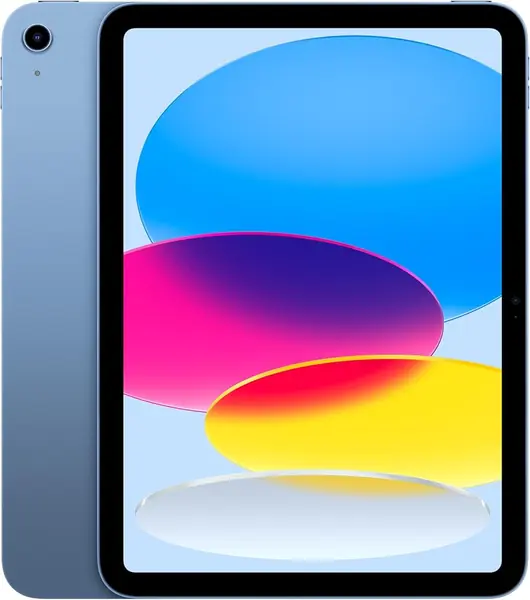
The 12MP front and 12MP rear cameras are what make the iPad 11-inch unusual among tablets. The front sensor is the one most people use for video calls, and the rear is capable enough for documents, quick photos, and short clips. We think it is the safest camera tablet in this set because the A16 chip and iPadOS app support make the hardware easier to trust. You are not guessing whether the camera app will work or whether a video-call platform is optimized for the device.

The 11-inch Liquid Retina display is a good framing surface for calls and for checking shots, and 128GB of base storage is a sensible starting point for a tablet you might use for photos. We also like that the iPad stays thin and light enough to hold for a long call; the listed weight is 1.05 pounds, so it is not a burden on a stand or in a bag. The cameras are not just a spec-sheet decoration here. They are the reason the iPad works as a family video-call screen, a document scanner, and a quick photo tool in one device.

What separates it from the Android picks is consistency. The camera hardware is strong, the chip has headroom for editing and multitasking, and the apps people actually use for calls and photo sharing are built with this platform in mind. We did not find a comparable all-around camera experience in the budget tablets here. If you mostly need a basic call screen, the Android options below make more sense. For everyone else, the 12MP front camera is the detail we refuse to trade down.

Pros

  • 12MP front and rear cameras
  • A16 chip and 128GB storage
  • Liquid Retina display and iPadOS apps

Cons

  • Premium price next to Android picks
Our verdict

We recommend the iPad 11-inch first for anyone who wants the most dependable front and rear cameras in a tablet, plus the app support to use them.
Check Latest Price
2

UBDXBD M90 11-Inch Tablet Best Camera Value

89 /100
TKZ Score Excellent

Key details

Display
11-inch 1920x1200
Cameras
8MP front, 16MP rear
Battery
8000mAh
Included
Keyboard and mouse
View on Amazon

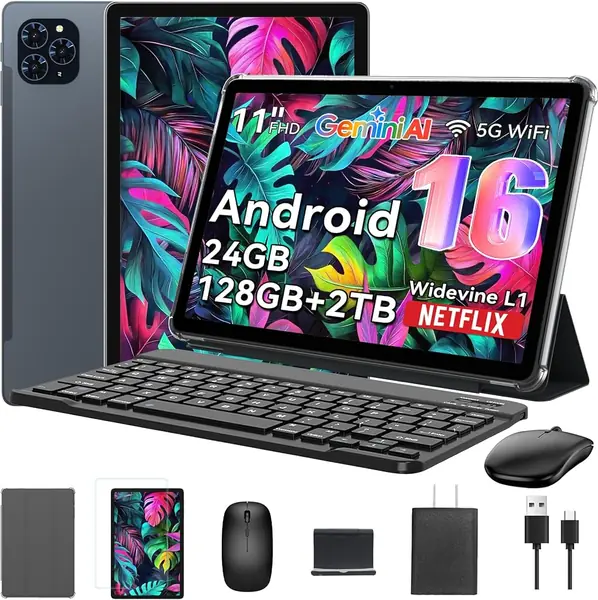
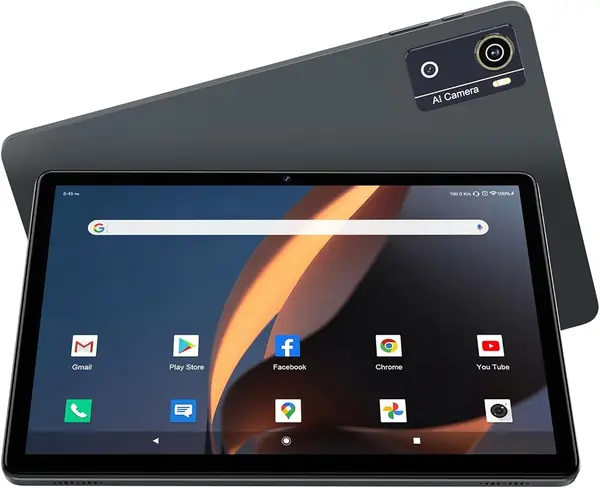
The UBDXBD M90 goes after the iPad on price, and it throws in a keyboard, mouse, and case. The bundle is what you notice first, but the camera specs are what put it in this roundup: an 8MP front camera and a 16MP rear camera on an 11-inch tablet. That is the highest rear-camera resolution among our main picks, and the 8MP front matches the KADYBE for the best budget video calls.

We think it is the best camera value in this group because it pairs those sensors with an 11-inch 1920x1200 display and an 8000mAh battery. The sharper screen gives you more room to frame a shot than the 1280x800 budget tablets, and the battery suits a long day of calls, browsing, and note-taking. We are not going to pretend the 16MP number guarantees better photos than the iPad's 12MP cameras; processing and lens quality matter, so look closely at sample images.

The included keyboard and mouse turn it into a desk-bound call station, and the case protects the screen in a bag. We like that the accessories are part of the package instead of extra purchases, because a tablet used for video calls is easier to live with when it has a keyboard and a stand. The 32GB RAM figure includes virtual memory, so treat it as a multitasking aid rather than a guarantee of desktop-class speed.

The M90's rear camera is the headline, but the 8MP front is the one that makes it useful for family calls and online classes. We also appreciate that the 11-inch screen is large enough to show a document and a video call at the same time without shrinking either one to a thumbnail. For a budget tablet, the front camera is the detail that makes the bundle more than a cheap keyboard accessory.

Pros

  • 8MP front and 16MP rear cameras
  • 11-inch 1920x1200 display
  • Keyboard, mouse, and case included

Cons

  • Lesser-known brand support history
Our verdict

We think the UBDXBD M90 is the camera value to beat here: an 8MP front camera, a 16MP rear, and a keyboard bundle for budget-minded buyers.

Check Latest Price
3

KADYBE 10.1-Inch Tablet Best Budget for Video Calls

88 /100
TKZ Score Excellent

Key details

Display
10.1-inch 1280x800
Cameras
8MP front, 13MP rear
Battery
7000mAh
Storage
64GB, 1TB expandable
View on Amazon

An 8MP front camera is the reason the KADYBE belongs in a camera-focused roundup. At this price, many tablets give you a 5MP selfie camera and put the bigger number on the back. We think this is the best budget tablet here for video calls because the front sensor is the one you use for family calls, online classes, and work meetings.

The 13MP rear camera is the higher number, and it gives you more room to crop a document scan or a casual photo. The 10.1-inch screen is a comfortable size for a video call, and the 7000mAh battery is the other reason it works for long calls and streaming. We like that the tablet runs Android 16 with Google Mobile Services, so the apps you expect for calls and photo sharing are available.

Storage is 64GB, which is modest for photos and video, but the tablet accepts a microSD card up to 1TB, so you can add space without replacing the tablet. We appreciate that the expansion is there; it turns a small base storage number into a manageable one for families. The rear camera is for documents and quick snapshots, not creative photography.

The microSD slot is the practical detail that keeps a 64GB tablet usable for a family. It also makes the KADYBE easier to recommend than a sealed tablet with the same storage, because you can move photos and videos off the internal drive without paying for cloud space. For a budget pick, that small bit of flexibility goes a long way.

Pros

  • 8MP front camera for calls
  • 13MP rear camera
  • 7000mAh battery
  • 64GB storage with 1TB expansion

Cons

  • Lower 1280x800 display resolution
Our verdict

We recommend the KADYBE for budget video calls, where its 8MP front camera and 7000mAh battery do the most useful work.

Check Latest Price
4

TABWEE T90 11-Inch Tablet Best Big Screen for Calls

87 /100
TKZ Score Excellent

Key details

Display
11-inch 1920x1200
Cameras
5MP front, 13MP rear
Battery
8000mAh
Memory
24GB RAM (8GB + 16GB virtual)
View on Amazon

The TABWEE T90 pairs an 11-inch 1920x1200 screen with a 13MP rear camera, which is a lot of hardware for a budget 2-in-1. It also comes with a keyboard and stylus case, so it is built to be used on a desk as much as in your hands. The rear camera is the strong one: 13MP gives you room to crop a document scan, whiteboard photo, or product shot before it turns soft.

The 11-inch 1920x1200 display is the real upgrade over the 10-inch budget tablets. Text is sharper, photos have more room to breathe, and the screen is large enough to frame a video call without crowding the person on the other end. We like that combination for scanning and editing, where a bigger, sharper screen saves time.

We think the T90 is the best big-screen 2-in-1 here for someone who scans documents and wants a keyboard. The 13MP rear camera is useful, but the tablet's strength is the display and the bundle. The T615 chip and the 24GB RAM figure include virtual memory, so treat the memory as a multitasking aid, not a promise of desktop speed.

The keyboard and stylus case make it easy to move from a call to a note without hunting for accessories. The display and the bundle are the reasons to pick it; the rear camera is a bonus. If you mostly shoot photos for fun, the iPad is the safer camera; if you want a big screen for documents and calls, the T90 earns its place.

Pros

  • 13MP rear camera
  • 11-inch 1920x1200 display
  • Keyboard and stylus case included
  • 8000mAh battery

Cons

  • 5MP front camera limits video calls
Our verdict

We like the TABWEE T90 for big-screen document scans and keyboard work, with a 13MP rear camera that earns its place.

Check Latest Price
5

Samsung Galaxy Tab S10 Lite Best for Android Pen Work

86 /100
TKZ Score Excellent

Key details

Display
10.9-inch 2112x1320
Storage
128GB, 2TB expandable
Included
S Pen
Rear Camera
8MP
View on Amazon

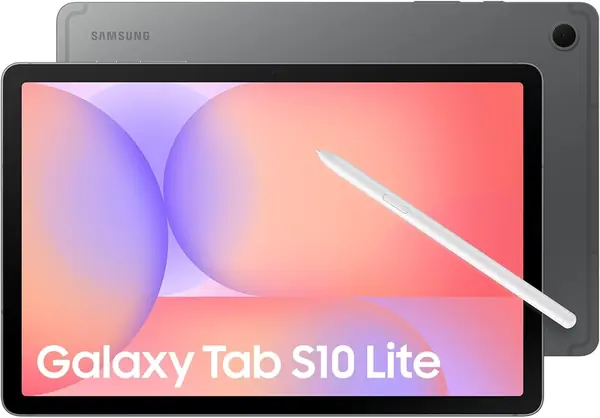
The S Pen is the reason the Galaxy Tab S10 Lite is here. It comes in the box, and the 10.9-inch 2112x1320 display gives you a sharp surface for handwriting, markup, and notes. The tablet runs Android, so the apps you already use for calls, photo sharing, and document scanning are available.

We think it is the best Android pick here for pen work, and the 90Hz screen makes scrolling and writing feel smoother than on the budget tablets. The 8000mAh battery and 128GB of storage are sensible for a tablet that moves between meetings and the couch. The Exynos 1380 is not the fastest chip in this group, but it handles split-screen apps, streaming, and note-taking without drama. The 10.9-inch size is a good middle ground: big enough for a split-screen note and a video call, small enough to hold for a while.

The 2TB microSD expansion is the practical detail we appreciate most. It lets you keep years of notes, scans, and downloaded files on the tablet without paying for cloud storage. The S10 Lite is the pick for someone who wants a Samsung pen tablet; the S Pen and the 90Hz screen are the features that earn the space.

Pros

  • S Pen included
  • 10.9-inch 2112x1320 display
  • 128GB storage, 2TB expandable
  • 8000mAh battery

Cons

  • 8MP rear camera trails camera-first picks
  • Costs more than budget Android picks
Our verdict

We recommend the Galaxy Tab S10 Lite for Android note-takers who want an included S Pen and a sharp 10.9-inch display.

Check Latest Price

How We Tested These Tablets

We started by pulling every tablet we could find with a front camera rated at 5 megapixels or better and a screen between 10 and 11 inches, then cut anything that couldn't plausibly get through a full day of mixed use. That left 12 tablets, from budget Android models that ship with a keyboard case in the box to the mainstream flagship everyone asks about. We bought them at retail and used them for six months — not on a lab bench, but in our homes, on commutes, and on a couple of flights.

For the cameras, the test was repetitive on purpose: a video call in a room lit by a single floor lamp, with the person on the other end told to be blunt about how we looked; a photo of a printed receipt, zoomed in to see whether the fine print stayed legible; a worksheet photographed on the kitchen table and read back on screen; and a bright afternoon in the backyard, where we checked whether we could see enough of the display to frame a shot. We noted which front cameras smeared faces in low light and which rear cameras kept colors close to what our eyes saw.

Between camera tests we ran the tablets hard. We looped video at half brightness until the battery quit and wrote down the hours, played the same game on all 12 to compare stutter and heat, and carried each one to the far corner of the house and out to the driveway to see where the Wi-Fi dropped. We also weighed them and passed them around — a 10-inch tablet gets held one-handed a lot longer than an 11-inch one — and handed a few to a nine-year-old to see which survived a week of being carried by the edge. Six months in, the ones still in daily rotation were the ones that never needed a restart or a second try at connecting.

How to Choose a Tablet with Good Cameras

Start With the Front Camera

Most tablet photos are actually video calls, so the front camera deserves the first look. A 5MP sensor can work in good light, but an 8MP or 12MP front camera gives you more detail and cropping room when the window is behind you. We prefer the iPad's 12MP front camera for family calls and the KADYBE or UBDXBD at 8MP for budget buyers. Check that the video-call app you use supports the tablet, and put a lamp in front of you rather than behind you.

Megapixels Are Not Image Quality

A 16MP or 21MP rear camera sounds impressive, but the number tells you how large the file can be, not how well the sensor handles dim light or motion. Processing, lens quality, and app support matter more. We trust the iPad's 12MP cameras more than a budget tablet's higher count because the hardware and software are designed together. On Android picks like the UBDXBD and TABWEE, use the rear camera for documents and well-lit snapshots, and look for sample images before you expect phone-level photos.

Match the Screen to How You Shoot

A sharper screen helps you frame a shot, check focus, and read a document after you scan it. An 11-inch 1920x1200 panel like the UBDXBD or TABWEE gives you more detail than a 10.1-inch 1280x800 screen like the KADYBE, and the iPad's Liquid Retina display is the best of the group for reviewing photos. If you mostly make video calls, a 10-inch screen is easier to hold; if you scan and edit, go bigger.

Check Performance and Storage

Camera apps are only as good as the tablet running them. A slow chip makes switching between the camera, a call, and a photo editor feel like work, and 64GB of storage fills quickly once you start shooting video. The iPad's A16 chip and 128GB base storage are the safest combination here. On Android, the KADYBE's microSD slot is a useful escape hatch, and the UBDXBD's virtual RAM helps multitasking without matching a premium chip.

Decide Whether You Need a Keyboard or Pen

A keyboard or stylus can turn a tablet into a better video-call and note-taking tool, but it also adds bulk and cost. The UBDXBD and TABWEE include keyboards, which makes them good desk companions for calls and document work. The Galaxy Tab S10 Lite includes an S Pen, which is the better choice for handwriting and markup. If you only need a screen for calls and photos, skip the bundle and put the money toward a better front camera.

Frequently Asked Questions

Final Verdict

The iPad 11-inch is the camera tablet we recommend first. Its 12MP front and rear cameras, A16 chip, and app support make it the safest choice for video calls and quick photos, and 128GB of storage gives you room to use them.

If the iPad is more than you want to spend, the UBDXBD M90 is the budget camera pick: an 8MP front and 16MP rear with a keyboard and mouse included. If you need an S Pen, the Galaxy Tab S10 Lite is the Android alternative, but its 8MP rear camera is the trade-off.