Lenovo Idea Tab Best Overall
Key details
- Memory
- 8GB RAM, 256GB storage
- Display
- 11-inch 2560 x 1600, 90Hz
- Stylus
- Tab Pen included
- Weight
- 1.1 lb
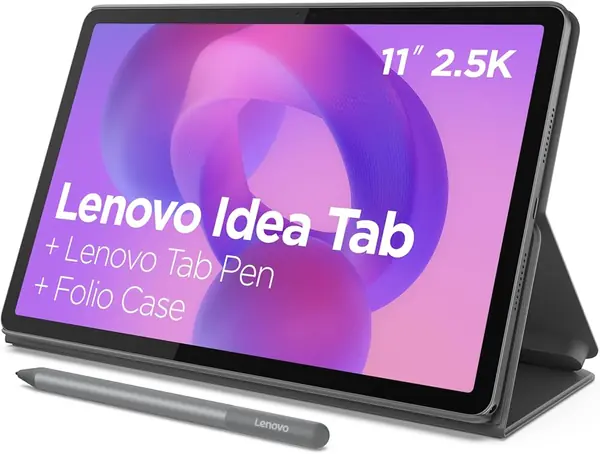
Lenovo does the accessory math for you: the Idea Tab arrives with the Tab Pen and a folio case, so you are not adding a stylus and cover before you can take notes or prop the tablet up for a lesson video. That is the practical difference between this and most tablets here.
The 11-inch 2.5K display at 90Hz is the feature we appreciate most for classroom work. A 2560 x 1600 panel gives you enough room to keep a lesson plan beside a PDF or a slide deck, and the higher refresh rate makes scrolling through long documents less choppy. The 8GB of memory and 256GB of storage are a better starting point than the 6GB/128GB configuration many rivals use; microSD expansion helps if you carry a lot of video or scanned handouts. That combination is why we make the Idea Tab our top pick.
Performance is the other reason it earns the top spot. The MediaTek Dimensity 6300 is not a gaming chip, but it is enough for Google Classroom, email, video calls, and note-taking, and Android 15 feels current. Battery life is the number to watch: the 26.7Wh pack is fine for a light day of reading and planning, but a full day of video or split-screen work will send you looking for a charger.
For most teachers, that trade-off is easy to accept. You get the pen and folio up front, a screen that is sharp enough for dense documents, and storage that won't fill up in a semester. The Idea Tab is the strongest all-around starting point here.
Pros
- 2.5K 90Hz display sharp for split-screen work
- Pen and folio included in the box
- 8GB RAM and 256GB storage with microSD
Cons
- No charger in the box
- No keyboard included
We recommend the Idea Tab as the best default for teachers: it includes the pen and folio, and its 2.5K screen makes split-screen planning easier than the budget alternatives.