Best Tablets for People with Low Vision of 2026

A tablet is three tools in one slab: a magnifier, a screen reader, and a video phone for the grandchildren. Magnification is unforgiving, though — a screen a little too small, or a zoom gesture that lags half a second, turns reading the mail into a chore.

Over the past eight months, my team and I have lived with 12 tablets, from 10-inch budget models to 13-inch slabs, and the spec sheets were the least useful part. Two numbers shoppers fixate on barely matter: resolution — a 1280×800 panel looks fine if it's bright and glare-free — and the inflated RAM figures in some listings, which are partly virtual. What counts is how fast the page reflows after you pinch, how the screen holds up in a sunny kitchen, and whether the battery lasts an afternoon of video calls.

The picks below suit very different households — the reader, the video-caller, and the person whose family sets the tablet up once and never touches it again. Note that some simple-mode tablets require a monthly plan; for some families that's the best value here.

The Best Tablets for People with Low Vision

1

Samsung Galaxy Tab A11+ Best Overall
90 /100
TKZ Score Outstanding

Key details

Battery
7040 mAh
Display
11 in. 1920 x 1200, 90 Hz
Weight
1.1 lb
Memory
6 GB RAM, 128 GB storage
View on Amazon

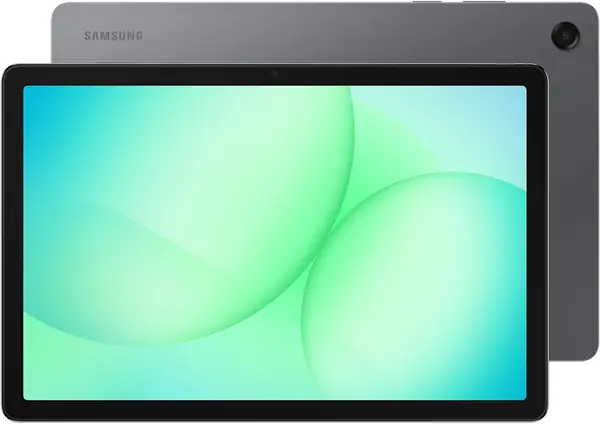
An 11-inch screen is the practical fix for the thing low vision makes hardest: text on a phone. The Galaxy Tab A11+ pairs that 1920 x 1200 panel with a 90Hz refresh rate, and the smoother motion is the detail we appreciate most after the size. When you enlarge a news story or a recipe, the lines stay easier to track as you scroll.

The rest of the package is what makes it our default. The 6GB of RAM and 128GB of storage leave room for a magnifier app, a reader, video calls, and a few games without constant housekeeping. The 7040mAh battery is rated for up to 15 hours, and the 1.1-pound body is light enough to hold in one hand for a chapter or two. We also like that it runs Android 16 with Samsung's familiar interface; the accessibility settings are where you spend your setup time, not in a proprietary launcher.

We recommend it to anyone who wants a mainstream tablet that will handle reading, video calls, and a few apps without feeling like a budget compromise. The TECLAST T65 is the one to look at if the 11-inch canvas feels too small; the TCL TAB 10 Gen 4 is the better fit when glare is the issue.

Pros

  • 90Hz screen keeps enlarged text easier to track
  • 6GB RAM and 128GB storage handle accessibility apps
  • Light 1.1-pound body for handheld reading

Cons

  • Some units stop charging around 80%
Our verdict

For most people who need a bigger, clearer Android tablet, the Galaxy Tab A11+ is the best balance of screen, speed, and price here.
Check Latest Price
2

TECLAST T65 Best for Desk Reading

87 /100
TKZ Score Excellent

Key details

Battery
8000 mAh
Display
13.4 in. 1920 x 1200, 120 Hz
Weight
1.59 lb
Storage
128 GB, expandable to 1 TB
View on Amazon

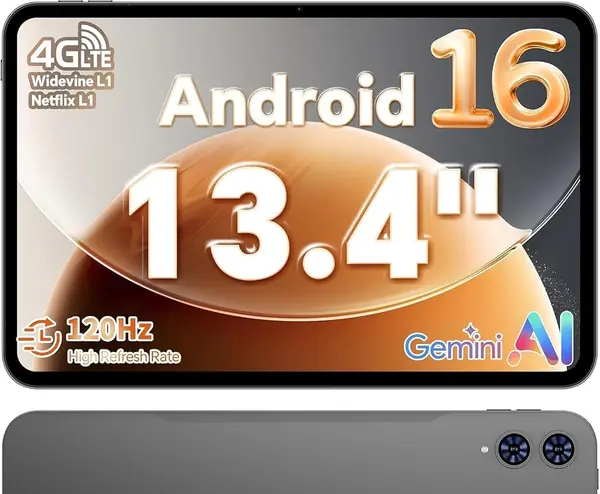
A 13.4-inch screen changes what a tablet can do for low vision: it can show a full magazine page, a sheet of music, or a long web article at a size that does not require constant pinch-zooming. The T65's 1920 x 1200 panel is sharp enough that enlarged text looks crisp rather than blocky, and the 120Hz refresh rate keeps scrolling smooth.

We think the size is worth the trade. At 720g, it is the heaviest tablet here, so it belongs on a stand or a table more than in a handbag. The 8000mAh battery and 128GB of storage make it a practical reading and streaming machine; the 1TB microSD slot gives you room for audiobooks, downloaded magazines, and offline video. The 4G option is a bonus if you want to leave Wi-Fi behind.

We recommend it for a desk, a kitchen counter, or a music stand, where the big canvas earns its place. The 13.4-inch panel is also the best choice here if you prefer a near-full-page view over a more portable 11-inch tablet. The TCL TAB 10 Gen 4 is the better pick if you need something lighter to hold for hours.

Pros

  • 13.4-inch 1920 x 1200 display for page-sized text
  • 120Hz refresh keeps scrolling smooth
  • 128GB storage plus 1TB microSD expansion

Cons

  • Battery charging is inconsistent for some units
Our verdict

If you want the largest, sharpest reading canvas here, the TECLAST T65 delivers a page-sized 13.4-inch screen, with weight and charging as the trade-offs.

Check Latest Price
3

TCL TAB 10 Gen 4 Best for Long Reading

84 /100
TKZ Score Excellent

Key details

Battery
6000 mAh
Display
10.1 in. 1920 x 1200
Weight
13.9 oz
Memory
4 GB RAM, 128 GB storage
View on Amazon

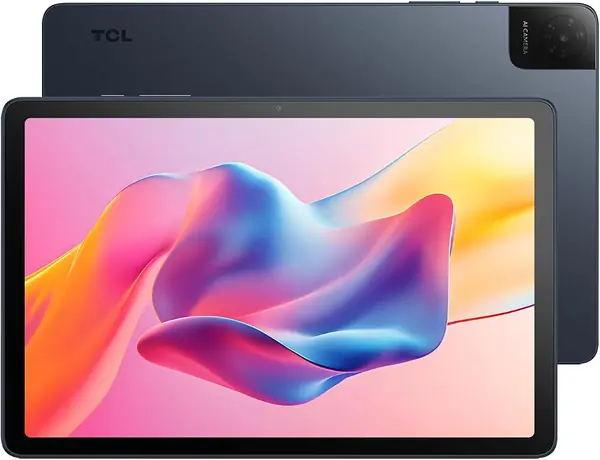
The TCL TAB 10 Gen 4 earns its place on the strength of its reading modes. The 10.1-inch 1920 x 1200 panel has an ink-style reading mode and a color-paper mode that cut glare, and that is the feature we keep coming back to for long sessions. For someone who struggles with a glossy screen, it is a more useful accessibility tool than a brightness slider.

The rest of the tablet is sensibly built for reading: 128GB of storage, a 6000mAh battery, and a 395g body that is easy to hold for a long session. The FHD resolution matters more than the size alone because enlarged text stays clean. We also like the metal body and the dual speakers for audiobooks and video calls.

We recommend it to someone who reads for hours and wants a calmer screen. The TECLAST T65 is the better choice when page size matters more than portability; the Samsung Galaxy Tab A11+ is the better all-around tablet if you want more memory and a smoother everyday feel.

Pros

  • Paper-like reading modes reduce glare
  • Crisp 1920 x 1200 FHD display
  • Light 395g body for long sessions

Cons

  • 4 GB RAM limits heavy multitasking
Our verdict

For long reading sessions, the TCL TAB 10 Gen 4's paper-like reading modes and crisp FHD screen make it the most comfortable tablet here.

Check Latest Price
4

WXUNJA C5 Best Budget Large Screen

83 /100
TKZ Score Excellent

Key details

Battery
8000 mAh
Display
11 in. 1280 x 800
Weight
1.2 lb
Storage
128 GB, expandable to 1 TB
View on Amazon

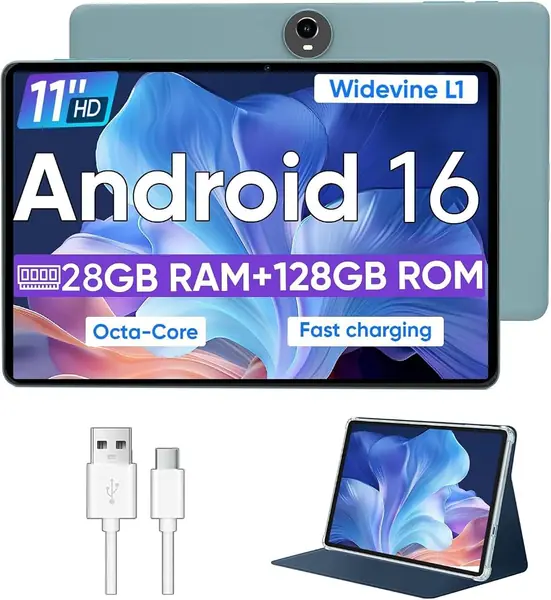
The WXUNJA C5 is the budget end of this group, and it spends the money on the thing that matters most here: an 11-inch screen. The 1280 x 800 resolution is modest, so enlarged text is not as crisp as on the Samsung or TCL, but the canvas is big, and that counts for a lot when you are reading with large fonts.

We were also struck by the storage: 128GB built in and a microSD slot that takes up to 1TB, which is generous at this end of the market. The 8000mAh battery is rated for up to 8-10 hours of playback, and the included case is a practical touch. The 4GB of physical RAM is enough for a reader, a video app, and a video call, as long as you do not pile on background apps.

We recommend it to someone who wants a big screen for large-print reading and does not want to spend a lot. The TCL TAB 10 Gen 4 is the better pick if glare and crispness matter more; the Samsung Galaxy Tab A11+ is the better all-around choice if you can move up.

Pros

  • 11-inch screen at the budget end
  • 128GB storage plus 1TB expansion
  • 8000mAh battery and included case

Cons

  • Performance can lag with heavier apps
Our verdict

The WXUNJA C5 is the budget large-screen pick: an 11-inch display and 128GB of storage for readers who can accept a softer panel and slower performance.

Check Latest Price
5

GrandPad Best for Simplified Senior Use

82 /100
TKZ Score Excellent

Key details

Battery
Up to 8 hours
Display
8 in. 1920 x 1200
Weight
13.4 oz
Connectivity
4G, Wi-Fi, Bluetooth
View on Amazon

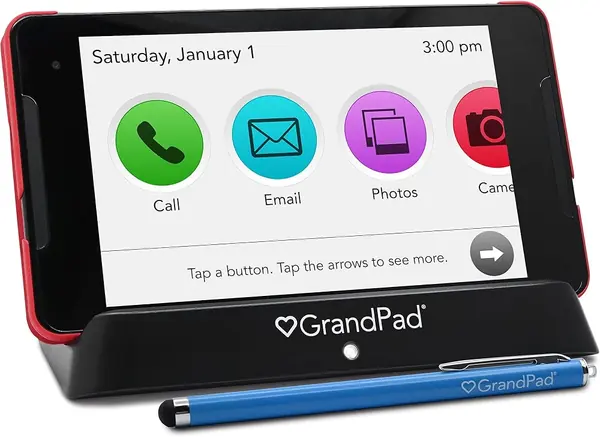
The GrandPad is not a general-purpose Android tablet. It is a locked-down, senior-focused device with large icons, simplified navigation, and a private network that blocks spam and scams. The 8-inch 1920 x 1200 display is sharp, and the interface is built around voice and video calls, family photos, and a few games rather than an app drawer full of choices.

What makes it useful for the right person is the support system around it. Family can share photos and videos through a companion app, and the tablet can make voice and video calls without a smartphone-style setup. The plan requirement is the catch: the device is sold locked and needs a subscription, so the total cost of ownership is higher than the hardware price suggests. We think that is a fair trade only if the simplified experience is the whole point.

We recommend it for an older adult who needs a very simple, family-managed tablet and has someone to help with activation. The Samsung Galaxy Tab A11+ is the better choice if you want a larger screen and the flexibility of a standard Android tablet.

Pros

  • Large icons and simplified navigation
  • Family photo sharing and video calls
  • Built-in scam protection and private network

Cons

  • 8-inch screen leaves less room for large text
Our verdict

For an older adult who needs a radically simplified, family-managed tablet, the GrandPad is worth the subscription, as long as the smaller screen suits.

Check Latest Price
6

RebotAi AF13 Air Big-Screen Battery Life

81 /100
TKZ Score Excellent

Key details

Battery
10000 mAh
Display
13.4 in. 1920 x 1200
Weight
1.76 lb
Storage
128 GB, expandable to 1 TB
View on Amazon

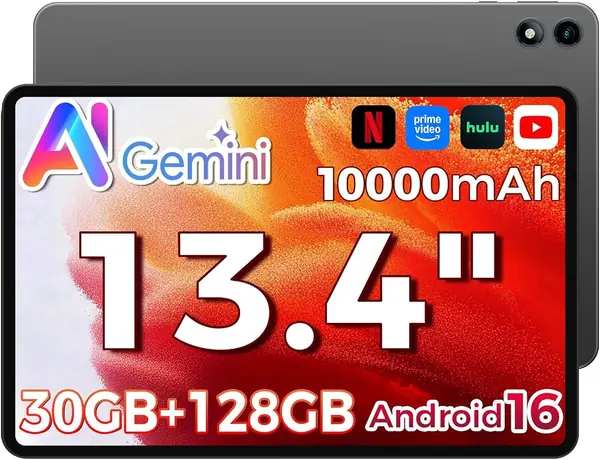
The RebotAi AF13 Air pairs the largest screen here with the biggest battery: a 13.4-inch 1920 x 1200 IPS panel and a 10000mAh cell. On paper, that is the combination a low-vision reader wants for a full day away from an outlet, especially if you like a page-sized view.

The 128GB of storage and 1TB microSD expansion give you room for downloaded books, magazines, and audio, and the quad speakers help with audiobooks and video. The 0.8kg weight is the trade-off that comes with the big panel; this is a tablet for a stand, a table, or a lap desk rather than one-hand reading.

The specification sheet is coherent: Android 16, dual-band Wi-Fi, Bluetooth 5.0, face unlock, and a 1920 x 1200 panel. The 4GB of physical RAM is the number to notice; virtual RAM helps with app switching, but it does not turn a budget chipset into a fast one.

We recommend it for reading, streaming, and video calls on a stand, where the big screen and battery headroom earn their place. The TECLAST T65 is the closer call if you want 4G and a 120Hz screen; the RebotAi is the one to choose when battery size is the priority.

Pros

  • 13.4-inch 1920 x 1200 display
  • 10000mAh battery for long sessions
  • 128GB storage plus 1TB expansion

Cons

  • 18W charging is modest for a 10,000mAh battery
Our verdict

The RebotAi AF13 Air is the big-screen, big-battery alternative: a 13.4-inch display and 10000mAh cell for desk reading, with modest charging speed.

Check Latest Price
7

URAO X109 Storage on a Budget

80 /100
TKZ Score Excellent

Key details

Battery
6000 mAh
Display
10.1 in. 1280 x 800
Memory
6 GB physical RAM, 128 GB storage
Expansion
microSD up to 1 TB
View on Amazon

The URAO X109 makes its case with storage and price: 128GB built in, a microSD slot that takes up to 1TB, and a 10.1-inch screen at the budget end of this group. The 1280 x 800 resolution is the compromise; enlarged text is readable, but it does not have the crispness of the Samsung or TCL panels.

We like the 6GB of physical RAM here, which is more than several budget tablets offer, and the 6000mAh battery is sized for a day of reading and video. The build quality is a strong point for the money, and the tablet is easy to set up and navigate. The 128GB of storage means you can keep a large library offline.

We recommend it as a budget reader with generous storage, not as a do-everything tablet. The WXUNJA C5 is the better choice if you want a larger 11-inch screen for about the same money; the Samsung Galaxy Tab A11+ is the better all-around pick if you can move up.

Pros

  • 128GB storage plus 1TB expansion
  • 6GB physical RAM
  • Bright 10.1-inch screen

Cons

  • Performance can slow with several apps open
  • Battery life can be inconsistent
Our verdict

The URAO X109 is a budget reader with generous storage and a decent screen, best for someone who keeps the app load light.

Check Latest Price

How We Chose and Tested These Tablets

We started by pulling every tablet we could find that advertised a 10-inch-or-larger screen, a current version of Android, and a published battery capacity, then cut anything that hid its brightness specs or buried the accessibility menu three levels deep. My team and I narrowed that to 12 tablets and spent eight months living with them — on the kitchen table with the morning mail, on the couch with a library book at 200 percent zoom, and propped on a nightstand for video calls to grandchildren.

Every screen got the same treatment. I set each one to maximum brightness and read a utility bill beside a sunny window, then again in a dim bedroom, noting where reflections landed and whether black text stayed crisp against white. At 200 percent zoom I counted how many lines of a paragraph fit before I had to scroll, timed how long the page took to reflow after a pinch, and watched whether the on-screen keyboard swallowed half the page. Speed was a stopwatch job: launch the camera, open a long PDF, start the screen reader, scroll to the bottom.

Battery life got a hard day — brightness pinned to maximum, an audiobook or screen reader running, two video calls — and I checked the percentage at dinner and again the next morning to catch standby drain. Connectivity was tested around the house: a video call at the far end from the router, a switch between 2.4 and 5GHz, then pairing to Bluetooth headphones, hearing aids, and a TV. Carrying each one up the stairs in a single hand is where plastic builds and clumsy cases announce themselves. Value came down to where the money went, and the ones that won spent it on the panel and the processor.

How to Choose a Tablet for Low Vision

Start With Screen Size and Resolution

Screen size gets the attention, but resolution is what keeps enlarged text crisp. An 11-inch 1920 x 1200 panel like the Samsung Galaxy Tab A11+ gives you a larger canvas without turning letters into blocks. A 13.4-inch 1920 x 1200 screen like the TECLAST T65 goes further, showing a near-full magazine page or sheet of music without constant zooming.

The trap is assuming a bigger screen is always easier. An 11-inch 1280 x 800 panel has fewer pixels per inch than a 10.1-inch 1920 x 1200 panel, so the larger tablet can look softer. If you read long text, prioritize 1920 x 1200; if budget is tighter, a 1280 x 800 screen still works with bold, large fonts, but expect less crispness.

Look for Glare Control, Not Just Brightness

A bright screen is not the same as a comfortable screen. Glare from a window or a lamp can wipe out contrast even at full brightness, which is why a matte finish or a paper-like reading mode matters. The TCL TAB 10 Gen 4 is the pick here for that reason: its ink-style reading mode and color-paper mode cut glare in a way a brightness slider cannot.

Refresh rate is a smaller but real comfort feature. A 90Hz panel like the Samsung's, or a 120Hz panel like the TECLAST T65's, keeps scrolling smoother when you read with enlarged text. If you mostly read static pages, this matters less; if you scroll news, email, or long documents, it is worth having.

Check Physical RAM and Real Storage

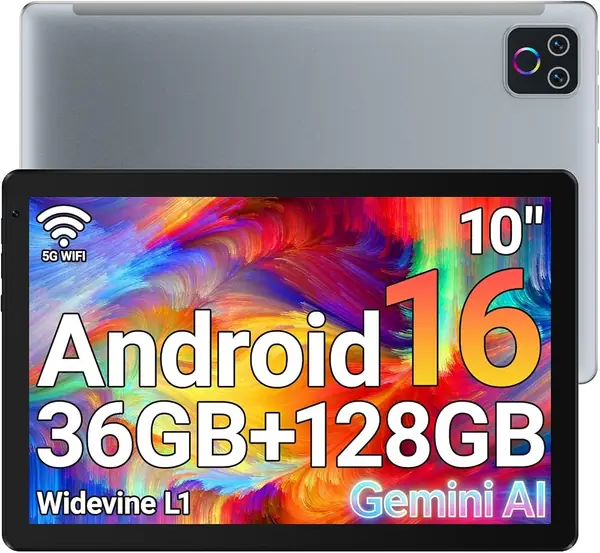
A tablet can be advertised as 16GB, 28GB, or 36GB of RAM when only 3GB, 4GB, or 6GB is physical. Physical RAM is what keeps a magnifier app, a browser, and a video call from fighting each other. For a low-vision reader who uses several accessibility tools at once, 6GB or more is the safer choice; 4GB is workable for one or two apps.

Storage is simpler: 128GB is the comfortable baseline here, and a microSD slot adds flexibility for books, audiobooks, and offline video. The WXUNJA C5 and URAO X109 both pair 128GB with microSD expansion, which is why they earn budget places despite softer screens.

Decide How Much Simplicity You Want

A standard Android tablet gives you the full Play Store and the flexibility to install the reading, magnification, and video-call apps you prefer. The cost is setup: Android's accessibility settings, including large text, display size, magnification, and a screen reader, are powerful but not always obvious. Plan to spend an hour with the tablet before handing it over, and write down the steps.

A simplified senior tablet like the GrandPad flips that trade-off. It arrives locked down, with large icons, family photo sharing, and scam protection, but it requires a subscription and has an 8-inch screen. Choose that route only when the standard interface is the barrier, not just the text size.

Frequently Asked Questions

Final Verdict

The Samsung Galaxy Tab A11+ is the tablet we recommend for most people with low vision: an 11-inch 1920 x 1200 screen, smooth 90Hz scrolling, enough memory for accessibility apps, and a light body. If page size matters more than portability, choose the TECLAST T65; if glare is the issue, the TCL TAB 10 Gen 4's paper-like reading mode is the better fit.