Best Earbuds for Seniors of 2026

The complaint I hear most about earbuds isn't about sound — it's that people stopped wearing the pair they bought. The tips ached after an hour, the buttons were too small to find by feel, and with something sealed in their ears they couldn't hear the doorbell or the person across the kitchen table.

The fix is usually a different shape. Open-ear designs clip over the ear or hook behind it and leave the canal open, so you stay comfortable for hours and stay aware of the room. My team and I have spent the past six months wearing 16 pairs — clip-ons, ear hooks, neckbands, and a couple of noise-canceling sets — through audiobooks, calls with family, grocery runs, and evening TV.

Two things I'd pass along before you shop: physical buttons beat touch sensors once fingers get stiff or dry, and a set that pairs to two devices at once saves a lot of fiddling if you split your day between a phone and a tablet. The ones below are the pairs we kept reaching for.

The Best Earbuds for Seniors

1

Soundcore V20i Best Overall
90 /100
TKZ Score Outstanding

Key details

Battery Life
36 hours with case
Fit
Four hook positions
Bluetooth
5.4
Water Resistance
IP55
View on Amazon

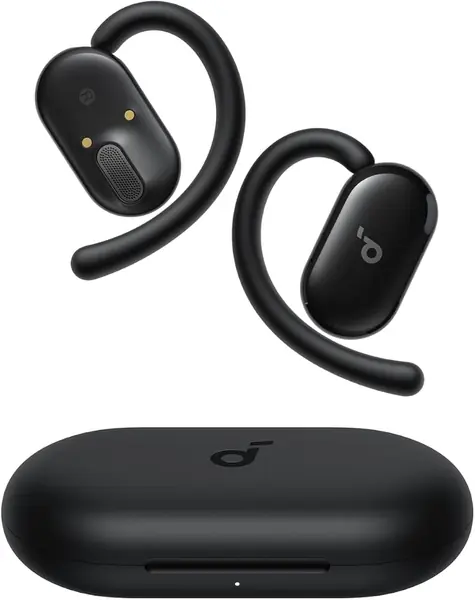
The four-position hook is the first thing we look at on the V20i. It lets the earpiece sit outside the canal instead of plugging it, and that is the difference between an earbud an older adult forgets about and one that gets pulled out after an hour. There are no ear tips to swap or lose, either. We like that combination for anyone who has struggled with in-ear buds that feel like pressure after a while.

The daily numbers are sensible: 36 hours total with the case, 8 hours per charge, IP55, Bluetooth 5.4, and four mics for calls. The open shape keeps conversation and traffic audible, which is the right default for someone who walks to the mailbox or answers the door. The case is small enough to live on a charger by the kitchen phone, so topping up is less of a project.

The caveat is long-term reliability, which is uneven enough that we treat the V20i as a buy-from-a-return-friendly-retailer pick. That is not unusual at this end of the market, but it is the reason we do not call it a lifetime purchase. What keeps it at the top is the fit system: four hook positions let each ear sit where it wants, which is a small detail until one ear has never gotten along with standard buds.

Pros

  • Open-ear hooks stay outside the ear canal
  • Four-position hooks adjust to each ear
  • 36-hour total battery with case
  • Four mics for clearer calls

Cons

  • Touch controls take a deliberate tap
Our verdict

We recommend the V20i to older adults who want an open-ear fit they can adjust, clear calls, and enough battery for a full day without fussing with ear tips.
Check Latest Price
2

Sony WI-C100 Best with Physical Buttons

89 /100
TKZ Score Excellent

Key details

Battery Life
Up to 25 hours
Controls
Physical buttons
Design
Flexible neckband
Weight
0.71 oz
View on Amazon

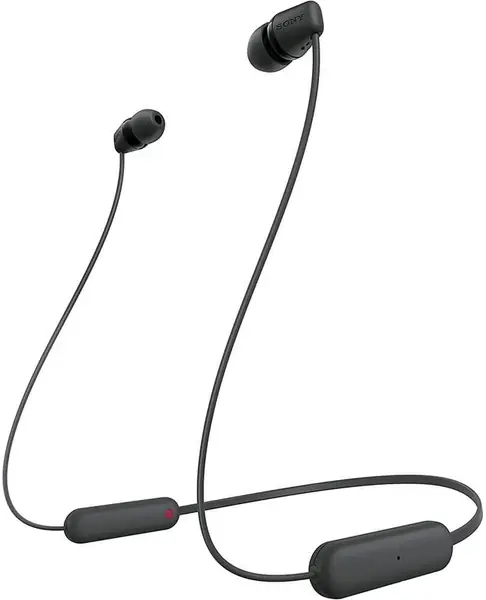
The WI-C100 is the pair we point to when touch controls are the dealbreaker. A neckband puts physical buttons within reach and keeps the earbuds on a cable, so there is no tiny case to open or single bud to lose between the sofa and the kitchen. That sounds like a small thing until you have watched someone hunt for a dropped earbud under a chair.

Sony lists 25 hours of battery, a 20-gram neckband, IPX4 splash resistance, and hands-free calling. The light weight matters because a neckband only helps if it does not feel like a collar; 20 grams is close to nothing. The earbuds still go into the canal, so this is not the open-ear choice; if awareness is the priority, the V20i is the better fit.

What sells us is the combination of real buttons and a tether. The sound is good enough for podcasts and calls, and the controls give a click that tells you the press registered. The neckband also gives the earbuds a home around the neck, so they are less likely to end up in a coat pocket.

Pros

  • Physical buttons are easy to find
  • Neckband keeps buds tethered
  • 25 hours of battery
  • Light 20-gram build

Cons

  • In-ear tips may not stay put
Our verdict

The WI-C100 is our pick for anyone who wants real buttons and a neckband that keeps both buds accounted for, with 25 hours of battery behind it.

Check Latest Price
3

TOZO OpenEarRing Best Clip-On Fit

88 /100
TKZ Score Excellent

Key details

Battery Life
40 hours with case
Fit
Clip-on ear hooks
Bluetooth
5.4
Charging Display
LED battery readout
View on Amazon

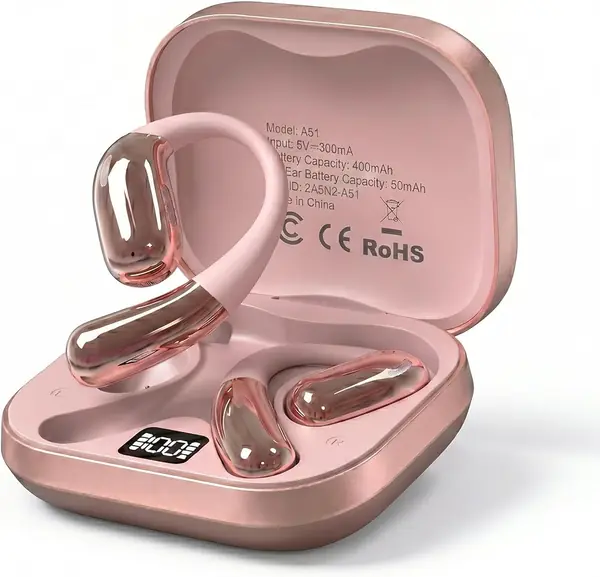
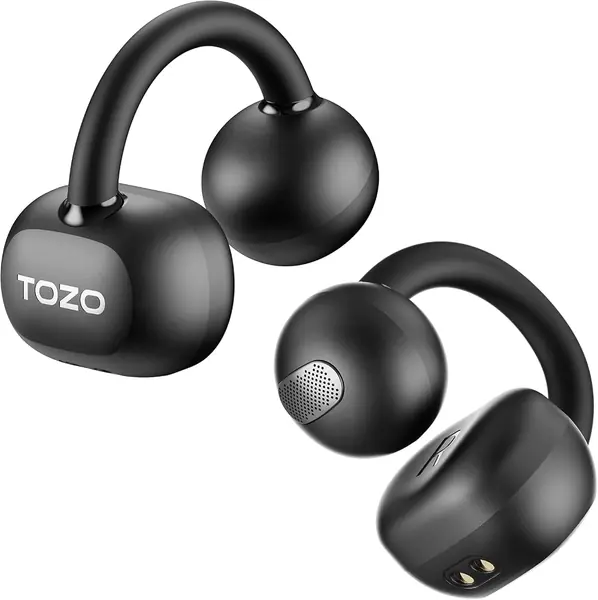
The OpenEarRing's charging case has a digital display that shows the battery level, which is one of those small conveniences that becomes a daily one. Instead of guessing whether the case is charged, you see it. The clip-on hooks sit outside the ear canal, so there are no tips to push in or clean, and the 40-hour total means the case does not need a charger every night.

TOZO lists 10 hours on a charge, Bluetooth 5.4, and a 20-meter range. Those are strong numbers for a budget pair, and the open shape gives the same awareness benefit as our top pick. The clip is not adjustable like a hook, though, so it either matches the curve of the ear or it does not. We like it as a value alternative for someone who wants a simple LED gauge and does not need the V20i's four-position fit.

The case display is the detail that makes it easy to live with, and the clip-on shape is the one to try if behind-the-ear hooks tend to press on glasses. If you want a more deliberate glasses fit, the Kinglucky is the more specific choice. That makes the OpenEarRing a strong second pair or a first open-ear for someone who mostly listens at home.

Pros

  • 40-hour total battery
  • LED battery display
  • Clip-on open-ear design
  • Bluetooth 5.4

Cons

  • Long-term durability is uneven
Our verdict

The OpenEarRing is our clip-on pick for older adults who want an LED battery readout and long case life at a budget price.

Check Latest Price
4

Kinglucky Clip-On Best for Glasses

87 /100
TKZ Score Excellent

Key details

Battery Life
50 hours with case
Fit
Slim extended hooks
Bluetooth
6.0
Water Resistance
IPX5
View on Amazon

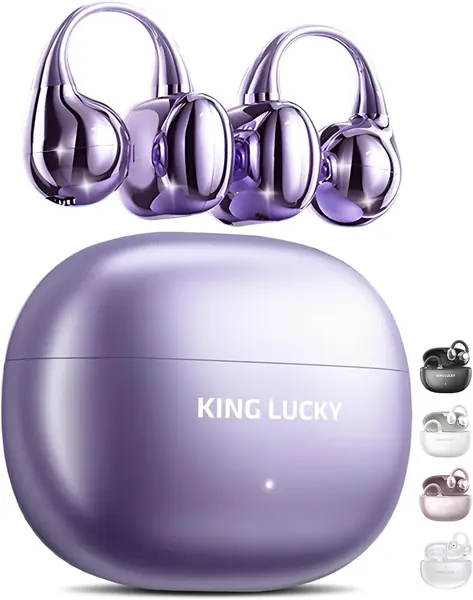
The Kinglucky hooks are longer and thinner than the usual clip-on shape, and the company shapes them for small ears and glasses. That is a narrow claim, but it is the right one to make for a senior who already has temples and a hearing-aid body competing for space behind the ear. The open design also leaves the canal clear, so there is no tip to wrestle in.

The numbers are aggressive: 50 hours total, 7 hours on a charge, IPX5, and Bluetooth 6.0. The 7-hour single-charge figure is the one we care about, because it covers a day of errands and calls without the case. The slim hook is the reason to consider this over the V20i.

We see the Kinglucky as the glasses-first alternative to the V20i: the hook is designed to slip around a temple, and the long case life means fewer charging sessions. The fit is the whole point here; if the wearer does not have glasses or small ears, the V20i's four-position hook is the more flexible choice. The 50-hour case is the detail that makes it feel less like a budget experiment.

Pros

  • Slim hooks designed for glasses
  • 50-hour total playtime
  • Open-ear comfort without canal pressure

Cons

  • Touch panel sits behind the ear
  • Long-term reliability is less proven
Our verdict

The Kinglucky is our glasses-friendly pick, with slim hooks and 50 hours of case life for older adults who want an open-ear fit that clears their frames.

Check Latest Price
5

Soundcore P30i Best Noise Canceling

86 /100
TKZ Score Excellent

Key details

Battery Life
45 hours with case
Water Resistance
IP54
Case
Built-in phone stand
Noise Control
Active noise canceling
View on Amazon

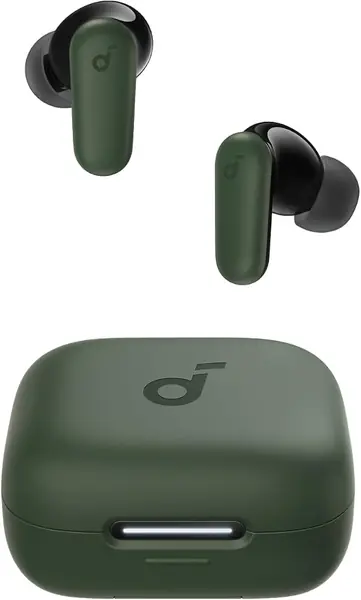
The P30i's case opens into a phone stand, which is a strange feature until you picture a video call with a grandchild: prop the phone, put in the buds, and keep your hands free. That is the reason we include this in-ear pair in a senior-focused list. It is not the open-ear default, but it solves a different problem.

Active noise cancellation is rated to reduce noise by up to 42dB, and there is a transparency mode when you need to hear the room. The 45-hour total battery and 10-hour single charge are generous. The catch is the in-ear fit, which is not as forgiving as an open-ear hook; if the wearer has small canals or sensitive ears, start with the V20i instead.

Noise cancellation is not a substitute for awareness. We see this as a situational pick: good for a loud living room or a phone call, not the pair to wear on a walk if hearing traffic matters. The case stand is the detail that makes it easier to live with than a plain charging case, and the transparency mode keeps a conversation within reach. The sound is bass-forward, which suits podcasts and calls more than critical listening.

Pros

  • Active noise canceling
  • Case doubles as a phone stand
  • 45-hour total battery

Cons

  • Touch controls take a precise tap
Our verdict

The P30i is our noise-canceling pick for older adults who want to quiet a loud room and prop up a phone for video calls.

Check Latest Price
6

Tuemvia Open Ear Budget Open-Ear

85 /100
TKZ Score Excellent

Key details

Battery Life
35 hours with case
Fit
Open-ear hooks
Controls
Touch controls
Charging Display
LED power display
View on Amazon

The Tuemvia is the lightest-looking open-ear pair here, with a single-piece hook that sits over the ear and a case that shows the charge level. At the budget end, that combination is the whole pitch: you get the open-ear idea without paying for the top pick. The 35-hour total is ordinary for this group, but it is enough for a few days of short walks and calls.

The open hook avoids the ear-canal pressure that makes some in-ear buds a nonstarter, and the LED display takes the guesswork out of charging. Nothing goes inside the ear, so there is no tip to clean or reseat. That makes the comfort case easy to understand for anyone who has given up on traditional buds.

A fixed hook means the fit is decided the moment you put it on, so try it before the return window closes. We treat it as a budget way to find out whether an open-ear hook suits the wearer. The touch controls are the part to test with the return policy in mind, and the LED case makes it feel more considered than the price suggests.

Pros

  • 35-hour total battery
  • Open-ear hook design
  • LED power display

Cons

  • No stated warranty
Our verdict

The Tuemvia is a budget open-ear option for older adults who want a barely-there hook and a visible battery gauge.

Check Latest Price

How We Tested the Best Earbuds for Seniors

We started by pulling together every open-ear, neckband, and noise-canceling model we could find that had drawn steady praise from older listeners, then cut the field to 16 by reading the specs that matter here: long rated playtime, real buttons or oversized touch panels, a water-resistance rating, and call hardware with more than one microphone. Anything that required an app just to raise the volume didn't make the cut.

Each pair went home with a tester for at least three weeks, worn on morning walks, in the grocery store, at the kitchen table during calls with family, and through an evening of TV. For fit, we wore every set with glasses for two-hour stretches and noted where the hooks pressed, and we logged how long we could keep them in before we wanted them out. For controls, we tried every button and tap without looking, with dry fingers, and once with a glove on.

Battery life got timed rather than trusted: we charged each set to full, played an audiobook at a comfortable volume until the low-battery warning, and compared that to the claim. The models with a spoken readout or an LED display were far easier to live with than the ones that gave us a single blinking light. Connectivity was tested by pairing to a phone and a tablet at once and walking from room to room; a few dropped the second device every time. For noise, we stood in a kitchen with the dishwasher running and on a busy sidewalk, and had a colleague sit nearby to hear how much sound leaked out of the open designs.

Durability came from ordinary abuse: each pair rode in a coat pocket or a tote bag, got dropped on a kitchen floor at least once, and was wiped with a damp cloth after sweaty walks. For call quality, we recorded voice memos outside on a windy day and had a colleague rate them blind. Value was the last cut — a set with an impressive playtime claim and no comfort got marked down fast.

How to Choose Earbuds for Seniors

Start With Fit, Not Features

The first question is whether the earbud sits outside the ear canal or inside it. An open-ear hook or clip avoids the pressure and itching that make some in-ear tips a nonstarter, and it leaves the canal clear. The trade-off is that an open design lets more room noise in. We favor an adjustable hook, like the four-position hook on the Soundcore V20i, because one ear rarely matches the other. If the wearer has glasses, check that the hook clears the temple before committing.

Choose Controls That Announce Themselves

A touch panel looks clean, but it asks for a precise tap in the right spot. A physical button gives a click you can feel and usually works through a pocket or a shaky hand. Look for separate volume and answer/end controls rather than one multifunction button that requires a sequence. The Sony WI-C100 is the clear example in this group: its neckband puts real buttons within reach and keeps the buds on a cable. Touch controls are workable, but they are the first thing we test with a less steady hand.

Decide Between Awareness and Quiet

Open-ear earbuds leave traffic, a doorbell, and a conversation audible, which is why we make them the default for older adults who move around the house or walk outdoors. Noise cancellation is for the opposite situation: a loud living room, a flight, or a call that needs background roar pushed down. The Soundcore P30i adds active noise cancellation and a transparency mode, but it sits in the ear and isolates more. If the wearer needs to hear a caregiver or a smoke alarm, choose open-ear first and treat ANC as a situational extra.

Plan the Charging Routine

A total playtime figure matters less than how the earbuds get charged. A neckband or a case with a visible battery readout removes the guesswork; the TOZO OpenEarRing's LED case shows the charge, and a 25-to-50-hour total means fewer sessions. Check the charging port and whether the case needs its own cable, because a senior who has to hunt for a cable will not keep the routine. A case that holds the buds in a fixed orientation is easier than one that requires a precise drop.

Check Calls and Connection

Clear voice is mostly about microphone placement and how much background noise the earbuds can reject. More microphones help, but an open-ear design still lets some room sound in, so a quiet room is the fairest place to judge a call. Bluetooth 5.4 and multipoint are worth having if the wearer switches between a phone and a tablet; the Soundcore V20i covers both. Pair the earbuds before the return window closes and try a real call, not just music.

Frequently Asked Questions

Final Verdict

Our default is the Soundcore V20i because it solves the three things that most often send earbuds back into the case: an unadjustable fit, muffled conversation, and a short battery. The four-position hook, open-ear shape, and 36-hour total make it the easiest pair to live with.

If physical buttons and a tether matter more, the Sony WI-C100 is the better buy. If the main problem is background noise, the Soundcore P30i is the one to try.